Garden HUB WordPress Theme
by SteelThemes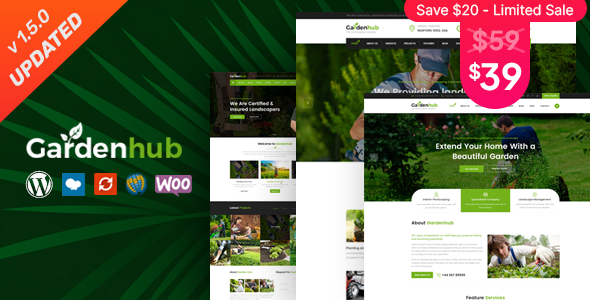
Stuck on your Garden HUB WordPress theme? Let's fix it.
No endless back-and-forth. Just send us the details and we'll get it done.
No obligation · Replies within 1 hour · Quote within 1 day
Setup · Customization · Bug fixes · WooCommerce integration
About Garden HUB WP Theme
Garden HUB is a WordPress theme by SteelThemes built specifically for garden centers, plant nurseries, landscaping companies, and outdoor living businesses. It ships with a clean, nature-inspired design and tight WooCommerce integration, making it practical for selling plants, tools, and garden supplies online.
The theme includes pre-built demo content, a drag-and-drop page builder, and product filtering suited to garden inventory. It supports seasonal promotions, category-rich shop layouts, and blog sections for gardening tips and advice. SteelThemes maintains active updates, so compatibility with recent versions of WordPress and WooCommerce stays consistent.
Garden HUB works well for small independent nurseries and larger garden retailers alike. The layout options are flexible without requiring deep technical knowledge, though getting the most out of its features does benefit from some hands-on configuration.
Get matched with a Garden HUB developer in under one day
Tell us about your Garden HUB project. Small fixes, Garden HUB theme customization, or a full website build, whatever you need, we've got it covered.
We'll connect you to the right Garden HUB developers, define the scope, and get everything 100% clear.
You'll get one estimate, hire your preferred developer, and start collaborating.
Getting a Garden HUB site live and performing well takes more than installing the demo. Layout decisions, WooCommerce setup, product filtering, and performance tuning all need attention. FoxyConcept works with vetted WordPress developers through Codeable, matching you with specialists who have hands-on experience with garden and retail themes. Every project starts with a free estimate, and you only move forward if the scope and cost make sense for you. No risk, no obligation.
Pros
- Purpose-built for garden and plant retail, so WooCommerce layouts match typical nursery inventory structures
- Pre-built demo content covers common pages like shop, services, blog, and contact, reducing initial setup time
- Clean, nature-themed design that works across seasons without looking dated
- Active maintenance by SteelThemes keeps the theme compatible with current WordPress and WooCommerce versions
- Product filtering and category layouts are well-suited to large plant and garden supply catalogs
Cons
- Customizer options are limited compared to more flexible multipurpose themes, so unique layouts require custom CSS or a developer
- Demo import can be inconsistent depending on hosting environment, sometimes requiring manual cleanup
- Not ideal for businesses outside the garden niche without significant design rework
- Documentation is basic and does not cover advanced WooCommerce configurations in detail
- Page builder dependency means switching builders later can break existing layouts
Who is Garden HUB for?
Plant Nurseries
Garden HUB’s WooCommerce product layouts handle large plant catalogs well. Category filtering by type, size, or season makes it easy for customers to browse. Nurseries can list care instructions, pot sizes, and availability without needing custom post types or heavy plugin work.
Landscaping Companies
Landscaping businesses can use Garden HUB’s service page templates to showcase project portfolios and service packages. Adding a booking or quote request form integrates cleanly. The visual style suits outdoor work, and local SEO can be built on top without design conflicts.
Garden Centers and Retail Stores
Garden centers with physical locations and online shops benefit from the theme’s dual focus on browsing and purchasing. Seasonal promotions, featured product sections, and a clear shop layout make it practical for mixed retail operations selling tools, seeds, soil, and plants.
Outdoor Living and Furniture Shops
Outdoor furniture and living product shops fit the aesthetic and functional structure of Garden HUB. Larger product images, grouped categories, and a clean checkout flow work well for higher-value items. The theme handles product variation displays without layout issues.
Gardening Blogs and Content Sites
Garden HUB’s blog layout is clean and readable, making it a good fit for gardening content sites and advice blogs. Categories for plant types, growing guides, and seasonal tips display well. Monetization through affiliate product links or WooCommerce digital downloads can be layered in without theme conflicts.

Customizing Garden HUB
Garden HUB offers customization through the WordPress Customizer, with controls for typography, color palettes, header layouts, and homepage sections. Page builder compatibility means most visual changes can be made without touching code. That said, matching the theme exactly to your brand often requires CSS adjustments and careful configuration of WooCommerce product templates.
Custom work like adding booking functionality for landscaping consultations, integrating a plant care database, or building out a trade account system goes beyond standard settings. A Garden HUB expert can handle these modifications cleanly, without breaking the theme’s existing structure or introducing compatibility issues down the line.
If you want specific features built into your Garden HUB site rather than patched together with conflicting plugins, working with a developer who knows the theme saves significant time.
Recommended plugins for Garden HUB
Garden HUB pairs well with several plugin categories. WooCommerce extensions cover product bundles, quantity discounts, and wholesale pricing, all useful for nursery and trade customers. For local businesses, adding booking plugins supports landscaping consultations or garden design appointments.
SEO plugins like Yoast or Rank Math work without conflict, and if you need help with that side of things, our WordPress SEO service covers on-page optimization for garden and plant-related content. For store speed, image-heavy garden product pages benefit from proper caching and optimization covered under our WordPress performance service.
Not sure which plugins to use? This WordPress plugins directory covers the most popular options with reviews and setup guides.
Garden HUB common issues
Garden HUB demo import not working
Demo import failures in Garden HUB usually come down to server memory limits or PHP timeouts. Set max_execution_time to at least 300 seconds and memory_limit to 256MB in your PHP configuration. If the import still stalls, try importing XML content manually through the WordPress importer tool, then configure widgets and menus separately. Some hosts block demo imports entirely, requiring a host-side adjustment.
Garden HUB WooCommerce product layout broken
Broken WooCommerce product layouts in Garden HUB are often caused by a WooCommerce major version update that changes template file structure. Check whether your theme templates are outdated using WooCommerce’s system status report. Updating the theme to the latest SteelThemes release usually resolves it. If customizations were made directly to theme template files, those changes need to be moved to a child theme before updating. Our WordPress bug fixing service can handle this cleanly.
Garden HUB homepage not showing after update
If your Garden HUB homepage disappears after an update, the most common cause is the homepage setting reverting to the default posts page. Go to Settings, then Reading, and confirm your static homepage is still selected. If the page itself is blank, check whether the page builder content was affected. A theme or plugin conflict after the update can also cause this, so deactivate recently updated plugins one by one to isolate the issue.
Garden HUB slow loading on mobile
Garden HUB sites with many product images tend to load slowly on mobile when images are not properly sized or compressed. Use a plugin like ShortPixel or Imagify to compress existing images, and enable lazy loading. Check that your hosting serves pages through a caching layer. Large unoptimized CSS from the page builder can also add weight. Our WordPress performance service covers full audits for exactly this kind of issue.
Garden HUB FAQ
SteelThemes releases updates to keep Garden HUB aligned with current WooCommerce versions. Before updating WooCommerce on a live site, check the theme’s changelog for any noted compatibility requirements. Running updates on a staging environment first prevents storefront issues from affecting customers. If your version is significantly behind, a developer can handle the update process safely.
Yes. Garden HUB’s service and portfolio templates work well for landscaping companies. You can build out service pages, a project gallery, and a contact or quote form without needing a separate theme. The shop functionality is optional, so businesses without an online store can disable it and focus on lead generation pages instead.
Garden HUB is generally compatible with Elementor, though some theme-specific sections may not translate directly into Elementor widgets. Most users build new pages in Elementor while keeping the theme’s header, footer, and shop templates. Mixing the theme’s native builder with Elementor on the same pages can cause layout conflicts, so it is better to commit to one approach.
Booking functionality is not built into Garden HUB natively. Plugins like Bookly, Simply Schedule Appointments, or WooCommerce Bookings can be added. Each requires some configuration to match the theme’s visual style. A developer familiar with the theme can integrate a booking system cleanly and make sure form layouts and confirmation emails match your branding.
Yes. Migrating a Garden HUB site involves moving the database, files, and theme settings to the new host. The visual design is stored in the database and theme files, so it transfers with the site. DNS and SSL need to be updated separately. Our WordPress migration service handles this without downtime or data loss.
Hire a Garden HUB Developer
Whether you need a full Garden HUB build from scratch, custom feature development, or fixes to an existing site, we can match you with the right developer. Work is handled through Codeable, so you get a vetted professional with relevant experience, not a generalist taking a guess at your project.
Get a free estimate and describe what you need. There is no obligation to hire, and the process takes less than five minutes to start.
You'll need a free Codeable account so developers can ask questions and send their quotes.