Gauge WordPress Theme
by GhostPool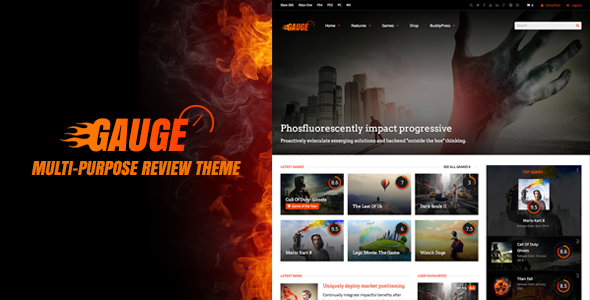
Stuck on your Gauge WordPress theme? Let's fix it.
No endless back-and-forth. Just send us the details and we'll get it done.
No obligation · Replies within 1 hour · Quote within 1 day
Setup · Customization · Bug fixes · WooCommerce integration
About Gauge WP Theme
Gauge is a WordPress theme by GhostPool built around a directory and listings concept. It ships with a clean, card-based layout and is designed to handle categorised content at scale. The theme integrates tightly with custom post types, Ajax-powered filters, and a front-end submission system, making it a practical starting point for directory, review, or community-driven sites.
GhostPool has a track record of building theme frameworks that go beyond aesthetics. Gauge includes a visual composer integration, multiple header layouts, and a structured options panel. It is compatible with WooCommerce, which opens the door to monetising listings through paid submissions or featured placements. If you are building a niche directory or local business listing site on WordPress, Gauge covers most of the core requirements without requiring a separate directory plugin.
Get matched with a Gauge developer in under one day
Tell us about your Gauge project. Small fixes, Gauge theme customization, or a full website build, whatever you need, we've got it covered.
We'll connect you to the right Gauge developers, define the scope, and get everything 100% clear.
You'll get one estimate, hire your preferred developer, and start collaborating.
Gauge has enough depth that generic WordPress developers often underestimate the setup time. A developer who knows GhostPool themes understands how the custom post type architecture, submission system, and shortcode framework fit together. Through Codeable, you get access to vetted WordPress specialists who have worked with directory themes like Gauge hands-on. You post a project, get a free estimate within 24 hours, and only move forward if the scope and price make sense for you.
Pros
- Built-in front-end submission system with user account integration out of the box
- Ajax-powered category and tag filters work without a separate directory plugin
- WooCommerce compatibility allows paid listings and featured placement monetisation
- Multiple header and listing layout options give reasonable design flexibility without custom code
- GhostPool provides active theme updates and a support forum with developer responses
Cons
- Visual Composer dependency adds page weight and can conflict with block editor workflows
- Default Ajax filter performance degrades noticeably with listing counts above a few hundred
- Front-end submission forms have limited conditional logic without additional plugin integration
- Child theme documentation is thin, making safe customisation harder for less experienced developers
- WooCommerce listing monetisation requires manual configuration and is not fully guided in the documentation
Who is Gauge for?
Local Business Directory
Gauge suits local business directories well. Its category filter, map integration options, and front-end submission flow let business owners add or claim listings without backend access. A Gauge developer can configure custom fields for opening hours, contact details, and categories specific to your region or industry, giving users a functional and fast local search experience.
Niche Review Site
For review-focused sites, Gauge’s rating system and card layout display scores cleanly across categories. A Gauge specialist can extend the default review fields to include criteria-based scoring, user-submitted reviews with moderation, and structured data markup so review stars appear in Google search results, improving click-through rates from organic traffic.
Community Events Listings
Event listing sites benefit from Gauge’s filterable grid and front-end submission. A Gauge expert can add date-based filtering, recurring event logic, and calendar views alongside the standard card layout. Combined with a submission workflow tied to WooCommerce, organisers can pay to feature events or submit listings directly without requiring admin intervention.
Job Board
Gauge can be configured as a job board with employer-submitted listings, category filters by job type or location, and application links. A Gauge developer would map custom fields to job-specific data like salary range, contract type, and deadline. WooCommerce handles paid job posting tiers. The Ajax filter keeps the candidate browsing experience fast even with hundreds of active listings.
Real Estate Listings
Real estate sites need property search with price range, location, and feature filters. Gauge’s filter system can be extended by a Gauge specialist to handle these query types. Custom listing templates can display floor plans, gallery sliders, and agent contact forms. For high-traffic property portals, performance optimisation of the database queries behind the filter is essential.

Customizing Gauge
Gauge gives you a solid baseline, but most serious projects will need customisation beyond what the options panel offers. The theme’s page builder integration lets you rearrange layouts visually, but custom listing card templates, bespoke filter logic, or a tailored submission workflow all require work at the code level.
A Gauge expert can handle things like custom taxonomies tied to your specific niche, front-end form modifications, conditional field logic, and Ajax filter tuning for large datasets. Style overrides via a child theme keep your changes upgrade-safe. If you need the theme to match a specific brand or add functionality that GhostPool did not build in by default, working with a Gauge specialist saves you significant time and avoids breaking core theme files during future updates.
Recommended plugins for Gauge
Gauge works well with a focused set of plugins. For search and filtering, FacetWP or SearchWP can replace or extend the built-in Ajax filter for more complex query logic. Gravity Forms or WPForms handle advanced front-end submission flows.
On the performance side, a Gauge site with many listings can slow down without proper optimisation. Caching, database query tuning, and image compression matter here. See our WordPress performance service for specifics. If your directory depends on organic traffic, structured data for listings and proper indexing setup are critical. Our WordPress SEO service covers both technical and on-page needs for directory sites.
Not sure which plugins to use? This WordPress plugins directory covers the most popular options with reviews and setup guides.
Gauge common issues
Gauge theme Ajax filter not working after update
Ajax filter failures in Gauge usually trace back to a JavaScript conflict introduced by a plugin update or a permalink structure change that breaks the filter’s endpoint. Start by checking the browser console for JS errors. Flush permalinks under Settings > Permalinks. If the issue appeared after a plugin update, deactivate plugins one by one to isolate the conflict. For persistent or complex filter issues, our WordPress bug fixing service can diagnose and resolve the problem without disrupting your live listings.
Gauge front-end submission form not displaying correctly
Submission form display problems in Gauge are often caused by a missing or overridden stylesheet, a caching layer serving stale CSS, or a conflict with a form plugin that loads its own scripts. Clear all caches first. Check that the Gauge shortcode is placed on a full-width template without conflicting column wrappers. If the form broke after a theme update, compare your child theme overrides against the updated parent template. A bug fix specialist can identify the root cause quickly.
Gauge theme slow loading with large number of listings
Performance drops on Gauge listing pages with large datasets usually come from unoptimised database queries on the filter and from loading full post objects where only a few fields are needed. Add a persistent object cache like Redis or Memcached to reduce repeat query overhead. Use lazy loading on listing images and review your hosting plan’s PHP memory limit. If the filter is the bottleneck, replacing it with FacetWP or a custom query layer can make a significant difference on sites with hundreds or thousands of listings.
Gauge theme Visual Composer conflict with Gutenberg
Gauge was built with Visual Composer in mind, and switching to a Gutenberg-first workflow creates friction. The two editors handle content storage differently, which can cause layout rendering issues when editing pages built with Visual Composer shortcodes in the block editor. The safest approach is to keep Visual Composer active for legacy pages and build new pages in Gutenberg with separate block templates. A Gauge developer can migrate content progressively and set up a clean separation between the two editing environments.
Gauge FAQ
Gauge works well for small to medium directories. Once listing counts go beyond a few hundred, the default Ajax filter can slow down. You will need server-side caching, query optimisation, and possibly a more capable filter solution like FacetWP. A Gauge developer familiar with directory site scaling can set this up correctly before performance becomes a visible problem for your users.
Yes, Gauge includes WooCommerce compatibility. This is most commonly used to charge for listing submissions or to offer featured placement upgrades. The integration requires configuration to connect WooCommerce products to the submission workflow. It works, but the setup is not fully documented and benefits from hands-on experience with both Gauge and WooCommerce.
Yes. Gauge uses custom post types with custom fields that can be extended. Adding fields specific to your niche, whether that is property details, job specifications, or business attributes, requires either a custom fields plugin like ACF or direct code modification in a child theme. A Gauge specialist can map new fields to both the submission form and the listing template display.
Gauge includes a built-in front-end submission system. You set it up by creating a dedicated submission page, assigning the correct Gauge shortcode, and configuring user roles and submission status defaults in the theme options. WooCommerce is needed if you want to charge for submissions. The process is documented by GhostPool but can be fiddly to configure correctly alongside membership or payment logic.
GhostPool continues to release updates for Gauge and maintains a support forum. Response times vary, and complex technical issues often go beyond what forum support covers. If you need reliable ongoing support, working with an independent Gauge specialist or signing up for a WordPress maintenance plan gives you more consistent access to developer help.
Hire a Gauge WordPress Developer
Whether you need a full Gauge build from scratch, custom listing templates, front-end submission workflows, or fixes to an existing site, the right developer makes the difference. Our team at FoxyConcept specialises in WordPress theme development and works through Codeable’s vetted network. Get a free estimate with no obligation. Tell us what you need and we will come back to you with a clear scope and price within 24 hours.
You'll need a free Codeable account so developers can ask questions and send their quotes.