Gecko WordPress Theme
by JanStudio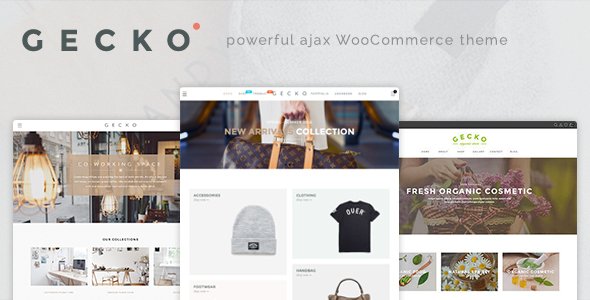
Stuck on your Gecko WordPress theme? Let's fix it.
No endless back-and-forth. Just send us the details and we'll get it done.
No obligation · Replies within 1 hour · Quote within 1 day
Setup · Customization · Bug fixes · WooCommerce integration
About Gecko WP Theme
Gecko is a multipurpose WordPress theme by JanStudio, built for creative agencies, portfolio sites, and business landing pages. It ships with a drag-and-drop page builder, pre-built demo templates, and a clean codebase that keeps load times reasonable out of the box.
The theme supports WooCommerce, has built-in header and footer builders, and gives you granular control over typography, colors, and layout without writing a single line of code. JanStudio updates Gecko regularly, which means compatibility with current WordPress and PHP versions is generally well maintained.
It sits in the mid-range of multipurpose themes. Not as feature-heavy as Avada or Divi, but lighter and easier to work with for smaller teams who want a polished site without a steep learning curve.
Get matched with a Gecko developer in under one day
Tell us about your Gecko project. Small fixes, Gecko theme customization, or a full website build, whatever you need, we've got it covered.
We'll connect you to the right Gecko developers, define the scope, and get everything 100% clear.
You'll get one estimate, hire your preferred developer, and start collaborating.
Most Gecko issues come down to one thing: the theme can do it, but you need to know where to look. A developer who has worked inside Gecko’s codebase before will find the right hook, filter, or template file in minutes instead of hours.
Through Codeable, you get matched with vetted WordPress developers who know multipurpose themes like Gecko inside out. No generalist freelancers, no guesswork. Post a project, get a free estimate, and only pay if you decide to move forward.
Pros
- Lightweight codebase compared to most multipurpose themes, which helps with baseline performance
- Built-in header and footer builder covers most layout needs without extra plugins
- WooCommerce integration is solid out of the box with dedicated product page options
- Regular updates from JanStudio keep compatibility with current WordPress and PHP versions
- Pre-built demo templates cover a wide range of niches and import cleanly in most environments
Cons
- Documentation is thinner than larger themes like Avada, so some features require trial and error to find
- The page builder dependency means switching builders later can require rebuilding page layouts
- Some advanced WooCommerce customisations hit limits quickly without custom code
- Community support forums are smaller, so finding answers to niche problems takes longer
- Mobile customisation options in the header builder are more limited than desktop controls
Who is Gecko for?
Creative Agency Portfolio
Gecko’s full-width layouts, smooth scroll effects, and grid-based portfolio post types make it a practical choice for agencies showcasing client work. A Gecko developer can extend the default portfolio with custom taxonomies, filterable grids, and case study templates that go beyond what the theme ships with.
WooCommerce Store
The built-in WooCommerce support handles standard product pages, cart, and checkout without major conflicts. For stores needing custom product builders, bundle displays, or subscription layouts, a Gecko specialist can build those on top of the existing WooCommerce integration cleanly.
Freelancer or Consultant Site
A single-page or minimal multi-page site for a freelancer loads fast with Gecko and looks polished with minimal setup. The Customizer gives enough control over personal branding that a consultant can maintain the site themselves after a developer sets the foundation.
Local Business Website
Local businesses need contact info, service pages, and trust signals front and center. Gecko’s pre-built business demo templates cover this well. A Gecko expert can add local SEO schema, Google Maps integration, and review displays that help the site perform in local search results.
SaaS or Tech Product Landing Page
Landing pages for SaaS products need fast load times, clear CTAs, and conversion-focused layouts. Gecko handles this well when properly configured. A Gecko developer can build modular section templates for feature breakdowns, pricing tables, and testimonial blocks that match the product’s brand.

Customizing Gecko
Gecko gives you a lot of control through the WordPress Customizer and its own theme options panel. You can adjust global colors, fonts, spacing, and container widths site-wide, then override them at the page level using the bundled builder.
A Gecko expert can go further: building custom header layouts, adding conditional logic to templates, integrating third-party APIs, or creating child theme overrides that survive updates cleanly. If the visual editor is hitting a wall, custom PHP and CSS hooks in Gecko are well-structured and easy to extend.
Common customization requests include custom WooCommerce product layouts, sticky navigation tweaks, custom post type templates, and performance-focused CSS rewrites. A Gecko specialist can handle all of these without breaking your existing design.
Recommended plugins for Gecko
Gecko works with most major WordPress plugins without conflicts. Popular pairings include WooCommerce for e-commerce, Contact Form 7 or WPForms for lead capture, and WPML for multilingual sites.
For SEO, Gecko’s clean HTML output pairs well with Yoast or Rank Math. Our WordPress SEO service can take that further with schema markup, crawl optimisation, and Core Web Vitals improvements.
On the performance side, Gecko benefits from proper caching, image optimisation, and script management. Our WordPress performance service covers all of that, including server-level tuning specific to how Gecko loads assets.
Not sure which plugins to use? This WordPress plugins directory covers the most popular options with reviews and setup guides.
Gecko common issues
Gecko theme header not showing on mobile
Mobile header issues in Gecko usually come from a conflict between the header builder’s mobile breakpoint settings and a caching plugin serving a stale version of the page. Start by clearing all caches, then check the header builder’s mobile visibility toggles for each header element.
If the problem persists, a CSS media query conflict from a third-party plugin or child theme stylesheet is likely the cause. Our WordPress bug fixing service can isolate and resolve this without disrupting your existing layout.
Gecko theme slow loading after plugin update
A performance drop after a plugin update in Gecko is almost always caused by new JavaScript or CSS assets being loaded by the updated plugin without proper deferral or minification. Use Query Monitor to identify which plugin is adding the new requests.
Check whether your caching and minification plugin needs its settings refreshed after the update. If the slowdown is significant, our WordPress bug fixing service can audit the asset load order and restore previous performance levels.
Gecko page builder layout broken after WordPress update
After a WordPress core update, page builder layouts in Gecko can break if the builder version is outdated or if a block editor compatibility issue has been introduced. Update the bundled page builder plugin first, then check whether any custom CSS classes used in your layouts have been renamed in the new version.
If columns or sections are stacking incorrectly, the issue is often a flexbox or grid CSS change in the theme or builder update that needs a targeted override in your child theme stylesheet.
Gecko WooCommerce product page layout not working
WooCommerce product page layout problems in Gecko usually trace back to a version mismatch between the theme’s WooCommerce template files and the current WooCommerce release. Run a WooCommerce system status check and look for outdated template warnings.
Copy the relevant WooCommerce template files into your child theme’s WooCommerce folder and update them to match the current plugin version. If the layout is custom-built inside the page builder, check whether the WooCommerce single product hook placements have shifted in the new version.
Gecko FAQ
Gecko has partial Gutenberg compatibility. You can use the block editor for basic content pages, but the theme’s main layout tools are its own page builder. Full-block-editor workflows are not where Gecko is designed to shine. If you need a block-first workflow, you may hit limitations that require a developer to bridge.
Technically yes, but Gecko’s demo templates and most of its layout flexibility assume you are using the bundled builder. Without it, you are working with standard WordPress templates and the Customizer only. For simple sites this is fine, but for anything complex you will need the builder or a Gecko developer to build custom templates.
Gecko is listed as WPML-compatible. Most string translations and language switcher integrations work without issues. Dynamic content inside the page builder may need manual string registration in WPML’s string translation module. A Gecko specialist can set this up correctly if you are running into untranslated strings.
Always use a child theme for any CSS or PHP customisations. Theme options saved in the Customizer or theme panel are stored in the database and survive updates. Page builder layouts saved to pages also survive updates. The risk area is any direct edits to theme files, which will be overwritten. A child theme prevents that entirely.
Gecko’s HTML output is reasonably clean and its default heading structure is logical, which gives a decent SEO baseline. It does not bloat pages with unnecessary markup. That said, SEO performance depends more on your content, schema, and site speed than the theme itself. Pair Gecko with a solid SEO plugin and a performance setup for best results.
Hire a Gecko WordPress Expert
Whether you need a custom layout built, a bug tracked down, or a full Gecko site built from scratch, working with a specialist saves time and avoids the trial-and-error that comes with generic WordPress help.
Post your project and get matched with a vetted Gecko developer within 24 hours. No obligation, no upfront cost. Get a free estimate and see exactly what your project will take before you commit.
You'll need a free Codeable account so developers can ask questions and send their quotes.