GetFit WordPress Theme
by SkatDesign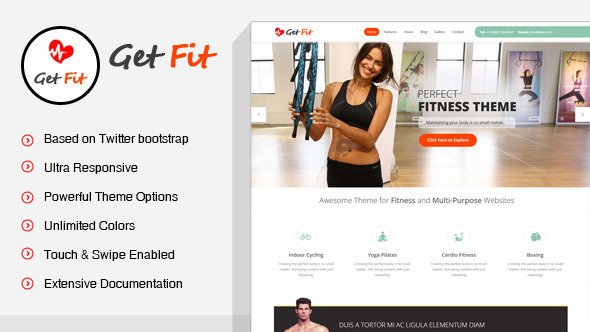
Stuck on your GetFit WordPress theme? Let's fix it.
No endless back-and-forth. Just send us the details and we'll get it done.
No obligation · Replies within 1 hour · Quote within 1 day
Setup · Customization · Bug fixes · WooCommerce integration
About GetFit WP Theme
GetFit is a WordPress theme built by SkatDesign, aimed at gyms, personal trainers, fitness studios, and health coaches. It ships with a bold visual style, pre-built section layouts, and a class schedule display that suits most fitness businesses out of the box.
The theme is built on a clean foundation with WooCommerce compatibility, making it practical for selling memberships, training packages, or merchandise. It supports popular page builders, so you can rearrange sections without touching code. Retina-ready graphics and mobile-first structure mean it holds up well on phones, which matters when most gym visitors browse on the go. Overall, GetFit covers the core requirements a fitness website needs without overcomplicating the setup process.
Get matched with a GetFit developer in under one day
Tell us about your GetFit project. Small fixes, GetFit theme customization, or a full website build, whatever you need, we've got it covered.
We'll connect you to the right GetFit developers, define the scope, and get everything 100% clear.
You'll get one estimate, hire your preferred developer, and start collaborating.
GetFit looks straightforward until you need it to do something specific. Booking integrations, custom trainer profile layouts, WooCommerce membership setups, or a timetable that actually matches your class schedule all require careful configuration. A developer who knows this theme avoids the trial-and-error that costs time and breaks things. Work is matched and managed through Codeable, which means you get a vetted developer, not a random freelancer. Estimates are free and there is no obligation to proceed.
Pros
- Pre-built fitness-specific sections including class timetables, trainer profiles, and pricing tables reduce setup time significantly
- WooCommerce compatibility allows straightforward selling of memberships, supplements, or training packages
- Mobile-first layout works well for gym visitors browsing on phones between sessions
- Visual style is bold and energetic without requiring heavy graphic design work from the site owner
- Compatible with major page builders, making layout changes accessible without custom code
Cons
- Timetable functionality is limited without a dedicated booking plugin, which adds cost and configuration time
- Heavy use of full-width images and large sections can slow load times if not optimised properly
- Demo content import does not always transfer cleanly, leaving layout gaps that need manual fixing
- Typography options in the Customizer are limited compared to more flexible multipurpose themes
- Support response times from SkatDesign can be slow, which is frustrating when a blocking issue appears
Who is GetFit for?
Gym and Fitness Studio
GetFit works well for physical gyms that need a class schedule, membership pricing display, and a contact or booking section. The timetable layout and trainer profile sections match exactly what most gym websites need. Pair it with a booking plugin and WooCommerce to handle memberships and the site covers most operational requirements without custom development.
Personal Trainer Website
Personal trainers need a site that communicates trust fast. GetFit’s trainer profile layouts and testimonial sections do that job. Add a simple contact form or booking link and the theme functions as a solid lead generation tool. It suits trainers who want something professional without spending weeks on design decisions or hiring a designer separately.
Online Fitness Coaching
Online fitness coaches selling programmes, video memberships, or one-to-one packages can use GetFit with WooCommerce and a membership plugin like MemberPress. The bold visual style suits the online coaching market. Video embeds, programme breakdowns, and transformation testimonials all fit naturally into the existing section structure without major layout changes.
Yoga or Pilates Studio
Yoga and pilates studios need a calmer tone than a heavy gym site, but GetFit’s layout flexibility allows that. The class schedule section works for weekly timetables and the instructor profiles suit studios with multiple teachers. With colour palette adjustments and lighter imagery, the theme adapts away from its default high-intensity aesthetic without structural changes.
Sports Nutrition or Supplement Store
Sports nutrition brands and supplement retailers can use GetFit’s WooCommerce compatibility to run a product store alongside fitness content. Blog sections support ingredient guides and training articles. The visual language already fits the fitness and health market. Product pages require some styling work to match the homepage, but the foundation is solid for a niche eCommerce store.

Customizing GetFit
Out of the box, GetFit gives you colour controls, font options, and layout switches through the WordPress Customizer. You can swap the hero section, adjust the class timetable style, and change button colours without writing a single line of code.
Beyond that, customisation gets more technical. Custom post types for trainers and classes, WooCommerce membership tweaks, and third-party booking plugin integration all require developer input to work reliably. A GetFit expert knows where the theme’s CSS structure is rigid and where it can be extended cleanly. If you need a layout that differs from the demo or want to connect a specific booking system, working with a specialist saves significant time and avoids conflicts that break things quietly in the background.
Recommended plugins for GetFit
GetFit pairs well with several plugins that extend its core functionality. WooCommerce handles product sales and membership tiers. Amelia or BookingPress adds appointment scheduling. Contact Form 7 or WPForms covers lead capture. Yoast or Rank Math slots in for on-page SEO without conflicts.
For speed, combining GetFit with a caching plugin and a CDN makes a noticeable difference on image-heavy fitness pages. Check out the WordPress performance service or WordPress SEO optimisation if either area needs dedicated attention beyond basic plugin setup.
Not sure which plugins to use? This WordPress plugins directory covers the most popular options with reviews and setup guides.
GetFit common issues
GetFit class timetable not displaying correctly
Timetable display issues in GetFit usually come from a conflict with a caching plugin or a missing shortcode argument. First, clear your site cache completely and reload. If the layout is broken, check whether the timetable shortcode is placed inside a page builder element that is adding extra wrappers. A blank layout often means the class post type has no published entries. Populate it with at least one class and the structure should render. If conflicts persist, a WordPress bug fixing service can isolate the cause quickly.
GetFit theme slow loading on mobile
GetFit’s mobile speed issues are almost always tied to large uncompressed hero images and unoptimised scripts loading across every page. Start by running the site through PageSpeed Insights to see specific failures. Compress images with ShortPixel or similar, defer non-critical JavaScript, and enable a caching layer. If the theme is loading all its CSS globally rather than per page, a developer can split it. See the WordPress performance service for a more structured approach.
GetFit WooCommerce styles broken after update
WooCommerce style conflicts after an update usually mean the theme’s stylesheet has not been updated to match WooCommerce’s current markup. Check whether a GetFit theme update is available and install it. If the theme is at its latest version and styles are still broken, the fix involves adding targeted CSS overrides to restore correct button, cart, and product page styling. Avoid editing theme files directly. Use a child theme or the Additional CSS section in the Customizer to keep changes safe across future updates.
GetFit demo import not working
Failed demo imports in GetFit are commonly caused by server memory limits or PHP timeout settings that are too low for the import process to complete. Ask your host to temporarily raise the PHP memory limit to 256MB and the max execution time to 300 seconds. Also ensure the Required Plugins listed with the theme are all installed and activated before starting the import. If the import completes but images are missing, run the media regeneration tool to re-fetch attachments that did not transfer.
GetFit FAQ
GetFit is compatible with Elementor and most other major page builders. You can use Elementor to build or modify page layouts while GetFit handles the class timetables, trainer profiles, and other fitness-specific elements through its own shortcodes and post types. Some theme-specific sections may need minor CSS adjustments to align correctly within Elementor’s column structure, but the two work together without major conflicts.
GetFit works with WooCommerce, and you can add a membership plugin like MemberPress or WooCommerce Memberships on top of it. The theme does not include native membership logic, so the functionality comes entirely from the plugin. Expect some styling work to make the membership pages match the rest of the site. A developer familiar with GetFit can connect the two cleanly and handle any checkout page styling issues that come up.
GetFit does not include a built-in booking system. You need to add a plugin like Amelia, BookingPress, or Simply Schedule Appointments. Once installed, the booking form can be embedded into any page using a shortcode. Styling the form to match GetFit’s design usually needs a small amount of CSS. For a full booking setup connected to staff schedules and payments, working with a developer saves time and avoids configuration errors.
Yes, GetFit can work for a yoga or pilates studio. The class schedule and instructor profile sections are directly relevant. The main adjustment is visual: the default colour palette and imagery lean toward high-intensity gym branding. Changing the primary colours, swapping in calmer photography, and adjusting font choices brings the tone in line with a yoga audience. The structural layout requires no changes to support a studio use case.
SkatDesign has released updates for GetFit, but update frequency is not consistent compared to larger theme shops. Before purchasing or building on GetFit, check the ThemeForest changelog for the last update date. If the theme has not been updated within the past year, verify it has been tested against the current WordPress version. Running an outdated theme on a live site creates security and compatibility risks over time. A WordPress maintenance plan helps manage this ongoing.
Hire a GetFit WordPress Developer
Whether you need a GetFit site built from scratch, a specific feature added, or something fixed that is not behaving correctly, the right developer makes the difference between a site that looks like the demo and one that actually works for your business. Post your project and get a free estimate with no obligation to hire. Get a free estimate today and get matched with a GetFit expert within 24 hours.
You'll need a free Codeable account so developers can ask questions and send their quotes.