Globax WordPress Theme
by enovathemes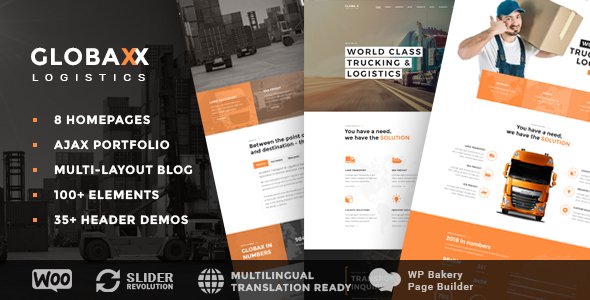
Stuck on your Globax WordPress theme? Let's fix it.
No endless back-and-forth. Just send us the details and we'll get it done.
No obligation · Replies within 1 hour · Quote within 1 day
Setup · Customization · Bug fixes · WooCommerce integration
About Globax WP Theme
Globax is a WordPress theme built by Enovathemes, designed for logistics, transport, and freight companies. It ships with a drag-and-drop page builder, pre-built demo pages, and industry-specific sections like service showcases, fleet displays, and quote request forms.
The theme uses a custom Enovathemes page builder rather than Elementor or WPBakery, which gives it a consistent visual style but does mean a steeper onboarding curve if you are used to other tools. Globax also includes a header builder, sticky navigation options, and built-in icon sets suited to the shipping and warehousing sector. It is a focused theme, not a multi-purpose one, which keeps the codebase tighter and the design more coherent for its target audience.
Get matched with a Globax developer in under one day
Tell us about your Globax project. Small fixes, Globax theme customization, or a full website build, whatever you need, we've got it covered.
We'll connect you to the right Globax developers, define the scope, and get everything 100% clear.
You'll get one estimate, hire your preferred developer, and start collaborating.
Globax uses Enovathemes’ own page builder, which behaves differently from Elementor or Gutenberg. If you have not used it before, getting a clean result takes longer than expected. A developer familiar with the theme’s structure can configure the demo content, wire up your forms and tracking integrations, and deliver a site that does not look like a slightly broken demo. Work is matched through Codeable, so you get a vetted WordPress specialist, not a generalist freelancer guessing their way through the theme panel.
Pros
- Purpose-built for logistics and freight, so the design language fits the industry without heavy customisation
- Includes a header builder with sticky and transparent header options out of the box
- Pre-built demo pages cover common logistics site structures like services, fleet, and tracking pages
- Built-in icon sets include transport and shipping icons not found in generic theme libraries
- Enovathemes provides ongoing theme updates and dedicated support through ThemeForest
Cons
- Uses a proprietary Enovathemes page builder, so switching to Elementor later requires rebuilding pages
- Demo import can be slow and sometimes requires manual steps to get all content displaying correctly
- Typography options are limited compared to Elementor-based themes with Google Fonts full integration
- Mobile layout adjustments sometimes need custom CSS, as the builder does not expose full responsive controls
- The theme is narrowly focused on logistics, making it a poor fit if your business later expands into unrelated sectors
Who is Globax for?
Freight and Shipping Companies
Globax was designed with freight and shipping in mind. The pre-built service pages, fleet showcase sections, and quote request forms map directly to what a freight company needs on its site. You can go from demo to a functional company site faster than you would with a generic multi-purpose theme, without the visual mismatch that comes from adapting layouts meant for something else.
Warehousing and Storage Businesses
Warehousing businesses need to communicate capacity, locations, and service tiers clearly. Globax’s section-based builder handles this well, letting you display facility specs, certifications, and contact forms in a structured way. The industrial visual style fits the sector without needing heavy colour or typography overrides to look credible.
Courier and Last-Mile Delivery Services
Courier services often need a site that works equally well for business clients and individuals. Globax’s homepage layouts can be adapted to show delivery zones, pricing tiers, and tracking links. The quote form functionality is particularly useful here, letting potential clients request rates directly from the site without a phone call.
Supply Chain Consultancies
Supply chain consultancies need to position expertise rather than showcase physical assets. Globax’s team sections, case study layouts, and service description pages work for this, though you will likely spend more time in the theme options stripping back the more freight-specific visual elements to reach a cleaner, consultancy-appropriate look.
Fleet Management Companies
Fleet management companies can use Globax’s vehicle showcase sections to display fleet categories, specifications, and availability. The grid-based layouts handle this well. Pairing the theme with a booking or enquiry plugin gives clients a clear path from browsing fleet options to making contact, without needing a custom-built solution.

Customizing Globax
Globax gives you a reasonable amount of control through its theme options panel. You can adjust colours, typography, header layouts, and section visibility without touching code. The custom page builder handles most layout changes through the WordPress admin.
Where things get more complex is when you need to go beyond the included demos. Custom post type adjustments, third-party plugin integration, or layout changes that the builder does not support natively will require PHP and CSS work. A Globax expert can set up demo content correctly, customise the quote form to feed into your CRM, and ensure the header and footer behave consistently across mobile and desktop without the visual inconsistencies that often appear when you push the builder past its defaults.
Recommended plugins for Globax
Globax is built for logistics sites, so its useful add-ons are fairly specific. The theme supports WooCommerce if you want to sell shipping services or products directly. Contact Form 7 and WPForms both work cleanly for quote and inquiry forms.
For performance, image optimisation and caching plugins make a noticeable difference given the theme’s use of large header images. You can read more about that on the WordPress performance page. If organic search matters to your logistics business, pairing Globax with Yoast SEO or Rank Math is worth doing early. See the WordPress SEO optimisation service for more detail.
Not sure which plugins to use? This WordPress plugins directory covers the most popular options with reviews and setup guides.
Globax common issues
Globax demo content not importing correctly in WordPress
Demo import failures in Globax are usually caused by PHP memory limits or execution time limits on your hosting. Set memory_limit to at least 256MB and max_execution_time to 300 in your php.ini or wp-config.php. Also make sure the required plugins listed in the theme documentation are installed and activated before running the import. Importing without the companion plugins active is the most common reason sections appear empty after a completed import.
Globax header logo not showing on mobile
This is usually a CSS specificity issue or a retina logo setting that has not been configured for smaller screens. Check the theme options panel under Header settings and confirm that a mobile logo has been uploaded separately if the theme supports it. If the logo disappears only at a specific breakpoint, inspecting the element in Chrome DevTools will show whether a CSS rule is hiding it. A small custom CSS fix targeting the mobile header class typically resolves it. See the WordPress bug fixing service if you need hands-on help.
Globax page builder elements not loading or displaying blank
Blank elements in the Enovathemes page builder are almost always caused by a JavaScript conflict with another plugin. Deactivate plugins one at a time while reloading the page builder to identify the conflict. jQuery version mismatches are a frequent culprit, especially if you have a caching or optimisation plugin that defers scripts. Disabling script deferral for the page builder’s JS files in your optimisation plugin settings usually resolves it without needing to remove the conflicting plugin entirely.
Globax contact form not sending emails
If the Globax contact or quote form is not sending emails, the issue is almost never the theme itself. WordPress uses PHP mail by default, which most shared hosts block. Install an SMTP plugin like WP Mail SMTP and connect it to a transactional email service such as SendGrid, Mailgun, or Gmail SMTP. After setting up the SMTP connection, use the plugin’s test email tool to confirm delivery. Also check your spam folder before assuming email is not arriving. For ongoing WordPress maintenance, keeping SMTP configured is a standard part of site health.
Globax FAQ
Globax uses its own Enovathemes page builder, not Elementor. You can install Elementor alongside it, but the pre-built demo pages are built with the native builder and will not transfer. If you want to rebuild pages in Elementor, that is possible but means starting layouts from scratch. For most Globax users, sticking with the native builder and customising within it is the more practical path.
Technically yes, but it is not ideal. Globax’s design language, icon sets, and demo layouts are built around logistics and transport. Using it for a restaurant, agency, or retail site means overriding a lot of default styling. You would spend more time fighting the theme than building the site. A more flexible multi-purpose theme would be a better starting point for anything outside the transport sector.
Yes, Globax supports WooCommerce. The theme applies styling to standard WooCommerce pages including the shop, product, and cart pages. It is not a dedicated WooCommerce theme, so heavy customisation of the store layout may require additional CSS or a child theme. For logistics businesses selling services or products online, the WooCommerce integration covers standard use cases without major issues.
Enovathemes provides support through the ThemeForest comments section and a dedicated support system. A regular ThemeForest purchase includes six months of support, extendable on renewal. Response times vary. For faster resolution of development issues or customisation work beyond what theme support covers, working with a specialist developer is often quicker than waiting in a support queue.
Migrating an existing site to Globax means rebuilding your pages in the Enovathemes page builder, since your current content structure will not map cleanly to the theme’s layouts. Blog posts and basic pages transfer fine, but any custom layouts need to be recreated. If you are also moving hosts at the same time, the WordPress migration service can handle both tasks together cleanly.
Hire a Globax Developer
If you need someone to build or fix a Globax site, you can get a free estimate with no obligation. Projects are matched to vetted WordPress developers through Codeable, typically within 24 hours. Whether you need a full build from a demo, custom form integrations, or fixes to an existing site, you only pay if you decide to move forward. Get a free estimate here and describe what you need.
You'll need a free Codeable account so developers can ask questions and send their quotes.