go.arch WordPress Theme
by The_Black_Pearls_Pro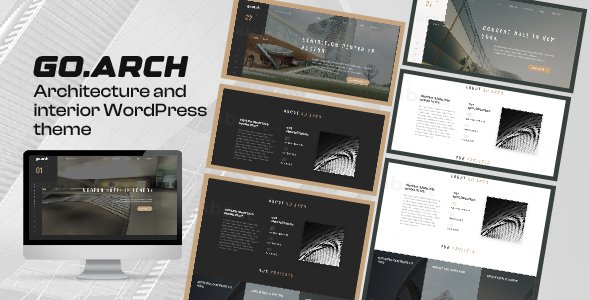
Stuck on your go.arch WordPress theme? Let's fix it.
No endless back-and-forth. Just send us the details and we'll get it done.
No obligation · Replies within 1 hour · Quote within 1 day
Setup · Customization · Bug fixes · WooCommerce integration
About go.arch WP Theme
Go.arch is a WordPress theme built by The_Black_Pearls_Pro, designed specifically for architecture firms, interior designers, and creative studios. It puts visual work front and center with full-width portfolio layouts, minimal typography, and clean grid structures that let projects speak for themselves.
The theme is built on a solid foundation with Elementor compatibility, making it accessible to designers who want control without writing code. It supports custom post types for portfolio projects, filterable galleries, and a contact section setup that suits service-based businesses.
Go.arch is a good fit for professionals who need a polished online presence without starting from scratch. The design leans modern and restrained, which works well for high-end architecture and design practices that want their work to be the focus of every page.
Get matched with a go.arch developer in under one day
Tell us about your go.arch project. Small fixes, go.arch theme customization, or a full website build, whatever you need, we've got it covered.
We'll connect you to the right go.arch developers, define the scope, and get everything 100% clear.
You'll get one estimate, hire your preferred developer, and start collaborating.
Go.arch looks clean out of the box, but getting it to match your exact brand and workflow takes real WordPress knowledge. Codeable connects you with vetted developers who have worked with architecture and portfolio themes before. You post your project, get a fixed estimate within 24 hours, and only proceed if you are happy with the scope. No bidding wars, no junior developers figuring things out on your live site. Just experienced WordPress professionals who get the work done properly.
Pros
- Clean, minimal design that suits high-end architecture and interior design portfolios
- Full Elementor compatibility allows page-level customization without coding
- Filterable portfolio grid works well for studios with diverse project categories
- Typography and whitespace defaults are well-chosen for design-focused audiences
- Responsive layouts handle large project photography well across screen sizes
Cons
- Limited built-in demo content makes initial setup slower than more popular themes
- Documentation is sparse, which creates friction when troubleshooting edge cases
- Portfolio custom post type lacks advanced fields without adding ACF manually
- Fewer community tutorials available compared to themes like Astra or Divi
- Some header and footer options require CSS overrides to fully customize
Who is go.arch for?
Architecture Firms
Go.arch suits architecture firms that need to present built work clearly. The portfolio grid handles project photography at scale, and the minimal layout keeps the focus on the buildings rather than the interface. Category filters make it easy for visitors to browse by project type, such as residential, commercial, or public.
Interior Design Studios
Interior design studios benefit from go.arch’s full-width image support and clean project detail pages. Each project can include before and after images, material specifications, and client testimonials. The theme’s neutral color palette does not compete with the work being presented, which matters when clients are evaluating visual taste.
Landscape Design Practices
Landscape design practices can use go.arch to showcase site plans, planting schemes, and completed outdoor spaces. The filterable portfolio works well for separating residential gardens from commercial or public space projects. A contact form integration makes it straightforward for potential clients to request consultations directly from project pages.
Real Estate Developers
Real estate developers can use go.arch to present completed developments with high-quality imagery and project specs. The theme supports a structured layout that communicates project scale, location, and availability. Adding WooCommerce or a booking plugin extends its functionality without requiring a full theme switch.
Freelance Architectural Photographers
Architectural photographers need a theme that loads images fast and displays them accurately. Go.arch’s full-width layouts and minimal chrome keep the photography central. Pairing it with a performance-optimized setup ensures large image files do not slow down the site, which affects both user experience and search ranking.

Customizing go.arch
Customizing go.arch starts in the WordPress Customizer, where you can adjust colors, fonts, header layout, and logo placement. The theme works with Elementor, so individual pages can be rebuilt or extended without touching code.
For deeper changes, such as custom project templates, animated transitions, or a bespoke homepage layout, you will likely need a go.arch expert. The theme has its own structure and overriding it incorrectly can break layouts or conflict with future updates.
A developer familiar with go.arch knows which template files to modify, how to use child themes correctly, and how to extend the portfolio functionality without creating technical debt. Small customizations done wrong tend to compound into bigger problems over time, especially after theme updates.
Recommended plugins for go.arch
Go.arch pairs well with several plugins that extend its core functionality. WooCommerce can be added for selling prints or design services. WPML works for multilingual architecture firms operating across regions. Contact Form 7 or WS Form handle project inquiry forms cleanly.
For site speed, pairing go.arch with a caching plugin and a CDN makes a measurable difference, especially on image-heavy portfolio pages. You can read more about that on our WordPress performance page. If you want organic traffic from your portfolio, structured SEO work matters too. See our WordPress SEO optimisation service for details.
Not sure which plugins to use? This WordPress plugins directory covers the most popular options with reviews and setup guides.
go.arch common issues
go.arch portfolio not displaying correctly after update
Portfolio display issues after a theme update usually come from cached templates or a plugin conflict introduced in the new version. Start by clearing your caching plugin and checking for JavaScript errors in the browser console. If the layout is still broken, temporarily deactivate plugins one by one to isolate the conflict. If you modified theme files directly rather than using a child theme, the update may have overwritten your changes. A developer can audit the damage and restore functionality properly. See our WordPress bug fixing service for help.
go.arch Elementor layout broken on mobile
Elementor mobile layout problems in go.arch are often caused by conflicting CSS between the theme’s responsive rules and Elementor’s own breakpoint settings. Open the Elementor editor, switch to mobile view, and check for padding, margin, or width values set at the desktop level that do not carry over correctly. Custom CSS added to the theme customizer can also override Elementor styles unpredictably on smaller screens. If the issue persists across multiple sections, a developer review of the stylesheet hierarchy will identify the conflict faster than trial and error.
go.arch contact form not sending emails
Go.arch does not include its own mail system, so contact form delivery depends on your hosting configuration and whichever form plugin you are using. Many shared hosts block PHP mail by default. Install the WP Mail SMTP plugin, connect it to a transactional email service like SendGrid or Mailgun, and test again. Also check your spam folder and confirm the form is pointed at a valid recipient email. If forms were working previously and stopped, a recent plugin or PHP update may have changed the mail handling behavior on your server.
go.arch header logo not showing on all pages
Logo display issues across pages in go.arch are usually tied to page-specific header settings in Elementor or a transparent header option that changes the logo on scroll. Check the Customizer header settings first, then look at individual page settings in Elementor if you have overridden the header template. Some go.arch configurations use a separate sticky header with its own logo upload field. Uploading the logo in only one location will leave other states blank. A developer can standardize the header behavior across all page types quickly.
go.arch FAQ
Yes, go.arch is built with architecture and design portfolios in mind. It handles project photography well, supports category filtering, and uses a restrained layout that suits professional design practices. It is a better fit for studios that want a clean, image-led presentation rather than a feature-heavy site with lots of moving parts.
Yes, go.arch is compatible with Elementor. You can use Elementor to build and edit individual pages within the theme’s structure. Some sections, like the portfolio grid and header, are controlled by the theme itself rather than Elementor, so full page-builder control depends on which part of the site you are editing.
Go.arch uses a portfolio custom post type. In your WordPress dashboard, look for a Portfolio or Projects menu item. Create a new entry, add your images, write a project description, and assign it to a category. The category filter on the portfolio page updates automatically. If the post type is missing, a plugin conflict or incomplete theme setup may be the cause.
Go.arch can work with WPML or Polylang for multilingual setups, but it requires careful configuration. The portfolio post type and any custom strings in the theme need to be registered as translatable. This is a technical process and getting it wrong can create duplicate content or broken navigation. A developer experienced with WordPress multilingual setups will save significant time here.
Update frequency depends on The_Black_Pearls_Pro’s ongoing support for the theme. Check the theme’s page on ThemeForest or wherever you purchased it for the last update date and changelog. Themes with infrequent updates can develop compatibility issues with newer versions of WordPress or popular plugins. It is worth checking before committing to a full build.
Hire a go.arch WordPress Developer
If your go.arch site needs custom development, layout fixes, plugin integration, or a full build from scratch, FoxyConcept can match you with the right developer through Codeable. Work is scoped clearly, priced fairly, and delivered by someone who knows WordPress architecture themes inside and out. Get a free estimate with no obligation to hire. The process takes minutes and you will have a developer proposal within 24 hours.
You'll need a free Codeable account so developers can ask questions and send their quotes.