GoBlog WordPress Theme
by BloomPixel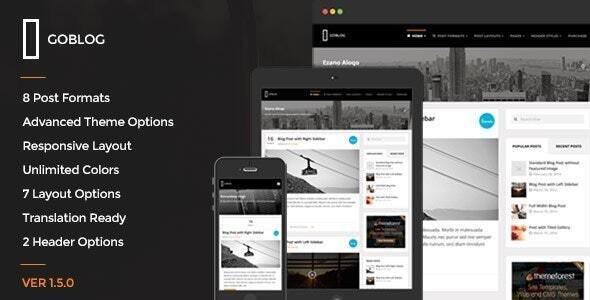
Stuck on your GoBlog WordPress theme? Let's fix it.
No endless back-and-forth. Just send us the details and we'll get it done.
No obligation · Replies within 1 hour · Quote within 1 day
Setup · Customization · Bug fixes · WooCommerce integration
About GoBlog WP Theme
GoBlog is a WordPress theme built by BloomPixel for bloggers who want a clean, fast, and readable site without a heavy page builder holding things back. It’s built around typography, content hierarchy, and minimal distraction — the kind of design that keeps readers focused on the writing.
The theme supports multiple blog layouts, post formats, and a widget-rich sidebar structure. It works well with WooCommerce for selling digital products or memberships, and it’s coded with performance in mind — lean markup, no unnecessary scripts loaded on every page.
GoBlog suits personal bloggers, niche content creators, and small editorial teams who need something that works out of the box but can still be shaped to match a brand. It’s a solid starting point without requiring custom development from day one.
Get matched with a GoBlog developer in under one day
Tell us about your GoBlog project. Small fixes, GoBlog theme customization, or a full website build, whatever you need, we've got it covered.
We'll connect you to the right GoBlog developers, define the scope, and get everything 100% clear.
You'll get one estimate, hire your preferred developer, and start collaborating.
GoBlog is approachable for DIY setup, but getting it to perform exactly how you want takes time and technical know-how. If you’re spending hours in the Customizer or copying Stack Overflow snippets into your functions.php, it’s probably worth talking to a developer instead.
Through Codeable, you get access to vetted WordPress developers who have worked with themes like GoBlog across real projects. No generalist freelancers, no guesswork. Post your project, get an estimate within 24 hours, and only move forward if the scope and price work for you. Explore WordPress development services to see what’s possible.
Pros
- Clean typography-first design that keeps readers focused on content
- Lightweight code base with minimal front-end bloat
- Multiple blog layout options built into the theme without plugins
- WooCommerce compatible for monetisation without major conflicts
- Active BloomPixel support and regular theme updates
Cons
- Customizer options are limited for users wanting advanced design control
- No built-in mega menu — complex navigation requires a plugin or custom code
- Child theme is necessary for any code-level changes to avoid update overwrites
- Limited third-party documentation outside of BloomPixel's own support
- Not ideal as a base for non-blog site types like portfolios or directories
Who is GoBlog for?
Personal Blog
GoBlog’s minimal layout and strong typographic base make it a natural fit for personal bloggers. Posts stay readable on any device. The sidebar supports recent posts, categories, and social links without clutter. Setup is fast and the design doesn’t need much adjustment before it looks professional enough to publish.
Niche Content Publication
For niche blogs covering specific topics — finance, tech, health, travel — GoBlog’s category and archive structure keeps content organised. Multiple layout options let you display posts differently by category. Clean HTML output helps with SEO, which matters when you’re competing in a specific vertical and need every ranking advantage.
Food and Recipe Blog
Food blogs need good image presentation and fast load times. GoBlog handles large featured images cleanly without distorting the layout. Combined with a recipe plugin and performance optimisation, it delivers a good user experience. The structured post format support also helps search engines parse content for rich results.
Digital Product Creator
Bloggers selling ebooks, courses, or templates can connect WooCommerce to GoBlog without major theme conflicts. The shop pages inherit the theme’s clean styling with minimal friction. A developer can wire up a simple digital storefront that feels native to the blog rather than bolted on from a separate template.
Freelance Writer Portfolio
Writers who want to showcase published work alongside a blog can use GoBlog’s page templates and sidebar widgets to create a simple portfolio structure. It won’t replace a dedicated portfolio theme, but for a writing-focused site where the blog is the main attraction, it works cleanly and loads fast.

Customizing GoBlog
GoBlog uses the WordPress Customizer for most settings — colors, fonts, header layout, sidebar position, and footer widgets. That covers the basics for most bloggers, but it has limits if you want something more distinctive.
Beyond the Customizer, deeper changes like custom post templates, modified archive layouts, or adjusted typography scales require direct theme file edits or a child theme. That’s where a GoBlog expert becomes useful. Rather than fighting the theme’s structure, a developer who knows GoBlog can extend it cleanly without creating update conflicts or breaking existing styles.
If you want a unique header, a custom homepage built around your content categories, or brand-specific styling throughout, working with a GoBlog specialist gets you there without the workarounds.
Recommended plugins for GoBlog
GoBlog pairs well with several common WordPress plugins. Yoast SEO or Rank Math slot in cleanly for on-page optimisation. WooCommerce works for digital downloads or paid newsletter setups. Elementor can be used on standalone pages, though the theme’s native templates are faster and cleaner for blog content.
For performance, GoBlog’s lean base means caching plugins like WP Rocket or LiteSpeed Cache make a real difference. Image optimisation through Imagify or ShortPixel helps on image-heavy posts. If you’re running ads, ad management plugins like Advanced Ads integrate without layout issues. Explore WordPress performance optimisation and SEO services to get more from your GoBlog site.
Not sure which plugins to use? This WordPress plugins directory covers the most popular options with reviews and setup guides.
GoBlog common issues
GoBlog header menu not showing on mobile
Mobile menu issues in GoBlog are usually caused by a JavaScript conflict with another plugin or a caching plugin serving a stale version of the theme’s script. Start by deactivating plugins one by one to identify the conflict. Clear all caches after each deactivation. If the issue persists, check your browser console for JS errors that point to the specific script causing the problem. A developer can resolve this quickly through WordPress bug fixing.
GoBlog featured image not displaying correctly on posts
If GoBlog featured images are missing, cropped badly, or not appearing on single posts, the most common causes are incorrect image size settings or a missing add_theme_support('post-thumbnails') call in a child theme. Run the Regenerate Thumbnails plugin after any theme switch. If thumbnails were registered at a different size previously, old images won’t match the new dimensions until regenerated. Check the theme’s image size settings in the Customizer as well.
GoBlog sidebar showing below content instead of beside it
A sidebar falling below content instead of sitting beside it usually means a CSS float or flexbox property has been overridden somewhere. Common causes include a plugin adding full-width styles to the body or a page set to a full-width template by mistake. Check the page template setting in the editor sidebar first. Then inspect the layout with browser dev tools to find which CSS rule is breaking the column structure.
GoBlog custom CSS not applying after update
If custom CSS stops applying after a GoBlog update, it’s likely because the CSS was added to the parent theme’s stylesheet rather than through the Customizer’s Additional CSS field or a child theme. Theme updates overwrite parent theme files. Move all custom CSS to the Customizer’s Additional CSS section or into a child theme stylesheet. This ensures your styles survive future updates without needing to be re-added each time. See WordPress maintenance for ongoing support.
GoBlog FAQ
GoBlog is a premium WordPress theme sold by BloomPixel. It is not available for free through the WordPress.org theme directory. Purchasing it gives you access to theme files, BloomPixel’s documentation, and their support channels. A valid licence is also required to receive automatic updates through WordPress, which is important for security and compatibility.
GoBlog is compatible with Elementor, but it’s designed primarily for block editor and native WordPress use. You can use Elementor on specific pages — landing pages, for example — while keeping the blog area running on GoBlog’s native templates. Mixing the two too heavily can introduce layout conflicts and slow down your site, so it’s worth being selective about where you use the page builder.
To create a child theme for GoBlog, create a new folder in your wp-content/themes directory, add a style.css file with the correct header including Template: goblog, and create a functions.php file that enqueues the parent theme’s stylesheet. Activate the child theme from Appearance > Themes. All custom CSS and PHP changes should live in the child theme to survive updates.
GoBlog can handle small editorial sites with multiple categories and authors, but it’s not built for high-volume magazine layouts with tabbed sections, breaking news tickers, or complex ad placements. For a straightforward niche publication it works well. If you need a true magazine layout with multiple content blocks on the homepage, a dedicated magazine theme would be a better fit.
Yes, GoBlog supports WooCommerce. The theme’s styles carry over to shop pages without major visual conflicts. It works best for simple store setups — selling digital products, ebooks, or memberships alongside a blog. Complex product catalogues with filtering and custom shop layouts may need additional CSS or a developer’s help to match the theme’s design properly.
Hire a GoBlog Developer
Whether you need GoBlog set up from scratch, customised to match your brand, or fixed after something broke, a specialist developer gets it done faster and cleaner than trial and error. Work is delivered through Codeable, so you’re matched with vetted WordPress developers only — no bidding wars, no unvetted freelancers.
Get a free estimate — describe your project and hear back within 24 hours. No obligation to hire.
You'll need a free Codeable account so developers can ask questions and send their quotes.