Good Space WordPress Theme
by GoodLayers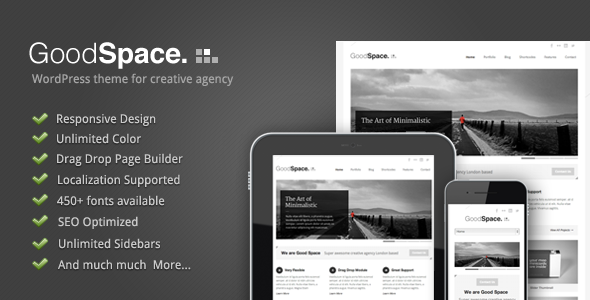
Stuck on your Good Space WordPress theme? Let's fix it.
No endless back-and-forth. Just send us the details and we'll get it done.
No obligation · Replies within 1 hour · Quote within 1 day
Setup · Customization · Bug fixes · WooCommerce integration
About Good Space WP Theme
Good Space is a minimalist portfolio WordPress theme built by GoodLayers. It uses the GoodLayers page builder and is aimed at photographers, designers, agencies, and creatives who want a clean, image-forward layout without a lot of visual clutter.
The theme ships with multiple demo layouts, a fullscreen portfolio grid, smooth AJAX page transitions, and built-in support for WooCommerce. Typography controls are solid, and the white-space-first design approach makes content the focal point rather than decorative elements.
Good Space runs on the GDLR Core plugin framework, which powers most GoodLayers themes. That means customization happens through a mix of theme options, shortcodes, and the page builder interface rather than through the block editor. It works well for single-page or multi-page creative sites where presentation matters more than blog functionality.
Get matched with a Good Space developer in under one day
Tell us about your Good Space project. Small fixes, Good Space theme customization, or a full website build, whatever you need, we've got it covered.
We'll connect you to the right Good Space developers, define the scope, and get everything 100% clear.
You'll get one estimate, hire your preferred developer, and start collaborating.
GoodLayers themes use a proprietary framework that behaves differently from Elementor or block-editor builds. A generic WordPress developer may lose time figuring out how GDLR Core hooks and filters work. A Good Space specialist already knows the template hierarchy, the page builder shortcode structure, and where the theme stores its meta settings.
Through Codeable, you get matched with vetted WordPress developers who have direct experience with themes like Good Space. Every project starts with a free estimate and no obligation to hire.
Pros
- Clean minimalist design that works well for photography and creative portfolios out of the box
- Built-in AJAX page transitions give the site a smooth, app-like feel without extra plugins
- Multiple pre-built demo layouts cover agencies, studios, and freelancers without heavy modification
- WooCommerce support is baked in, useful for selling prints or digital products directly
- Fullscreen portfolio grid with filtering is included and does not require a separate plugin
Cons
- Relies on the GDLR Core plugin framework, which creates a dependency that complicates migrations
- Not compatible with the Gutenberg block editor, so content editing feels dated compared to modern themes
- Page builder shortcodes get embedded directly in post content, making it hard to switch themes later
- GoodLayers documentation is thin and community support forums are not very active
- Performance out of the box is poor due to unoptimized script loading from GDLR Core
Who is Good Space for?
Photography Portfolio
Good Space suits photographers who want large image displays and minimal interface distraction. The fullscreen grid and AJAX transitions keep the focus on the work. A Good Space developer can customize gallery behavior, add password-protected client proofing pages, or integrate a digital download plugin for selling high-resolution files.
Creative Agency
Agencies with a portfolio-first pitch benefit from the white-space layout and multi-page demo structures. A Good Space expert can set up case study templates, custom project category pages, and a team section that matches the agency’s brand without fighting the default demo styling.
Graphic Design Studio
Graphic designers need a theme that does not compete visually with their work. Good Space keeps the chrome minimal. A Good Space specialist can adjust the portfolio post type, add custom metadata fields for project details, and fine-tune hover effects on the grid to match the studio’s preferred interaction style.
Print and Art Shop
The WooCommerce integration makes Good Space a reasonable base for selling art prints, posters, or digital assets. A Good Space developer can build custom product page templates, match the shop styling to the portfolio aesthetic, and configure tax and shipping settings without breaking the theme layout.
Freelance Designer or Illustrator
Freelancers need a fast setup that looks polished without a large budget. Good Space demo content installs quickly and covers the basics. A Good Space expert can strip out demo content cleanly, configure a contact form, and optimize the site for speed so the portfolio loads fast on mobile.

Customizing Good Space
Good Space gives you a dedicated theme options panel built on the GoodLayers framework. From there you can control typography, color schemes, header styles, footer layout, and portfolio settings. The page builder handles column layouts, sliders, and content blocks without requiring code.
For deeper changes, a Good Space expert can go well beyond the panel. Custom post type tweaks, portfolio filtering behavior, AJAX transition timing, and WooCommerce template overrides all require PHP and CSS work that the options panel does not expose. A Good Space developer can also clean up the GDLR Core plugin dependencies if you are migrating the site or switching hosting environments.
If you need a custom portfolio layout, a unique header structure, or specific mobile breakpoints adjusted, hiring a Good Space specialist saves a lot of trial and error inside the GoodLayers builder interface.
Recommended plugins for Good Space
Good Space works with most standard WordPress plugins. WooCommerce is officially supported for selling prints, products, or digital downloads. Contact Form 7 and Gravity Forms both integrate cleanly into the page builder layouts.
For performance, the GoodLayers scripts and styles can pile up quickly. A developer can defer non-critical assets, combine GDLR Core stylesheets, and configure caching correctly. See the WordPress performance service for what that typically involves.
YOAST SEO and Rank Math both work with Good Space, though schema output and Open Graph tags sometimes need manual adjustment for portfolio post types. The WordPress SEO service covers those gaps.
Not sure which plugins to use? This WordPress plugins directory covers the most popular options with reviews and setup guides.
Good Space common issues
Good Space portfolio page not showing posts
This usually happens when the portfolio post type is not assigned to the correct page template. Go to Pages, edit the portfolio page, and confirm the template is set to Portfolio in the page attributes panel. Also check that GDLR Core is active, since the portfolio post type is registered by that plugin. If posts are published but still not appearing, check the portfolio settings in the theme options panel for category or count filters that may be excluding content.
Good Space AJAX transitions broken after plugin update
AJAX transitions in Good Space depend on specific JavaScript files loaded by GDLR Core. A plugin update that enqueues conflicting scripts or modifies the wp_head output can break this. Open the browser console and look for JavaScript errors. The most common culprits are jQuery version mismatches or script loading order issues. Deactivate recently updated plugins one at a time to isolate the conflict. If you need help tracking this down, the WordPress bug fixing service can diagnose and resolve it.
GDLR Core plugin conflict with WooCommerce
GDLR Core registers its own styles and scripts that sometimes collide with WooCommerce assets on cart and checkout pages. Common symptoms include broken checkout layouts or missing WooCommerce buttons. The fix usually involves enqueueing GDLR styles conditionally so they only load on non-WooCommerce pages, or overriding the WooCommerce templates inside the theme’s woocommerce folder. A child theme is the right place to make these changes so updates do not overwrite them.
Good Space mobile menu not opening
The Good Space mobile menu relies on a JavaScript toggle class added to the navigation element. If the menu does not open, check for JavaScript errors in the console first. A common cause is a script that prevents event propagation on touch devices. Also verify that the mobile breakpoint in the theme options matches your site’s actual header structure. If you have a custom header, the mobile trigger selector may need to be updated manually in the theme settings.
Good Space page builder content not saving
Good Space page builder data is stored as post meta. If saves are not sticking, the issue is often a PHP memory limit or a security plugin blocking the meta update request. Increase the PHP memory limit to at least 256MB in wp-config.php. If a security plugin like Wordfence is active, check its firewall logs for blocked requests. Clearing the object cache can also help if a caching plugin is interfering with the save request. If the issue persists, the WordPress bug fixing service can dig into the server logs.
Good Space slider not displaying images
Slider images in Good Space not displaying is typically a missing or incorrect image size registration. The theme registers custom image sizes through GDLR Core. If those sizes were not generated when images were uploaded, the slider pulls a fallback or shows nothing. Run a thumbnail regeneration tool like Regenerate Thumbnails after confirming the theme and GDLR Core are both active. Also check that slider items have a featured image set and that the slider shortcode settings specify a valid image size.
Good Space theme options reset after update
Good Space stores theme options in the WordPress database under a specific option key. A theme update that changes that key name, or a migration that did not carry over all option rows, causes settings to appear reset. Before updating, export your theme options using the export function in the theme options panel. If the reset has already happened, check the database directly in phpMyAdmin for any rows prefixed with gdlr or goodspace. A Good Space developer can restore these values from a backup or rebuild the configuration.
Good Space portfolio filter not working
Portfolio filtering in Good Space uses JavaScript to show and hide items by taxonomy term. If filters click but nothing happens, the issue is usually a JavaScript error or a class mismatch between what the filter buttons reference and what the portfolio items are tagged with. Check the browser console for errors. Also verify that portfolio items are assigned to the correct portfolio category terms. If you recently changed taxonomy slugs, the filter data attributes on the items need to be updated to match.
Good Space slow loading speed fix
Good Space is not a lightweight theme. GDLR Core loads multiple CSS files and several JavaScript libraries unconditionally. To improve speed, combine and defer GDLR scripts, enable server-side caching, and use a CDN for static assets. Image optimization is also critical since portfolio themes tend to load large files. For a structured approach to these improvements, see the WordPress performance service. Lazy loading portfolio images alone can cut initial load time significantly.
Good Space white screen after activation
A white screen after activating Good Space almost always means GDLR Core is not active or is running an incompatible version. The theme requires GDLR Core to function and will fatal error without it. Activate GDLR Core from the Plugins screen first, then activate Good Space. If the white screen persists, enable WP_DEBUG in wp-config.php to see the actual error message. PHP version incompatibility between the server and the theme files is the next most common cause after a missing dependency plugin.
Good Space FAQ
Good Space and GDLR Core have received updates that maintain basic WordPress 6 compatibility. However, full Gutenberg block editor support is not there. The theme uses the classic editor workflow through its own page builder. Always test a theme or GDLR Core update on a staging site before pushing to production, since GoodLayers update cadence is slower than core WordPress releases.
Good Space is not designed to work with Elementor. It uses the GoodLayers proprietary page builder, which stores content differently. Mixing Elementor and the GDLR builder on the same site causes layout conflicts and duplicate asset loading. If you want to use Elementor, a different base theme designed for it will give better results. A Good Space developer can help you assess whether a theme switch makes sense for your project.
After activating Good Space and GDLR Core, a demo import notice should appear in the WordPress dashboard. The import uses the GoodLayers one-click demo installer. Select the demo layout you want, confirm the import, and wait for it to complete. A slow server or low PHP memory limit can cause the import to time out partway through. Set memory to at least 256MB and max execution time to 300 seconds before running the import.
No. GDLR Core is a required dependency. It registers the portfolio custom post type, loads the page builder, and handles most of the theme’s frontend output. Deactivating it breaks the theme immediately. This is a known limitation of the GoodLayers framework. The plugin is provided free with the theme purchase but it creates a hard dependency that makes the theme harder to migrate or replace later.
Good Space includes Google Fonts integration through the theme options panel. Go to Appearance, then Theme Options, then Typography. You can select Google Fonts for headings, body text, and the navigation from dropdowns there. For custom hosted fonts or Adobe Fonts, you need to enqueue them via a child theme’s functions.php file and then reference the font family name inside the theme options typography fields.
Yes, Good Space has built-in WooCommerce support. The theme includes basic WooCommerce template overrides for shop, product, cart, and checkout pages. The styling matches the minimal theme aesthetic. For more complex store setups, custom product page layouts, or checkout customizations, a Good Space developer can extend the WooCommerce templates inside a child theme without touching the core theme files.
Before any update, export your theme options from the Theme Options panel using the export button. Back up your database and any child theme files. Install the update on a staging environment first if possible. After updating, reimport your theme options if anything was reset. Never update Good Space or GDLR Core on a live site without a full backup. The GDLR framework does not always preserve settings across major version jumps.
Yes, but the GDLR Core dependency and the way page builder data is stored in post meta requires a careful migration. Use a migration plugin that copies both the database and all files. After migration, update the site URL, flush permalinks, and verify that GDLR Core is active before checking the frontend. If you run into issues after moving the site, the WordPress migration service covers these kinds of post-migration fixes.
GoodLayers does not ship an official child theme for Good Space. You need to create one manually. Add a child theme folder with a style.css that declares the parent theme as Good Space and a functions.php that enqueues the parent stylesheet. All custom CSS and PHP overrides go in the child theme. This protects your changes from being overwritten when the parent theme updates. A Good Space specialist can set this up correctly in about 30 minutes.
Good Space loads large portfolio images, GDLR Core scripts, and slider assets even on pages that do not need them. Mobile performance suffers most from unoptimized images and render-blocking scripts. Compress images before uploading, enable lazy loading, and defer GDLR JavaScript files that are not needed above the fold. A caching plugin with CSS and JS minification helps but may need manual exclusions to avoid breaking the AJAX transitions the theme relies on.
Hire a Good Space Developer
If you need a Good Space expert for a custom layout, a bug fix, a WooCommerce integration, or a full site build, the fastest way to get started is through a vetted developer who already knows the GoodLayers framework. No guesswork, no wasted time. Get a free estimate and describe what you need. You will hear back within 24 hours with a clear scope and price.
You'll need a free Codeable account so developers can ask questions and send their quotes.