GoStore WordPress Theme
by skygroup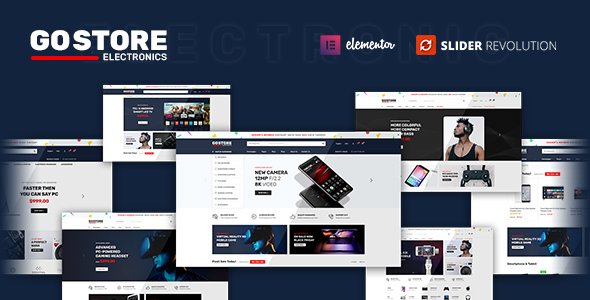
Stuck on your GoStore WordPress theme? Let's fix it.
No endless back-and-forth. Just send us the details and we'll get it done.
No obligation · Replies within 1 hour · Quote within 1 day
Setup · Customization · Bug fixes · WooCommerce integration
About GoStore WP Theme
GoStore is a WooCommerce theme built by Skygroup, aimed at online stores that want a clean, fast-loading front end without heavy page builder overhead. It ships with a mobile-first layout, Ajax-powered cart and search, product filtering, and a homepage builder that covers most standard ecommerce layouts out of the box.
The theme targets small to mid-size stores selling physical or digital goods. Setup is straightforward: install, import a demo, connect WooCommerce, and start replacing placeholder content. Skygroup keeps the codebase relatively lean, which helps with Core Web Vitals scores on stores that haven’t loaded up too many third-party plugins. GoStore works well with Elementor for teams that want more layout control beyond the built-in options.
Get matched with a GoStore developer in under one day
Tell us about your GoStore project. Small fixes, GoStore theme customization, or a full website build, whatever you need, we've got it covered.
We'll connect you to the right GoStore developers, define the scope, and get everything 100% clear.
You'll get one estimate, hire your preferred developer, and start collaborating.
GoStore handles the visual layer well, but most growing stores hit a point where default theme options aren’t enough. Custom filtering logic, unique product page layouts, third-party API integrations, or checkout modifications all require someone who knows WooCommerce and the GoStore codebase. FoxyConcept works through Codeable, a vetted network of WordPress specialists. You get a developer matched to your project within 24 hours, with a free estimate and no obligation to proceed.
Pros
- Lightweight codebase compared to most multipurpose WooCommerce themes
- Built-in Ajax cart, search, and product filtering work without extra plugins
- Mobile-first layout with a sticky add-to-cart bar on product pages
- Compatible with Elementor for teams that need more layout flexibility
- One-click demo import covers multiple store types with minimal cleanup needed
Cons
- Customizer options are limited for teams wanting deep layout control without a page builder
- Documentation is sparse on advanced hook and filter usage
- Some built-in widgets look dated without custom CSS adjustments
- Support response times from Skygroup can be slow on the standard license
- Fewer third-party child themes and community resources compared to Flatsome or Astra
Who is GoStore for?
Fashion and Apparel Stores
GoStore’s product card layouts and variation swatches make it a practical fit for clothing stores. Color and size filtering work cleanly out of the box, and the image zoom on product pages handles apparel photography well. Stores selling multiple SKUs per product benefit from the Ajax filtering, which keeps bounce rates down on category pages with large inventories.
Electronics and Gadget Shops
Electronics stores need fast load times and clear spec presentation. GoStore’s tab system on product pages handles technical specifications, compatibility notes, and warranty information without cluttering the main product description. The Ajax search also helps customers find specific models quickly, which matters more in electronics than in most other categories.
Health and Beauty Products
Health and beauty stores often rely on repeat purchases and subscription models. GoStore works well with WooCommerce Subscriptions for this, and the clean product page layout gives enough space for ingredient lists and usage instructions without overwhelming the buy button. The sticky add-to-cart bar improves conversion on longer product descriptions typical in this category.
Digital Downloads and Software
For software, templates, or digital asset stores, GoStore’s minimal design keeps the focus on the product rather than the storefront. Download delivery integrates cleanly through WooCommerce’s built-in digital product handling. Stores selling licenses or tiered access plans benefit from the theme’s ability to display pricing tables cleanly alongside standard product listings.
Home Decor and Furniture Retail
Home decor stores benefit from GoStore’s large image support and multi-column product grids. High-resolution photography loads efficiently with proper image optimisation in place. The theme’s homepage builder handles featured collections and seasonal promotions without requiring a separate page builder plugin, keeping the site lighter than many competing setups in this category.

Customizing GoStore
GoStore’s Customizer panel covers colors, typography, header layout, footer columns, and product card styles. You can switch between a sticky header, a transparent header for landing-style homepages, and a minimal navigation bar. Product pages support tabbed descriptions, video thumbnails, and a sticky add-to-cart bar on scroll.
Beyond the defaults, most stores need custom work: tweaking checkout flow, building a non-standard category landing page, or integrating a loyalty or subscription plugin cleanly into the theme’s design. That’s where a GoStore expert saves significant time. A developer who knows the theme’s hooks and filter structure can extend it without fighting the base styles or breaking future updates.
Recommended plugins for GoStore
GoStore pairs well with WooCommerce extensions for filtering (FiboSearch, YITH WooCommerce Ajax Product Filter), subscriptions (WooCommerce Subscriptions), and wishlist functionality. For stores prioritising search traffic, combining GoStore with proper schema markup and a caching layer matters more than the theme itself.
If speed is a concern, a WordPress performance audit can identify what’s slowing down your store beyond the theme. For stores investing in organic traffic, a structured WordPress SEO setup alongside GoStore gives a measurable edge over competitors using the same base theme.
Not sure which plugins to use? This WordPress plugins directory covers the most popular options with reviews and setup guides.
GoStore common issues
GoStore theme product filter not working
Product filter issues in GoStore usually come down to a conflict with a caching plugin serving stale pages, or a widget area that hasn’t been configured after a demo import. Check that your caching plugin excludes shop and category pages from full-page cache. If you’re using YITH or FiboSearch filters, verify the Ajax URL in the plugin settings matches your site URL exactly, including whether HTTPS is enforced. Our WordPress bug fixing service can diagnose and resolve this quickly.
GoStore Ajax cart not updating on mobile
Ajax cart failures on mobile in GoStore are typically caused by a JavaScript conflict with another plugin or a theme script loading out of order. Open your browser console on a mobile emulator and look for JS errors on the add-to-cart action. Common culprits include outdated WooCommerce versions, aggressive JS minification in a performance plugin, or a cookie consent plugin blocking cart session cookies. Disabling plugins one by one in a staging environment usually isolates the cause within a few tests.
GoStore theme slow loading after WooCommerce update
After a WooCommerce major version update, GoStore may load slowly if the theme’s template files haven’t been updated to match WooCommerce’s current template structure. Check the WooCommerce system status for outdated templates flagged under the GoStore theme. Updating those templates manually or through a child theme resolves most post-update slowdowns. Also check whether any WooCommerce hooks changed in the update that GoStore relies on for its Ajax features.
GoStore header layout broken after plugin conflict
A broken GoStore header after installing a new plugin is almost always a CSS or JavaScript conflict. The new plugin may be enqueuing its own styles that override GoStore’s header classes, or loading a script that interferes with the sticky header behaviour. Deactivate the new plugin to confirm, then use browser inspector tools to identify which conflicting styles are being applied. A small CSS fix in your child theme or a script load order adjustment usually resolves this without modifying core theme files.
GoStore FAQ
Skygroup updates GoStore to maintain WooCommerce compatibility, but template files sometimes lag behind major WooCommerce releases. After any WooCommerce major version update, check the system status report inside WooCommerce for outdated template warnings. If you see any GoStore templates flagged, those need manual updating or a developer review before they cause front-end issues on your store.
Yes. GoStore is compatible with Elementor, and most store owners use it for custom page layouts beyond what the theme’s built-in homepage builder covers. The theme’s header and footer stay in place while Elementor handles the page canvas. For product pages, you’d need Elementor Pro with its WooCommerce widgets to override the default GoStore product page template.
GoStore is designed for single-vendor stores. You can install a multivendor plugin like Dokan or WCFM Marketplace on top of it, but the theme has no built-in vendor dashboard or multi-vendor layout support. Significant custom development is usually needed to make the vendor experience work smoothly. For complex marketplace builds, a purpose-built multivendor theme is often a better starting point.
GoStore pulls from Google Fonts through the Customizer’s typography settings. Select a font family from the dropdown for headings and body text. For fonts not available through Google Fonts, you’ll need to enqueue the font manually in your child theme’s functions.php and add CSS to apply it to the relevant selectors. Self-hosting fonts this way also avoids a Google Fonts external request, which benefits page speed scores.
GoStore uses a clean HTML structure that doesn’t create major SEO problems out of the box. It doesn’t add schema markup automatically, so you’ll want an SEO plugin like Rank Math or Yoast with WooCommerce schema support installed. Page speed, which directly affects Core Web Vitals, depends more on your hosting, image sizes, and plugin stack than the theme itself. A structured WordPress SEO setup alongside GoStore makes a bigger difference than the theme choice alone.
Hire a GoStore Expert Developer
Whether you need a single fix, a full store build, or ongoing development work, we match you with a GoStore developer who knows WooCommerce inside out. Projects are handled through Codeable, so you get a vetted developer, transparent pricing, and a money-back guarantee if the work doesn’t meet expectations.
Get a free estimate and describe what you need. No commitment required.
You'll need a free Codeable account so developers can ask questions and send their quotes.