GoTravel WordPress Theme
by Mikado-Themes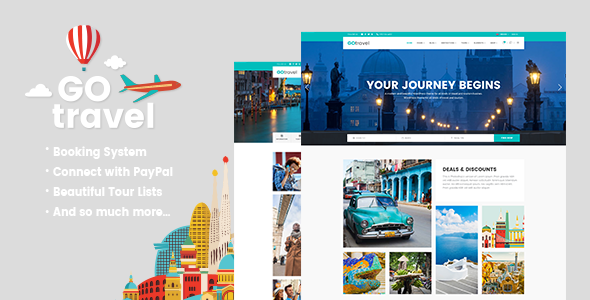
Stuck on your GoTravel WordPress theme? Let's fix it.
No endless back-and-forth. Just send us the details and we'll get it done.
No obligation · Replies within 1 hour · Quote within 1 day
Setup · Customization · Bug fixes · WooCommerce integration
About GoTravel WP Theme
GoTravel is a WordPress theme built by Mikado-Themes, designed specifically for travel agencies, tour operators, and travel bloggers. It ships with a dedicated booking system, destination pages, tour listings, and visual layouts that suit travel-focused content out of the box.
The theme is built on Mikado’s in-house framework and uses Elementor or their own page builder depending on the version. It includes pre-built demo content covering single tours, multi-day itineraries, destination archives, and travel guides. Pricing tables, availability calendars, and review sections are included without requiring third-party plugins for basic setups.
GoTravel works well for small to mid-size travel businesses that want a polished site without building from scratch. It supports WooCommerce for payment handling and integrates with popular booking plugins if you need more advanced reservation management.
Get matched with a GoTravel developer in under one day
Tell us about your GoTravel project. Small fixes, GoTravel theme customization, or a full website build, whatever you need, we've got it covered.
We'll connect you to the right GoTravel developers, define the scope, and get everything 100% clear.
You'll get one estimate, hire your preferred developer, and start collaborating.
GoTravel has more moving parts than a standard business theme. The booking logic, tour post types, and Mikado framework all interact in ways that aren’t always obvious. Getting it wrong means broken checkout flows or layouts that fall apart on mobile.
Working through Codeable, you get access to vetted WordPress developers who have worked with travel themes and booking setups before. No generalist freelancers. Post your project, get an estimate within 24 hours, and only hire if it makes sense for your budget.
Pros
- Includes dedicated tour and destination custom post types out of the box
- Pre-built demo pages for multi-day itineraries, tour listings, and destination archives
- WooCommerce integration for handling tour payments without extra plugins
- Built-in availability calendar and pricing table elements for tour pages
- Mikado support team provides documentation and update maintenance regularly
Cons
- Mikado's proprietary framework adds learning curve for developers unfamiliar with it
- Heavy demo content and bundled plugins slow page load without performance tuning
- Booking features are basic compared to dedicated plugins like WP Travel Engine
- Switching away from GoTravel later is difficult due to Mikado shortcodes in content
- Limited third-party tutorials compared to more widely used themes
Who is GoTravel for?
Tour Operator Websites
Tour operators need structured pages for each tour, clear pricing, itinerary details, and a booking path that works. GoTravel’s tour post type handles the structure, and WooCommerce covers payment. A developer can extend this to add deposit payments, group pricing tiers, or date-based availability.
Travel Blogs
Travel bloggers benefit from GoTravel’s destination archive pages and visual layouts. The theme supports large featured images, map embeds, and category filtering that works well for content-heavy travel sites. A developer can strip out the booking elements and optimize the blog-focused templates for speed and SEO.
Destination Travel Agencies
Agencies selling packages to specific regions can use GoTravel’s destination pages to organize content by location. Combined with a search filter, visitors can browse tours by destination, duration, or price. This requires some developer setup to configure correctly, but the foundation is built into the theme.
Adventure and Outdoor Activity Bookings
Adventure companies selling hiking, diving, or cycling trips need clear activity pages with safety info, skill levels, and group sizes. GoTravel’s flexible tour templates support this content structure. A developer can add custom fields for difficulty ratings and equipment lists without breaking the theme’s booking layout.
Cruise and Specialty Travel Companies
Cruise and specialty travel companies need detailed multi-day itinerary pages and custom inquiry forms rather than direct checkout. GoTravel’s itinerary elements suit this well. A developer can replace the WooCommerce checkout with a quote request flow and connect it to a CRM like HubSpot or Zoho.

Customizing GoTravel
GoTravel gives you a solid starting point, but most travel businesses need adjustments before the site is ready to launch. That includes custom tour structures, modified booking flows, branded color schemes, and layout changes that the default demo doesn’t cover.
A GoTravel expert can rework the theme’s page templates, extend the custom post types for tours and destinations, and connect third-party booking systems like WP Travel Engine or Checkfront. Typography, header layouts, and mobile behavior all need attention on real projects.
If you’re using Mikado’s Qi Addons or the bundled Elementor widgets, a developer who knows the theme’s structure will save you significant time. Changes made without understanding the framework often break on updates or conflict with the booking logic built into the theme.
Recommended plugins for GoTravel
GoTravel pairs well with WP Travel Engine for advanced itinerary management and payment gateways beyond WooCommerce. WPML is the recommended route for multilingual tour pages if you’re targeting international markets.
For site speed, the theme’s built-in sliders and image-heavy tour galleries need caching and image optimization to perform well. See our WordPress performance service for that. If your travel site relies on organic search for destination keywords, structured SEO work matters early. Our WordPress SEO service covers schema markup for tours and local destination pages specifically.
Not sure which plugins to use? This WordPress plugins directory covers the most popular options with reviews and setup guides.
GoTravel common issues
GoTravel theme booking form not sending emails
Email delivery issues in GoTravel are almost always a server SMTP problem rather than a theme bug. WordPress’s default mail function fails on most managed hosts. Install WP Mail SMTP and configure it with your email provider’s credentials. If the form itself isn’t submitting, check for JavaScript errors in the browser console caused by plugin conflicts, particularly with caching plugins that minify scripts.
GoTravel tour page layout broken after update
GoTravel layout breaks after updates usually point to outdated Mikado plugins that ship with the theme. Go to Appearance > Install Plugins and update all bundled plugins, especially Mikado Core. If the issue persists, clear all caches and check whether a child theme is overriding a template file that changed in the update. Our bug fixing service can handle this quickly.
GoTravel Elementor widgets not loading correctly
Mikado’s Elementor widgets depend on the Mikado Core plugin being active and up to date. If widgets show as missing or broken, first check that Mikado Core matches the theme version. Conflicts with other Elementor addon plugins are also common. Deactivate third-party Elementor extensions one by one to isolate the cause. A developer can identify the conflict and patch it without removing needed functionality.
GoTravel site loading slowly with tour listings
Tour listing pages in GoTravel load slowly because they combine large images, map scripts, and filter JavaScript on a single page. Start by enabling lazy loading for images, using a caching plugin like WP Rocket, and serving images via a CDN. The Google Maps embed should load conditionally, not on every page view. Our WordPress performance service covers this optimization in full.
GoTravel FAQ
Yes, GoTravel is built to work with WooCommerce. Tours can be set up as WooCommerce products, which handles payment processing, order management, and email confirmations. For more advanced booking features like per-person pricing or date-based availability, you’ll need a dedicated booking plugin alongside WooCommerce.
GoTravel and WP Travel Engine can run on the same WordPress install, but they have overlapping functionality. WP Travel Engine has its own tour post type that differs from GoTravel’s. A developer would typically use WP Travel Engine’s tour structure and apply GoTravel’s styling to it, rather than running both systems fully in parallel.
Yes, GoTravel supports Elementor and ships with Mikado-specific Elementor widgets through its Mikado Core plugin. The Qi Addons for Elementor plugin extends this further. You need both the theme and Mikado Core active for the widgets to appear in the Elementor panel correctly.
After installing GoTravel and its required plugins, go to Appearance > Import Demo Content in the WordPress dashboard. Mikado includes a one-click importer that pulls in pages, posts, menus, and settings. Run this on a fresh WordPress install to avoid conflicts with existing content. Demo import on an existing site often causes layout issues.
Migrating an existing travel site to GoTravel is possible but takes planning. Tour and destination content needs to map to GoTravel’s custom post types, and your existing booking data may not transfer cleanly. Our WordPress migration service handles content restructuring alongside the theme switch to avoid data loss or broken pages.
Hire a GoTravel WordPress Developer
Whether you need a full GoTravel setup, a booking system integration, or fixes to an existing site, we can connect you with a developer who knows the theme. Work is scoped clearly before anything starts. Get a free estimate and see what your project would cost. No commitment required, and the estimate is free regardless of whether you hire.
You'll need a free Codeable account so developers can ask questions and send their quotes.