Grand College WordPress Theme
by GoodLayers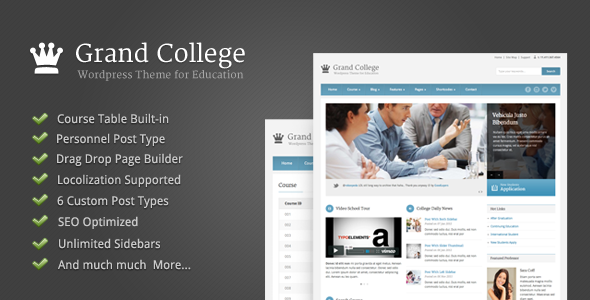
Stuck on your Grand College WordPress theme? Let's fix it.
No endless back-and-forth. Just send us the details and we'll get it done.
No obligation · Replies within 1 hour · Quote within 1 day
Setup · Customization · Bug fixes · WooCommerce integration
About Grand College WP Theme
Grand College is a WordPress theme built by GoodLayers, designed specifically for universities, colleges, schools, and other educational institutions. It ships with the GoodLayers page builder, giving you a drag-and-drop layout system without needing a third-party plugin.
The theme includes department pages, event listings, course structures, faculty profiles, and a news section out of the box. It handles the typical content architecture a higher education site needs without requiring heavy customization from scratch.
GoodLayers has a solid track record building education-focused themes, and Grand College reflects that. The code is reasonably clean, the demo content is importable in one click, and the theme is regularly updated to stay compatible with current WordPress versions. It is a practical starting point for any institution building a new site or refreshing an existing one.
Get matched with a Grand College developer in under one day
Tell us about your Grand College project. Small fixes, Grand College theme customization, or a full website build, whatever you need, we've got it covered.
We'll connect you to the right Grand College developers, define the scope, and get everything 100% clear.
You'll get one estimate, hire your preferred developer, and start collaborating.
GoodLayers themes have their own ecosystem, and Grand College is no different. Finding a developer who actually knows the theme’s page builder, its custom post types, and its panel structure takes time you probably don’t have.
Codeable connects you with vetted WordPress developers who have worked with education themes and know Grand College specifically. You post your project, get a clear estimate, and only move forward if the scope and price make sense. No commitment, no risk. If you need a Grand College developer who can deliver clean work on a real deadline, that’s exactly what Codeable is built for.
Pros
- Built specifically for education sites with department, faculty, and course structures included
- GoodLayers drag-and-drop builder means layout changes without writing code
- One-click demo import gets a working base site up quickly
- Regular theme updates from GoodLayers maintain WordPress compatibility
- Multiple header and footer layout options without needing custom CSS
Cons
- GoodLayers page builder is proprietary, making future theme migrations difficult
- Theme options panel is dense and poorly documented for first-time users
- Heavy demo content can slow down the site if not properly optimised after import
- No native LMS functionality, so course management requires a separate plugin
- Support response times from GoodLayers can be slow during peak periods
Who is Grand College for?
Universities and Colleges
Grand College handles the complex page structures that universities need. Department landing pages, faculty directories, event calendars, and news sections are all built into the theme. A Grand College developer can extend these with custom admissions workflows and student resource portals that fit your institution’s specific processes.
Private Schools and Academies
Private schools need a site that communicates credibility and community. Grand College’s clean layout system and strong typography options make it straightforward to build an admissions-focused site. A Grand College specialist can configure enrollment inquiry forms, school event listings, and parent communication pages without compromising design quality.
Online Course Providers
Online educators running structured programs can use Grand College as a front-end marketing and information site paired with LearnDash or LifterLMS on the backend. A Grand College expert can set up course catalog pages that connect cleanly to your LMS enrollment flow, keeping the user journey from landing page to signup friction-free.
Training and Certification Centers
Training centers offering certifications need clear program pages and a straightforward way to manage intake. Grand College’s course and event post types provide a solid structure. A Grand College developer can build custom registration forms and schedule displays that match your operational workflow without relying on expensive third-party booking tools.
Educational Nonprofits
Educational nonprofits often need a site that serves multiple audiences: donors, students, and partners. Grand College’s flexible layout builder lets a Grand College specialist create distinct page experiences for each group while keeping the site manageable for a small internal team handling ongoing content updates.

Customizing Grand College
Grand College comes with a large set of theme options, but getting a site to match your institution’s exact branding takes real work. Typography, color schemes, header layouts, and footer configurations all live inside the GoodLayers theme panel, which has its own learning curve.
A Grand College expert can map out your department hierarchy, set up custom post types for courses and faculty, and configure the built-in page builder so your content team can manage pages without breaking layouts. If your institution needs custom admissions forms, student portals, or LMS integration, that work sits outside the theme and requires developer involvement.
Hiring a Grand College specialist early saves time. Retrofitting a poorly configured theme setup costs more than getting it right at the start. A developer familiar with GoodLayers knows where the theme’s defaults fall short and how to work around them efficiently.
Recommended plugins for Grand College
Grand College pairs well with a number of plugins that extend its core functionality. For learning management, LearnDash and LifterLMS both integrate cleanly with the theme’s layout system. Contact Form 7 and Gravity Forms handle admissions inquiries and event registrations without much friction.
If your site is carrying slow page loads from large faculty photo galleries or embedded video content, a proper WordPress performance audit can bring load times down significantly. For institutions investing in organic search traffic, a structured WordPress SEO strategy built around your course catalog and department pages can drive consistent enrollment inquiries over time.
Not sure which plugins to use? This WordPress plugins directory covers the most popular options with reviews and setup guides.
Grand College common issues
Grand College theme demo import not working
Demo import failures in Grand College are usually caused by PHP memory limits or max execution time settings that are too low on your server. Set memory_limit to at least 256MB and max_execution_time to 300 in your php.ini or via your host’s control panel. Also confirm that all required plugins listed in the theme’s setup wizard are installed and activated before attempting the import again.
Grand College page builder elements not displaying correctly
Missing or broken page builder elements usually point to a plugin conflict or a missing GoodLayers dependency. Deactivate all non-GoodLayers plugins and check if the elements render correctly. If they do, reactivate plugins one at a time to find the conflict. Also confirm you are running the latest version of the GoodLayers page builder plugin that shipped with Grand College. If the issue persists, our WordPress bug fixing service can isolate the problem quickly.
Grand College theme update broke my site layout
After a theme update, layout breaks are often caused by deprecated shortcodes or page builder elements that changed structure in the new version. Check the GoodLayers changelog for breaking changes. Restore a pre-update backup, then manually update the theme and test each template. If you did not have a backup, a WordPress bug fixing specialist can reconstruct affected pages from the current theme version.
Grand College faculty page showing wrong template
If your faculty pages are rendering with the wrong template, check the page template setting on the individual page under Page Attributes in the WordPress editor. Grand College includes specific templates for faculty and department pages that must be selected manually. Also verify that the faculty custom post type is configured correctly in the theme settings panel under GoodLayers options.
Grand College slow loading after demo import
Demo content imports a large volume of images and placeholder data that can significantly bloat your site. After import, delete demo posts and pages you do not need, run an image optimisation pass on all imported media, and install a caching plugin. Also check whether the theme is loading all demo scripts globally instead of conditionally. A full WordPress performance review after demo import is worth doing before launch.
Grand College header logo not showing on mobile
The Grand College header logo disappearing on mobile is usually a CSS specificity issue or a misconfiguration in the mobile header settings inside the GoodLayers theme panel. Open Theme Options, navigate to the Header section, and check the mobile header logo field specifically. If it is set to inherit from desktop and your desktop logo path has changed, update both. Clear your caching plugin after saving.
Grand College events not appearing on calendar
If events are not showing on the Grand College calendar, first confirm the Events post type is enabled in the GoodLayers theme options. Then check that the events you created are published and assigned to the correct category. If the calendar shortcode or page builder element is on the page, verify the element settings are pointing to the correct event category filter and date range.
Grand College slider not working on homepage
Slider issues in Grand College are commonly caused by a JavaScript conflict with another plugin or a missing slider image that breaks the initialization. Open your browser console and look for JS errors. Deactivate other plugins temporarily to test. Also confirm that the slider images meet the minimum dimensions specified in the theme’s slider settings, as undersized images can cause the slider to fail silently.
Grand College custom colors not saving in theme options
Custom color settings failing to save in Grand College theme options are often caused by a nonce timeout, a caching layer intercepting the save request, or a PHP session issue. Try saving with all caching plugins deactivated. If you are on a managed hosting platform like WP Engine or Kinsta, clear server-side cache after saving. If the problem continues, check for JavaScript errors in the browser console that might be blocking the save action.
Grand College theme not compatible with WooCommerce
Grand College is not designed with WooCommerce in mind, so styling mismatches are expected. The theme does not ship with WooCommerce template overrides, which means cart pages, product pages, and checkout will use default WooCommerce styling. A Grand College developer can write custom CSS and template overrides to bring WooCommerce pages in line with your site’s design without modifying core theme files.
Grand College FAQ
Yes, Grand College is built specifically for higher education use cases. It includes department pages, faculty profiles, event listings, and course structure templates out of the box. For a standard institutional site, it covers most of the content architecture you need. Complex integrations like LMS or admissions portals require additional plugins and a developer to configure them properly.
Grand College is developed by GoodLayers, a Thai-based WordPress theme company with a long catalog of niche themes. They have been building WordPress themes since around 2012 and maintain an active theme update schedule. Grand College is one of their more specialized products, focused entirely on educational institution websites.
Technically yes, but it is not practical. Grand College’s demo content and most of its layout templates are built around the GoodLayers page builder. Using the theme with only the default WordPress editor means losing most of the designed layouts. If you want to use a different page builder like Elementor, you would need a Grand College developer to rebuild the templates from scratch.
After activating Grand College, the theme will prompt you to install required plugins via a setup wizard. Complete that first. Once all plugins are active, go to Theme Options and look for the Demo Import section. Select the demo variation you want and click import. Make sure your server’s PHP memory limit is at least 256MB or the import may fail partway through.
Grand College does not have a built-in LearnDash integration, but the two can work together. You would use Grand College for the institutional front end and LearnDash for course delivery. A Grand College developer can style LearnDash templates to match the theme’s design and create a smooth transition between the marketing pages and the course content areas.
Grand College includes a custom Faculty post type that activates when the theme is set up. Go to your WordPress dashboard and look for a Faculty menu item in the left sidebar. Add a new faculty entry, fill in the name, title, bio, and photo fields, and assign it to a department if the taxonomy is configured. The faculty page template in Grand College will pull these entries automatically.
Yes, Grand College is built to be responsive across screen sizes. Mobile header, navigation, and layout adjustments are included. That said, heavily customized pages or non-standard page builder configurations can sometimes produce layout issues on smaller screens. Test on actual devices before launch, and address any mobile-specific CSS issues with a Grand College specialist if needed.
You can migrate content to a site running Grand College, but the layout work is essentially a rebuild since page builder content is not transferable between themes. Your posts, pages, and media can be migrated, but each page will need to be rebuilt using the GoodLayers page builder. A developer can handle both the content migration and the layout reconstruction to reduce downtime.
After a WordPress core update breaks Grand College, first check whether GoodLayers has released a theme update that addresses the compatibility issue. Update the theme and all associated GoodLayers plugins. If the site is still broken, restore a backup taken before the update, then apply the updates in a staging environment first. If you do not have a staging setup, our WordPress bug fixing service can diagnose and repair the issue.
Grand College is translation-ready and includes a .pot file for manual translation. For a full multilingual site, you would need WPML or Polylang. GoodLayers themes generally work with WPML, but some page builder elements need manual string registration to translate correctly. A Grand College developer can handle WPML setup and string configuration to make the multilingual site function cleanly.
Hire a Grand College Developer
Whether you need a full site build, a layout fix, or custom functionality added on top of Grand College, working with a specialist gets it done faster and cleaner. Our developers know GoodLayers inside out and have delivered education sites that hold up under real institutional demands.
Post your project, get a free estimate, and see exactly what the work involves before you commit. Get a Free Estimate and have a Grand College expert ready within 24 hours.
You'll need a free Codeable account so developers can ask questions and send their quotes.