Grand Conference WordPress Theme
by ThemeGoods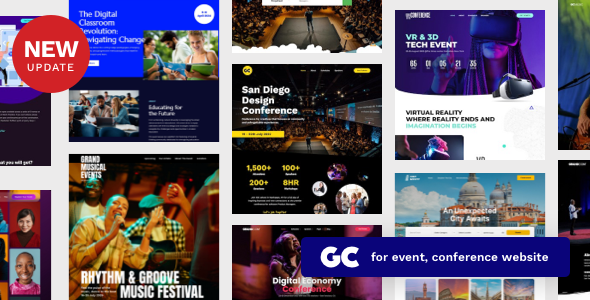
Stuck on your Grand Conference WordPress theme? Let's fix it.
No endless back-and-forth. Just send us the details and we'll get it done.
No obligation · Replies within 1 hour · Quote within 1 day
Setup · Customization · Bug fixes · WooCommerce integration
About Grand Conference WP Theme
Grand Conference is a WordPress theme built by ThemeGoods specifically for event and conference websites. It ships with a speaker grid, schedule builder, sponsor tiers, ticket pricing tables, and countdown timers — everything a conference organiser needs without bolting on a dozen separate plugins.
The theme is built on the Visual Composer page builder and includes WooCommerce support for selling event tickets directly from the site. It supports multiple agenda tracks, which makes it practical for multi-day or multi-stage events. The design is clean and professional, with a focus on getting attendees the information they need fast: who’s speaking, when, and how to register.
ThemeGoods maintains the theme with regular updates, and it’s compatible with major event plugins like The Events Calendar. If you’re running a corporate summit, academic symposium, or community meetup, Grand Conference covers the structural needs out of the box.
Get matched with a Grand Conference developer in under one day
Tell us about your Grand Conference project. Small fixes, Grand Conference theme customization, or a full website build, whatever you need, we've got it covered.
We'll connect you to the right Grand Conference developers, define the scope, and get everything 100% clear.
You'll get one estimate, hire your preferred developer, and start collaborating.
Grand Conference is structured enough to get you live quickly, but the details — session filtering, ticket logic, speaker archive customisation — take real WordPress development experience to get right. Guesswork costs time you don’t have before an event deadline.
Codeable connects you with vetted WordPress developers who have worked with event themes like Grand Conference before. Every developer on the platform is screened, and you get a clear estimate before any work starts. No bidding wars, no uncertainty about who you’re hiring.
Pros
- Built-in speaker, schedule, and sponsor post types save significant setup time
- Multi-track agenda support works well for complex multi-day events
- WooCommerce integration allows direct ticket sales without a third-party platform
- Countdown timer and call-to-action sections are included and easy to configure
- Regular updates from ThemeGoods maintain compatibility with current WordPress versions
Cons
- Visual Composer dependency makes the codebase heavier than Gutenberg-native alternatives
- Speaker and session templates are rigid and need custom development to alter significantly
- No built-in multi-language support — WPML must be purchased and configured separately
- Ticket sales via WooCommerce require additional setup for tax, VAT, and regional compliance
- Mobile schedule display can break on narrow screens when multiple tracks are active
Who is Grand Conference for?
Corporate Conferences
Grand Conference suits corporate events well. The sponsor tier display, keynote speaker layouts, and ticket pricing tables match what enterprise event teams need. A Grand Conference developer can connect the site to a CRM or email platform like HubSpot to automate attendee follow-up after registration closes.
Academic Symposiums
Academic events need structured speaker bios, paper submission links, and multi-session agendas. Grand Conference handles the core of this, and a specialist can extend it with downloadable programme PDFs, abstract submission forms via Gravity Forms, and institutional branding that meets university style guidelines.
Tech Summits and Developer Events
Developer conferences and tech summits often run multiple tracks simultaneously. Grand Conference’s agenda builder supports this, but filtering by track on mobile needs custom work. A Grand Conference expert can add AJAX-based schedule filtering so attendees can personalise their agenda without page reloads.
Community Meetups
Smaller community meetups benefit from Grand Conference’s lightweight speaker grid and simple ticket or RSVP setup. A developer can strip out unused sections, speed up the front end, and connect Meetup.com or Eventbrite to the site so event data stays in sync without manual updates.
Hybrid and Virtual Events
Hybrid events need live stream embeds, virtual session links, and separate ticketing for in-person versus online attendees. A Grand Conference specialist can build this logic into WooCommerce ticket products and add a password-protected virtual stage page that only registered online attendees can access.

Customizing Grand Conference
Grand Conference gives you a solid starting point, but most event sites need tailoring. Speaker profile layouts, custom colour schemes matching brand guidelines, agenda filters for multi-track events, and ticket checkout flows all require hands-on configuration or custom development.
A Grand Conference expert can rebuild the default homepage sections to match your event identity, set up conditional ticket pricing with early-bird logic, and integrate third-party registration platforms like Eventbrite or Ticket Tailor. Custom post type adjustments for speakers and sponsors are common requests, as is adding a live Q&A or session rating system.
If Visual Composer’s drag-and-drop approach is slowing your team down, a developer can migrate the site to a cleaner block-based workflow without breaking the existing layout. Getting a Grand Conference specialist involved early saves hours of trial-and-error later.
Recommended plugins for Grand Conference
Grand Conference pairs well with several plugins that extend its core functionality. Gravity Forms or WS Form handle complex registration flows. WooCommerce with a payment gateway like Stripe covers ticket sales. For multi-track schedules, Event Organiser adds backend structure the theme’s built-in tools lack.
On the technical side, a caching plugin like WP Rocket improves load times during high-traffic registration windows. If you need better WordPress performance around your event launch, image optimisation and CDN setup matter. For visibility in search, proper schema markup for events and speaker pages is worth setting up — a WordPress SEO specialist can handle that correctly from the start.
Not sure which plugins to use? This WordPress plugins directory covers the most popular options with reviews and setup guides.
Grand Conference common issues
Grand Conference schedule not displaying correctly on mobile
The multi-track schedule uses a CSS grid that collapses poorly on screens below 480px. Inspect the .tg-schedule wrapper in browser dev tools to identify overflow issues. Add a media query that stacks tracks vertically below 600px. If the issue appeared after a theme update, check the changelog for layout changes. Persistent or complex layout breaks are best handled by a WordPress bug fixing specialist.
Grand Conference speaker images not showing after update
Speaker image issues after a theme update usually point to a thumbnail size mismatch. Go to Settings > Media and confirm the thumbnail dimensions match the theme’s registered sizes. Run a thumbnail regeneration using the Regenerate Thumbnails plugin. If images were uploaded at low resolution, they’ll need to be replaced. Check that the speaker post type still has the featured image metabox enabled in Screen Options.
Grand Conference countdown timer not working
The countdown timer relies on JavaScript that reads a date field in the theme options. Go to the theme’s event settings and confirm the target date is formatted correctly — Grand Conference expects MM/DD/YYYY HH:MM. If the timer shows zeros or doesn’t render, check the browser console for JS errors. A conflict with a caching plugin serving stale HTML is a common cause. Flush all caches and test in an incognito window.
WooCommerce tickets not sending confirmation email in Grand Conference
WooCommerce email delivery failures in Grand Conference are almost always a server SMTP issue, not a theme problem. Install WP Mail SMTP and connect it to a transactional email service like Mailgun or SendGrid. Check WooCommerce > Settings > Emails to confirm the order confirmation email is enabled. Test delivery using the built-in WP Mail SMTP test tool. If emails reach spam, configure SPF and DKIM records for your domain.
Grand Conference Visual Composer not loading in WordPress editor
Visual Composer failing to load is usually caused by a plugin conflict or an outdated VC version bundled with the theme. Go to Plugins and deactivate non-essential plugins one at a time to isolate the conflict. Check whether ThemeGoods has released a theme update that bundles a newer VC version. If you’re on a managed host with specific PHP settings, memory limits below 256MB can also prevent the editor from loading.
Grand Conference agenda tabs broken after WordPress update
Agenda tab breakage after a WordPress update typically means a jQuery version conflict. Grand Conference’s tab functionality depends on jQuery UI. Check the browser console for is not a function errors. Some page builder or plugin updates dequeue jQuery UI. Add a small snippet to your child theme’s functions.php to re-enqueue jQuery UI tabs. If you’re not comfortable editing functions.php, a WordPress bug fixing service can resolve this quickly.
Grand Conference homepage sections missing after import
When Grand Conference demo content imports but homepage sections are blank, the issue is usually unresolved plugin dependencies. The dummy content requires Visual Composer and the theme’s custom post types to be active before import. Delete the imported pages, activate all required plugins, and re-run the import. If you imported via XML manually rather than the theme’s one-click importer, page builder shortcodes may not map correctly to installed VC elements.
Grand Conference sponsor logos not displaying at correct size
Sponsor logo sizing is controlled by the sponsor widget or shortcode parameters in Grand Conference. Check the shortcode attributes for width and height values. If logos appear stretched or pixelated, upload SVG or high-resolution PNG versions. The theme’s default sponsor display uses fixed-height containers — logos with non-standard aspect ratios need CSS adjustments. Add object-fit: contain to the sponsor image class in your child theme’s stylesheet.
Grand Conference site slow to load during event registration
Slow load times during event registration peaks are usually a caching and hosting problem. Enable full-page caching but exclude WooCommerce cart and checkout pages. Add a CDN to serve static assets. If you’re on shared hosting, a registration spike will exhaust PHP workers quickly — consider moving to a VPS or managed WordPress host before your event goes live. For deeper performance troubleshooting, a developer can profile server response times and identify bottlenecks.
Grand Conference custom CSS not applying to speaker archive
Custom CSS not applying to speaker archive pages in Grand Conference is often a specificity issue. The theme’s speaker archive uses specific class names like .tg-speakers-archive. Open browser dev tools, inspect the element, and find which theme stylesheet rule is overriding yours. Increase specificity in your custom CSS or add your styles to a child theme’s stylesheet rather than the WordPress Customizer’s Additional CSS field, which can have specificity limitations.
Grand Conference FAQ
ThemeGoods releases updates to keep Grand Conference compatible with current WordPress versions. Always check the theme changelog before updating your live site. Running the update on a staging environment first is good practice. If you’ve made edits directly to the theme files rather than a child theme, updates will overwrite your changes.
Yes. Grand Conference includes WooCommerce support for selling tickets. You can create ticket products with variable pricing for early-bird, standard, and VIP tiers. WooCommerce handles checkout, payment, and order confirmation emails. You’ll need to configure a payment gateway like Stripe or PayPal separately — these aren’t included with the theme.
Grand Conference is built around Visual Composer, not Elementor. Replacing VC with Elementor requires rebuilding all page templates, which is a significant development task. If Elementor is a hard requirement, a different event theme may be a better fit. A Grand Conference developer can advise on whether migration makes sense for your specific project.
Grand Conference’s schedule builder supports multiple tracks through its agenda post type. In the backend, assign sessions to specific tracks when creating them. The frontend displays tracks in columns. If you need more than three or four tracks, the column layout will need CSS adjustments to display cleanly on desktop and mobile.
Grand Conference doesn’t have native virtual event features, but a developer can add them. Common additions include embedding Zoom or YouTube Live streams, creating password-protected virtual stage pages, and setting up separate ticket products for online attendees. The theme’s structure supports this with some custom development work.
Grand Conference is WPML-compatible, which means you can run a multilingual event site. WPML is a paid plugin purchased separately. You’ll need to translate speaker bios, agenda entries, and page content manually or through a translation service. Some theme strings require translation via WPML’s string translation module.
Before updating, back up your site including the database and files. If you’re not using a child theme, document any customisations first because updates overwrite theme files. Test the update on staging. Check that Visual Composer and any other bundled plugins also update to versions compatible with the new theme release.
Yes, but Grand Conference is designed around a single event. For recurring annual events, most teams duplicate the site or create a new event archive section each year. A developer can set up a more scalable structure with year-based archives and a clean content reset process so you’re not rebuilding from scratch each cycle.
Yes. Grand Conference includes demo content that can be imported via the theme’s one-click importer. This populates the homepage, speaker archive, agenda, and sponsor sections with placeholder content. You’ll need Visual Composer and the recommended plugins active before importing for the demo to render correctly.
Grand Conference is purpose-built for conferences specifically, with speaker, session, and sponsor post types built in. General event themes like EventOn or The Events Calendar are more flexible but require more configuration to match what Grand Conference delivers out of the box. If conferences are your primary use case, Grand Conference’s structure saves setup time.
Hire a Grand Conference Developer
Whether you need a full Grand Conference setup, a single layout fix, or a custom integration with your registration platform, working with an experienced developer is the fastest way to get it done properly. Our team at FoxyConcept delivers Grand Conference development through Codeable, where every project starts with a clear scope and a free estimate.
Get a Free Estimate and describe what you need — no obligation to proceed.
You'll need a free Codeable account so developers can ask questions and send their quotes.