Grand Restaurant WordPress WordPress Theme
by ThemeGoods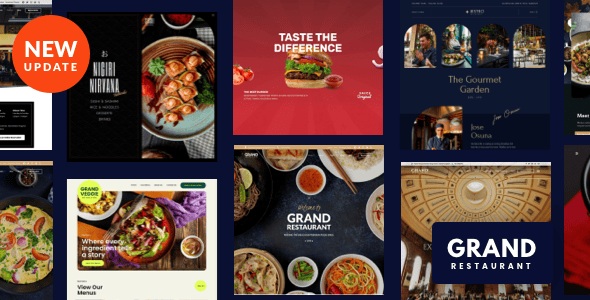
Stuck on your Grand Restaurant WordPress WordPress theme? Let's fix it.
No endless back-and-forth. Just send us the details and we'll get it done.
No obligation · Replies within 1 hour · Quote within 1 day
Setup · Customization · Bug fixes · WooCommerce integration
About Grand Restaurant WordPress WP Theme
Grand Restaurant WordPress is a theme by ThemeGoods built specifically for food and hospitality businesses. It ships with a visual menu builder, reservation integration, and a drag-and-drop page builder that works without shortcode clutter. The design leans toward upscale dining but adapts to casual cafes and food trucks with a bit of configuration.
Built on the WPBakery page builder, it includes pre-built demo pages for restaurants, bars, and catering companies. The theme supports WooCommerce for online ordering, OpenTable and OpenHour reservation widgets, and a dedicated food menu post type. Performance out of the box is average, but the feature set for food businesses is hard to match at this price point. It runs on any standard WordPress hosting environment and receives regular updates from ThemeGoods.
Get matched with a Grand Restaurant WordPress developer in under one day
Tell us about your Grand Restaurant WordPress project. Small fixes, Grand Restaurant WordPress theme customization, or a full website build, whatever you need, we've got it covered.
We'll connect you to the right Grand Restaurant WordPress developers, define the scope, and get everything 100% clear.
You'll get one estimate, hire your preferred developer, and start collaborating.
Grand Restaurant WordPress has enough moving parts that small configuration mistakes can break reservation flows, menu layouts, or checkout pages. Finding a developer who knows this theme specifically means fewer trial-and-error hours on your project. Through Codeable, you get matched with vetted WordPress developers who have worked with ThemeGoods themes before. Every project starts with a free estimate, and you only pay when you decide to move forward. No cold freelancer marketplaces, no guesswork on quality.
Pros
- Dedicated Food Menu post type with categories, pricing, and dietary labels built in
- Multiple pre-built demo sites covering restaurants, bars, cafes, and catering
- WooCommerce compatible for online ordering without extra setup
- Six header layouts including sticky and transparent variants
- Regular theme updates from ThemeGoods with active support documentation
Cons
- WPBakery page builder produces bloated HTML that slows page load on shared hosting
- Child theme not included by default, making updates risky if you have custom CSS
- Reservation widgets rely on third-party embeds that occasionally break after theme updates
- Demo import can overwrite existing content and settings without a clear warning
- Mobile menu styling requires custom CSS tweaks to match complex multi-level navigation
Who is Grand Restaurant WordPress for?
Fine Dining Restaurants
Grand Restaurant WordPress suits upscale dining well. The dark, image-heavy layouts showcase food photography effectively. You can build a full menu with pricing tiers, set up reservation flows using OpenTable or Amelia, and present a distinct brand identity through the header and hero section options without heavy custom development.
Cafes and Coffee Shops
Cafes benefit from the lighter demo templates and the WooCommerce integration for selling coffee subscriptions or merchandise. The food menu post type handles seasonal specials cleanly. A Grand Restaurant WordPress specialist can strip the theme back to a minimal, fast-loading cafe site without losing the built-in ordering and menu features ThemeGoods includes.
Food Trucks and Pop-Ups
Food trucks need simple, mobile-first sites with location updates and a rotating menu. Grand Restaurant WordPress handles this with custom menu layouts and a blog section for location announcements. The theme’s event and gallery sections work well for showcasing pop-up appearances, and WooCommerce can handle advance order deposits with the right configuration.
Catering Companies
Catering companies need service pages, package pricing, and inquiry forms more than a reservation system. Grand Restaurant WordPress covers this with flexible WPBakery layouts and pricing table elements. A developer can configure contact forms with conditional logic and connect them to a CRM or email automation tool to handle lead capture from the site.
Bars and Cocktail Lounges
Bars and cocktail lounges use the theme’s dark color schemes and full-width image sections to build atmosphere online. The drinks menu post type works the same as the food menu. Event sections are useful for promoting nights and special bookings. A Grand Restaurant WordPress developer can add age verification overlays and event ticketing through WooCommerce if needed.

Customizing Grand Restaurant WordPress
Most of Grand Restaurant WordPress’s visual settings live inside the WordPress Customizer, covering colors, fonts, header layouts, and footer structure. The theme ships with six header styles and two footer variations. Switching between them is straightforward, but deeper layout changes require editing WPBakery rows or digging into child theme CSS.
Menu pages are built using a custom Food Menu post type with category filtering and pricing fields baked in. Reservation sections connect to third-party booking tools via widget areas. A Grand Restaurant WordPress expert can reconfigure demo content to match your branding, set up custom color schemes, adjust typography to match your restaurant’s identity, and wire up booking plugins like Amelia or BookingPress cleanly. If you want layouts that go beyond what the demo provides, a developer familiar with this theme will save you significant time.
Recommended plugins for Grand Restaurant WordPress
Grand Restaurant WordPress works well with several plugins that extend its core functionality. WooCommerce adds online ordering and table booking payments. Amelia or Simply Schedule Appointments handle reservations more reliably than embedded widgets. Yoast SEO or Rank Math integrate cleanly and help with local search visibility. If you want to improve load times, combining a caching plugin with a CDN makes a measurable difference. A proper WordPress performance audit can identify bottlenecks introduced by WPBakery or unoptimized images. For restaurants targeting local search, structured data and on-page work covered in a WordPress SEO setup will improve rankings for location-based queries significantly.
Not sure which plugins to use? This WordPress plugins directory covers the most popular options with reviews and setup guides.
Grand Restaurant WordPress common issues
Grand Restaurant WordPress demo import not working
Demo import failures in Grand Restaurant WordPress are usually caused by server memory limits or a PHP execution timeout. Increase max_execution_time to 300 and memory_limit to 256M in your php.ini or wp-config.php. If the import still stalls, import XML content manually through Tools > Import, then set the theme options and widgets separately. Clear your cache after each step.
Food menu items not displaying on Grand Restaurant WordPress
If food menu items are not appearing, check that the correct menu category is assigned to each item and that the menu section on the page is pointing to the right category slug. WPBakery food menu elements have a category filter field that is easy to leave blank. Also confirm the Food Menu custom post type is published and not stuck in draft. Flushing permalinks under Settings > Permalinks often resolves display issues after setup.
Grand Restaurant WordPress reservation form not sending emails
Reservation form emails failing in Grand Restaurant WordPress are almost always an SMTP configuration issue, not a theme bug. WordPress default mail is blocked by most hosting providers. Install WP Mail SMTP and connect it to a transactional email service like Mailgun or SendGrid. Test the form after configuring SMTP. If the form still fails, check that the booking plugin version is compatible with your current theme version. Our WordPress bug fixing service can diagnose this quickly.
WPBakery editor not loading in Grand Restaurant WordPress
WPBakery not loading in the backend usually points to a JavaScript conflict. Deactivate plugins one at a time to find the conflict, starting with security and optimization plugins. Also check that your WPBakery license is activated, as unlicensed copies block the editor in newer versions. If the issue appeared after a theme update, clear the browser cache and server-side cache before deeper troubleshooting.
Grand Restaurant WordPress mobile menu not opening
A mobile menu that does not open in Grand Restaurant WordPress is typically caused by a JavaScript error on the page or a CSS z-index conflict with another plugin’s elements. Open the browser console on mobile or using device emulation in Chrome DevTools and check for JS errors. If a slider or popup plugin is loading scripts that conflict, deactivate it to test. Custom CSS overrides on the hamburger button element also cause this. Inspect the toggle element directly to check for pointer-events or display issues.
Grand Restaurant WordPress slider not showing on homepage
Slider display problems on the Grand Restaurant WordPress homepage are usually linked to the Revolution Slider or Layer Slider plugin not being activated. These sliders come bundled with the theme and require separate activation under Appearance > Install Plugins. If the slider is activated but blank, check that slides are published and that images meet the required dimensions. Slider settings also include a visibility toggle that is easy to disable accidentally in the WPBakery row settings.
Grand Restaurant WordPress slow loading on mobile
Grand Restaurant WordPress runs heavy on mobile due to WPBakery markup, large hero images, and multiple plugin scripts loading on every page. Start by running the site through PageSpeed Insights to get a baseline. Install a caching plugin like WP Rocket, enable lazy loading for images, and reduce the size of hero and background images to under 200KB. Disabling unused WPBakery elements via a plugin like WPBakery Assets Manager also reduces render-blocking scripts significantly. Our WordPress bug fixing service handles performance issues like this regularly.
Grand Restaurant WordPress update broke the layout
Layout breaks after a Grand Restaurant WordPress update are most often caused by CSS or JavaScript changes in the new theme version conflicting with customizations added directly to the parent theme files. Always use a child theme for any custom code. If you do not have one set up, the safest recovery path is to restore a backup, create a child theme, move your custom CSS into it, and then update the parent theme. If no backup exists, use a staging environment before applying future updates.
WooCommerce not working properly with Grand Restaurant WordPress
WooCommerce conflicts in Grand Restaurant WordPress often affect cart pages, checkout layout, and product archive styling. The theme includes WooCommerce support but the CSS does not always cover every WooCommerce template. If buttons are unstyled or the cart page is broken, add targeted CSS through your child theme. For checkout issues, test with all plugins disabled except WooCommerce to rule out plugin conflicts. Make sure both the theme and WooCommerce are on their latest compatible versions.
Grand Restaurant WordPress header logo not displaying correctly
If the header logo is not displaying correctly in Grand Restaurant WordPress, check the logo upload settings under Customize > Header. The theme has separate logo fields for the default header, sticky header, and mobile header. Uploading a logo to one field does not populate the others. If the logo appears too large or too small, use the logo height control in the Customizer. For retina screens, upload a version at double the intended display size and set the max-height via CSS in your child theme.
Grand Restaurant WordPress FAQ
Yes, for food and hospitality businesses it is one of the more practical options available. It has a dedicated menu post type, reservation integrations, event sections, and WooCommerce support. It is not the fastest theme out of the box, but the feature set is specific enough to save significant development time compared to building from a generic theme.
Grand Restaurant WordPress includes an OpenTable widget area that you can embed in reservation sections on any page. You paste your OpenTable embed code into the widget or a text block in WPBakery. It is not a deep integration but it works reliably. If you want a tighter booking flow, a dedicated plugin like Amelia gives you more control over the booking process and notification emails.
Not practically. The theme’s page templates and demo layouts are built around WPBakery. You can use the classic editor for basic pages but you will lose most of the visual flexibility the theme offers. If you want a block editor experience, a different theme built for Gutenberg would serve you better than trying to work around WPBakery in Grand Restaurant WordPress.
Go to Food Menu in the WordPress admin and create menu items. Assign each item to a category you create under Food Menu > Categories. On your menu page, add a WPBakery Food Menu element and select the category you want to display. Set the column layout and enable or disable pricing display from the element settings. Each item supports a title, description, price, and featured image.
Yes. Grand Restaurant WordPress declares WooCommerce support and includes basic styling for shop, cart, and checkout pages. It works well for online ordering setups and merchandise stores. Some WooCommerce template pages may need minor CSS adjustments to match your site’s design exactly, especially on the checkout and account pages, which are best handled through a child theme.
After activating the theme, go to Appearance > Import Demo Data and select the demo that matches your layout. The importer pulls in pages, theme settings, sliders, and widgets. Make sure required plugins are activated first. Some users need to increase their PHP memory limit if the import times out. Always run the demo import on a fresh WordPress install to avoid conflicts with existing content.
Grand Restaurant WordPress is developed and maintained by ThemeGoods, a theme developer active on ThemeForest. They have a support forum on the Envato platform and release periodic updates. Support is handled through ThemeForest comments and their dedicated support system. For custom development work beyond the built-in options, hiring a specialist through a platform like Codeable is the practical route.
Yes. For custom layouts, booking system integration, or performance work, hiring a Grand Restaurant WordPress developer is the most efficient option. Through Codeable you can post your project, get a free estimate, and be matched with a vetted developer within 24 hours. You only pay when you decide to proceed. Our WordPress development services cover everything from small fixes to full builds.
Yes. The theme includes widget areas and shortcodes for connecting OpenTable and OpenHour. You can also integrate any third-party booking plugin like Amelia, BookingPress, or WP Simple Booking Calendar. These plugins handle availability management, email confirmations, and calendar sync better than embedded widgets. A developer can configure the booking flow to match your specific table management needs.
Start by enabling a caching plugin and compressing images across the site. Disable WPBakery front-end scripts on pages that do not use them. Use a CDN to serve static assets faster. If you have multiple sliders or video backgrounds, consider replacing them with static images on mobile. A structured WordPress performance audit will give you a prioritised list of fixes specific to your setup.
Hire a Grand Restaurant WordPress Expert
Whether you need a full site build, a layout fix, or help connecting a booking system, working with a Grand Restaurant WordPress developer who knows the theme saves time and avoids costly mistakes. Post your project and get matched with a specialist within 24 hours. Get a Free Estimate with no obligation to hire. The process is straightforward and completely risk-free.
You'll need a free Codeable account so developers can ask questions and send their quotes.