Graviton WordPress Theme
by Bravis-Themes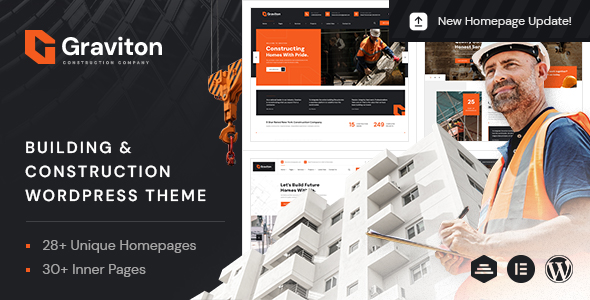
Stuck on your Graviton WordPress theme? Let's fix it.
No endless back-and-forth. Just send us the details and we'll get it done.
No obligation · Replies within 1 hour · Quote within 1 day
Setup · Customization · Bug fixes · WooCommerce integration
About Graviton WP Theme
Graviton is a multipurpose WordPress theme built by Bravis-Themes. It ships with a drag-and-drop page builder, a large library of pre-built demo sites, and a clean, modular codebase that suits agencies, freelancers, and business owners alike.
The theme supports WooCommerce out of the box and includes built-in options for typography, color schemes, header layouts, and footer configurations. Import a demo in one click, then adjust from there. Graviton targets users who want design flexibility without writing code, while still giving developers enough hooks and customizer controls to do more advanced work.
It is regularly updated by Bravis-Themes and carries solid ratings on ThemeForest, making it a reasonable starting point for a wide range of business and portfolio sites.
Get matched with a Graviton developer in under one day
Tell us about your Graviton project. Small fixes, Graviton theme customization, or a full website build, whatever you need, we've got it covered.
We'll connect you to the right Graviton developers, define the scope, and get everything 100% clear.
You'll get one estimate, hire your preferred developer, and start collaborating.
Graviton covers a lot of ground out of the box, but the options panel can only take you so far. When you need a precise layout, a custom integration, or a fix that the theme documentation does not address, a specialist makes a real difference.
FoxyConcept connects you with vetted WordPress developers through Codeable. Every developer on the platform has passed a thorough technical screening. You get a free estimate before any work starts, and you only move forward if the scope and price make sense for your project.
Pros
- One-click demo import gets a working site up in minutes
- Built-in WooCommerce compatibility with styled product and cart pages
- Multiple header and footer layout options controlled from the Customizer
- Regular updates from Bravis-Themes with active ThemeForest support
- Clean child theme support that keeps customizations safe through updates
Cons
- Page builder is proprietary, making it harder to switch themes later without rebuilding content
- Demo import can pull in a large number of images and dummy posts that need manual cleanup
- Some advanced layout options are buried several levels deep in the options panel
- Performance requires additional optimization plugins out of the box on image-heavy pages
- Limited documentation for developer-level customization beyond the theme options panel
Who is Graviton for?
Creative Agency Website
Graviton’s portfolio layouts and animated section transitions suit creative agencies well. You can present case studies, team members, and service packages using the built-in demo blocks. A developer can extend this with custom project post types and filterable grids that go beyond the default options.
WooCommerce Online Store
WooCommerce support is baked in, so product pages, category archives, and the cart inherit the Graviton styling automatically. The theme handles single-product layouts cleanly. For stores needing custom variation displays, bundle products, or subscription logic, a Graviton developer can build on top of the existing WooCommerce templates.
Freelance Portfolio
Freelancers can use Graviton’s portfolio section to display work samples with project descriptions and client details. The layout options let you mix grid and fullscreen formats. Adding a contact form, testimonials block, and a clean about page rounds out a professional solo portfolio without needing extra page builder plugins.
Corporate Business Site
Graviton includes business-focused demo templates with sections for services, team bios, client logos, and contact information. The header options support corporate navigation patterns including mega menus. Teams that need HR portals, client login areas, or CRM integrations can have a developer extend the base theme accordingly.
Event or Conference Page
Event organizers can use Graviton to build countdown timers, speaker grids, schedule sections, and ticket purchase links. The pre-built blocks cover most conference page needs. Integrating an event management plugin like The Events Calendar alongside Graviton gives a more structured registration and scheduling workflow.

Customizing Graviton
Graviton gives you a live WordPress Customizer panel with real-time previews for colors, fonts, layout widths, and header styles. You can switch between multiple header types, control sticky navigation behavior, and adjust spacing values without touching CSS.
For deeper work, a Graviton expert can modify template files, add custom post types, wire up Advanced Custom Fields, or rework the built-in page builder sections to match an exact design brief. Child theme setup is straightforward, which keeps customizations safe across updates.
If you need something beyond what the theme options panel offers — custom animations, conditional logic, or integrations with third-party APIs — working with a Graviton developer saves significant trial and error time.
Recommended plugins for Graviton
Graviton works well with the plugins most WordPress sites already rely on. WooCommerce integration is built in, so product pages and checkout inherit the theme styles without manual CSS fixes.
Popular extensions worth pairing with Graviton include WPForms or Gravity Forms for contact and lead capture, WPML for multilingual sites, and Yoast or Rank Math for on-site SEO. For performance improvements, combining Graviton with WP Rocket and Imagify handles caching and image optimization reliably. The theme does not bundle unnecessary plugins, so your stack stays clean.
Not sure which plugins to use? This WordPress plugins directory covers the most popular options with reviews and setup guides.
Graviton common issues
Graviton theme header not displaying correctly after update
Header display issues after a Graviton update usually come from cached theme options or a conflict with a customization made directly in the parent theme files. First, clear your caching plugin and browser cache. If the header is still broken, check whether a child theme is active. If you edited the parent theme directly, those changes may have been overwritten. A WordPress bug fixing service can audit the template files and restore the correct header output.
Graviton page builder content broken or missing on front end
Missing page builder content on the front end typically means a required Graviton plugin companion was deactivated or the shortcodes are rendering as plain text. Go to Appearance > Install Plugins and confirm all bundled plugins are active and updated. If content still shows broken shortcodes, the page builder data may need manual recovery. A developer can extract content from the database and rebuild affected pages cleanly.
Graviton WooCommerce product page layout not matching theme style
When Graviton’s WooCommerce styles do not apply to product pages, the most common causes are a stale stylesheet cache or a plugin overriding WooCommerce template files. Clear all caches first. If the issue persists, check whether a third-party WooCommerce plugin is loading its own templates. Enqueuing the correct Graviton WooCommerce stylesheet manually or rebuilding the product template in a child theme usually resolves this.
Graviton theme slow loading on mobile devices
Graviton can load slowly on mobile when large slider images, unoptimized scripts, or render-blocking CSS are present. Start by running a PageSpeed Insights test to identify the specific bottlenecks. Compress images using Imagify or ShortPixel, enable lazy loading, and use WP Rocket to defer non-critical scripts. For persistent performance issues, a WordPress performance specialist can audit the theme’s asset loading and apply targeted fixes.
Graviton FAQ
Yes. Graviton includes built-in WooCommerce support with styled product pages, cart, and checkout templates. Basic stores can be set up using the included demo content without additional plugins. For complex store requirements like custom product types, subscriptions, or advanced filtering, you will need extra plugins and likely some developer customization on top of the theme.
Graviton ships with its own bundled page builder. While Elementor can technically run alongside it, mixing two page builders on the same site creates performance overhead and layout conflicts. It is cleaner to pick one. If you prefer Elementor, a developer can replicate your Graviton layout inside Elementor so you work with a single consistent editor throughout the site.
Graviton’s one-click demo import will overwrite menus, widgets, and Customizer settings. It does not delete existing posts or pages by default, but it adds all demo posts on top of them. If you want a clean install, run the demo import on a fresh WordPress installation, then migrate your real content across. A WordPress migration service can handle this without data loss.
Graviton is listed as WPML-compatible on ThemeForest. Most theme strings can be translated through WPML’s String Translation module. For full multilingual setups, you will also need to configure the language switcher in the Graviton header options and test all page builder sections for translation readiness, as custom modules sometimes need additional string registration.
Always use a child theme before making any code-level changes to Graviton. Customizer settings are stored in the database and survive theme file updates, but direct edits to parent theme PHP or CSS files will be overwritten. Before updating, back up your site, check the Bravis-Themes changelog for breaking changes, and test the update on a staging environment first. A WordPress maintenance plan can automate this process safely.
Hire a Graviton WordPress Developer
Need help customizing Graviton, fixing a layout issue, or building something the theme options do not support? FoxyConcept works with experienced WordPress developers through Codeable’s vetted network.
Post your project, get matched with a developer within 24 hours, and receive a free estimate with no obligation to hire. Get your free estimate today and get your Graviton site moving in the right direction.
You'll need a free Codeable account so developers can ask questions and send their quotes.