Gravity WordPress Theme
by Avanzare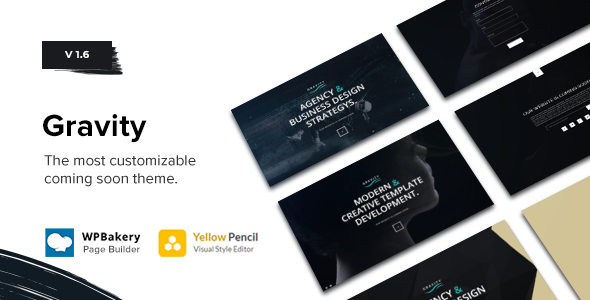
Stuck on your Gravity WordPress theme? Let's fix it.
No endless back-and-forth. Just send us the details and we'll get it done.
No obligation · Replies within 1 hour · Quote within 1 day
Setup · Customization · Bug fixes · WooCommerce integration
About Gravity WP Theme
Gravity is a WordPress theme built by Avanzare, designed around clean typographic layouts and flexible grid-based content structures. It targets businesses and creatives who want a minimal but polished presence without wrestling with a bloated page builder.
The theme ships with pre-built page templates, customizer-driven design controls, and solid WooCommerce compatibility. It keeps things lean by default, which means faster load times out of the box compared to feature-heavy multipurpose themes.
Where Gravity earns its place is in structured content sites: service businesses, portfolios, and small e-commerce shops that need clarity over complexity. The layout system gives editors enough control without exposing unnecessary options that slow down content workflows.
Get matched with a Gravity developer in under one day
Tell us about your Gravity project. Small fixes, Gravity theme customization, or a full website build, whatever you need, we've got it covered.
We'll connect you to the right Gravity developers, define the scope, and get everything 100% clear.
You'll get one estimate, hire your preferred developer, and start collaborating.
Gravity looks straightforward until you need something specific. Custom layouts, plugin conflicts, WooCommerce template overrides, or performance bottlenecks all require someone who knows the theme’s structure. Through Codeable, you get matched with a vetted Gravity developer who has handled these problems before. No generalist freelancers, no guesswork. Post a project, get a free estimate within 24 hours, and only move forward if the scope and cost make sense for you.
Pros
- Clean default markup that does not require heavy post-processing to perform well
- WooCommerce compatible with minimal styling conflicts out of the box
- Customizer controls are organized and do not overwhelm non-technical users
- Lightweight theme file structure makes child theme development straightforward
- Works reliably with major page builders if you need layout flexibility beyond the defaults
Cons
- Limited built-in demo content, which makes initial setup slower without a reference layout
- Header customization options are basic and require custom CSS or a child theme for anything non-standard
- Blog layout templates lack variety, which is a problem for content-heavy publishing sites
- Sparse documentation from Avanzare makes troubleshooting harder for developers new to the theme
- No built-in mega menu support, which limits navigation options for large-site structures
Who is Gravity for?
Service Business Websites
Gravity suits service-based businesses well. The grid layout handles service listings cleanly, and the customizer gives non-technical owners enough control to update content without developer help. A Gravity specialist can extend it with custom service post types and contact form integrations to build a functional lead-generation setup without over-engineering the stack.
Portfolio Sites
The minimal design language makes Gravity a solid base for portfolio builds. It stays out of the way visually so the work itself leads. A Gravity developer can set up custom portfolio post types with filterable grids, lightbox integration, and project detail templates that go beyond what the default layouts provide.
Small WooCommerce Stores
WooCommerce drops in without major styling issues, which makes Gravity a reliable choice for small product catalogs. Shop pages, product templates, and cart flows need only moderate customization to match the theme’s aesthetic. A Gravity expert can handle WooCommerce template overrides cleanly using a child theme structure.
Agency Landing Pages
Agencies building campaign landing pages or service microsites find Gravity useful as a clean starting point. The lean markup reduces the work needed to hit good Core Web Vitals scores. With targeted custom CSS and a Gravity specialist handling layout adjustments, pages can be built and launched quickly without resorting to heavy page builder dependencies.
Professional Blogs
For writers and content-focused sites, Gravity’s typography-first approach keeps posts readable without distraction. The default blog templates work for standard use cases, though a Gravity developer is typically needed to build out category landing pages, author archives, or newsletter integration beyond what the theme handles natively.

Customizing Gravity
Out of the box, Gravity covers the basics through the WordPress Customizer: colors, typography, header layout, and footer structure. For most standard setups, that gets you reasonably far without touching code.
Where it gets more involved is custom post type styling, advanced layout variations, and anything requiring changes outside the bundled templates. A Gravity expert can extend the theme using child themes, custom hooks, and targeted CSS without breaking core functionality during updates.
If you need specific layout adjustments, WooCommerce customization, or integration with third-party plugins like ACF or Gravity Forms, working with a Gravity specialist saves significant time and avoids the trial-and-error cycle that comes with modifying theme files directly.
Recommended plugins for Gravity
Gravity works well with caching plugins like WP Rocket and image optimization tools. Pairing those with proper hosting configuration makes a measurable difference in scores. For more structured performance tuning, see our WordPress performance service.
On the SEO side, Gravity outputs clean HTML and supports schema markup through plugins like Yoast or Rank Math without conflicts. If your site needs deeper on-page SEO work beyond plugin setup, our WordPress SEO service covers technical and content-level optimization that complements what the theme handles natively.
Not sure which plugins to use? This WordPress plugins directory covers the most popular options with reviews and setup guides.
Gravity common issues
Gravity theme mobile menu not working after WordPress update
Mobile menu failures after a WordPress update usually point to a JavaScript conflict introduced by the update or a plugin that loads its own scripts on the same hooks. Start by deactivating plugins one at a time to isolate the conflict. If the issue persists, check whether the theme’s navigation script is still enqueued correctly in the child theme or functions.php. For faster diagnosis and a clean fix, our WordPress bug fixing service handles exactly this type of post-update regression.
Gravity theme WooCommerce product page layout broken
WooCommerce layout breaks in Gravity usually happen when WooCommerce updates its template files and the theme’s bundled templates fall out of sync. Check the WooCommerce status screen under Tools for outdated template warnings. The fix involves updating the relevant template files in your child theme to match the current WooCommerce version. If you are not comfortable editing template files directly, our WordPress bug fixing service can handle the update safely without disrupting your store.
Gravity theme customizer changes not saving
Customizer changes failing to save usually trace back to a permissions issue, a PHP error triggered during the save request, or a caching layer intercepting the response. Check your browser console for failed AJAX requests and your server error log for PHP notices. Disabling caching plugins temporarily often confirms whether that is the culprit. If the problem persists across cache clears, it typically requires direct server-level investigation to resolve cleanly.
Gravity theme slow loading on mobile
Slow mobile performance on a Gravity site is usually a combination of unoptimized images, render-blocking scripts, and unminified CSS being loaded on every page. Start by running a PageSpeed Insights audit to identify the specific bottlenecks. Common fixes include lazy loading images, deferring non-critical JavaScript, and enabling server-side caching. For a structured approach, see our WordPress performance service for a full audit and implementation plan tailored to Gravity’s asset loading patterns.
Gravity FAQ
Avanzare has not been consistently active with major updates on Gravity, which is something to factor in before building a long-term project on it. The theme functions correctly on current WordPress versions for most use cases, but sparse update history means compatibility issues with future WordPress releases are a real risk. A developer can help maintain compatibility through a child theme layer.
Gravity works with both Elementor and WPBakery, though results vary by page template. Elementor tends to integrate more cleanly with Gravity’s layout system. WPBakery can introduce styling conflicts on some templates, particularly around inner content widths. A Gravity specialist can resolve those conflicts through targeted CSS overrides in a child theme without touching the core theme files.
Creating a child theme for Gravity follows the standard WordPress process: create a new folder in wp-content/themes, add a style.css file with the Template header pointing to the Gravity parent theme, and enqueue the parent stylesheet in functions.php. This setup keeps your customizations intact when the parent theme updates. A Gravity developer can set this up correctly in under an hour.
The Gravity theme and Gravity Forms plugin are separate products with no official integration. They run independently without conflicts in most setups. Form styling may need minor CSS adjustments to match the theme’s design, but functionally they work together without issues. A Gravity expert can handle the styling alignment quickly through a child theme stylesheet.
Rates for a Gravity theme developer through Codeable typically range based on project scope. Small fixes and customizations can run a few hundred dollars. Full site builds or complex WooCommerce setups are priced higher based on hours. The best way to get an accurate number is to post your project and get a free estimate before committing to anything.
Hire a Gravity Expert Developer
Whether you need a one-off fix or a full site build on Gravity, working with a specialist makes the difference between a site that almost works and one that performs correctly. From template customization to WooCommerce integration and performance tuning, a Gravity developer handles it without the back-and-forth. Get a free estimate and describe your project. No obligation, no risk.
You'll need a free Codeable account so developers can ask questions and send their quotes.