Grogin WordPress Theme
by KlbTheme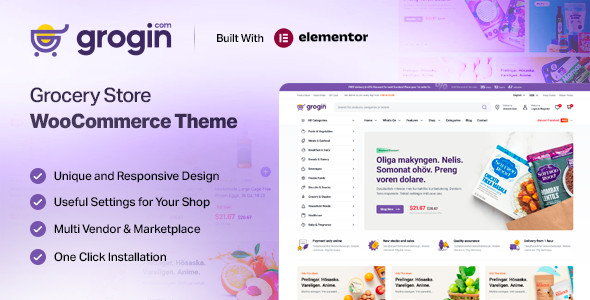
Stuck on your Grogin WordPress theme? Let's fix it.
No endless back-and-forth. Just send us the details and we'll get it done.
No obligation · Replies within 1 hour · Quote within 1 day
Setup · Customization · Bug fixes · WooCommerce integration
About Grogin WP Theme
Grogin is a WooCommerce theme built by KlbTheme, designed specifically for online grocery and food retail stores. It ships with multiple homepage layouts, a clean product grid, and built-in support for features like product quick view, wishlist, and compare. The theme targets stores that sell fresh produce, packaged goods, or multi-category food products.
Under the hood, Grogin uses Elementor for page building, which keeps layout editing accessible without writing code. KlbTheme also bundles several premium plugins with the theme license, reducing the need for third-party tools. The design prioritises product visibility with large category banners, countdown timers for deals, and a sticky header with cart access. It suits shops that need a structured, grocery-style storefront out of the box.
Get matched with a Grogin developer in under one day
Tell us about your Grogin project. Small fixes, Grogin theme customization, or a full website build, whatever you need, we've got it covered.
We'll connect you to the right Grogin developers, define the scope, and get everything 100% clear.
You'll get one estimate, hire your preferred developer, and start collaborating.
Grogin is a capable theme, but its bundled plugin dependencies and Elementor-based structure mean customisation has real complexity. Getting things wrong at the theme or plugin layer can break the cart, checkout, or product display across the whole store. The developers on Codeable have worked with WooCommerce grocery and food themes extensively. They can scope your project accurately, give you a clear estimate, and deliver without guesswork. If you need Grogin configured, extended, or fixed, that experience matters.
Pros
- Ships with multiple pre-built grocery store homepage layouts ready to import
- Built-in WooCommerce features like quick view, wishlist, and product compare included
- Elementor integration makes layout editing accessible without custom code
- Bundled premium plugins reduce third-party costs for core grocery store functionality
- Mega menu with category images suits stores with large product hierarchies
Cons
- Bundled KlbTheme plugins create update dependency risks if the developer stops maintaining them
- Heavy out-of-the-box feature set can slow page load without performance tuning
- Limited documentation makes advanced customisation harder to self-manage
- Support quality from KlbTheme on ThemeForest can be inconsistent on complex issues
- Design is tightly tied to the grocery niche, making it harder to repurpose for other store types
Who is Grogin for?
Online Grocery Store
Grogin was designed with the grocery store format in mind. Category banners, deal countdowns, and a structured product grid map directly to how grocery shoppers browse. Stores with hundreds of SKUs across fresh, frozen, and packaged categories get a workable starting structure without building layouts from scratch.
Farm Box and Fresh Produce Delivery
Farm box and subscription delivery businesses benefit from Grogin’s clean product presentation and WooCommerce Subscriptions compatibility. Showcasing weekly boxes, seasonal items, and add-ons works well within the existing homepage sections. A developer can wire up delivery scheduling plugins to complete the customer experience.
Organic Food Shop
Organic food retailers can use Grogin’s visual hierarchy to highlight certifications, sourcing information, and product stories alongside standard shop functionality. The theme supports badge and label overlays on product images, which works well for organic, non-GMO, or local sourcing flags without additional plugins.
Wholesale Food Supplier
Wholesale food suppliers selling to restaurants or retailers can configure Grogin with tiered pricing plugins and account-based access. The mega menu handles large category trees well, and the theme structure supports the volume browsing behavior typical of B2B buyers looking across multiple product categories quickly.
Multi-Category Food Retail
Stores selling across grocery, household, beauty, and health categories fit Grogin’s multi-section homepage format. Each section can feature a different category with its own banner and product row. This layout matches how supermarket-style online stores present a broad inventory without the page feeling disorganised.

Customizing Grogin
Grogin ships with a working demo, but most stores need changes beyond what the default setup provides. Customizing the homepage sections, adjusting the mega menu, modifying the checkout flow, or adding custom product filters all require developer knowledge once you move past basic color and font changes in the Customizer.
KlbTheme bundles its own plugin set, and modifying behavior tied to those plugins without breaking updates takes care. A Grogin expert understands how the theme hooks into WooCommerce, where the bundled plugins interact with core functionality, and how to extend the theme without creating maintenance problems down the line. If you need changes that go beyond the demo, working with a specialist saves significant time and avoids hard-to-diagnose conflicts later.
Recommended plugins for Grogin
Grogin pairs well with several WooCommerce extensions. Product filter plugins like FiboSearch or AJAX Search for WooCommerce improve search for large catalogs. For delivery and local pickup, the WooCommerce Local Pickup Plus or Delivery Slots plugins integrate cleanly. Subscription boxes work with WooCommerce Subscriptions.
If your store grows, performance optimisation becomes necessary, especially with large product catalogs and image-heavy category pages. For stores running content alongside the shop, WordPress SEO work targeted at category and product pages can drive meaningful organic traffic from food and grocery search terms.
Not sure which plugins to use? This WordPress plugins directory covers the most popular options with reviews and setup guides.
Grogin common issues
Grogin theme mega menu not working after update
Mega menu failures after a Grogin update are usually caused by a version mismatch between the theme and one of the bundled KlbTheme plugins. Check that the KlbTheme Core plugin is updated alongside the theme. If the menu worked before the update, temporarily reverting the theme version while keeping the plugin current often confirms the conflict. Clearing the Elementor cache and any server-side caching after updates also helps. If the issue persists, a WordPress bug fix specialist can isolate the exact conflict point quickly.
Grogin WooCommerce quick view not showing product images
Quick view image problems in Grogin typically come from a conflict between the bundled KlbTheme WooCommerce plugin and another active plugin handling product galleries. Disable third-party plugins one at a time to isolate the conflict. Also check that the product images are correctly assigned as the featured image, not just added to the gallery. If your theme version is behind, updating it and the bundled plugins together resolves this in many cases. A JavaScript console error will often point directly at the broken component.
Grogin homepage sections missing after importing demo
Missing homepage sections after a demo import usually mean the required Elementor templates or widgets did not import correctly. This happens when the KlbTheme Core plugin was not active during the import, or when the server timed out mid-process. Re-run the demo import with all bundled plugins active and increase PHP execution time limits if needed. If individual sections are missing rather than the whole page, they may need to be re-added manually through the Elementor editor using the included template library.
Grogin theme slow loading speed on product category pages
Category pages in Grogin load slowly when product images are not properly sized or optimised, and when multiple bundled scripts load on every page regardless of need. Start by running an image compression pass across the product catalog. Then audit which scripts and styles are loading on category pages using browser dev tools. Disabling unused bundled plugin features can trim load time noticeably. For sustained performance across a growing catalog, targeted WordPress performance work covering caching, lazy loading, and database queries is worthwhile.
Grogin FAQ
Grogin is a solid starting point for a WooCommerce grocery store. It includes category-focused layouts, deal timers, and product comparison features that suit food retail. The demo content mirrors a real grocery store structure. That said, you will likely need developer help to configure it fully for your product catalog, delivery setup, and checkout requirements beyond what the demo shows.
Yes, Grogin uses Elementor as its primary page builder. Most homepage sections and inner page templates are built with Elementor widgets, including some custom widgets added by the bundled KlbTheme plugin. This means you can edit layouts visually, but some of the custom widgets will only work correctly when the required plugins are active alongside the theme.
Grogin requires the KlbTheme Core plugin to function correctly. It also recommends several bundled plugins for features like wishlist, compare, and product quick view. These are included with your ThemeForest purchase. Some features will not display or work properly if these plugins are deactivated, so keeping them updated alongside the theme is important for stability.
Technically yes, but it is not ideal. Grogin’s layouts, demo content, and design language are built around grocery and food retail. Repurposing it for fashion, electronics, or services takes significant redesign work that removes most of the time advantage of starting with a theme. A more general WooCommerce theme would be a better foundation for non-food products.
KlbTheme offers support through ThemeForest comments, but response times and depth vary. For customisation beyond theme settings, you need a developer rather than theme support. Getting a free estimate from a vetted Grogin developer through Codeable connects you with someone who can handle specific customisation requests with a clear scope and fixed cost.
Hire a Grogin Developer
Whether you need a full store setup, a specific feature added, or something that stopped working fixed, a vetted Grogin developer can handle it. Work is scoped clearly before anything starts. Get a free estimate through Codeable and hear back within 24 hours. No obligation to hire, no upfront payment until you approve the project. It is the lowest-risk way to get Grogin work done properly.
You'll need a free Codeable account so developers can ask questions and send their quotes.