Gym Edge WordPress Theme
by RadiusTheme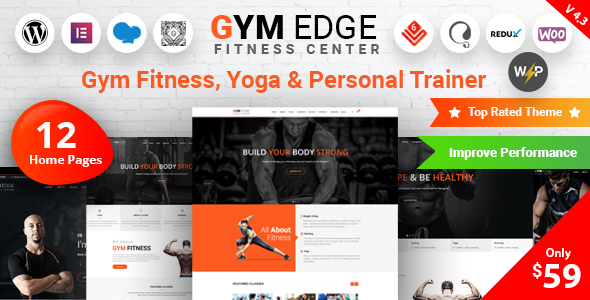
Stuck on your Gym Edge WordPress theme? Let's fix it.
No endless back-and-forth. Just send us the details and we'll get it done.
No obligation · Replies within 1 hour · Quote within 1 day
Setup · Customization · Bug fixes · WooCommerce integration
About Gym Edge WP Theme
Gym Edge is a WordPress theme built by RadiusTheme, designed specifically for gyms, fitness studios, personal trainers, and sports clubs. It ships with a drag-and-drop page builder, pre-built demo content, and a layout built around fitness business needs: class schedules, trainer profiles, membership pricing tables, and BMI calculators.
The theme is compatible with Elementor and WPBakery, which means most common page layouts can be built without writing code. It also integrates with WooCommerce for selling memberships or fitness products online.
RadiusTheme has a reasonable support track record on ThemeForest, and the theme gets periodic updates. That said, like most niche fitness themes, it has a specific design direction. If your brand doesn’t match that aesthetic, customisation will take more effort than a blank-canvas theme would.
Get matched with a Gym Edge developer in under one day
Tell us about your Gym Edge project. Small fixes, Gym Edge theme customization, or a full website build, whatever you need, we've got it covered.
We'll connect you to the right Gym Edge developers, define the scope, and get everything 100% clear.
You'll get one estimate, hire your preferred developer, and start collaborating.
Gym Edge is a well-structured theme, but getting it to exactly match your brand and workflow takes hands-on WordPress knowledge. FoxyConcept connects you with vetted developers through Codeable, the specialist WordPress platform used by agencies and businesses that need reliable, experienced help.
Whether you need a full site build, a child theme, or targeted fixes to an existing Gym Edge installation, you get matched with a developer who has done this before. No generalist freelancers, no guesswork.
Pros
- Purpose-built for fitness businesses with class schedules, trainer bios, and BMI calculator included
- Compatible with both Elementor and WPBakery, so you're not locked into one page builder
- WooCommerce integration works reliably for selling memberships and fitness products
- Multiple pre-built demo layouts covering gyms, yoga studios, and personal trainers
- RadiusTheme provides documentation and a support forum on ThemeForest with regular update releases
Cons
- Design style is quite specific, so heavy rebranding requires real developer effort
- The class schedule feature lacks booking functionality by default and needs a third-party plugin
- Page load times can be slow without performance tuning due to bundled scripts and image-heavy layouts
- WPBakery dependency in older imports can create shortcode lock-in if you switch page builders later
- Support response times on ThemeForest can be slow during busy periods or for complex issues
Who is Gym Edge for?
Commercial Gym or Fitness Club
Gym Edge suits multi-facility gyms well. The class schedule, membership pricing tables, and trainer profile sections cover the core pages a commercial gym needs. WooCommerce handles online membership sales, and the layout handles large photo-heavy hero sections without requiring custom design work.
Personal Trainer Website
For solo personal trainers, Gym Edge provides a clean way to present services, certifications, and client testimonials. The BMI calculator adds a small interactive element. Most trainers will need a booking plugin added, since the theme doesn’t include scheduling by default, but the overall setup is fast.
Yoga or Pilates Studio
The softer visual demos in Gym Edge translate reasonably well to yoga and pilates studios. Class timetables, instructor bios, and package pricing all map directly. If your studio has a specific aesthetic, typography and colour customisation will need more attention to move away from the default fitness look.
CrossFit or Functional Fitness Box
CrossFit boxes need clear class times, coach profiles, and programming information. Gym Edge covers those use cases directly. Adding a WOD display or community board typically requires a custom plugin or widget, but the core theme structure is a solid fit for this type of facility.
Online Fitness Coaching Business
Online coaches selling programmes or memberships can use Gym Edge with WooCommerce to run a full e-commerce setup. Pairing it with a membership plugin like MemberPress or Restrict Content Pro unlocks gated content. The theme’s sales-focused layouts work well for coaching products and digital fitness programmes.

Customizing Gym Edge
Gym Edge gives you a solid starting point, but most fitness businesses will want to push it further. Adjusting the colour scheme, typography, and section layouts is straightforward through the WordPress Customizer and Elementor. Deeper changes, like reworking the class schedule layout, modifying the BMI calculator output, or customising WooCommerce membership pages, typically require PHP or CSS work.
If your gym or studio has specific branding requirements, or you need custom functionality like booking integrations or member-only content, working with a Gym Edge expert saves significant time. A developer who knows the theme’s structure can make targeted changes without breaking existing layouts or creating conflicts with future updates.
Custom header styles, mobile layout adjustments, and child theme setup are among the most common requests for this theme.
Recommended plugins for Gym Edge
Gym Edge works well with a range of plugins to extend what it does out of the box. WooCommerce handles memberships and product sales. For bookings, Amelia and BookingPress both integrate cleanly. WPML adds multilingual support if you run a multi-location gym with an international audience.
On the performance side, pairing Gym Edge with a caching layer and image optimisation is worth doing early, especially given the image-heavy layouts fitness sites typically use. See our WordPress performance service for help there.
If organic search matters to your gym, structured content and proper schema markup for fitness classes can improve visibility. Our WordPress SEO service covers that.
Not sure which plugins to use? This WordPress plugins directory covers the most popular options with reviews and setup guides.
Gym Edge common issues
Gym Edge class schedule not displaying correctly on mobile
The class schedule in Gym Edge uses a table-based layout that doesn’t always reflow cleanly on smaller screens. The fix usually involves adding custom CSS to switch the table to a block layout below a certain breakpoint, or replacing it with a plugin like Amelia or BookingPress that has proper mobile support built in. Check your theme’s stylesheet isn’t being overridden by a caching plugin first. Our WordPress bug fixing service can resolve this quickly.
Gym Edge demo import failing or incomplete
Failed demo imports in Gym Edge are most often caused by PHP memory limits or upload size restrictions on the hosting server. Increase memory_limit to at least 256MB and upload_max_filesize to 64MB or higher in your php.ini or via the hosting control panel. If the import still fails, try importing the XML content file manually through Tools > Import, then applying the Customizer settings separately from the theme options panel.
Gym Edge WooCommerce shop page layout broken
WooCommerce layout breaks in Gym Edge usually happen after a WooCommerce major version update that changes template file structure. Check if your theme or child theme contains outdated WooCommerce template overrides in a /woocommerce/ folder. Updating or removing those files typically restores the layout. Running a child theme for these overrides makes future updates easier to manage without losing custom changes.
Gym Edge Elementor widgets not loading after update
If Gym Edge’s Elementor widgets disappear after an update, the likely cause is a version conflict between the theme’s bundled Elementor addon and the current version of Elementor. Deactivate and reactivate the addon plugin first. If that doesn’t work, check whether the theme developer has released an updated version on ThemeForest. Downgrading Elementor temporarily is a short-term fix while waiting for a patch.
Gym Edge FAQ
Yes. Gym Edge supports Elementor and includes custom Elementor widgets for fitness-specific sections like class schedules, trainer profiles, and pricing tables. Some older demo content was built with WPBakery, so if you’re starting fresh with Elementor, importing the right demo version matters. Check the RadiusTheme documentation for the Elementor-specific demo files before importing.
Gym Edge works for yoga studios, though the default design leans toward a harder fitness aesthetic. The class timetable, instructor bio, and pricing sections are directly useful. You’ll likely want to adjust the typography, colours, and hero imagery to suit a softer brand. A child theme makes those changes easier to maintain across updates without losing your customisations.
No. Gym Edge includes a class schedule display but not an actual booking or reservation system. For real booking functionality, you’ll need a plugin like Amelia, BookingPress, or Simply Schedule Appointments. These integrate well with the theme’s layout. If you need help connecting a booking plugin to your Gym Edge site, a developer can set that up cleanly.
Gym Edge integrates with WooCommerce, which handles basic product and membership sales. For proper recurring memberships and content gating, pair it with a plugin like MemberPress or WooCommerce Subscriptions. The theme’s pricing table sections display membership tiers well. WooCommerce setup and membership plugin configuration typically takes a few hours of developer time to get right.
RadiusTheme continues to update Gym Edge and maintains a support forum on ThemeForest. Update frequency has been consistent, though gaps between releases do occur. For critical security or compatibility issues, response time varies. If you’re running a live gym site, pairing the theme with a WordPress maintenance plan ensures updates are applied safely and monitored.
Hire a Gym Edge Developer
Need a Gym Edge developer who knows the theme inside out? FoxyConcept works through Codeable, where every developer is vetted and rated. Post your project and get a free estimate within 24 hours. No commitment required.
From full site builds to targeted customisations and bug fixes, you get matched with someone who can actually deliver. Get a free estimate today and see what’s possible.
You'll need a free Codeable account so developers can ask questions and send their quotes.