Haar WordPress Theme
by Edge-Themes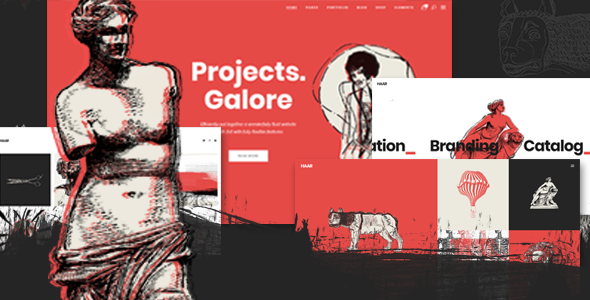
Stuck on your Haar WordPress theme? Let's fix it.
No endless back-and-forth. Just send us the details and we'll get it done.
No obligation · Replies within 1 hour · Quote within 1 day
Setup · Customization · Bug fixes · WooCommerce integration
About Haar WP Theme
Haar is a WordPress theme developed by Edge-Themes, built for creative portfolios, photography sites, and agency projects. It ships with a clean, minimal design that puts visual content front and center. The layout options are flexible enough to work across a wide range of niches without heavy configuration out of the box.
Under the hood, Haar uses Edge-Themes’ own page builder plugin, Qode Interactive Addons, alongside WPBakery. This gives you drag-and-drop control over most layout decisions. The theme includes multiple pre-built demo templates, portfolio post types, a custom blog layout, and full WooCommerce support for anyone selling products alongside their creative work.
Performance is reasonable for a feature-rich theme, though the bundled plugins do add weight. Overall, Haar is a solid pick for creatives who want visual flexibility without writing code.
Get matched with a Haar developer in under one day
Tell us about your Haar project. Small fixes, Haar theme customization, or a full website build, whatever you need, we've got it covered.
We'll connect you to the right Haar developers, define the scope, and get everything 100% clear.
You'll get one estimate, hire your preferred developer, and start collaborating.
Edge-Themes builds polished themes, but Haar’s combination of WPBakery, proprietary Qode plugins, and a deep options panel creates a learning curve. Small mistakes in the settings can break layouts across multiple pages at once.
Developers on Codeable who specialize in Edge-Themes products know exactly where those traps are. Through our WordPress development services, you get matched with a vetted Haar developer who can deliver accurate, clean work without the trial and error.
Pros
- Multiple pre-built demo templates that cover photography, agency, and portfolio layouts
- Strong header customization with sticky, transparent, and split header options built in
- Full WooCommerce support allows combining a shop with a creative portfolio
- Qode Interactive Addons adds useful elements like portfolio grids and sliders without third-party plugins
- One-click demo import gets a full site structure live quickly
Cons
- WPBakery is the only page builder supported, which limits options if you prefer Gutenberg or Elementor
- Bundled plugins from Qode add noticeable page weight and can slow load times without optimization
- The options panel is deep and can be confusing for first-time Edge-Themes users
- Heavy reliance on shortcodes from WPBakery makes switching themes later difficult
- Support response times from Edge-Themes can be slow during busy periods
Who is Haar for?
Photography Portfolio
Haar’s full-width image layouts and portfolio grid options make it a natural fit for photographers. Gallery post types, lightbox support, and minimal surrounding UI keep the focus on the images. The transparent header option works particularly well over large hero photos without cluttering the top of the page.
Creative Agency Website
Agencies can use Haar’s case study-style portfolio templates to present client work clearly. Team sections, service pages, and a structured blog all sit within the same design system. The multiple header styles give room to match a specific brand identity without custom development in most cases.
Freelance Designer Portfolio
Freelancers benefit from Haar’s clean single-page demo options. A simple structure covering work samples, an about section, and a contact form covers most needs. The theme handles this without excessive plugin dependencies, keeping the site manageable for someone working solo.
Architecture or Interior Design Studio
Architecture and interior design studios need high-quality image presentation above everything else. Haar’s project portfolio templates use wide image containers and minimal text formatting that suit this sector well. Horizontal scrolling gallery options add a distinctive visual layer that fits design-led studios.
Online Store with Portfolio
Haar’s WooCommerce compatibility means creatives selling prints, digital products, or merchandise can add a shop without switching themes. Product pages inherit the overall design, keeping the store visually consistent with the portfolio. This is particularly useful for photographers or illustrators selling their work directly.

Customizing Haar
Haar’s customization happens through two routes: the WordPress Customizer for global settings like typography, colors, and header styles, and the WPBakery page builder for individual page layouts. Edge-Themes also bundles its own Qode Interactive plugin, which adds extra elements like interactive showcases, sliders, and portfolio grids.
Header options are a strong point. You get sticky, transparent, and split header variants, each configurable without touching code. Footer widgets, sidebar positions, and blog layouts all have dedicated panel controls.
That said, pushing Haar beyond its defaults often means digging into custom CSS or template files. A Haar expert can handle those adjustments accurately and without breaking existing styles. If you need specific layout tweaks, custom post type integrations, or design changes that the panel does not cover, working with a specialist saves significant time.
Recommended plugins for Haar
Haar is built to work with WooCommerce, making it straightforward to add a shop to a portfolio or agency site. The bundled Qode Interactive Addons plugin extends the theme with carousels, countdown timers, team member grids, and pricing tables.
For performance, pairing Haar with a caching plugin and a CDN helps offset the weight added by WPBakery and the Qode stack. See our WordPress performance service for specifics. The theme is also compatible with Yoast SEO and Rank Math. For deeper SEO work beyond on-page settings, our WordPress SEO service covers technical and content optimization.
Not sure which plugins to use? This WordPress plugins directory covers the most popular options with reviews and setup guides.
Haar common issues
Haar theme demo import not working
Demo import failures in Haar are usually caused by server timeout limits or a max upload size that is too low. Check that max_execution_time is set to at least 300 seconds and upload_max_filesize is 64MB or higher in your PHP configuration. Also confirm that both WPBakery and the Qode Interactive Addons plugin are activated before running the import. Importing without required plugins active is the most common cause of incomplete demo installations.
Haar portfolio grid not displaying correctly
Portfolio grid display issues in Haar are often tied to filter category assignments or a WPBakery shortcode conflict. First, check that each portfolio item has at least one category assigned and that the grid element is pointing to the correct category filter. If the layout is broken visually, a JavaScript conflict with another plugin is frequently the cause. Deactivate plugins one at a time to isolate it. Our WordPress bug fixing service can handle this efficiently.
Haar header overlapping page content
Header overlap in Haar usually happens when the transparent header option is enabled but the top padding on the first page section has not been increased to compensate. Go into the page section settings in WPBakery and add enough top padding to push content below the header height. If the issue only appears on specific page templates, check whether that template has a different header setting under the page’s Qode options meta box, which overrides the global setting.
Haar theme slow loading after setup
Haar loads WPBakery scripts and Qode plugin assets on every page, including pages that do not use those elements. This creates unnecessary load. Use a plugin like Asset CleanUp to disable scripts and styles on pages that do not need them. Also enable lazy loading for images, use a caching plugin, and consider a CDN for static assets. For a full audit, our WordPress performance service identifies and resolves the specific bottlenecks affecting your Haar site.
Haar FAQ
No, Haar is built around WPBakery and the Qode Interactive Addons plugin. Elementor is not officially supported, and using it with Haar will likely cause layout conflicts. If you prefer Elementor, you would need a different theme or a custom build. Edge-Themes has other themes with broader builder support, but Haar specifically is tied to the WPBakery workflow.
Technically you can install Haar without WPBakery, but most of the demo layouts and template elements depend on WPBakery shortcodes. Without it, pages built from demos will show raw shortcode text instead of rendered content. You can build new pages using the WordPress block editor, but pre-built demo content will not display correctly. Haar is not designed as a Gutenberg-first theme.
Yes, Haar includes full WooCommerce support. Product pages, cart, checkout, and shop archive pages all inherit the theme’s design. Some styling adjustments may be needed depending on your product types, but the core WooCommerce templates are included. You can combine a portfolio setup with a functional shop without conflicts between the two areas of the site.
Before updating Haar, back up both your files and database. If you have made edits directly to theme files rather than using a child theme, those changes will be overwritten. Updates from Edge-Themes come through the WordPress admin if you have an active license registered. Check the changelog before updating on a live site, and test on a staging environment first if your site is active and business-critical.
Yes, Haar sites can be migrated to a new host without theme-specific issues. The process is the same as any WordPress migration: export the database, move the files, update the wp-config.php connection details, and run a search-replace on URLs. WPBakery content is stored in the database as shortcodes, so it transfers correctly. Our WordPress migration service handles this end to end.
Hire a Haar WordPress Developer
Whether you need a full Haar setup from one of the demo templates, custom layout work, or fixes for a specific issue, we can match you with a developer who knows the theme well. Projects are handled through Codeable, so you get a free estimate before committing to anything. No risk, no obligation.
Get a free estimate for your Haar project and hear back within 24 hours.
You'll need a free Codeable account so developers can ask questions and send their quotes.