Happy Kids WordPress Theme
by CreativeWS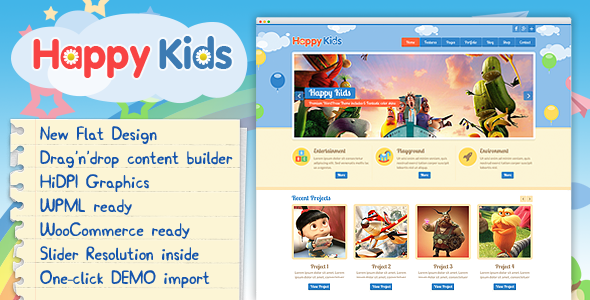
Stuck on your Happy Kids WordPress theme? Let's fix it.
No endless back-and-forth. Just send us the details and we'll get it done.
No obligation · Replies within 1 hour · Quote within 1 day
Setup · Customization · Bug fixes · WooCommerce integration
About Happy Kids WP Theme
Happy Kids is a WordPress theme by CreativeWS built for schools, kindergartens, nurseries, and child-focused organisations. It ships with a colourful, playful design that doesn’t sacrifice usability. The layout is fully responsive, and the theme includes dedicated page templates for class schedules, staff profiles, event listings, and gallery sections commonly needed by education sites.
Under the hood, Happy Kids works with Elementor and the WPBakery page builder, giving site owners drag-and-drop control without touching code. It also integrates with popular plugins like WooCommerce for selling courses or merchandise, Contact Form 7 for enquiry forms, and Revolution Slider for animated hero sections. CreativeWS packages demo content with the theme, so a basic site can be imported and live within an hour.
Get matched with a Happy Kids developer in under one day
Tell us about your Happy Kids project. Small fixes, Happy Kids theme customization, or a full website build, whatever you need, we've got it covered.
We'll connect you to the right Happy Kids developers, define the scope, and get everything 100% clear.
You'll get one estimate, hire your preferred developer, and start collaborating.
Most issues with Happy Kids come down to conflicts between the theme, page builder, and third-party plugins. Diagnosing those problems takes familiarity with how CreativeWS built the theme and where it commonly breaks. The developers available through Codeable have worked across hundreds of education and childcare WordPress sites. They can fix bugs, build custom functionality, or take a full project from import to launch. Work is scoped upfront with a fixed estimate, so there are no billing surprises.
Pros
- Purpose-built templates for schools and childcare centres save significant setup time
- Compatible with both Elementor and WPBakery, so you're not locked into one builder
- One-click demo import includes real school site content and layout examples
- WooCommerce support allows selling courses, uniforms, or event tickets directly
- Revolution Slider included at no extra cost, normally a paid plugin
Cons
- WPBakery shortcode lock-in makes switching page builders later messy and time-consuming
- Demo import can overwrite existing settings, risky on a live site without a backup
- Some bundled plugins are older versions that need manual updating after initial install
- Default colour scheme is very specific and requires CSS work to rebrand significantly
- Limited documentation for edge cases like multilingual setup or custom post type extensions
Who is Happy Kids for?
Primary Schools
Happy Kids covers the core needs of a primary school site: class pages, staff profiles, a news section, and a parent contact form. A Happy Kids developer can extend this with term calendars, password-protected parent portals, and integration with school management tools. The theme’s visual tone is appropriate for primary age without feeling too young for staff-facing content.
Nurseries and Kindergartens
Nurseries and kindergartens need warmth and clarity. Happy Kids delivers both. The theme’s colourful blocks work well for displaying sessions by age group, fees, and availability. A Happy Kids specialist can add a registration form with document upload, map integration for drop-off information, and Ofsted rating badges without disrupting the existing layout.
After-School Activity Providers
Sports clubs, arts classes, and tutoring centres running after-school programmes need a clear schedule and an easy booking path. Happy Kids can be configured with timetable plugins and WooCommerce for session bookings. A developer can build term-based pricing, sibling discounts, and automated confirmation emails on top of the theme’s existing structure.
Children's Birthday Party Venues
Party venues targeting families need strong visuals and a simple enquiry path. Happy Kids handles galleries and event-style content well. A Happy Kids developer can wire up a booking request form with date selection, package options, and auto-reply confirmations. The theme’s layout makes it easy to present packages visually without heavy custom design work.
Online Tutoring Services for Children
Online tutors working with children need a site that reassures parents and converts visitors to enquiries. Happy Kids provides the right visual tone. A Happy Kids specialist can integrate Zoom or Teams booking links, add subject-specific landing pages, and connect a payment gateway for session deposits, keeping everything within the theme’s existing framework.

Customizing Happy Kids
Happy Kids gives you a solid starting point, but most school and childcare sites need changes that go beyond the theme options panel. A Happy Kids expert can rework the colour palette to match your brand, adjust typography for better readability, and restructure page layouts without breaking the underlying template logic.
Common customisation requests include adding age-group filtering to class listings, building custom registration or enrolment forms, integrating a timetable plugin that fits the theme’s visual style, and modifying the header to include emergency contact numbers or term date notices. Child theme development is recommended for any code-level changes so updates don’t wipe out your work. A Happy Kids specialist can set that up and document what was changed so future maintenance is straightforward.
Recommended plugins for Happy Kids
Happy Kids pairs well with several plugins that extend its core functionality. For event and class management, The Events Calendar adds structured scheduling without custom development. For admissions or contact workflows, Gravity Forms handles conditional logic better than simpler alternatives. Adding a caching layer through WP Rocket or W3 Total Cache makes a real difference on image-heavy sites with gallery pages. For detailed advice on speed improvements, see the WordPress performance service. If your school site needs to rank in local search, structured SEO work can help significantly. The WordPress SEO optimisation service covers technical and on-page improvements specific to WordPress sites running themes like Happy Kids.
Not sure which plugins to use? This WordPress plugins directory covers the most popular options with reviews and setup guides.
Happy Kids common issues
Happy Kids theme Revolution Slider not loading on homepage
Revolution Slider failures on the Happy Kids homepage are usually caused by a plugin version mismatch or a missing plugin activation after demo import. Check that Revolution Slider is activated under Plugins, not just installed. If the slider shows a white block, open the slider editor and verify the alias matches what the homepage template calls. A PHP memory limit below 256MB will also cause silent failures on slider-heavy pages.
Happy Kids demo import fails or stops halfway through
Demo import failures in Happy Kids are almost always a server timeout or memory issue. Shared hosting with low PHP execution time limits cuts the import process short. Increase max_execution_time to 300 and memory_limit to 256M in your php.ini or contact your host to do it. If the import partially completed, reset the site using a plugin like WP Reset before trying again to avoid duplicate content conflicts.
Happy Kids theme not showing staff profiles correctly
Staff profile display issues in Happy Kids usually mean the custom post type wasn’t registered properly or the template is pulling from the wrong query. Check that the Staff custom post type appears in the WordPress admin. If posts exist but don’t display, inspect the page template assigned to your staff page and confirm the loop query matches the registered post type slug. A child theme override of the template file is a clean fix that survives updates.
WooCommerce product pages broken after Happy Kids update
WooCommerce and Happy Kids conflicts after an update often come from outdated WooCommerce template overrides bundled with the theme. Go to WooCommerce > Status > Tools and look for outdated templates. Update them or ask a developer to reconcile the differences. For persistent layout breaks, the WordPress bug fixing service can isolate whether the issue is theme-side or plugin-side before making changes to a live site.
Happy Kids theme mobile menu not opening on phones
Mobile menu failures in Happy Kids are commonly caused by a JavaScript conflict with another plugin, or a missing jQuery dependency. Open your browser console on mobile emulation and look for JS errors. Plugins like Autoptimize can break script load order if CSS and JS combining is too aggressive. Disable those optimisations temporarily to confirm. If the menu works after disabling a plugin, that plugin’s scripts need to be excluded from concatenation.
Happy Kids page builder content showing as shortcode text
Shortcode text appearing instead of rendered content means WPBakery is either deactivated or the licence is not properly tied to the current domain. Activate WPBakery under Plugins and check its licence status. If you migrated the site, the licence may need to be re-registered. For persistent rendering issues after re-activation, clear all caching layers and check that your PHP version is 7.4 or higher, as older PHP can cause WPBakery output failures with Happy Kids.
Happy Kids theme fonts not loading or showing system default
Font loading failures in Happy Kids are usually caused by Google Fonts being blocked by a consent management plugin or a firewall rule. Check your browser’s network tab for blocked font requests. If fonts load in incognito but not normally, a cookie consent plugin is likely deferring them. Alternatively, if your server blocks external HTTP requests, self-host the fonts using a plugin like OMGF and point the theme’s font settings accordingly.
Happy Kids event calendar layout broken on smaller screens
Broken event calendar layouts on small screens in Happy Kids are generally a CSS specificity conflict between the calendar plugin and the theme’s responsive stylesheet. Inspect the broken element in DevTools to find which stylesheet is overriding the layout. A small block of CSS in your child theme’s style.css targeting the calendar wrapper at the relevant breakpoint usually resolves it. If you don’t have a child theme set up, a developer can create one safely without touching live files. The WordPress bug fixing service handles exactly this type of layout conflict.
Happy Kids contact form not sending emails
Contact Form 7 email failures on Happy Kids sites are almost always a server mail configuration issue, not a theme problem. Most shared hosts block PHP’s mail() function. Install WP Mail SMTP and route emails through an authenticated SMTP service like SendGrid, Mailgun, or even Gmail. After setting it up, use the plugin’s test email tool to confirm delivery. Also check spam folders before assuming emails aren’t sending at all.
Happy Kids theme slow to load on pages with galleries
Slow gallery pages in Happy Kids are typically caused by uncompressed images and no lazy loading. Happy Kids galleries can load dozens of full-size images at once if images weren’t resized before upload. Run images through ShortPixel or Imagify, enable lazy loading, and set a maximum image dimension in WordPress Media settings. For deeper speed work including caching and script optimisation, the WordPress performance service covers a full audit and implementation.
Happy Kids FAQ
Happy Kids was built primarily around WPBakery, but it works with Elementor as a page builder with some limitations. Core templates and shortcodes are WPBakery-specific. Using Elementor works on a page-by-page basis, but the pre-built demo layouts are designed for WPBakery and won’t import into Elementor without rebuilding. A Happy Kids developer can advise on the cleanest approach for your build.
Yes. Happy Kids is well-suited to nursery and childcare websites. It includes templates for session listings, age-group pages, staff bios, and gallery sections. The design is warm and parent-friendly. A Happy Kids specialist can add registration forms, term calendars, and Ofsted or inspection rating sections to complete a professional childcare site.
Happy Kids includes WooCommerce compatibility, making it possible to sell courses, event tickets, uniforms, or merchandise. The default WooCommerce templates are styled to match the theme. Complex shop setups like subscription-based classes or tiered pricing will need a developer to extend the default WooCommerce functionality within the Happy Kids framework.
Go to Appearance > Import Demo Data after installing and activating the Happy Kids theme and its required plugins. Select the demo closest to your intended layout and click import. The process requires adequate PHP memory and execution time. On shared hosting, you may need to ask your host to temporarily increase these limits before the import completes successfully.
Happy Kids itself doesn’t handle GDPR directly. You’ll need a cookie consent plugin, a clear privacy policy page, and GDPR-compliant form handling. Contact Form 7 with a consent checkbox and a plugin like Complianz or CookieYes covers the basics. For sites collecting children’s data, legal advice on data retention is recommended beyond technical implementation.
Create a folder in wp-content/themes/ named happy-kids-child. Add a style.css file with the correct theme header referencing Happy Kids as the template, and a functions.php that enqueues the parent theme’s stylesheet. Activate the child theme in Appearance > Themes. All customisations go into the child theme so updates to the parent theme don’t overwrite your work.
Yes. A Happy Kids developer can handle anything from minor design tweaks to full custom builds. Work is available through Codeable, where developers are vetted and projects are scoped with a fixed estimate before any work begins. Get a Free Estimate to describe your project and receive a response within 24 hours.
Happy Kids has basic WPML compatibility, but full multilingual setup requires careful configuration of the custom post types and template strings. Not all theme strings are automatically translatable without registering them manually. A Happy Kids specialist familiar with WPML can map out the string translation requirements and set up a working bilingual or multilingual site without layout issues.
Never make direct edits to the Happy Kids parent theme files. Set up a child theme first and move all customisations there. CSS changes go in the child theme’s style.css, PHP overrides go in matching template files within the child theme folder. With this structure, updating the parent theme through the WordPress dashboard won’t affect any of your modifications.
Happy Kids is built around WPBakery Page Builder, which is bundled with the theme at no extra cost. The theme’s demo layouts, shortcodes, and content blocks are all WPBakery-based. Some elements can be built independently with Elementor, but the full Happy Kids template library and pre-built sections are only available through WPBakery.
Hire a Happy Kids Developer
Whether you need a full site build, a specific feature added, or a bug fixed, a vetted Happy Kids developer can take it on. Post your project and receive a free estimate within 24 hours. No obligation to proceed. Work is handled through Codeable, where all developers are individually screened before taking client work. Get a Free Estimate and describe what you need.
You'll need a free Codeable account so developers can ask questions and send their quotes.