Health Coach WordPress Theme
by StylemixThemes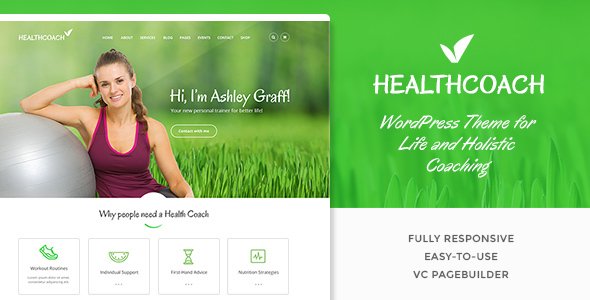
Stuck on your Health Coach WordPress theme? Let's fix it.
No endless back-and-forth. Just send us the details and we'll get it done.
No obligation · Replies within 1 hour · Quote within 1 day
Setup · Customization · Bug fixes · WooCommerce integration
About Health Coach WP Theme
Health Coach is a WordPress theme by StylemixThemes built specifically for wellness professionals, personal trainers, nutritionists, and coaching practices. It ships with a visual page builder, pre-built demo content, and appointment booking support out of the box. The design is clean, mobile-responsive, and structured around conversion goals like booking calls and capturing leads.
StylemixThemes has a solid reputation for building niche-specific themes with real functionality rather than just aesthetics. Health Coach follows that pattern. It includes sections for testimonials, service listings, pricing tables, and team profiles. The theme is compatible with WooCommerce if you sell digital products or coaching packages, and it integrates with popular booking plugins. For anyone running a health or wellness business on WordPress, it covers the basics without requiring heavy customization from day one.
Get matched with a Health Coach developer in under one day
Tell us about your Health Coach project. Small fixes, Health Coach theme customization, or a full website build, whatever you need, we've got it covered.
We'll connect you to the right Health Coach developers, define the scope, and get everything 100% clear.
You'll get one estimate, hire your preferred developer, and start collaborating.
StylemixThemes builds themes with a lot of built-in options, which can make customization feel straightforward until it isn’t. When something breaks after an update, or the layout doesn’t behave on mobile, you need someone who knows the theme internals. Codeable connects you with vetted WordPress developers who have demonstrated real project experience. There’s no bidding, no guessing, and no risk. Post your project, get matched with a Health Coach developer within 24 hours, and receive a free estimate before committing to anything.
Pros
- Pre-built demo content imports quickly and covers all core sections a coaching site needs
- Native appointment booking support reduces reliance on heavy third-party plugins
- WooCommerce compatible for selling courses, packages, or digital downloads
- Responsive layout works well on mobile without requiring extra configuration
- StylemixThemes provides regular updates and maintains compatibility with current WordPress versions
Cons
- Demo import can overwrite existing settings if not handled carefully on an active site
- Some layout options are tied to the bundled page builder, making migration to Gutenberg more work
- Customer support response times from StylemixThemes can be slow during high-volume periods
- Built-in booking functionality is limited compared to dedicated plugins like Amelia for complex scheduling
- Heavy reliance on shortcodes in some sections makes content harder to manage after a theme switch
Who is Health Coach for?
Personal Health Coaches
Health Coach works well for individual coaches who need a professional site to book discovery calls, display client testimonials, and outline their coaching packages. The service sections and pricing tables map directly to a solo practice. A Health Coach specialist can configure the booking flow to match your specific intake process and connect it to your calendar tool.
Nutritionists and Dietitians
Nutritionists need to communicate credentials, list services like meal planning or consultations, and capture leads efficiently. Health Coach includes team profile sections and service layouts that transfer well to a nutrition practice. Adding a recipe blog or downloadable meal plan section is straightforward with the right Health Coach developer handling the setup.
Fitness Trainers and Gyms
Gyms and personal trainers benefit from the class schedule layout options and team member sections. The theme supports multiple trainers, timetable displays, and program listings. Integration with a scheduling plugin for group or one-on-one sessions is a common customization a Health Coach expert handles during initial setup.
Mental Wellness Practitioners
Therapists, mindfulness coaches, and mental wellness professionals need a calm, trust-focused design. Health Coach’s clean layout and testimonial sections work well for this audience. Custom intake forms, session booking, and HIPAA-adjacent considerations around contact forms are areas where a Health Coach developer adds specific value.
Online Coaching Programs
Coaches who deliver programs online need more than a brochure site. Health Coach can be extended with membership plugins like MemberPress or LearnDash to gate content, deliver courses, and manage client access. A Health Coach specialist sets up the integration so the theme design and the membership layer work together without conflicts.

Customizing Health Coach
Health Coach gives you a decent starting point, but most clients need it adjusted to match their brand, restructure the layout, or extend functionality beyond what the demo shows. A Health Coach expert can rework the header, typography, and color scheme to fit your practice without touching a line of code on your end.
Deeper customization, like adding custom intake forms, integrating a specific CRM, building a membership area for clients, or connecting a booking system like Amelia or Bookly, requires hands-on development work. A Health Coach specialist familiar with StylemixThemes architecture knows which parts of the theme to extend and which to override cleanly. Trying to do this with generic tutorials often results in broken layouts after updates. Hiring a dedicated Health Coach developer saves significant debugging time and produces a cleaner result.
Recommended plugins for Health Coach
Health Coach works well with several plugin categories that extend what the theme handles by default. For bookings, Amelia and Bookly both integrate cleanly. For email sequences and lead capture, Mailchimp for WordPress and FluentCRM are reliable choices. WooCommerce adds digital product or course sales if you offer paid programs.
On the technical side, caching and image optimization matter for any service-based site. A well-configured setup following WordPress performance best practices keeps load times fast, which directly affects lead conversion. If you plan to rank for local or niche wellness keywords, pairing the theme with a solid WordPress SEO strategy is worth doing from the start rather than retrofitting later.
Not sure which plugins to use? This WordPress plugins directory covers the most popular options with reviews and setup guides.
Health Coach common issues
Health Coach theme demo import not working
Demo import failures in Health Coach are usually caused by memory limit restrictions or a timeout on the server. Increase the PHP memory limit to at least 256MB and set max execution time to 300 seconds in your php.ini or wp-config.php. If the import still fails, try importing the XML content file manually through WordPress Tools > Import. If the issue persists, a WordPress bug fixing service can identify server-level conflicts quickly.
Health Coach appointment booking section not showing
If the booking section isn’t showing, check whether the required plugin listed in the theme’s documentation is active. Health Coach relies on specific plugins for its booking functionality. Go to Appearance > Install Plugins and ensure all bundled plugins are installed and activated. Also verify that the section isn’t set to hidden in the page builder row settings. Clearing your caching plugin after changes often resolves display issues.
Health Coach theme broken after WordPress update
A broken layout after a WordPress core update usually points to a conflict between the theme and an updated plugin, or a PHP version change on your server. Deactivate all plugins except the theme’s required ones and check if the issue resolves. Re-enable plugins one at a time to isolate the conflict. If the theme itself is broken, check for a pending theme update from StylemixThemes. For persistent issues, a WordPress bug fixing specialist can trace the exact conflict.
Health Coach page builder elements not loading
Page builder elements failing to load in Health Coach are typically caused by a JavaScript error on the page. Open your browser’s developer console and look for script errors. Common causes include a caching plugin serving stale JS files or a CDN stripping required assets. Clear all caches, disable minification temporarily, and test again. If you’re using Cloudflare, check the Rocket Loader setting and disable it for builder scripts.
Health Coach mobile menu not opening
A mobile menu that doesn’t open is almost always a JavaScript conflict. A competing plugin or a custom script is likely interfering with the menu toggle event. Test by switching to a default WordPress theme to confirm the menu works, then switch back and disable plugins one at a time. Check for jQuery conflicts specifically, as Health Coach’s menu relies on jQuery being loaded correctly and only once.
Health Coach WooCommerce pages not styled correctly
WooCommerce pages losing their styling in Health Coach usually means the theme’s WooCommerce template files are outdated. After a WooCommerce update, go to WooCommerce > Status > Tools and run the template update check. StylemixThemes periodically releases updates to align with WooCommerce changes. If your theme version is behind, updating it should restore the correct styling. Back up before updating.
Health Coach contact form not sending emails
Contact form emails not arriving is rarely a theme issue. It’s almost always a mail delivery problem at the server level. WordPress uses PHP mail by default, which most hosting providers block or filter. Install an SMTP plugin like WP Mail SMTP and configure it with a transactional email service like Mailgun, SendGrid, or Gmail SMTP. Test delivery through the plugin’s send test tool after setup. Check spam folders as an immediate first step.
Health Coach theme slow loading speed
Health Coach can load slowly if images are uncompressed or if the bundled page builder is loading unnecessary scripts on every page. Start by running the site through Google PageSpeed Insights to identify specific blockers. Install a caching plugin, compress images with ShortPixel or Imagify, and enable lazy loading. Disabling unused page builder scripts on pages where they’re not needed reduces render-blocking resources significantly. See more at our WordPress bug fixing service.
Health Coach header image not displaying on mobile
Header images not showing on mobile in Health Coach are often caused by a CSS rule hiding the element below a certain breakpoint, or the image being set as a CSS background rather than an HTML element. Open the browser inspector on a mobile viewport and check what’s being applied to the header container. If a display:none rule is hiding it, you can override it in the theme’s custom CSS field. Check Appearance > Customize > Additional CSS.
Health Coach custom fonts not applying
Custom fonts not applying in Health Coach usually means the font wasn’t saved correctly in the theme options, or a caching layer is serving old CSS. Go to the theme’s typography settings, reselect the font, save, and clear all caches including any server-side cache. If using Google Fonts, verify there’s no network request being blocked by a privacy plugin or browser extension. For fonts loaded via CSS import, check that the import URL is correct and loading over HTTPS.
Health Coach FAQ
Yes. It’s designed primarily with solo practitioners in mind. The sections for services, testimonials, about, and booking work well for a single coach. You won’t need most of the multi-trainer features unless you expand. A Health Coach specialist can strip out unused sections and focus the layout on your specific offer and booking flow.
Health Coach is compatible with Amelia. The theme doesn’t conflict with Amelia’s booking forms, and Amelia’s styling can be adjusted to match the theme’s design. A Health Coach developer typically handles the integration to make the booking widget look native to the site rather than a bolted-on element.
Some sections of Health Coach are built with the bundled builder, so removing it entirely will break those layouts. You can use Gutenberg for new pages, but existing demo content will need to be rebuilt. A Health Coach expert can help you migrate specific pages to Gutenberg blocks while keeping the theme’s design intact.
Always back up your site before updating. Use a staging environment if your host provides one. After updating, check your key pages visually and test the booking flow. StylemixThemes includes a changelog with each release. If you have customizations in theme files rather than a child theme, those will be overwritten by an update.
Health Coach is WPML compatible and works with Polylang for multilingual setups. The theme strings are translatable. Setting up a second language correctly still requires configuration work, particularly for dynamic content and booking confirmation messages. A Health Coach specialist handles this without breaking the existing layout.
Yes, Health Coach supports WooCommerce. You can sell coaching packages, digital downloads, or course access directly through the site. The theme includes styled WooCommerce templates that match the overall design. Keep both the theme and WooCommerce updated together to avoid template compatibility issues.
Rates vary depending on scope. Small fixes or tweaks run from a few hundred dollars. A full site build on Health Coach with booking integration and custom design typically ranges from $1,500 to $4,000. Through Codeable, you get a free estimate upfront so there are no surprises. Visit our free estimate page to start.
Yes, but migrating to a new theme always carries some risk for content structure and SEO. A WordPress migration specialist can transfer your content, redirect old URLs, and rebuild key pages in Health Coach without losing search rankings or breaking existing links. Planning the migration carefully before executing it matters.
Out of the box, Health Coach loads several scripts and styles that may not all be necessary on every page. With proper caching, image optimization, and script management, it performs well. A poorly configured install will be slow. A Health Coach developer optimizes the setup so the theme doesn’t carry unnecessary overhead on production.
Health Coach is made by StylemixThemes, a theme development company with a large catalog of niche WordPress themes. They maintain the theme actively and provide updates. Support is handled through their own ticketing system. For hands-on development work beyond basic support, hiring an independent Health Coach developer is usually faster and more effective.
Hire a Health Coach WordPress Expert
Whether you need a full site built on Health Coach, a specific feature added, or something fixed after an update broke it, working with an experienced Health Coach developer gets it done correctly the first time. FoxyConcept works through Codeable, a vetted network of WordPress specialists. Get a free estimate with no obligation to hire. You describe the project, we scope it accurately, and work starts only when you’re ready.
You'll need a free Codeable account so developers can ask questions and send their quotes.