Hemma WordPress Theme
by opendept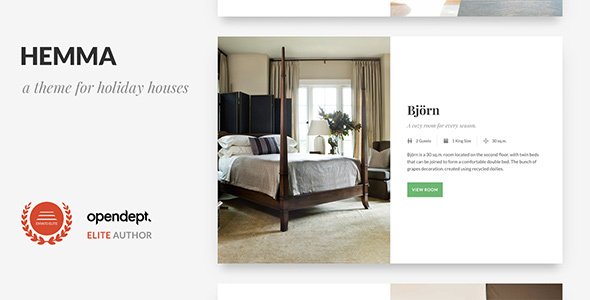
Stuck on your Hemma WordPress theme? Let's fix it.
No endless back-and-forth. Just send us the details and we'll get it done.
No obligation · Replies within 1 hour · Quote within 1 day
Setup · Customization · Bug fixes · WooCommerce integration
About Hemma WP Theme
Hemma is a WordPress theme developed by opendept, designed for interior design studios, home decor brands, and architecture firms. It puts visual presentation first, with a clean grid layout, large image support, and a minimal typographic system that lets the work speak for itself.
The theme is built on a solid foundation with full-site editing support, making it flexible enough for both portfolio showcases and product-driven sites. Navigation is clean, page structure is logical, and the default styling avoids the over-designed feel that plagues many niche themes in this space.
If you run a design-focused business and want a WordPress theme that looks polished without requiring heavy customization out of the box, Hemma is worth a close look. It handles visual hierarchy well and keeps the focus on imagery and content rather than decorative UI clutter.
Get matched with a Hemma developer in under one day
Tell us about your Hemma project. Small fixes, Hemma theme customization, or a full website build, whatever you need, we've got it covered.
We'll connect you to the right Hemma developers, define the scope, and get everything 100% clear.
You'll get one estimate, hire your preferred developer, and start collaborating.
Not every WordPress developer knows how opendept structures their themes. Hemma has specific template hierarchy choices and FSE conventions that need someone familiar with the codebase to work with efficiently.
Through Codeable, you get matched with developers who have hands-on experience with block-based themes like Hemma. No generalist guesswork. Post your project, get an estimate within 24 hours, and move forward only if the scope and price work for you. No commitment required upfront.
Pros
- Clean minimal design suited to interior design and home decor brands
- Full-site editing support gives non-developers real layout control
- Large image and grid layouts handled well out of the box
- Lightweight default markup keeps performance scores respectable
- Logical template structure makes developer customization straightforward
Cons
- Limited built-in demo content makes initial setup slower without a developer
- Full-site editing has a learning curve for users new to block-based themes
- WooCommerce styling requires additional work to match the base design closely
- Fewer third-party tutorials available compared to mainstream themes like Astra or Kadence
- Plugin compatibility edge cases need manual testing, especially for gallery and portfolio plugins
Who is Hemma for?
Interior Design Studio
Hemma’s grid layouts and large image support make it a strong fit for interior design studios that need to showcase room photography and project galleries. The minimal UI keeps the focus on the work rather than the website chrome, which is exactly what clients in this space expect when they land on your site.
Home Decor E-commerce
With WooCommerce integration, Hemma can power a home decor shop cleanly. Product image presentation is strong, and the neutral aesthetic doesn’t clash with product photography. Custom product category pages and styled checkout flows are achievable with developer input to align the shop with the rest of the site.
Architecture Portfolio
Architecture firms need a portfolio that handles high-resolution project imagery without slowing down. Hemma’s structure supports this well. Project pages can be built with custom templates that give each case study room to breathe, and the typographic system handles detailed project descriptions without looking cluttered.
Furniture Brand
Furniture brands need product pages that feel editorial and commercial at the same time. Hemma’s design language sits in that space naturally. Combined with WooCommerce and performance optimization, it can handle a product catalogue that looks curated rather than like a generic shop template.
Interior Styling Blog
For interior styling bloggers, Hemma offers a clean reading experience with strong visual support for lifestyle photography. Post layouts give images the space they need, and the overall aesthetic matches audience expectations in the home and living content space without requiring heavy customization from day one.

Customizing Hemma
Hemma supports WordPress’s native block editor and site editor, so most layout and style changes happen directly in the interface without touching code. You can adjust color palettes, typography, spacing, and section layouts through the Global Styles panel.
For more specific needs, a Hemma expert can go further. That includes custom post type templates for portfolios or product lines, header and footer modifications, WooCommerce integration for selling decor products, and custom block patterns that match your brand guidelines.
If the default layout options feel limiting, a developer familiar with opendept’s theme structure can extend it cleanly without leaving a mess of overrides. Custom page templates, conditional layouts, and advanced typography setups are all achievable with the right hands on the code.
Recommended plugins for Hemma
Hemma pairs well with WooCommerce if you’re selling home goods or design services directly from your site. Contact Form 7 or WPForms handles inquiry forms cleanly within its layout. For image-heavy builds, lazy loading plugins and image optimization tools matter more than usual here.
If your site needs to grow beyond the theme’s defaults, performance tuning and SEO improvements are worth investing in early. See our WordPress performance service and WordPress SEO service for practical next steps after launch.
Not sure which plugins to use? This WordPress plugins directory covers the most popular options with reviews and setup guides.
Hemma common issues
Hemma theme images not displaying correctly in WordPress
Image display issues in Hemma are often tied to incorrect image size registration or block settings using wrong alignment options. Check that your featured image dimensions match the sizes defined in the theme. Also verify that images are inserted using the correct block type for that template. If the issue appeared after a plugin update, a conflict with a gallery or optimization plugin is likely. Our WordPress bug fixing service can identify the exact cause quickly.
Hemma WordPress theme full-site editor not saving changes
Full-site editor changes not saving in Hemma usually point to a caching problem or a JavaScript conflict with another active plugin. Clear all caches first, including any server-level caching. Then deactivate plugins one by one to isolate a conflict. If the issue persists in a clean environment, it may be a permissions problem on the wp-content/uploads directory preventing template part files from being written correctly.
WooCommerce pages not matching Hemma theme styles
WooCommerce uses its own template files that themes need to explicitly style. Hemma’s base WooCommerce support may not cover every shop page at the same level as the core theme pages. The fix involves adding a woocommerce folder to your child theme and creating overrides for cart, checkout, and product archive templates. A developer familiar with both Hemma and WooCommerce can do this cleanly without breaking the theme’s design system.
Hemma theme loading slowly on image-heavy pages
Slow loading on image-heavy Hemma pages is almost always an image optimization problem rather than a theme code issue. Ensure all images are served in WebP format, properly sized before upload, and lazy loaded. A CDN helps significantly for sites with large portfolios. If performance is still poor after image work, review render-blocking scripts and consider a dedicated caching setup. See our WordPress performance service for a structured approach.
Hemma FAQ
Hemma is developed by opendept and available through the WordPress theme ecosystem. Pricing depends on the license tier chosen. Check the official opendept or ThemeForest listing for current pricing. Premium licenses typically include support and updates, which matter for a site you plan to run long-term. Free versions, if available, usually come with feature restrictions.
Hemma supports WooCommerce, but the level of out-of-the-box styling varies. Basic product pages and shop archives will function, but matching WooCommerce templates visually to the rest of the Hemma design often requires custom template overrides. For a polished result, working with a developer who knows both Hemma and WooCommerce will save significant time.
Hemma supports full-site editing, which means most layout and style changes are accessible through the WordPress site editor without code. For straightforward sites, a non-developer can manage most of the setup. However, advanced customizations like custom post templates, WooCommerce integration, or specific layout changes will require developer input to get right.
Yes, Hemma is built for the block editor and supports full-site editing. This means you can edit headers, footers, page templates, and global styles directly in the WordPress editor. Block patterns are included to speed up page building. It is not reliant on a separate page builder plugin, which keeps the setup cleaner and more maintainable.
In Hemma, the header and footer are edited through the WordPress site editor under Appearance > Editor. Select the header or footer template part and modify it using blocks. You can change navigation menus, add logo blocks, adjust spacing, and rearrange elements. For more structural changes beyond what the editor allows, a child theme and custom template parts are the right approach.
Hire a Hemma Developer for Your Project
Whether you need layout adjustments, WooCommerce integration, custom templates, or a full site build on Hemma, the right developer makes the difference between a site that looks good and one that actually performs. Post your project and get a free estimate from a vetted Hemma expert within 24 hours. No obligation, no risk, just a clear picture of what your project needs and what it will cost.
You'll need a free Codeable account so developers can ask questions and send their quotes.