Herald WordPress Theme
by meks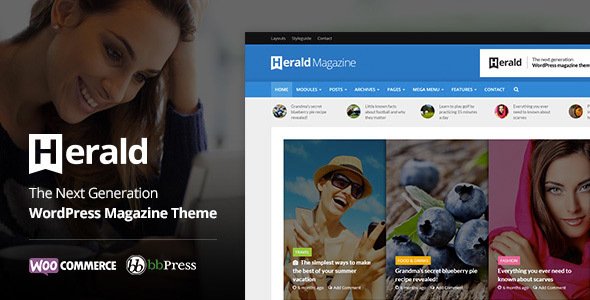
Stuck on your Herald WordPress theme? Let's fix it.
No endless back-and-forth. Just send us the details and we'll get it done.
No obligation · Replies within 1 hour · Quote within 1 day
Setup · Customization · Bug fixes · WooCommerce integration
About Herald WP Theme
Herald is a WordPress news theme built by Meks, a developer studio known for clean, functional themes aimed at media and editorial sites. It ships with a modular homepage builder, multiple post layout options, and a widget-heavy sidebar system that gives editors real control over content presentation.
The theme supports standard WordPress post formats, integrates neatly with popular plugins, and keeps the codebase relatively lightweight for a news theme. It works well for sites publishing high volumes of content across multiple categories. The admin panel uses native WordPress customizer options, which keeps the learning curve low for non-technical editors. Herald is translation-ready and includes RTL support, making it a viable option for international publications.
Get matched with a Herald developer in under one day
Tell us about your Herald project. Small fixes, Herald theme customization, or a full website build, whatever you need, we've got it covered.
We'll connect you to the right Herald developers, define the scope, and get everything 100% clear.
You'll get one estimate, hire your preferred developer, and start collaborating.
Meks themes are well-coded, but Herald customization still requires someone who knows WordPress theme development properly. Codeable connects you with vetted developers who have hands-on experience with Herald and news site builds. You post your project, get a clear estimate, and only move forward if the scope and price work for you. No bidding wars, no guesswork on quality. If your Herald site needs custom functionality, a layout overhaul, or just needs fixing, that’s the right place to start.
Pros
- Modular homepage builder lets editors rearrange content blocks without touching code
- Lightweight for a news theme, loads faster than many comparable magazine themes
- Native WordPress customizer integration means no proprietary page builder lock-in
- Supports multiple post formats including video, gallery, and audio out of the box
- RTL and translation-ready, suitable for multilingual and international news sites
Cons
- Homepage module options are limited compared to premium magazine themes like Newspaper or Jannah
- Mobile menu UX is basic and often needs custom work for sites with deep category structures
- No built-in dark mode, requires custom CSS or a plugin to implement
- Breaking news ticker lacks advanced configuration options without additional code
- Ad placement zones are fixed and require child theme edits to add custom ad positions
Who is Herald for?
Online News Publication
Herald handles high-volume publishing well. Category-based layouts, featured post modules, and a clear article hierarchy make it practical for editorial teams publishing multiple stories daily. A Herald developer can extend the homepage grid and add custom taxonomy filters to help readers navigate large content archives.
Sports Media Site
Sports sites need fast-loading pages and clear score or match update sections. Herald’s modular layout supports this with some customization. A Herald specialist can add custom post types for match results, integrate live score widgets, and configure category-specific templates for leagues or teams.
Tech Blog Network
Tech publications benefit from Herald’s clean article layout and support for code snippets via plugins. The theme works well for review-style content with pros and cons sections, rating systems, and product comparison tables added through a Herald developer’s custom post template work.
Regional Community News
Community news sites often run on tight budgets and need a theme that works without heavy ongoing maintenance. Herald is manageable for small editorial teams. A Herald expert can set up a contributor workflow, configure local category pages, and make the site accessible for non-technical editors.
Entertainment and Pop Culture Magazine
Entertainment sites need visual impact. Herald’s featured image handling and homepage carousel support this content type. With custom CSS and layout modifications from a Herald specialist, the theme can present celebrity news, reviews, and trending content in a way that matches the visual tone of the brand.

Customizing Herald
Herald gives you a good starting point, but most publishers need customization before it fits their brand properly. Typography, color schemes, header layout, and ad placement all require adjustments that go beyond what the theme options panel offers out of the box.
A Herald expert can build custom post templates, add category-specific layouts, modify the homepage modules to match your editorial structure, and integrate third-party tools like newsletter platforms or paywall systems. Custom widget areas, sticky sidebar logic, and archive page redesigns are all common requests.
If you want Herald to behave like a purpose-built theme for your specific publication rather than a generic news site, working with a Herald specialist saves a significant amount of trial and error and avoids the CSS patches that tend to pile up over time.
Recommended plugins for Herald
Herald pairs well with caching plugins and image optimization tools. Given the volume of content news sites publish, WordPress performance tuning matters more here than on most other site types. Lazy loading, CDN integration, and database cleanup routines all help under heavy traffic.
On the SEO side, Herald works with Yoast and Rank Math without conflicts, but schema markup for news articles and Google News eligibility often need manual configuration. A proper WordPress SEO setup ensures your content gets indexed correctly and article structured data passes validation.
Not sure which plugins to use? This WordPress plugins directory covers the most popular options with reviews and setup guides.
Herald common issues
Herald theme homepage modules not saving in WordPress customizer
This usually happens due to a JavaScript conflict in the customizer. Open your browser console while on the customizer page and check for JS errors. Common culprits are caching plugins serving stale scripts or a conflicting plugin hooking into the customizer API. Disable caching temporarily, clear browser cache, and test again. If the issue persists, deactivate plugins one at a time to isolate the conflict. For persistent cases, a WordPress bug fixing service can trace the exact conflict quickly.
Herald featured image not displaying correctly on archive pages
Herald uses specific image sizes registered in the theme. If featured images appear cropped or missing on archive pages, you likely need to regenerate thumbnails after switching to Herald or after changing image dimensions in theme settings. Use the Regenerate Thumbnails plugin to reprocess existing images. Check that the correct image size is set for archive templates in your theme options, and confirm your media upload settings match the expected dimensions.
Herald theme breaking news ticker not working
The breaking news ticker in Herald requires posts to be assigned to a specific category designated in the theme settings. First check that the correct category is selected under Herald options. If posts are assigned correctly but the ticker still doesn’t show, check for JavaScript errors in the console. A caching plugin may be serving an outdated version of the ticker script. Flush all caches and test in an incognito window. Plugin conflicts with news aggregator tools can also interfere.
Herald WordPress theme slow loading on mobile
News themes load heavy because of multiple post images and widget areas. For Herald specifically, check that you have a caching plugin active, images are served in WebP format, and render-blocking scripts are deferred. The theme’s Google Fonts loading can add latency on mobile. Use a plugin to locally host fonts or reduce the number of font weights loaded. Test with GTmetrix to identify the biggest bottlenecks specific to your Herald setup.
Herald theme sidebar widgets disappearing after WordPress update
Sidebar widget loss after a WordPress update is often caused by widget block editor changes introduced in WordPress 5.8 and later. If Herald uses classic widget areas, check that the Classic Widgets plugin is active if you rely on the old interface. Widget data itself is rarely lost but can appear reset if the widget area registration in the theme changed. Check your theme version and whether a Herald update changed the widget area slug, which would cause WordPress to unassign saved widgets.
Herald logo not showing in header after upload
If the Herald logo doesn’t display after uploading, check the image dimensions. Herald may require a specific logo size or format. Upload a PNG with a transparent background and ensure the file size isn’t too large for display. Go to Appearance, Customize, Site Identity and re-upload directly there. If the logo area shows blank, check for CSS conflicts hiding the image or a caching plugin showing an old header. A WordPress bug fix can resolve header rendering issues quickly.
Herald theme pagination not working on category pages
Pagination issues on Herald category pages are often caused by a custom posts per page setting conflicting with the main WordPress reading settings. Check Settings, Reading and confirm the blog posts count matches your expectations. If you use a custom query in a child theme template, ensure you’re using the paginate_links function correctly with the right max_num_pages value. Permalink structure changes can also break pagination. Re-save your permalink settings under Settings, Permalinks.
Herald social icons not displaying in header
Herald social icons in the header are typically managed through a theme options panel or customizer section. Navigate to Herald settings and locate the social links input fields. Ensure you’re entering full URLs including https. If icons appear as broken characters, the icon font file may not be loading. Check the browser network tab for failed font requests. A CDN misconfiguration or a security plugin blocking external font files is a common cause. Flush CDN cache and retest.
Herald theme conflict with WooCommerce plugin
Herald is not built as a WooCommerce theme, so shop page templates will inherit the default WooCommerce styles, which often conflict with Herald’s grid and sidebar layout. The most practical fix is to create a child theme with a custom woocommerce.php template file. You can also add targeted CSS to correct layout breaks on cart, shop, and product pages. If you’re running a large shop alongside a news site, consider whether Herald is the right base theme for that combination. For complex conflicts, see our WordPress bug fixing service.
Herald theme menu not showing on mobile devices
If the Herald mobile menu isn’t appearing, first check whether the menu is assigned under Appearance, Menus to the correct location. Herald uses a hamburger toggle for mobile, and if JavaScript is failing, the toggle won’t open. Check the browser console for JS errors on mobile view using Chrome DevTools device emulation. A caching plugin minifying JavaScript incorrectly is a common cause. Exclude the theme’s navigation script from minification and test again.
Herald FAQ
Herald works well for news and editorial sites. It handles category-heavy structures, multiple post formats, and high publishing volume without major performance issues. It’s not the most feature-rich news theme available, but it’s cleaner and easier to maintain than heavier alternatives. For complex editorial layouts, you’ll want a Herald developer to extend the default options.
Herald is developed by Meks, a theme studio known for clean, media-focused WordPress themes. Meks also builds themes like Meks Smart Author Widget and several other editorial-focused products. Their themes are generally well-coded and follow WordPress standards, which makes customization by a third-party Herald developer straightforward.
Herald is not designed specifically for Elementor. You can install Elementor alongside it, but the theme’s homepage modules and Elementor’s page builder will overlap in function and may cause layout conflicts on certain pages. Most Herald users work with the native customizer and theme widget areas rather than a page builder. A Herald specialist can advise on the best approach for your setup.
Herald is a premium WordPress theme sold through ThemeForest. It requires a one-time purchase for a regular license, which includes six months of support from Meks. Extended support is available for an additional cost. The theme is not available for free through the WordPress.org theme directory.
Yes, Herald suits magazine-style sites. It supports multiple content sections on the homepage, category-based layouts, and post format variety. It works better for text and image-heavy magazines than for highly visual lifestyle publications, which typically need heavier front-end customization. A Herald expert can adapt it for most magazine use cases.
Herald uses Google Fonts loaded through the theme options panel. To add custom fonts not available through Google Fonts, you’ll need to enqueue them via a child theme’s functions.php file and reference the font family in your CSS. Alternatively, plugins like Use Any Font or Custom Fonts handle this without code. A Herald developer can implement brand-specific typography properly.
Herald can support Google News eligibility, but the theme alone doesn’t guarantee it. You need a proper sitemap for news articles, valid article structured data, and content that meets Google News guidelines. These typically require SEO plugin configuration and sometimes custom schema markup. A Herald specialist familiar with news SEO requirements can set this up correctly.
Create a new folder in wp-content/themes with a name like herald-child. Add a style.css file with the correct Template header pointing to herald, then enqueue the parent theme stylesheet via a functions.php file. This is standard WordPress child theme setup. Any customizations go into the child theme to survive Herald updates. A Herald developer can set this up and migrate existing custom CSS safely.
Migrating an existing news site to Herald involves reassigning menus, rebuilding widget areas, and adjusting post categories to match Herald’s module structure. Content itself migrates fine since it stays in the WordPress database. The main work is front-end configuration and fixing any layout gaps. For larger sites, see our WordPress migration service for a managed approach.
Herald is translation-ready and includes RTL language support, which makes it suitable for multilingual sites. For full multilingual functionality, you’ll pair it with WPML or Polylang. Herald’s theme strings can be translated via .po files or directly through WPML’s string translation interface. A Herald developer can configure the multilingual setup correctly to avoid layout issues across language versions.
Hire a Herald WordPress Developer
Whether you need a Herald expert to build out a custom homepage layout, fix a display issue, or integrate advertising and membership tools, FoxyConcept can help. Work is matched and delivered through Codeable, so you get a developer with the right experience for your project. Get a Free Estimate and describe what you need. No obligation to hire, no upfront cost.
You'll need a free Codeable account so developers can ask questions and send their quotes.