Hermes WordPress Theme
by Lionthemes88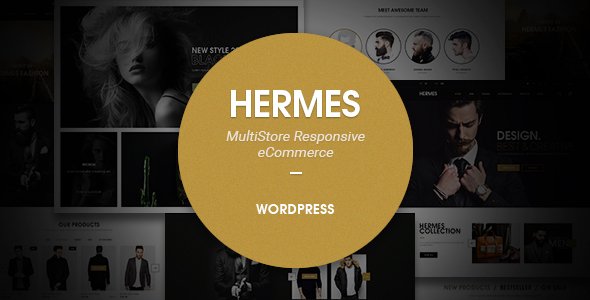
Stuck on your Hermes WordPress theme? Let's fix it.
No endless back-and-forth. Just send us the details and we'll get it done.
No obligation · Replies within 1 hour · Quote within 1 day
Setup · Customization · Bug fixes · WooCommerce integration
About Hermes WP Theme
Hermes is a WordPress theme by Lionthemes88 built for news, magazine, and blog-style websites. It ships with a clean editorial layout, multiple homepage templates, and support for popular page builders. The theme is structured around high-volume content display, making it a practical choice for publishers who need category-heavy front pages, featured post sliders, and grid-based article listings.
Hermes includes WooCommerce compatibility, translation support, and a widget-rich sidebar system. It works with Elementor and the classic WordPress editor. Out of the box, performance is reasonable, though image-heavy configurations will need extra attention. Lionthemes88 provides documentation and theme updates through ThemeForest, where Hermes is sold. For sites moving beyond basic setup, the theme offers enough flexibility to support custom layouts without requiring a full rebuild.
Get matched with a Hermes developer in under one day
Tell us about your Hermes project. Small fixes, Hermes theme customization, or a full website build, whatever you need, we've got it covered.
We'll connect you to the right Hermes developers, define the scope, and get everything 100% clear.
You'll get one estimate, hire your preferred developer, and start collaborating.
Hermes has enough configuration depth that small mistakes, like conflicting plugins, misconfigured ad zones, or poorly structured category templates, can quietly hurt your site. Hiring through Codeable means you get a vetted WordPress developer who has worked with themes like Hermes before. No hiring risk, no guesswork. You post your project, get matched within 24 hours, and receive a free estimate before any work starts. It’s a straightforward way to get the site you actually planned for.
Pros
- Multiple homepage templates designed specifically for news and magazine layouts
- Built-in support for Elementor, making visual editing straightforward
- WooCommerce compatibility allows adding a shop without a separate theme
- Rich widget areas and sidebar system suited to ad-heavy publisher sites
- Translation-ready with RTL support for multilingual and international publications
Cons
- Options panel can feel cluttered, with settings spread across multiple sections
- Default demo content import can be slow and occasionally incomplete
- Mobile menu behaviour on some templates needs CSS fixes to work cleanly
- Limited native AMP support, which matters for mobile-first news sites
- Lionthemes88 support response times on ThemeForest can be inconsistent
Who is Hermes for?
Online News Portal
Hermes handles high post volumes well. Its category-based homepage blocks let editors surface fresh content across multiple topics without manual updates. The grid and list layouts work for both breaking news and evergreen articles. Publishers running regional news sites or vertical-specific portals will find the structure matches their editorial workflow closely.
Personal Blog
For writers who publish regularly, Hermes keeps reading-focused. The single post layout is clean, with good spacing and sidebar options for related posts and newsletter sign-ups. It works without a page builder if you prefer writing directly in the block editor, which keeps things fast and simple for solo bloggers.
Niche Magazine Site
Food, travel, tech, fitness – any content-heavy niche fits the Hermes structure. Featured image handling is strong, and the homepage templates let you mix article types visually. Category pages can be customised to reflect different content priorities, so a recipes section can look distinct from a product review section.
Affiliate Review Site
Hermes suits affiliate sites that rely on article volume and clear calls to action. The layout supports comparison tables, review post formats, and prominent CTA placement. Combined with WooCommerce or a link management plugin, it functions well for sites where click-through rate from editorial content is the primary goal.
Community or Club Website
Sports clubs, local groups, and community organisations can use Hermes for event announcements, news updates, and member information. The widget system makes it easy to display upcoming events, social feeds, and contact details alongside regular posts. It won’t require heavy development work to get a functional, presentable site live.

Customizing Hermes
Hermes gives you a solid starting point, but most serious projects need work beyond the Theme Customizer. Typography, colour schemes, and header layouts are adjustable through the built-in options panel. However, getting a truly distinct design, restructuring post templates, or building out custom category pages usually requires someone who knows the theme well.
A Hermes expert can modify the theme properly without breaking update compatibility. That means using child themes, targeted CSS, and PHP hooks rather than editing core files. Common customisation requests include custom ad placements, unique homepage widget zones, and performance tuning for high-traffic news sites. If you have specific layout requirements that the default options don’t cover, working with a specialist saves time and avoids the usual trial-and-error approach most site owners face.
Recommended plugins for Hermes
Hermes pairs well with several WordPress plugins. WooCommerce adds a shop layer for merchandise or digital downloads. WPForms or Contact Form 7 handles reader submissions and contact pages. For ad management, Advanced Ads integrates cleanly with the theme’s widget areas.
If your publication needs better load times, a caching plugin like WP Rocket combined with image optimisation will make a noticeable difference. You can read more about that on our WordPress performance page. For organic search traffic, structured SEO work is worth investing in, which our WordPress SEO service covers in detail.
Not sure which plugins to use? This WordPress plugins directory covers the most popular options with reviews and setup guides.
Hermes common issues
Hermes theme homepage not displaying posts correctly
This usually comes down to widget configuration or category assignment. Hermes homepage blocks pull content from specific categories. If posts aren’t showing, check that the assigned categories have published posts and that the widget settings match. Also verify that the correct homepage template is set under Settings > Reading. If you’re using a cached homepage, clear it after making changes. Our WordPress bug fixing service can diagnose this quickly if the issue persists.
Hermes WordPress theme slow loading on mobile
Hermes loads multiple CSS files and JavaScript assets by default. On mobile, this creates noticeable delay, especially on slower connections. Start by installing a caching plugin like WP Rocket and enabling CSS/JS minification. Compress your featured images before upload, and consider a CDN for static assets. If the theme is loading scripts on pages that don’t need them, script management plugins can help. Persistent performance issues may need a developer to audit the load order properly.
Hermes theme header layout broken after update
Header breakage after a theme update usually means a child theme wasn’t in use, and custom CSS was overwritten. If you edited the parent theme files directly, those changes are now gone. Restore from a backup if available, then set up a child theme going forward. If the issue is a genuine bug introduced in the update, check the Lionthemes88 ThemeForest comments section for a known fix, or roll back to the previous version while waiting for a patch.
Hermes theme not compatible with Elementor plugin
Hermes officially supports Elementor, but conflicts can occur when both the theme’s built-in scripts and Elementor’s scripts load simultaneously. First, ensure both the theme and Elementor are fully updated. Deactivate other plugins temporarily to rule out a three-way conflict. If specific Elementor widgets don’t render correctly inside Hermes templates, the issue is often a CSS specificity clash that can be resolved with targeted overrides in a child theme stylesheet.
Hermes FAQ
Yes, Hermes is designed with news and magazine publishing in mind. It includes multiple homepage layouts, category-based content blocks, and a featured post slider that suit editorial workflows. It handles high post volumes reasonably well. For high-traffic news sites, you will want additional performance work on top of the default setup, but structurally it fits the format.
Hermes supports Elementor. Most sections of the theme can be edited visually using the Elementor page builder. Some theme-specific templates, like the homepage widget areas, are controlled through the WordPress Customizer rather than Elementor directly. For full-page designs, Elementor works without major issues. Conflicts can appear if the theme and plugin versions are out of sync.
Hermes includes a one-click demo import option accessible through the theme settings panel after installation. You’ll need the recommended plugins active before importing. The process pulls in pages, posts, widgets, and settings from the demo. Import times vary depending on your host. If the import stalls or comes in incomplete, increasing PHP memory limits on your server usually resolves it.
Hermes is WooCommerce compatible. You can add a shop section to a Hermes-powered site without switching themes. Standard WooCommerce pages, product listings, and cart functionality work with the theme’s styling. Some design adjustments may be needed to match the shop pages to your editorial layout, particularly for product category pages and checkout templates.
Migrating an existing site to Hermes means moving your content, reconfiguring menus and widgets, and rebuilding page layouts to match the new theme’s structure. Posts and pages transfer cleanly, but your current design won’t carry over automatically. If your old theme used a different page builder, those layouts will need rebuilding. Our WordPress migration service handles this without data loss.
Hire a Hermes WordPress Developer
Whether you need a layout rebuilt from scratch, a performance overhaul, or a specific feature added to your Hermes site, we can match you with the right developer. Work is delivered through Codeable, so every developer is pre-vetted. Post your project, get a free estimate, and only move forward if it feels right. No obligation, no risk. Get your free estimate here and have a developer matched within 24 hours.
You'll need a free Codeable account so developers can ask questions and send their quotes.