Himmelen WordPress Theme
by dedalx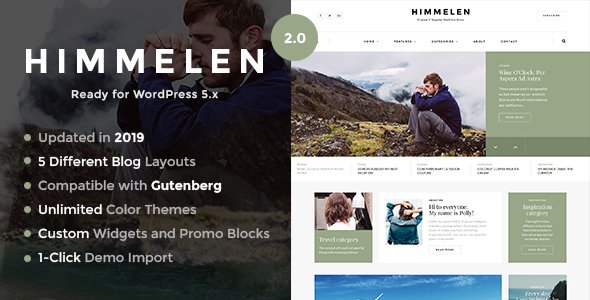
Stuck on your Himmelen WordPress theme? Let's fix it.
No endless back-and-forth. Just send us the details and we'll get it done.
No obligation · Replies within 1 hour · Quote within 1 day
Setup · Customization · Bug fixes · WooCommerce integration
About Himmelen WP Theme
Himmelen is a WordPress theme built by dedalx, designed around clean Scandinavian-inspired aesthetics. The name means “the sky” in Norwegian, and the visual style reflects that — lots of white space, minimal clutter, and a calm typographic hierarchy. It suits content-focused sites where readability matters more than flashy effects.
The theme is lightweight by design. It loads fast out of the box and works well with the WordPress block editor, making it a practical choice for bloggers, small studios, and portfolio owners who want something polished without spending hours configuring settings. Customization is handled through the native WordPress Customizer, keeping things familiar for users who prefer to avoid page builders. If you need a theme that gets out of the way and lets your content breathe, Himmelen is worth a close look.
Get matched with a Himmelen developer in under one day
Tell us about your Himmelen project. Small fixes, Himmelen theme customization, or a full website build, whatever you need, we've got it covered.
We'll connect you to the right Himmelen developers, define the scope, and get everything 100% clear.
You'll get one estimate, hire your preferred developer, and start collaborating.
Most Himmelen issues — broken layouts after updates, plugin conflicts, or customizations that need proper child theme structure — are faster to fix with an experienced developer than without one. FoxyConcept works through Codeable, a vetted network where every developer is screened before taking client projects. You get a free estimate before committing to anything. No retainers, no guessing on costs. Just qualified WordPress developers who know what they are doing and can get your Himmelen site working the way you need it to.
Pros
- Minimal, clean design that prioritizes readability over visual noise
- Lightweight codebase means fast page load times without extra optimization effort
- Works natively with the WordPress block editor without requiring a page builder
- Scandinavian aesthetic suits blogs, portfolios, and editorial sites well
- Standard WordPress Customizer controls keep the learning curve low for new users
Cons
- Limited built-in layout options compared to multipurpose themes like Astra or Kadence
- WooCommerce styling is basic and requires custom CSS for anything beyond a simple shop
- No dedicated theme panel means some advanced settings are hard to find or missing entirely
- Smaller developer community means fewer third-party tutorials and resources available
- Update frequency from dedalx has been inconsistent, which can create compatibility concerns over time
Who is Himmelen for?
Personal Blog
Himmelen’s typographic clarity and white space make it a strong fit for personal blogs. Long-form posts are easy to read, and the minimal sidebar options keep the focus on writing. A developer can set up custom post categories, reading time indicators, and a clean archive structure that keeps regular readers engaged without distracting UI.
Photography Portfolio
The theme’s minimal framing lets images carry the page, which works well for photographers showing portfolio work. Full-width image support and clean gallery layouts suit visual-first content. A Himmelen developer can configure custom gallery post types and lightbox integration so the presentation matches the quality of the photography itself.
Small Creative Studio
Small agencies and creative studios benefit from Himmelen’s clean aesthetic when presenting services and past work. It communicates professionalism without overdesign. Custom case study templates, a contact form setup, and a services page built in the block editor can all be configured without needing a heavy page builder on top.
Lifestyle or Travel Site
Lifestyle and travel content depends on strong imagery paired with readable copy. Himmelen handles both without forcing the content into rigid templates. Category pages, featured post sections, and Instagram feed integrations can be added by a developer to keep the site fresh and browsable for returning visitors.
Online Magazine or Editorial Site
For editorial sites publishing regularly across multiple categories, Himmelen’s clean grid and post hierarchy give editors a solid base. Custom archive templates, author bio sections, and related post modules can be developed on top of the theme to support a structured editorial workflow without relying on a full magazine-style theme.

Customizing Himmelen
Out of the box, Himmelen gives you control over colors, typography, header layout, and sidebar positioning through the WordPress Customizer. That covers most basic branding needs. But if your project demands more — custom post layouts, adjusted spacing, a unique header structure, or child theme development — you will need to work with code.
A Himmelen expert can build a child theme that protects your changes across updates, add custom CSS for brand-specific styling, and configure block patterns that match your content workflow. They can also integrate plugins without breaking the theme’s lightweight character. If you have tried tweaking Himmelen and hit a wall, working with a developer who knows the theme saves you from trial and error and avoids introducing technical debt into your site.
Recommended plugins for Himmelen
Himmelen works well with WooCommerce for simple shop setups, though complex product catalogs may need additional styling. Yoast SEO and Rank Math both integrate cleanly. For performance, pairing the theme with a caching plugin like WP Rocket and a CDN keeps load times tight. Check out our WordPress performance service if you want proper optimization beyond plugin defaults.
If organic search matters to your site, structured content and schema markup can be added without touching the theme core. Our WordPress SEO service handles that layer separately. Contact form plugins like WPForms and Gravity Forms drop in without layout issues.
Not sure which plugins to use? This WordPress plugins directory covers the most popular options with reviews and setup guides.
Himmelen common issues
Himmelen theme layout broken after WordPress update
Layout breaks after a WordPress core update usually point to a missing child theme or a conflict introduced by the update. If you are editing the parent theme directly, those changes get overwritten. The fix is to audit what changed, restore any missing template files, and move your customizations into a proper child theme. Our WordPress bug fixing service handles this quickly and prevents the same issue from happening again after the next update.
Himmelen custom fonts not loading correctly
Custom fonts failing to load in Himmelen are usually caused by incorrect enqueue hooks in the functions.php file, a caching plugin serving stale assets, or a Content Security Policy blocking external font sources. Check the browser console for 404 errors or blocked requests first. If the font is hosted externally via Google Fonts, verify the URL is correct and not being blocked by your server configuration. A developer can resolve this and set it up cleanly in a child theme.
Himmelen sidebar not showing on pages
The sidebar in Himmelen is controlled by page templates and widget area settings in the Customizer. If a sidebar disappears, check whether the correct page template is selected under Page Attributes in the editor. Also confirm that the sidebar widget area has active widgets assigned to it. Plugin conflicts can sometimes deregister sidebars. Switching to a default theme temporarily helps isolate whether the issue is theme-specific or plugin-related.
Himmelen theme slow loading on mobile
Slow mobile load times with Himmelen are usually caused by unoptimized images, render-blocking scripts, or no caching in place. Run a PageSpeed Insights test to identify the specific bottlenecks. Compress images before uploading, enable lazy loading, and configure a caching plugin. If scripts from plugins are loading on every page unnecessarily, a developer can conditionally load them only where needed. See our WordPress performance service for a full audit.
Himmelen FAQ
Himmelen is technically compatible with WooCommerce, but the default styling is minimal. Product pages, cart, and checkout will function correctly, but they will look unstyled compared to a dedicated WooCommerce theme. For a simple shop with a few products, it works fine with some custom CSS. For larger stores, additional developer work is needed to match the theme’s aesthetic across all WooCommerce templates.
Himmelen works with Elementor, but it is not built for page builders. The theme’s strengths are in the native block editor. Using Elementor adds page weight and can conflict with Himmelen’s default styles, requiring extra CSS to resolve overlaps. If your workflow relies on drag-and-drop building, a theme designed specifically for page builders will give you a smoother experience than Himmelen.
Creating a child theme for Himmelen involves creating a new folder in your themes directory with a style.css file that references the parent theme using the Template header field, plus a functions.php file to enqueue the parent stylesheet. Upload it via FTP or the theme editor, then activate it. All your customizations go into the child theme. This protects your changes when the parent theme updates.
Update frequency from dedalx has been inconsistent. The theme works with current WordPress versions, but it is worth checking the theme’s changelog on its distribution page before committing to it for a long-term project. If updates are infrequent, maintaining compatibility with future WordPress releases may require a developer to patch things manually. WordPress maintenance support can cover this ongoing.
Yes, migrating an existing site to Himmelen is possible. The process involves activating the theme, rebuilding or adjusting page layouts to match Himmelen’s template structure, and re-configuring widgets and menus. Content itself migrates cleanly since it is stored in the database. For sites with complex layouts built in another theme or page builder, a developer will need to rebuild those pages manually. See our WordPress migration service for help.
Hire a Himmelen WordPress Developer
Whether you need a full Himmelen site built from scratch, a child theme set up, a layout fixed, or custom functionality added, FoxyConcept can help. Work is scoped clearly before anything starts. Get a free estimate and describe what you need — you will hear back within 24 hours with a clear plan and price. No obligation to hire, no upfront payment required.
You'll need a free Codeable account so developers can ask questions and send their quotes.