HolaMed WordPress Theme
by like-themes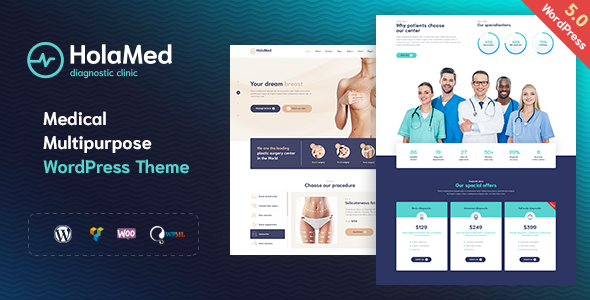
Stuck on your HolaMed WordPress theme? Let's fix it.
No endless back-and-forth. Just send us the details and we'll get it done.
No obligation · Replies within 1 hour · Quote within 1 day
Setup · Customization · Bug fixes · WooCommerce integration
About HolaMed WP Theme
HolaMed is a medical WordPress theme by like-themes, built specifically for healthcare websites. It covers clinics, hospitals, private practices, and medical service providers who need a clean, professional online presence without hiring a custom developer from scratch.
The theme includes a pre-built appointment booking system, doctor profile pages, department listings, and service sections. It ships with Elementor compatibility, giving you drag-and-drop control over layouts. Page speed is reasonably well-optimised out of the box, and the design follows a clean, minimal aesthetic that works well for patient-facing sites. Like-themes provides documentation and updates, making HolaMed a solid starting point for any medical or health-focused WordPress project.
Get matched with a HolaMed developer in under one day
Tell us about your HolaMed project. Small fixes, HolaMed theme customization, or a full website build, whatever you need, we've got it covered.
We'll connect you to the right HolaMed developers, define the scope, and get everything 100% clear.
You'll get one estimate, hire your preferred developer, and start collaborating.
HolaMed is feature-rich for a medical theme, but features and a working, polished website are two different things. Getting the booking system to behave exactly how your clinic needs it, styling doctor profiles consistently, and making sure mobile experience is smooth all take real development time.
The developers at FoxyConcept work through Codeable, a vetted platform where only experienced WordPress specialists are accepted. You get a proper developer, not a generalist. Work is scoped clearly and delivered without surprises.
Pros
- Pre-built appointment booking system included, no extra plugin required to get started
- Doctor and staff profile pages are structured and easy to populate with content
- Elementor compatibility gives non-developers control over page layouts
- Department and service archive pages are already templated, saving setup time
- Clean, minimal medical design that works well on mobile without heavy customisation
Cons
- Built-in booking system lacks advanced scheduling logic like multi-staff or paid appointments
- Heavy use of Elementor widgets can slow down page load times on shared hosting
- Customising the theme beyond demo layouts often requires PHP knowledge
- Documentation from like-themes is basic and doesn't cover edge-case configurations
- Limited built-in multilingual support, requiring additional plugins for bilingual practices
Who is HolaMed for?
Private Medical Clinic
Private clinics benefit from HolaMed’s department and doctor listing structure. Patients can browse specialisms, read staff profiles, and book appointments directly. A developer can extend this with custom intake forms, location-based filtering for multi-site clinics, and integration with practice management software.
Dental Practice
Dental practices need clear service pages, a visible booking button, and patient trust signals. HolaMed’s layout handles all three well. A HolaMed expert can add before-and-after galleries, treatment pricing tables, and a patient review section that feeds from Google or a custom post type.
Physiotherapy Centre
Physiotherapy centres often need condition-specific landing pages and referral contact forms. HolaMed’s service archive works as a starting point. With custom development, you can build out injury-specific pages, connect to an external booking calendar, and add downloadable exercise sheets for patients.
Mental Health Practice
Mental health practices need a calm, reassuring design and strict privacy in any contact or booking forms. HolaMed’s clean aesthetic fits well. A developer can configure anonymous enquiry forms, remove unnecessary data collection from the booking system, and ensure GDPR compliance across the site.
Medical Diagnostic Lab
Diagnostic labs need test listing pages, result turnaround information, and clear referral pathways. HolaMed’s service structure adapts to this use case. Custom development can add a test catalogue with filtering, an online sample collection booking tool, and a secure result download area for patients.

Customizing HolaMed
HolaMed gives you a decent foundation, but most clinics need changes that go beyond what the default options allow. Adjusting the appointment booking flow, creating custom doctor archive pages, or integrating a patient portal all require hands-on WordPress development.
A HolaMed expert can rework the theme’s layout without breaking future updates, hook into the booking system to add custom fields, and configure Elementor templates that match your brand properly. If you need multilingual support for a bilingual practice, or want to connect HolaMed to a CRM or EHR system, that work needs someone who knows the theme structure well. A developer familiar with HolaMed saves hours of trial and error and gets it done right the first time.
Recommended plugins for HolaMed
HolaMed pairs well with several plugins that extend its core functionality. WooCommerce works if you sell health products or paid consultations. Amelia or Bookly can replace or enhance the built-in booking system with more advanced scheduling logic. WPML or Polylang handles multilingual setups cleanly.
For performance, caching plugins like WP Rocket and image optimisation tools make a real difference on image-heavy doctor profile pages. Need better search visibility for your clinic? Pairing HolaMed with a solid WordPress SEO strategy helps patients find you. For site speed improvements, check out our WordPress performance service.
Not sure which plugins to use? This WordPress plugins directory covers the most popular options with reviews and setup guides.
HolaMed common issues
HolaMed appointment booking not sending confirmation emails
Email delivery issues in HolaMed’s booking system are usually caused by WordPress using PHP mail, which many hosts block. Install an SMTP plugin like WP Mail SMTP and connect it to a transactional email service such as Mailgun or SendGrid. Check that the booking confirmation email template is active in the theme settings. If emails still fail, the issue may be in how the booking plugin is configured, not the SMTP setup itself. A WordPress bug fix can identify the exact cause quickly.
HolaMed Elementor templates not loading correctly after update
After a HolaMed or Elementor update, saved templates can lose styling or fail to render correctly. First, clear all caches including server-side, Elementor’s CSS cache, and any CDN cache. Regenerate Elementor’s CSS files via the Elementor tools panel. If templates are still broken, there may be a widget conflict introduced in the update. Disable recently updated plugins one by one to isolate the problem. If the issue persists, check our bug fixing service for faster resolution.
HolaMed doctor profile page layout broken on mobile
Mobile layout issues on HolaMed doctor profile pages are often caused by custom column settings in Elementor that don’t have a mobile breakpoint override applied. Open the profile template in Elementor, switch to mobile view, and check each column’s width and padding settings. Also check if any custom CSS in the theme options is overriding responsive styles. If like-themes added a recent update that changed base styles, re-check the profile template after updating to ensure nothing was reset.
HolaMed theme slow page load on homepage with sliders
Slider sections are one of the biggest performance killers in HolaMed. Large uncompressed hero images, autoplay video backgrounds, and multiple slider instances add significant load weight. Start by compressing all slider images using a tool like ShortPixel or Imagify. Consider replacing decorative sliders with static hero sections. Enable lazy loading and use a caching plugin like WP Rocket. For deeper improvements, visit our WordPress performance service for a full audit.
HolaMed FAQ
HolaMed is a solid choice for clinics, private practices, and medical service providers. It includes built-in booking, doctor profiles, and department pages. It works well if you need a professional-looking site without building from scratch. For more complex needs like CRM integrations or custom patient portals, you’ll want a developer to extend it properly.
Yes. HolaMed is built with Elementor compatibility in mind. Most of the demo layouts use Elementor page builder, so you can edit content visually without touching code. Some sections are controlled by theme-specific widgets or shortcodes, so advanced layout changes may still require developer input to avoid breaking the theme structure.
HolaMed doesn’t include native multilingual support. You’ll need a plugin like WPML or Polylang to run a bilingual or multilingual clinic site. Both plugins work with Elementor, which HolaMed relies on. Setup requires careful configuration to translate theme strings, custom post types like doctors and departments, and the booking system fields correctly.
Adding custom fields to the HolaMed booking form depends on which booking plugin the theme uses. If it’s the built-in system, custom fields typically require code changes via a child theme or a custom plugin. Using a third-party booking plugin like Amelia gives you a visual field builder without touching code. A developer can set this up cleanly without disrupting the existing booking flow.
HolaMed can be migrated to a new host without layout issues if the migration is done correctly. This means moving both the database and all files together, updating site URLs, and clearing caches after the move. Elementor stores layout data in the database, so a partial migration that only copies files will break the design. For a smooth transfer, see our WordPress migration service.
Hire a HolaMed Developer
Whether you need HolaMed set up from scratch, customised to match your clinic’s brand, or fixed after something broke, FoxyConcept can help. Our developers know the theme well and work across booking systems, Elementor layouts, plugin integrations, and performance improvements.
Post your project and get a free, no-obligation estimate within 24 hours. Get your free estimate here and tell us what you need. No commitment required.
You'll need a free Codeable account so developers can ask questions and send their quotes.