Home Fix WordPress Theme
by designthemes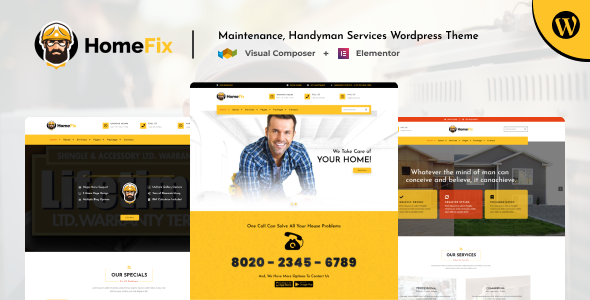
Stuck on your Home Fix WordPress theme? Let's fix it.
No endless back-and-forth. Just send us the details and we'll get it done.
No obligation · Replies within 1 hour · Quote within 1 day
Setup · Customization · Bug fixes · WooCommerce integration
About Home Fix WP Theme
Home Fix is a WordPress theme built by Designthemes for home services businesses. It targets contractors, plumbers, electricians, HVAC companies, and general repair services that need a professional site fast.
The theme ships with multiple pre-built demos, a drag-and-drop page builder, service listing layouts, appointment request forms, and a clean visual hierarchy designed to turn visitors into leads. It supports WooCommerce for selling service packages or products, and includes pricing tables, team sections, and testimonial blocks out of the box.
Built on a solid foundation with Bootstrap, Home Fix is responsive and works across mobile and desktop without additional configuration. It is compatible with major plugins and receives regular updates from Designthemes.
Get matched with a Home Fix developer in under one day
Tell us about your Home Fix project. Small fixes, Home Fix theme customization, or a full website build, whatever you need, we've got it covered.
We'll connect you to the right Home Fix developers, define the scope, and get everything 100% clear.
You'll get one estimate, hire your preferred developer, and start collaborating.
Home Fix has enough moving parts that getting it production-ready on your own takes longer than most people expect. A vetted developer through Codeable can set up the theme correctly from day one, configure the right plugins, and build out pages that actually convert visitors into calls and enquiries.
Every developer on Codeable has been through a strict vetting process. You get a free estimate with no obligation, and the work is backed by Codeable’s satisfaction guarantee. It is a straightforward way to get expert help without the risk of hiring the wrong person.
Pros
- Multiple niche-specific demos for different home service categories included
- WooCommerce compatible for selling service packages or products directly
- Built-in appointment request forms and lead capture sections
- Responsive layout works on mobile without extra configuration
- Regular updates from Designthemes with ongoing plugin compatibility maintenance
Cons
- Demo content requires significant time to replace with real business information
- Page builder dependency means switching builders later creates layout problems
- Theme options panel can feel cluttered and overwhelming for non-developers
- Out-of-the-box page speed scores are average and need optimisation work
- Some advanced layouts only work correctly with specific Designthemes plugins installed
Who is Home Fix for?
Plumbing and Drainage Companies
Home Fix works well for plumbing businesses that need to list services clearly, display emergency contact options prominently, and capture leads from local search traffic. The layout supports service area pages, pricing tables, and customer review sections that build trust before someone picks up the phone.
Electrical Contractors
Electrical contractors benefit from the clean service listing format and the ability to highlight certifications, insurance details, and project galleries. The theme handles both domestic and commercial positioning well, and the contact forms make it easy to route enquiries to the right team member.
HVAC and Heating Services
HVAC companies often need seasonal landing pages for heating and cooling campaigns. Home Fix supports this through its flexible page templates. Combined with a booking plugin, customers can schedule service calls directly from the site without needing to call during business hours.
General Home Renovation Companies
Renovation companies need strong visual layouts to showcase before and after project photos. Home Fix includes portfolio and gallery sections that display work clearly. The team section helps put faces to the business, which matters when customers are inviting tradespeople into their homes.
Cleaning and Maintenance Services
Cleaning and property maintenance businesses benefit from the pricing table and subscription-style layouts in Home Fix. You can display weekly, monthly, or one-off service tiers clearly. The testimonial blocks and star rating display help convert first-time visitors who are comparing multiple local providers.

Customizing Home Fix
Home Fix gives you a lot through the WordPress Customizer and its built-in options panel, but most serious builds need work beyond the defaults. Changing the demo layout to match your brand, setting up custom service areas, building location-specific landing pages, or wiring up booking plugins takes real development time.
A Home Fix expert can handle things like custom header layouts, child theme setup to protect your changes during updates, performance tuning, and integrating third-party tools like Calendly, Google Maps, or CRM forms. They can also restructure the demo content to fit your actual services instead of leaving placeholder copy and images in place.
If you want the theme to work exactly how your business needs it to, working with a developer saves hours of trial and error.
Recommended plugins for Home Fix
Home Fix works well with plugins that extend its core functionality. Popular additions include WooCommerce for online payments, WPForms or Gravity Forms for lead capture, and booking plugins like Bookly or Simply Schedule Appointments for client scheduling.
For sites that need more traffic, pairing the theme with proper WordPress SEO work makes a real difference for local search rankings. If speed is a concern, dedicated WordPress performance optimisation can bring Core Web Vitals scores up significantly, especially on media-heavy service pages.
Not sure which plugins to use? This WordPress plugins directory covers the most popular options with reviews and setup guides.
Home Fix common issues
Home Fix theme not displaying correctly after WordPress update
After a WordPress core update, visual breaks in Home Fix usually come from a conflict between the updated core and the theme’s bundled scripts or the page builder. The first step is to check whether the Designthemes plugins that came with the theme are also up to date. If the issue started immediately after the update, temporarily switching to a default theme helps confirm whether the theme itself is the source. A developer can audit the conflict and patch it without breaking your existing layout. If recurring issues are affecting your site, a WordPress bug fixing service can resolve them properly.
Home Fix demo import not working or incomplete
Home Fix demo imports fail most often because of PHP memory limits, execution time limits, or missing required plugins. Before importing, increase max_execution_time and memory_limit in your php.ini or wp-config.php. Make sure all required Designthemes plugins are activated first. If the import completes but images are missing, run the media regeneration tool. For persistent failures, a developer can import the demo content manually using WP CLI or migration tools.
Home Fix contact form not sending emails
Email delivery issues with Home Fix contact forms are almost always a server mail configuration problem, not a theme bug. Most shared hosting environments block the default PHP mail function. Install an SMTP plugin like WP Mail SMTP and connect it to a transactional email service such as Mailgun, SendGrid, or even Gmail SMTP. Set up a test email after configuring it. If you are also seeing form submissions disappear entirely, check whether a security plugin is blocking form submissions as false positives.
Home Fix theme slow loading on mobile
Home Fix loads several scripts and stylesheets that are not always needed on every page. On mobile, this adds up quickly. Start by enabling a caching plugin and setting it to minify and combine CSS and JS files. Compress images using a plugin like ShortPixel or Imagify before they are uploaded. If the theme is using a slider on the homepage, consider replacing it with a static image on mobile. For a full audit and fix, a WordPress performance optimisation service will get scores to a level that meets current standards.
Home Fix FAQ
Yes. Home Fix is specifically designed for local home service businesses. The demos cover common contractor niches and the layout prioritises phone numbers, service lists, and contact forms above the fold. It works well for sole traders and small teams that need a professional online presence without building from scratch. The main challenge is replacing the demo content, which takes time but is straightforward with the right help.
Home Fix is built around its own Designthemes page builder. Elementor can technically be used alongside it, but mixing two page builders on the same site creates conflicts and bloat. If you want to use Elementor, the cleaner approach is to disable the bundled builder and rebuild your pages in Elementor. A developer can handle this transition cleanly without losing your existing content structure.
Home Fix does not include a booking system by default. The most common approach is to install a plugin like Bookly, Simply Schedule Appointments, or Amelia and embed the booking form into service pages. Each plugin has different features for payment handling, staff scheduling, and email reminders. A developer can integrate the right one based on how your business actually takes bookings and match the form styling to your theme.
Yes, your content stays in the WordPress database when you switch themes. Posts, pages, images, and form submissions are not affected by a theme change. What changes is how that content is displayed. Some page layouts built with the old theme’s page builder will need to be rebuilt in Home Fix. For a smooth transition, WordPress migration support ensures nothing is lost and the new theme is configured correctly from the start.
Cost depends entirely on scope. A basic setup using a demo as a starting point with your own content and branding can take 8 to 15 hours of developer time. A fully custom layout with booking integration, SEO setup, and performance work takes longer. Getting a fixed-price quote before starting means you know the cost upfront. Request a free estimate to get a clear number for your specific project.
Hire a Home Fix WordPress Developer
Need a Home Fix developer who knows the theme inside out? Through FoxyConcept and Codeable, you can get matched with a vetted WordPress specialist within 24 hours. They will handle setup, customisation, plugin integration, or any fixes your current site needs.
There is no obligation after you receive your estimate. Get a free estimate today and see exactly what your project will cost before committing to anything.
You'll need a free Codeable account so developers can ask questions and send their quotes.