Honshi WordPress Theme
by Ninetheme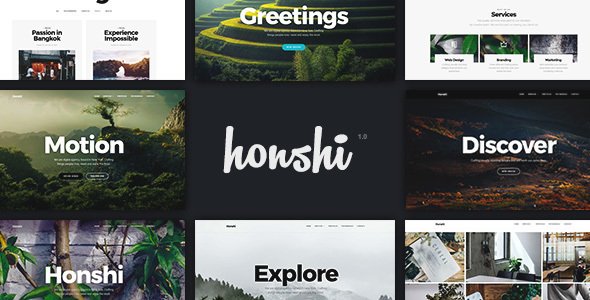
Stuck on your Honshi WordPress theme? Let's fix it.
No endless back-and-forth. Just send us the details and we'll get it done.
No obligation · Replies within 1 hour · Quote within 1 day
Setup · Customization · Bug fixes · WooCommerce integration
About Honshi WP Theme
Honshi is a multipurpose WordPress theme built by Ninetheme. It ships with multiple pre-built demo sites covering business, portfolio, agency, and creative niches. The theme is built on Elementor, so every section is editable through a visual drag-and-drop interface without touching code.
Ninetheme designed Honshi to be fast out of the box, with clean markup and minimal bloat. It supports WooCommerce for online stores, WPML for multilingual sites, and Contact Form 7 for lead generation. The bundled premium plugins — including Elementor Pro equivalents and a slider plugin — add real value to the purchase price.
If you need a polished, agency-style WordPress site without hiring a designer from scratch, Honshi gives you a solid starting point with a well-maintained codebase and regular theme updates from Ninetheme.
Get matched with a Honshi developer in under one day
Tell us about your Honshi project. Small fixes, Honshi theme customization, or a full website build, whatever you need, we've got it covered.
We'll connect you to the right Honshi developers, define the scope, and get everything 100% clear.
You'll get one estimate, hire your preferred developer, and start collaborating.
Most WordPress developers can install a theme. Fewer understand how a specific theme like Honshi handles its template hierarchy, custom widgets, and Elementor global settings. Getting those details wrong means visual inconsistencies, slow load times, or layouts that break on update.
FoxyConcept works through Codeable, a vetted network of WordPress specialists. Every developer has been screened for quality. You post your project, get a clear estimate within 24 hours, and only proceed if you’re satisfied. No risk, no obligation.
Pros
- Ships with multiple full demo sites covering business, agency, and portfolio niches
- Built entirely on Elementor, making visual edits accessible without coding
- Bundles premium plugins including Slider Revolution at no extra cost
- WooCommerce-ready with styled shop, cart, and product detail templates included
- Ninetheme provides regular updates and maintains compatibility with current WordPress versions
Cons
- Heavy reliance on Elementor means significant page builder lock-in from day one
- Demo import can be slow and occasionally requires manual cleanup of placeholder content
- Bundled plugins add to page weight if not configured carefully after installation
- Limited documentation depth for advanced customization beyond basic Elementor edits
- Support response times from Ninetheme can be slow during high-demand periods
Who is Honshi for?
Creative Agency Website
Honshi’s agency demo includes bold full-width layouts, animated counters, team sections, and case study templates. Creative studios can launch a polished agency site quickly by importing the demo and replacing placeholder content with their own work and branding.
Freelance Portfolio
The portfolio layouts in Honshi support grid and masonry displays with filterable categories. Freelancers in design, photography, or development can showcase their work clearly without needing custom development. The Elementor-based structure makes ongoing updates straightforward.
Small Business Services Site
Honshi includes service page templates, testimonial sections, and contact layouts suited to local businesses. Plumbers, consultants, and trades businesses can adapt a demo to their service area quickly. Adding a contact form and Google Maps takes minutes inside Elementor.
WooCommerce Online Store
WooCommerce integration is built into Honshi with styled product grids, single product pages, and cart templates. Shops selling physical or digital products get a consistent visual experience across the store without writing custom CSS or overriding templates manually.
Corporate Company Website
Honshi’s corporate demo includes structured page layouts with feature blocks, stat sections, and team profiles. Medium-sized companies that need a professional online presence without a lengthy design process can use this as a solid foundation and customize it to brand standards.

Customizing Honshi
Honshi customization goes well beyond swapping colors in the WordPress Customizer. The theme relies on Elementor as its primary builder, meaning layout changes, section reordering, and typography adjustments all happen visually. Header and footer layouts are also controlled through a dedicated builder, giving you full control over navigation structure.
For more advanced work — custom post types, ACF field integration, child theme development, or WooCommerce template overrides — you need someone who knows the Honshi codebase specifically. A Honshi expert understands how Ninetheme structures its templates, which hooks are safe to use, and how to extend the theme without breaking future updates.
FoxyConcept connects you with developers who have hands-on Honshi experience, so your customization gets done right the first time.
Recommended plugins for Honshi
Honshi works well with a range of WordPress plugins that extend its core functionality. For e-commerce, WooCommerce slots in cleanly with styled product pages included in the theme. For performance, pairing Honshi with a caching layer and image optimization pays off quickly — see our WordPress performance service for details.
Need better search rankings? Honshi’s clean HTML structure works well alongside proper SEO configuration — our WordPress SEO service covers the technical setup. Other common extensions include WPForms, Yoast SEO, WPML for multilingual builds, and Slider Revolution, which Ninetheme bundles with the theme license.
Not sure which plugins to use? This WordPress plugins directory covers the most popular options with reviews and setup guides.
Honshi common issues
Honshi Elementor widgets not displaying correctly after update
This usually happens when the Honshi Core plugin bundled with the theme is out of sync with the theme version. First, update both the theme and its companion plugin together. If widgets still appear broken, regenerate the Elementor CSS cache from Elementor > Tools > Regenerate Files. Plugin conflicts with third-party Elementor addons are another common cause — deactivate them one by one to isolate the issue. Persistent problems may need a developer to audit the Elementor global settings. Visit our bug fixing service if you need hands-on help.
Honshi demo import fails or imports incomplete content
Honshi demo imports require the correct set of companion plugins to be active before importing. Check that all required plugins listed by the theme installer are activated. Increase PHP memory limit and max execution time in your hosting environment — demo imports are resource-intensive. If the import completes but images are missing, run the WordPress media regeneration tool. For persistent failures, importing the XML content manually and then applying the Customizer settings separately often works around server timeout issues.
Honshi header layout breaking on mobile devices
Honshi uses a dedicated header builder separate from the main Elementor canvas. Mobile breakpoint settings for the header are controlled inside that builder, not in the standard Customizer. Open the header template in Elementor, switch to mobile preview mode, and check that mobile nav toggle settings are enabled. If the hamburger menu is not appearing, check that the mobile menu widget is placed in the correct header column for small screens. CSS overrides from child theme files can also interfere with the built-in mobile header logic.
Honshi WooCommerce pages not matching theme styling
Honshi ships with WooCommerce template files inside the theme’s woocommerce/ folder. If your shop pages look unstyled, the theme’s WooCommerce stylesheet may not be loading — check for plugin conflicts with other WooCommerce customizer plugins. If you’ve updated WooCommerce and templates look broken, Honshi’s bundled WooCommerce templates may be outdated and need refreshing. Avoid editing theme template files directly; copy them to a child theme first. Our WordPress bug fixing service can resolve template mismatches quickly.
Honshi FAQ
Yes. Honshi is built on Elementor and works alongside Elementor Pro without conflicts. The theme uses its own Elementor widgets via the Honshi Core plugin. You can use Elementor Pro features like the Theme Builder, popups, and advanced widgets on top of those included with the theme. Running both together is a common setup for sites that need greater design flexibility.
Yes. Honshi includes dedicated WooCommerce template files and stylesheet support. Product grids, single product pages, cart, and checkout are all styled to match the theme. It works with standard WooCommerce out of the box. For heavily customized stores, a developer may need to adjust template files or extend the default WooCommerce behavior beyond what the theme covers natively.
After activating Honshi, the theme will prompt you to install required and recommended plugins. Once those are active, go to Appearance > Import Demo Data and choose your preferred demo. The process imports pages, settings, and media. A stable server environment with adequate PHP memory and execution time limits is important for a clean import.
Technically yes, but it’s not practical. Honshi’s demo content and page layouts are built entirely with Elementor widgets. Switching to another builder or the block editor means rebuilding every page from scratch. The theme’s core functionality and companion plugins are also tightly tied to Elementor. If you prefer a block editor-first workflow, Honshi is not the right theme choice.
Yes, Honshi is WPML compatible. Ninetheme lists WPML support in the theme documentation. You can translate page content, custom widgets, and WooCommerce product data using WPML alongside the theme. String translations for theme-specific text are handled through WPML’s string translation module. For complex multilingual builds, a developer experienced with both Honshi and WPML will save significant setup time.
Hire a Honshi Developer
Whether you need a full Honshi site built from a demo, a specific layout customized, or a WooCommerce store integrated into an existing Honshi install, FoxyConcept can match you with the right developer. Work is scoped clearly before anything starts.
Get a free estimate — describe your project, receive a proposal within 24 hours, and hire only when you’re confident. No upfront payment required to get started.
You'll need a free Codeable account so developers can ask questions and send their quotes.