Hope WordPress Theme
by ThemeREX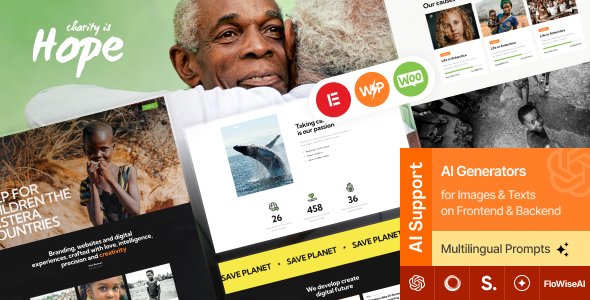
Stuck on your Hope WordPress theme? Let's fix it.
No endless back-and-forth. Just send us the details and we'll get it done.
No obligation · Replies within 1 hour · Quote within 1 day
Setup · Customization · Bug fixes · WooCommerce integration
About Hope WP Theme
Hope is a WordPress theme built by ThemeREX, designed primarily for non-profit organisations, charities, and fundraising campaigns. It ships with a drag-and-drop page builder, multiple pre-built demo layouts, and built-in donation integration through popular plugins like GiveWP.
The theme supports cause and campaign pages out of the box, making it straightforward to showcase projects, set fundraising goals, and accept online donations without heavy custom development.
ThemeREX themes are known for their dense feature sets. Hope follows that pattern, offering event management, volunteer registration forms, and blog layouts tailored to mission-driven organisations. Setup takes time to get right, but the foundation is solid for charities that need a professional web presence without starting from scratch.
Get matched with a Hope developer in under one day
Tell us about your Hope project. Small fixes, Hope theme customization, or a full website build, whatever you need, we've got it covered.
We'll connect you to the right Hope developers, define the scope, and get everything 100% clear.
You'll get one estimate, hire your preferred developer, and start collaborating.
Hope has a lot of built-in functionality, but getting it configured correctly for a live charity or non-profit site takes real WordPress experience. Codeable connects you with vetted developers who have worked with ThemeREX themes and understand donation plugin integrations, campaign page architecture, and performance optimisation. You get a fixed estimate before any work starts, no vague hourly billing. If you need the site done properly the first time, working with a specialist through our WordPress development service is the most direct route.
Pros
- Pre-built cause and campaign page templates reduce setup time for charities
- Native GiveWP compatibility makes donation forms functional without custom work
- Multiple homepage demo layouts available for import, covering different non-profit styles
- Built-in event management supports volunteer drives and fundraising event listings
- ThemeREX Options panel provides deep control over typography, colours, and layout without touching code
Cons
- The options panel is dense and poorly organised, making it slow to navigate for new users
- Demo content import can be unreliable and sometimes requires manual cleanup after import
- Mobile responsiveness needs manual checking on campaign pages, some elements do not scale cleanly
- Theme updates have historically been slow, which can create compatibility gaps with newer WordPress versions
- Heavy shortcode use in page content makes switching themes later a messy process
Who is Hope for?
Charity and Non-Profit Organisations
Hope is built specifically for charities. The cause listing templates, donation goal progress bars, and team pages align with what non-profits actually need on a website. You can present your mission clearly, list your programmes, and direct visitors toward donating or getting involved without needing custom post types built from scratch.
Fundraising Campaigns
Campaign-specific landing pages are straightforward to build with Hope. Each campaign can have its own goal tracker, story section, and donation button. GiveWP handles the payment side. This setup works well for time-limited fundraising drives where you need a focused page that converts visitors into donors quickly.
Church and Religious Communities
Churches benefit from Hope’s event calendar integration, sermon or news blog layout, and the ability to accept tithes or donations online. The theme’s warm visual style and flexible homepage layouts suit congregational websites that need to communicate schedules, leadership, and community activities in one place.
NGOs and International Aid Organisations
NGOs running projects across multiple regions can use Hope’s cause post type to document each project separately, with progress updates and associated donation forms. The theme handles multi-project sites well when set up correctly, though you may need a developer to organise the taxonomy and navigation structure cleanly.
Community Volunteer Programmes
Volunteer-driven organisations can use Hope’s registration form support and event listings to recruit and manage volunteers. The homepage layouts work well for communicating impact stats, upcoming events, and volunteer opportunities. Pair it with a contact form plugin and you have a functional recruitment tool for community programmes.

Customizing Hope
Hope gives you a large number of options inside the ThemeREX Options panel, covering typography, colour schemes, header styles, and footer layouts. Most changes are straightforward, but the sheer number of settings can be disorienting if you are not familiar with how ThemeREX structures its panels.
Customising donation campaign pages, cause layouts, or volunteer forms beyond the built-in defaults usually requires working with shortcodes or editing template files directly. If you want a unique look that moves away from the demo designs, that work adds up quickly.
A Hope expert can map out what is achievable through settings alone versus what needs custom code, saving you hours of trial and error. Whether you need a branded donation flow, a custom event archive, or a modified homepage layout, working with someone who knows the theme well makes the difference between a finished site and a half-built one.
Recommended plugins for Hope
Hope works well with GiveWP for donation management and The Events Calendar for scheduling fundraising events and volunteer drives. WooCommerce can be added for merchandise or branded goods shops.
For site speed, image optimisation and caching plugins are worth adding early, particularly if you are embedding video or running multiple campaign pages. See our WordPress performance service for help with this.
If organic traffic matters to your charity, pairing Hope with a proper SEO setup is worth the effort. Our WordPress SEO service covers technical and on-page work for themes like Hope.
Not sure which plugins to use? This WordPress plugins directory covers the most popular options with reviews and setup guides.
Hope common issues
Hope theme demo import not working in WordPress
Demo import failures in Hope are usually caused by server timeout limits or PHP memory restrictions. Increase your PHP memory limit to at least 256MB and set the maximum execution time to 300 seconds in your php.ini or wp-config.php. If the import still stalls, try importing content in stages using the native WordPress importer rather than the one-click ThemeREX tool. If you are stuck, our WordPress bug fixing service can sort it quickly.
GiveWP donation form not displaying correctly on Hope theme
GiveWP display issues inside Hope are often caused by CSS conflicts between the theme’s built-in styles and GiveWP’s own form styling. Open your browser inspector and look for conflicting margin, padding, or width rules on the form container. Adding targeted CSS overrides in the Hope customiser usually resolves the layout. If the form is not appearing at all, check that the GiveWP shortcode is placed inside a standard content block, not inside a ThemeREX-specific element.
Hope theme slow to load on mobile
Hope loads a significant amount of CSS and JavaScript on every page, which affects mobile performance. Start by enabling a caching plugin and deferring non-critical scripts. Use a tool like GTmetrix to identify which scripts are blocking render on mobile. ThemeREX themes often load all scripts globally, including ones only needed on specific pages. A developer can conditionally load assets based on page type to reduce the initial payload significantly. See our WordPress performance service for full optimisation.
Hope theme layout broken after WordPress update
Layout breaks after a WordPress core update usually point to a JavaScript conflict or a deprecated function in the theme. First, check the browser console for JS errors. If the issue appeared immediately after updating, temporarily switch to a default theme to confirm the theme is the source. Check if ThemeREX has released a patch update for Hope and apply it. If the break is in a customised area, a child theme conflict may be involved. Log the exact symptoms before reaching out for support.
Hope FAQ
Yes, Hope is specifically designed for non-profits and charities. It includes cause and campaign post types, donation goal display, event listings, and volunteer form support. These features are built into the theme rather than bolted on, which makes it a practical starting point for mission-driven organisations that need a functional site without extensive custom development.
Hope is compatible with GiveWP. Donation forms created in GiveWP can be embedded on cause pages or campaign landing pages using shortcodes. The theme’s styling generally accommodates GiveWP’s form output, though minor CSS adjustments are sometimes needed to align fonts and button colours with your site’s design. Test forms in a staging environment before going live.
Always use a child theme before making CSS or PHP changes to Hope. If you have been editing the parent theme directly, those changes will be overwritten on update. Before updating, back up your site, check the ThemeREX changelog for breaking changes, and test the update on a staging site first. Customisations stored in the ThemeREX Options panel are saved to the database and are not affected by theme file updates.
Hope was built around the ThemeREX page builder and its own shortcode system. Elementor can be installed alongside it, but conflicts with the native builder are common, particularly in page templates that rely on ThemeREX-specific layouts. Using Elementor on Hope works better on standard pages than on cause or campaign templates. A clean Elementor setup on Hope usually requires a developer to sort out the template hierarchy.
Migrating a Hope theme site involves moving your database, files, and plugin licences to the new host. Update the site URL in the database after migration and clear any cached files. ThemeREX plugin licences may need to be deactivated on the old host and reactivated on the new one. Our WordPress migration service handles this process fully if you want it done without risk.
Hire a Hope WordPress Developer or Hope Expert
Need someone to build, customise, or fix your Hope theme site? We match you with a developer who knows ThemeREX themes and non-profit WordPress builds. Post your project and get a free estimate within 24 hours, no obligation to hire. Get your free estimate here and describe what you need. Whether it is a full site build, a specific feature, or a broken layout, we will connect you with the right person for the job.
You'll need a free Codeable account so developers can ask questions and send their quotes.