Hostinza WordPress Theme
by XpeedStudio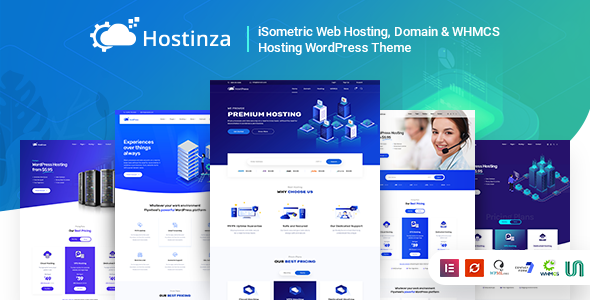
Stuck on your Hostinza WordPress theme? Let's fix it.
No endless back-and-forth. Just send us the details and we'll get it done.
No obligation · Replies within 1 hour · Quote within 1 day
Setup · Customization · Bug fixes · WooCommerce integration
About Hostinza WP Theme
Hostinza is a WordPress theme built specifically for web hosting companies, domain registrars, and tech service providers. Developed by XpeedStudio, it comes with a pre-built WHMCS integration, domain search functionality, and pricing table layouts designed to convert visitors into paying customers.
The theme ships with Elementor compatibility and includes multiple homepage demos tailored to different hosting niches — shared hosting, VPS, dedicated servers, and reseller packages. It supports WooCommerce for selling hosting plans directly through WordPress without WHMCS if preferred.
Hostinza is a focused theme. It does one job well: making hosting businesses look credible and professional. The design is clean, the page speed is reasonable out of the box, and the feature set covers most of what a small to mid-sized hosting company needs to launch and sell online.
Get matched with a Hostinza developer in under one day
Tell us about your Hostinza project. Small fixes, Hostinza theme customization, or a full website build, whatever you need, we've got it covered.
We'll connect you to the right Hostinza developers, define the scope, and get everything 100% clear.
You'll get one estimate, hire your preferred developer, and start collaborating.
Hostinza covers the design side well, but building a hosting business site that actually converts takes more than a theme install. Structure, copy, WHMCS integration, and page speed all matter. Finding a developer who knows this theme specifically saves time and avoids mistakes that are expensive to fix later.
Through Codeable, you get matched with vetted WordPress developers who have real experience with hosting-niche sites. No guesswork, no generic freelancers. Just developers who understand what hosting customers need to see before they buy.
Pros
- Built-in WHMCS integration with a domain search widget that connects directly to your registrar
- Multiple pre-built demos covering shared hosting, VPS, dedicated, and reseller niches
- Elementor-based page builder makes layout changes accessible without custom code
- WooCommerce compatibility allows direct hosting product sales without a billing platform
- Clean pricing table layouts with feature comparison rows built into the theme
Cons
- WHMCS Bridge plugin requires a paid license, adding cost on top of the theme purchase
- Demo content import can be inconsistent and sometimes requires manual cleanup
- Limited header and footer layout options without adding third-party plugins
- Some built-in widgets are basic and need Elementor Pro for more advanced functionality
- Design feels dated compared to newer hosting themes without significant customization
Who is Hostinza for?
Shared Hosting Provider
Hostinza’s shared hosting demo includes plan comparison tables, uptime guarantee sections, and a clean feature breakdown layout. It’s well-suited for smaller hosting companies launching their first professional site or replacing an outdated template. The WHMCS integration handles order processing so the WordPress side stays focused on converting visitors.
Domain Registrar
The domain search widget is one of Hostinza’s strongest features for registrars. It connects to WHMCS to check availability in real time and supports multiple TLD pricing displays. Combined with a clean landing page layout, it gives domain-focused businesses a straightforward way to drive searches and registrations from the homepage.
VPS and Cloud Hosting Company
Hostinza includes a VPS-specific demo with specs-focused layouts, server configuration tables, and performance-oriented copy sections. For cloud and VPS providers, these layouts communicate technical differentiation clearly. Custom plan pages can be built out in Elementor to match specific server tiers and billing cycles without starting from a blank page.
Reseller Hosting Business
Reseller businesses need to communicate value to a different buyer than end consumers. Hostinza supports dedicated reseller landing pages with white-label messaging and margin-focused plan structures. WHMCS handles the billing backend so resellers can manage client accounts separately while the WordPress front end handles marketing and onboarding.
Managed WordPress Hosting Service
Managed WordPress hosting is a growing niche and Hostinza’s clean layout adapts well to it. Feature sections can highlight staging environments, automatic backups, and developer tools. Pairing the theme with a strong content strategy and proper SEO setup helps managed hosting providers compete for search traffic against larger players.

Customizing Hostinza
Hostinza gives you a solid starting point, but most hosting businesses need customization before the site is genuinely ready — custom plan structures, tailored domain search UI, specific WHMCS order flows, or a design that matches existing branding.
Working with a Hostinza expert means you skip the trial-and-error phase. An experienced developer knows how WHMCS connects to the WordPress front end, where the Elementor widgets can be extended, and how to modify pricing tables without breaking mobile layouts.
Common customizations include building out additional service pages, integrating live chat tools, setting up custom headers per page, and adjusting the domain checker widget to match specific TLD offerings. A developer who knows the theme structure handles these changes faster and cleaner than starting from scratch.
Recommended plugins for Hostinza
Hostinza works well with several plugins that extend its core functionality. WHMCS Bridge is the most common addition, connecting your billing system directly to your WordPress front end. For performance, caching plugins like WP Rocket pair well with the theme’s structure — see our WordPress performance service for more on that.
WooCommerce adds direct hosting product sales without WHMCS. Elementor Pro unlocks additional widget types for building out service pages. If organic search matters to your business, pairing Hostinza with proper on-page work through a WordPress SEO service will help you rank for local and niche hosting queries.
Not sure which plugins to use? This WordPress plugins directory covers the most popular options with reviews and setup guides.
Hostinza common issues
Hostinza domain search not working
The domain search widget in Hostinza connects to WHMCS via API credentials entered in the theme settings. If the search returns errors or no results, check that your WHMCS URL, API identifier, and API secret are entered correctly with no trailing slashes. Also confirm that the WHMCS API has the correct IP whitelisted. If credentials look correct, the issue is often a WHMCS API access restriction or a plugin conflict. Our WordPress bug fixing service can diagnose this quickly.
Hostinza WHMCS connection error
WHMCS connection errors in Hostinza usually come down to one of three things: incorrect API credentials in the theme settings, a mismatched WHMCS version that changed API endpoints, or an SSL mismatch between your WordPress domain and WHMCS installation. Start by regenerating your WHMCS API keys and re-entering them. If the error persists, check that both domains use valid HTTPS and that the WHMCS Bridge plugin version matches your current WHMCS install. A developer can resolve this quickly if the cause isn’t obvious.
Hostinza pricing table not displaying correctly on mobile
Pricing table display issues on mobile in Hostinza are usually caused by the table’s column structure overflowing on smaller screens. The built-in tables are not always responsive by default. You can address this by switching to an Elementor-based pricing table widget with proper mobile breakpoints set, or by adding custom CSS to control column stacking. If you’re using the theme’s native tables, check for conflicting CSS from other plugins. Our bug fixing team can patch this without breaking the desktop layout.
Hostinza demo import failed or incomplete
Demo import failures in Hostinza are common and usually happen because of server memory limits, upload size restrictions, or a timeout during the XML import process. First, increase your PHP memory limit to at least 256MB and set max execution time to 300 seconds in your php.ini or wp-config.php. If the import completes but images or widgets are missing, try importing just the content XML manually through WordPress and then applying the customizer settings separately. Partial imports often need manual cleanup afterward.
Hostinza FAQ
Yes. Hostinza works without WHMCS. You can use WooCommerce instead to sell hosting plans directly through WordPress. The domain search and order management features that rely on WHMCS will not be available, but the design layouts, pricing tables, and page structure all function independently. For smaller hosting businesses not ready for WHMCS, the WooCommerce route is a practical starting point.
Yes, Hostinza is built to work with Elementor. The theme’s demo pages are built using Elementor layouts and most of the pre-built sections are editable through the Elementor page builder. Some advanced widget types require Elementor Pro. The free version of Elementor covers most standard edits including text, images, pricing tables, and basic layout changes.
You connect Hostinza to WHMCS through the theme settings panel. You’ll need your WHMCS installation URL, API identifier, and API secret key from your WHMCS admin area. Enter these in the Hostinza WHMCS settings section. The WHMCS Bridge plugin is also commonly used alongside the theme to embed WHMCS pages directly into your WordPress front end for a unified experience.
Technically yes, but it’s not ideal. Hostinza is designed specifically for hosting and tech service businesses. The layouts, terminology, and built-in features all assume a hosting context. Using it for an unrelated business would require significant customization to remove hosting-specific elements. A general-purpose theme would be a better starting point for non-hosting projects.
Hostinza is sold through ThemeForest, which includes six months of support from XpeedStudio with the purchase. Updates are provided for the lifetime of the theme. Extended support can be purchased at checkout or after the initial period expires. For ongoing maintenance beyond theme support, a WordPress maintenance plan covers updates, backups, and security monitoring.
Hire a Hostinza Developer
Need help setting up Hostinza, connecting WHMCS, customizing pricing pages, or fixing something that broke after an update? A specialist handles it faster and cleaner than working through it alone.
Post your project and get a free estimate with no obligation to hire. Matched with a vetted Hostinza developer within 24 hours. Get your free estimate here and see what a proper build looks like.
You'll need a free Codeable account so developers can ask questions and send their quotes.