Hostme v2 WordPress Theme
by AivahThemes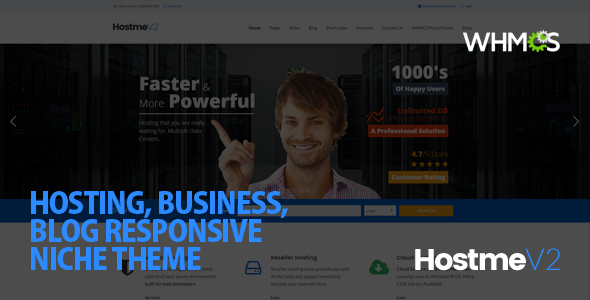
Stuck on your Hostme v2 WordPress theme? Let's fix it.
No endless back-and-forth. Just send us the details and we'll get it done.
No obligation · Replies within 1 hour · Quote within 1 day
Setup · Customization · Bug fixes · WooCommerce integration
About Hostme v2 WP Theme
Hostme v2 is a WordPress theme by AivahThemes built specifically for hosting companies, WHMCS-integrated service providers, and tech businesses. It ships with pre-built pages for hosting plans, domain search, pricing tables, and support sections — everything a hosting brand needs without starting from scratch.
The theme supports WHMCS integration out of the box, which sets it apart from generic business themes. Layouts are clean, load times are reasonable, and the page builder compatibility makes it accessible for non-developers. If you’re running a web hosting business or selling SaaS plans, Hostme v2 gives you a focused starting point rather than a blank canvas with dozens of irrelevant features.
AivahThemes maintains the product with periodic updates, and documentation covers the core setup steps well enough for most users to get started independently.
Get matched with a Hostme v2 developer in under one day
Tell us about your Hostme v2 project. Small fixes, Hostme v2 theme customization, or a full website build, whatever you need, we've got it covered.
We'll connect you to the right Hostme v2 developers, define the scope, and get everything 100% clear.
You'll get one estimate, hire your preferred developer, and start collaborating.
Most Hostme v2 problems — broken WHMCS connections, misaligned pricing tables, slow page speeds, mobile layout issues — come down to configuration gaps or code conflicts that take time to diagnose without experience. Hiring through Codeable means you get a vetted WordPress developer who has worked on real hosting sites, not someone learning on your project. FoxyConcept operates through Codeable’s platform, so every estimate is free and there’s no obligation to proceed until you’re confident in the plan.
Pros
- Includes WHMCS integration support out of the box, which most generic themes don't offer
- Pre-built pages for hosting plans, domain search, and pricing tables reduce initial setup time significantly
- Clean, minimal design that works well for tech and hosting brands without heavy customization
- Page builder compatible, so non-technical users can adjust content and layout without touching code
- AivahThemes provides documentation and periodic updates, keeping the theme reasonably current
Cons
- Niche focus means it's a poor fit for businesses outside hosting, tech, or SaaS without significant rework
- WHMCS integration requires correct server configuration — it won't work automatically on all hosting environments
- Design customization beyond the options panel requires child theme development to avoid update conflicts
- Demo content import can be inconsistent and may not reflect exactly what you see in the live preview
- Support from AivahThemes can be slow during high-volume periods, with limited response on complex issues
Who is Hostme v2 for?
Shared Hosting Providers
Shared hosting companies get the most out of Hostme v2. The pre-built pricing table layouts, feature comparison sections, and WHMCS billing integration map directly to how shared hosting is sold. You can have a functional, professional-looking site without rebuilding core pages from scratch.
Domain Registrars
Domain registrars can use Hostme v2’s domain search block as a lead-capture tool front and center on the homepage. Paired with a WHMCS connection for real-time availability checks, it gives visitors a reason to stay on-site and convert without clicking through to a separate portal.
VPS and Dedicated Server Resellers
VPS and dedicated server resellers benefit from the theme’s tiered pricing layouts and spec-comparison tables. The design is technical enough to communicate server resources clearly, and plan pages can be built out individually for different server configurations without the layout falling apart.
Managed WordPress Hosting Companies
Managed WordPress hosting companies can frame Hostme v2 around their specific service stack. The theme’s structure supports feature callouts, uptime guarantees, and support level comparisons — all the elements that differentiate managed hosting from cheap shared alternatives in the buyer’s mind.
SaaS and Software Subscription Businesses
SaaS businesses selling subscription software can adapt Hostme v2’s pricing and feature sections to non-hosting products. The clean layout and pricing table blocks translate well to software tiers, and the overall design aesthetic fits the expectations of a tech-savvy B2B or B2C audience.

Customizing Hostme v2
Out of the box, Hostme v2 covers the basics. Where things get more involved is when you need custom pricing logic, modified WHMCS flows, unique landing page layouts, or brand-specific design changes that go beyond what the theme options panel allows.
A Hostme v2 expert can adjust the theme’s template files without breaking update compatibility, build child theme overrides for complex layout changes, and connect third-party billing or support tools cleanly. If you need a hosting site that looks distinct from the default demo, that work requires someone who knows both WordPress and the specific structure AivahThemes used in Hostme v2.
FoxyConcept connects you with developers who have hands-on experience with hosting-niche themes like this one — not generalists guessing their way through the code.
Recommended plugins for Hostme v2
Hostme v2 works well with WooCommerce for product upsells, WHMCS Bridge for billing integration, and contact form plugins like WPForms or Gravity Forms for support ticket flows. Adding live chat tools such as Tidio or Crisp is straightforward given the theme’s clean HTML structure.
For speed improvements, pairing the theme with a caching plugin and a CDN makes a measurable difference — see our WordPress performance service if that’s a priority. If organic traffic matters, structured on-page work via our WordPress SEO service can help your hosting plans rank for local or niche terms.
Not sure which plugins to use? This WordPress plugins directory covers the most popular options with reviews and setup guides.
Hostme v2 common issues
Hostme v2 WHMCS integration not working
WHMCS integration failures in Hostme v2 are almost always tied to incorrect API credentials, a misconfigured WHMCS URL, or server-level restrictions blocking the connection. Start by verifying the API identifier and secret in both WHMCS and the theme settings panel. Check that your WHMCS installation is accessible from the WordPress server and that no firewall or mod_security rule is blocking requests. If the issue persists, a developer can inspect the actual API calls and server logs to identify what’s being rejected. Our WordPress bug fixing service covers this type of integration fault.
Hostme v2 pricing table not displaying correctly
Pricing table display problems in Hostme v2 usually come from a CSS conflict with another plugin, a missing shortcode attribute, or a page builder element that didn’t import cleanly. Open browser dev tools and check for console errors or overridden styles. If you’re using a caching plugin, clear all caches and test again. For shortcode-based tables, confirm every required parameter is present — missing values cause columns to collapse or render blank. Persistent layout issues typically need a developer to trace the conflicting rule and patch it in a child theme stylesheet.
Hostme v2 demo import failed or incomplete
Failed or partial demo imports in Hostme v2 are common on servers with low PHP memory limits or short max execution times. Set memory_limit to at least 256MB and max_execution_time to 300 seconds in your php.ini or wp-config.php. Try the import again on a clean WordPress install with no other plugins active. If images fail to import, download them manually from the theme demo and replace placeholders. If the structure still doesn’t match the preview, a developer can replicate the demo layout page by page using the included templates.
Hostme v2 mobile menu broken or not opening
A broken mobile menu in Hostme v2 is almost always caused by a JavaScript conflict — usually another plugin loading a different version of jQuery or a script that runs before the theme’s menu script finishes loading. Disable plugins one by one to isolate the conflict. Also check whether the theme’s main JavaScript file is actually loading by inspecting the network tab in browser dev tools. If a plugin is the cause, load order can often be adjusted without removing it. If the theme JS file is missing or throwing errors, a child theme fix or plugin replacement may be needed. See our bug fixing service for faster resolution.
Hostme v2 FAQ
Yes, Hostme v2 is built with WHMCS integration as a core feature. It connects to your WHMCS installation via API to display hosting plans, domain search, and billing options directly within your WordPress site. The integration requires correct API setup and a compatible WHMCS version — it doesn’t work automatically without configuration.
Hostme v2 is generally compatible with WPBakery, which AivahThemes references in the theme documentation. Elementor compatibility varies and is not officially guaranteed. Some users run both without issues; others encounter layout conflicts. Testing on a staging site before going live is recommended if you plan to use Elementor with this theme.
Technically possible, but it requires significant rework. The theme’s structure, pre-built pages, and design language are all oriented toward hosting and tech services. Adapting it for retail, restaurants, or other unrelated niches would take more effort than choosing a purpose-built theme for that industry from the start.
All custom changes should be made in a child theme. If you’ve edited the parent theme files directly, those changes will be overwritten when AivahThemes releases an update. Create a child theme, move your CSS and template overrides there, then update the parent theme safely. If you haven’t used a child theme yet, a developer can migrate your changes before the next update.
Hostme v2 can work alongside WooCommerce for selling products or add-ons, but WooCommerce is not a highlighted integration in the theme’s core feature set. Basic compatibility exists, though WooCommerce template pages may not inherit the Hostme v2 styling without additional CSS work to bring them in line with the rest of the site.
Hire a Hostme v2 Developer
Whether you need the initial setup done properly, a custom layout built, a WHMCS integration fixed, or ongoing changes as your hosting business grows, a dedicated Hostme v2 developer saves you time and avoids costly mistakes. FoxyConcept delivers WordPress work through Codeable’s vetted network — you get a real specialist, a clear scope, and a free estimate before anything starts. Get your free estimate today and describe exactly what you need.
You'll need a free Codeable account so developers can ask questions and send their quotes.