HumanRights WordPress Theme
by WPCharming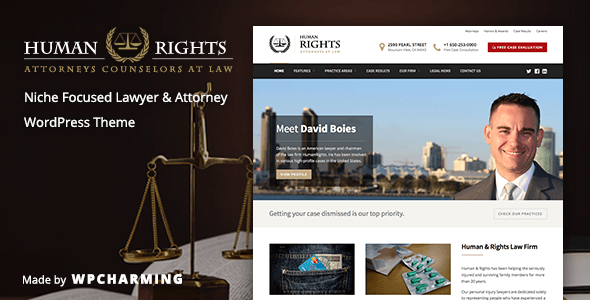
Stuck on your HumanRights WordPress theme? Let's fix it.
No endless back-and-forth. Just send us the details and we'll get it done.
No obligation · Replies within 1 hour · Quote within 1 day
Setup · Customization · Bug fixes · WooCommerce integration
About HumanRights WP Theme
HumanRights is a WordPress theme by WPCharming built specifically for nonprofits, NGOs, advocacy groups, and social justice organizations. It ships with a clean, cause-driven design that puts your mission front and center without burying visitors in unnecessary clutter.
The theme includes pre-built page templates for campaigns, donation integration, event listings, and team profiles. It is compatible with popular plugins like GiveWP and The Events Calendar, so you can get a functional site running quickly.
WPCharming has focused on accessibility in HumanRights, following WCAG guidelines to ensure your content reaches as wide an audience as possible. The theme is translation-ready and supports RTL languages, which matters when your work crosses borders and communities.
Get matched with a HumanRights developer in under one day
Tell us about your HumanRights project. Small fixes, HumanRights theme customization, or a full website build, whatever you need, we've got it covered.
We'll connect you to the right HumanRights developers, define the scope, and get everything 100% clear.
You'll get one estimate, hire your preferred developer, and start collaborating.
HumanRights is straightforward to install but harder to get right at scale. Donation flows, accessibility compliance, multilingual setups, and campaign page structures all need careful implementation. FoxyConcept connects you with vetted WordPress developers through Codeable, a platform where every developer has passed a rigorous vetting process. You get a specialist who has worked with cause-driven sites, not a generalist figuring it out as they go.
Pros
- Purpose-built for nonprofits with campaign, donation, and event templates included out of the box
- Follows WCAG accessibility guidelines, important for organizations serving diverse communities
- RTL and translation-ready, suitable for international human rights organizations
- Compatible with GiveWP and Charitable for donation management without custom development
- Clean, distraction-free design keeps focus on mission content and calls to action
Cons
- Default Customizer options are limited compared to page-builder-based themes, so design flexibility requires code edits
- No built-in petition or advocacy form tool; you need a third-party plugin for those features
- Demo content import can be inconsistent, sometimes requiring manual cleanup after setup
- WPCharming's update frequency is slower than larger theme shops, which can create plugin compatibility gaps
- Limited third-party documentation and community tutorials outside of WPCharming's own support
Who is HumanRights for?
Human Rights NGOs
NGOs working on human rights documentation, reporting, and public awareness need a site that communicates urgency without feeling chaotic. HumanRights provides structured templates for reports, country profiles, and donation drives, giving field-focused organizations a solid web presence without requiring a full design team.
Legal Aid Organizations
Legal aid providers can use HumanRights to publish case intake information, attorney directories, and resource libraries. The theme’s clean layout works well for text-heavy content like legal guides and policy documents, while the event templates support clinic scheduling and community outreach announcements.
Advocacy and Campaign Groups
Campaign-focused groups benefit from HumanRights’ homepage flexibility, which lets you rotate featured campaigns, embed petition tools, and push donation calls to action. Combine it with Mailchimp for WordPress and you have a basic but functional outreach infrastructure ready to go from day one.
Refugee and Asylum Support Services
Organizations supporting refugees and asylum seekers often need multilingual sites that load reliably on low-bandwidth connections. HumanRights’ RTL support and lean codebase make it a practical choice, especially when paired with WPML for language switching and performance optimization for slower networks.
Academic and Research Institutes
Research institutes and university human rights centers need a professional site for publishing papers, hosting event recordings, and profiling faculty. HumanRights handles this well with its post and page templates, though a developer may be needed to create custom publication archive structures or integrate institutional databases.

Customizing HumanRights
HumanRights works with the WordPress Customizer, giving you control over colors, typography, header layouts, and homepage sections without touching code. That said, matching the theme to a specific brand identity often requires going deeper than the default options.
A HumanRights expert can modify campaign page layouts, adjust donation call-to-action placement, create custom post types for case files or reports, and integrate third-party fundraising tools. If your organization needs multilingual support through WPML or Polylang, that setup also benefits from hands-on configuration.
WPCharming provides documentation, but organizations with complex needs, multiple stakeholders, or tight launch timelines will get further faster by working with someone who knows the theme’s structure and its limitations from the inside.
Recommended plugins for HumanRights
HumanRights pairs well with GiveWP or Charitable for donation management and The Events Calendar for rallies, webinars, and community meetings. For outreach, pairing it with Mailchimp for WordPress keeps your supporter lists connected to your site activity.
For better discoverability, combining the theme with solid WordPress SEO work helps your campaigns rank for the terms people actually search. If load times are slow due to media-heavy content, targeted WordPress performance optimization can make a real difference for visitors on mobile or slower connections.
Not sure which plugins to use? This WordPress plugins directory covers the most popular options with reviews and setup guides.
HumanRights common issues
HumanRights theme donation button not working
Donation button failures in HumanRights usually trace back to a JavaScript conflict with GiveWP or Charitable, or a missing form shortcode. Start by deactivating other plugins one at a time to isolate the conflict. If the button renders but the modal does not open, check your browser console for JS errors. A misconfigured payment gateway in the plugin settings is another common cause. For persistent issues, a WordPress bug fixing service can diagnose and resolve this quickly.
HumanRights WordPress theme mobile menu not opening
Mobile menu failures in HumanRights are typically caused by a JavaScript conflict or a CSS specificity issue introduced by a child theme or plugin. Open your browser’s developer tools on mobile view and look for console errors on page load. If a caching plugin is active, clear all caches and test again. If the issue appeared after adding a new plugin, deactivate recent additions. Persistent mobile nav problems often need direct theme file inspection to resolve properly.
HumanRights theme homepage layout broken after update
Homepage layout breaks after updates are usually caused by changes to theme template files overwriting customizations made outside a child theme. If you edited theme files directly, those changes would have been lost. Restore from a backup if available, then rebuild customizations inside a child theme going forward. If you are using a page builder alongside HumanRights, check for plugin version mismatches after the update, as those frequently cause rendering issues on the front page.
HumanRights theme slow loading on image-heavy pages
Image-heavy pages in HumanRights slow down when images are not compressed or lazy-loaded. Install a plugin like Imagify or ShortPixel to compress existing uploads and automate compression on new ones. Enable lazy loading through your performance plugin so below-the-fold images do not block initial render. If you are using a shared host, server response times may also be a factor. A full WordPress performance review can identify exactly where time is being lost.
HumanRights FAQ
Yes, HumanRights is designed specifically for nonprofits and cause-driven organizations. It includes campaign templates, event layouts, and donation integration hooks that generic themes do not offer. It also follows WCAG accessibility guidelines, which matters for public-facing charity and advocacy sites. The main limitation is that advanced customization requires a developer rather than just the Customizer options.
HumanRights is compatible with GiveWP. You can place donation forms using GiveWP shortcodes anywhere in the theme’s page templates. The theme does not add any special GiveWP styling by default, so form appearance may need CSS adjustments to match your brand. Testing the integration in a staging environment before going live is recommended, especially if you are using custom donation amounts or recurring donation settings.
HumanRights is translation-ready and supports RTL languages, making it suitable for international organizations. For full multilingual functionality, you need to pair it with WPML or Polylang. These plugins are not included with the theme and require separate setup. If your organization operates across multiple countries and languages, working with a developer for the multilingual configuration will save significant time.
HumanRights does not include a built-in petition tool. You need a third-party plugin such as Signature or Ящик Петиций to add petition functionality. Once installed, you embed the form using a shortcode on any page. Some organizations use Gravity Forms or WPForms with conditional logic to capture signatures. Plugin compatibility varies, so test your chosen tool on a staging site first before adding it to a live campaign page.
WPCharming does release updates for HumanRights, but the pace is slower compared to larger theme marketplaces. Check the theme’s changelog on ThemeForest or the WPCharming site to see recent update dates. If the theme has not been updated within the last six months and a major WordPress version has shipped, test carefully on a staging site before updating WordPress itself. Outdated themes can develop plugin compatibility and security issues over time.
Hire a HumanRights WordPress Developer
Whether you need a full site build, a custom campaign layout, or help connecting your donation plugin, a specialist makes the difference. FoxyConcept delivers HumanRights development through Codeable’s vetted network. You get a free estimate within 24 hours with no obligation to proceed. Get your free estimate today and launch your cause with confidence.
You'll need a free Codeable account so developers can ask questions and send their quotes.