Humpton WordPress Theme
by ClaPat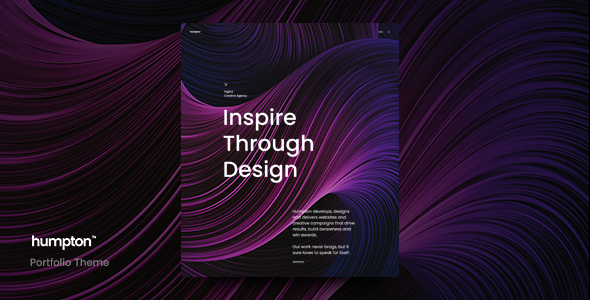
Stuck on your Humpton WordPress theme? Let's fix it.
No endless back-and-forth. Just send us the details and we'll get it done.
No obligation · Replies within 1 hour · Quote within 1 day
Setup · Customization · Bug fixes · WooCommerce integration
About Humpton WP Theme
Humpton is a WordPress theme developed by ClaPat, built for creative agencies, studios, and freelancers who want a clean, portfolio-focused layout without heavy page builder dependencies. It ships with a minimal design aesthetic, smooth scroll animations, and a structured grid system that keeps visual work front and center.
The theme is lightweight by default, which means faster load times compared to multipurpose alternatives loaded with features most sites never use. Humpton supports the WordPress block editor and includes custom post types for portfolio projects, making it practical for real client work rather than just demos.
If you need a polished online presence that loads fast and looks professional without heavy configuration, Humpton is a solid starting point. That said, customization beyond the defaults often requires developer help to get right.
Get matched with a Humpton developer in under one day
Tell us about your Humpton project. Small fixes, Humpton theme customization, or a full website build, whatever you need, we've got it covered.
We'll connect you to the right Humpton developers, define the scope, and get everything 100% clear.
You'll get one estimate, hire your preferred developer, and start collaborating.
ClaPat built Humpton with developers in mind, but that doesn’t mean every customization is straightforward for non-technical users. A Humpton developer knows where the theme’s structure can flex and where it needs child theme overrides rather than plugin workarounds.
Through Codeable, you get matched with vetted WordPress specialists who have worked with themes like Humpton before. No guesswork, no offshore marketplaces. Just a developer who can look at your specific project and tell you exactly what’s needed.
Pros
- Lightweight codebase with fast default load times compared to multipurpose themes
- Clean portfolio-focused layout that keeps visual work prominent without clutter
- Full WordPress block editor support with custom portfolio post types included
- Minimal design aesthetic that works across creative, agency, and freelance niches
- Low plugin dependency means fewer conflict points and easier long-term maintenance
Cons
- Limited built-in layout variations mean custom designs need developer work
- Smaller user community compared to major themes, so fewer community tutorials exist
- Advanced animation control requires editing theme files rather than dashboard options
- WooCommerce styling is basic and needs custom CSS to match Humpton's visual style
- Documentation is sparse, which makes troubleshooting harder without developer experience
Who is Humpton for?
Creative Agency Portfolio
Humpton’s grid-based portfolio layout works well for agencies that need to showcase multiple client projects cleanly. The structured post types keep work organized, and the minimal design ensures the client’s output stays in focus rather than competing with heavy theme elements. A developer can extend this with filterable categories and custom project detail pages.
Freelance Designer Website
Freelancers benefit from Humpton’s fast setup and professional visual output. The theme avoids the bloat common in freelancer-targeted themes, which often slow down sites unnecessarily. With minor customization, it handles service pages, a contact form, and a portfolio in a single cohesive package that doesn’t look like a template.
Photography Studio
Full-width image support and a clean grid make Humpton a practical choice for photography studios. The theme handles large image files without layout breaks, and a developer can implement lazy loading and proper srcset attributes to keep performance solid. Gallery pages and session category archives can be built on top of the existing portfolio structure.
Architecture Firm
Architecture firms need precise control over how projects are presented. Humpton’s structured layout supports detailed case studies with image sequences, project descriptions, and metadata. A Humpton developer can create custom project templates that display floor plans, location data, and build timelines alongside photography without cluttering the base design.
Independent Consultant
Independent consultants often need a site that looks credible but loads fast and stays easy to update. Humpton fits that profile well. It avoids unnecessary complexity while supporting the core pages a consultant needs: about, services, case studies, and contact. The block editor integration makes content updates manageable without developer support for routine changes.

Customizing Humpton
Humpton’s default settings get you far, but most serious projects need adjustments. Typography scaling, color systems, spacing, and layout breakpoints all benefit from hands-on work inside the theme files or via child theme overrides.
A Humpton expert can rebuild sections using custom block patterns, adjust the portfolio grid to match your exact content structure, and integrate third-party tools like contact forms, booking systems, or e-commerce without breaking the visual consistency ClaPat designed in.
Custom header behavior, sticky navigation, and animation timing are common requests that fall outside what the Customizer handles. Working with a developer who knows Humpton’s codebase directly means changes are clean and won’t break on theme updates.
Recommended plugins for Humpton
Humpton pairs well with WooCommerce if you need to sell services or products alongside a portfolio. Adding an SEO plugin is straightforward, and the theme’s clean markup means structured data can be implemented without workarounds.
For performance, image optimization and a caching layer work well with Humpton’s already lean output. If you want to extend functionality further, explore our WordPress performance services or WordPress SEO optimisation to get more from your existing setup without switching themes.
Not sure which plugins to use? This WordPress plugins directory covers the most popular options with reviews and setup guides.
Humpton common issues
Humpton theme portfolio grid not displaying correctly
Portfolio grid issues in Humpton usually trace back to image size mismatches or missing thumbnail regeneration after upload. Go to Settings > Media and confirm your thumbnail dimensions match what the theme expects. Then use a plugin like Regenerate Thumbnails to reprocess existing images. If the grid still breaks, check whether a caching plugin is serving outdated CSS. Our WordPress bug fixing service can diagnose this quickly.
Humpton WordPress theme not loading custom fonts
Custom fonts failing to load in Humpton typically means the font enqueue in the child theme is missing or incorrectly formatted. Check your functions.php for the wp_enqueue_style call and confirm the Google Fonts URL or local font path is correct. Also check your browser console for 404 errors on font files. If you’re using a caching or minification plugin, it may be stripping the font-face declarations. Clear all caches and test in an incognito window first.
Humpton theme menu not working on mobile
Mobile menu failures in Humpton are often caused by JavaScript conflicts with other plugins. Open your browser’s developer console on mobile simulation and look for JS errors. The most common culprits are optimization plugins that defer or concatenate scripts incorrectly. Try disabling script optimization temporarily to confirm. If the menu works after that, you need to exclude Humpton’s navigation script from deferral in your performance plugin settings.
Humpton theme animations broken after WordPress update
Humpton’s scroll animations rely on JavaScript libraries that can break if a WordPress update or plugin change alters script loading order. Check whether your animation library is still loading by inspecting the page source. If a caching plugin cached pages before the update, clear the cache fully and test again. Persistent issues usually mean the animation script handle was renamed or deregistered by a plugin conflict. A developer can patch this in a child theme without modifying core theme files.
Humpton FAQ
Humpton is developed by ClaPat and availability depends on the current distribution channel. Check the ThemeForest or ClaPat’s official site for licensing details. Free versions, if available, typically limit customization options or include attribution requirements. For a production site, using a properly licensed copy ensures you receive updates and support directly from the developer.
Humpton includes basic WooCommerce compatibility, but the out-of-box styling is minimal. Product pages, cart, and checkout will function correctly, but visual consistency with the rest of the theme requires custom CSS or a developer to align WooCommerce templates with Humpton’s design language. It works, but budget time for styling if your shop needs to match the portfolio aesthetic precisely.
Humpton is built around the native WordPress block editor, so it works best without an additional page builder layered on top. Elementor will technically function, but you lose Humpton’s layout system and may introduce conflicts with its animation and grid code. If you want page builder flexibility, a developer can advise whether adapting Humpton or switching themes is the better long-term decision for your project.
Create a child theme folder in wp-content/themes/, add a style.css with the Template: humpton header, and enqueue the parent theme stylesheet in a functions.php file. Activate the child theme from the WordPress dashboard. All customizations go into the child theme files so updates from ClaPat don’t overwrite your changes. This is the correct way to modify Humpton for any serious project.
Migrating to Humpton from another theme is possible but requires planning. Content migrates cleanly, but layouts built in another theme’s shortcodes or page builder blocks won’t transfer automatically. Portfolio items need to be reassigned to Humpton’s custom post types. Our WordPress migration service handles the full process, including content remapping and layout rebuilding so nothing gets lost in the switch.
Hire a Humpton Expert Developer
Whether you need a full Humpton build, a child theme, or fixes to an existing setup, working with a specialist saves time and avoids technical debt. Our developers understand ClaPat’s codebase and can scope your project accurately from the start.
Get a free estimate with no obligation to hire. You’ll receive a clear breakdown of what’s involved and a fair price before any work begins.
You'll need a free Codeable account so developers can ask questions and send their quotes.