Hyperon WordPress Theme
by Edge-Themes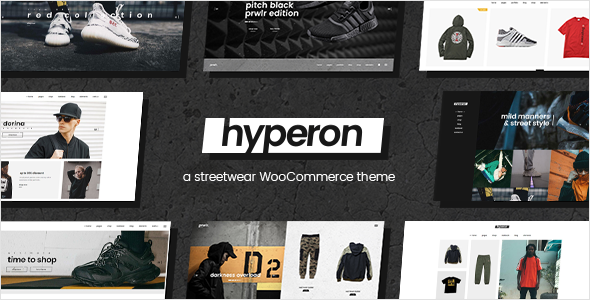
Stuck on your Hyperon WordPress theme? Let's fix it.
No endless back-and-forth. Just send us the details and we'll get it done.
No obligation · Replies within 1 hour · Quote within 1 day
Setup · Customization · Bug fixes · WooCommerce integration
About Hyperon WP Theme
Hyperon is a multipurpose WordPress theme built by Edge-Themes, the team behind popular themes like Edgt and Biagiotti. It ships with a large library of pre-built demos covering business, portfolio, shop, and creative industries. The theme is built on Edge-Themes’ proprietary framework, which includes a custom page builder, a detailed options panel, and tight WooCommerce integration out of the box.
Hyperon supports full-width layouts, sticky headers, mega menus, and advanced typography controls. It is compatible with Elementor and WPBakery, though most demos are built around the native Edge builder. The theme targets studios, agencies, and product companies that need a polished site without building everything from scratch. Purchase includes six months of support from Edge-Themes directly through ThemeForest.
Get matched with a Hyperon developer in under one day
Tell us about your Hyperon project. Small fixes, Hyperon theme customization, or a full website build, whatever you need, we've got it covered.
We'll connect you to the right Hyperon developers, define the scope, and get everything 100% clear.
You'll get one estimate, hire your preferred developer, and start collaborating.
Edge-Themes builds detailed themes, and Hyperon is one of their more complex ones. The options panel has hundreds of settings that interact in non-obvious ways. Getting a site that looks like the demo, adapted to your brand and content, is a real job. Working with a vetted developer through Codeable means you get someone who has handled these edge cases before and can deliver clean, maintainable work without guesswork.
Pros
- Large demo library with 30+ full-page imports covering multiple industries
- WooCommerce integration is built in with dedicated shop layout controls
- Mega menu builder included without needing a separate plugin
- Header and footer have multiple pre-built styles with granular sticky and scroll options
- Regular updates from Edge-Themes with active ThemeForest support
Cons
- Relies heavily on the proprietary Edge page builder, which creates lock-in
- Options panel has hundreds of settings with minimal documentation on interactions
- Page speed scores out of the box are average due to bundled scripts and sliders
- Demos import best on a clean install; importing over an existing site causes conflicts
- Six-month support window from ThemeForest is short for long-term projects
Who is Hyperon for?
Creative Agency
Hyperon has several agency-focused demos with project showcase layouts, team grids, and service pages. The portfolio CPT supports filtering and custom single layouts. It suits agencies that want a high-design presentation without a fully custom build. A developer can adapt the demo to the agency’s actual brand in a few days.
WooCommerce Store
The built-in WooCommerce styles handle product grids, single product pages, and cart styling without a separate plugin. Shops selling physical or digital products can launch quickly using the relevant demo. Custom product filters and checkout adjustments are common requests that benefit from a Hyperon-experienced developer.
Architecture or Interior Design Studio
Several Hyperon demos target design-heavy industries with full-screen image headers, project galleries, and clean typographic layouts. The theme handles large images well structurally, though performance optimization is usually needed for image-heavy studios. It is a strong fit for firms that rely on visual presentation to win clients.
Freelance Portfolio
Hyperon’s portfolio and about page templates give freelancers a professional online presence quickly. The single portfolio item layout supports case study content, galleries, and client details. It is more than most freelancers need, but scaling down a feature-rich theme is easier than building up from scratch.
Corporate Business Site
Corporate demos in Hyperon include services sections, team pages, stats counters, and contact layouts. The mega menu handles complex navigation for companies with multiple service areas or locations. It is a practical choice for mid-size companies that need credibility and structure without a fully bespoke theme.

Customizing Hyperon
Hyperon’s options panel is deep. You can control header styles, footer layouts, color schemes, button states, and scroll behavior all from the admin. The demo importer pulls in full page content, widgets, and menus in one click, which is a good starting point but rarely the finished product.
Custom post types for portfolio and team members have their own display settings. Matching those to a specific brand identity takes time, especially when clients want layouts that mix Edge builder sections with Elementor blocks. A Hyperon expert can move faster here because they know exactly which settings override others and where the theme’s CSS structure sits. Without that experience, small layout tweaks can turn into hours of trial and error.
Recommended plugins for Hyperon
Hyperon bundles several Edge-Themes plugins: Edge Core (required), Edge CPT (portfolio, team, testimonials), and a custom shortcode library. WooCommerce works with the included shop styles. The theme also supports Contact Form 7, Revolution Slider, and Layer Slider.
For stores, pairing Hyperon with well-tuned product pages can directly affect conversion. If you need faster load times across those pages, a WordPress performance service is worth considering. For organic visibility, WordPress SEO work on top of Hyperon’s clean structure can make a measurable difference.
Not sure which plugins to use? This WordPress plugins directory covers the most popular options with reviews and setup guides.
Hyperon common issues
Hyperon demo content not importing correctly
Demo import failures in Hyperon usually come from low PHP memory limits, upload size restrictions, or a missing Edge Core plugin activation. Check that Edge Core is active before importing. Set memory_limit to at least 256MB and max_execution_time to 300 in your php.ini or wp-config.php. If the importer stalls, try the manual XML import method via Tools > Import. A WordPress bug fixing service can resolve persistent import errors cleanly.
Hyperon header not showing on mobile
Hyperon mobile header issues are usually caused by a conflicting custom CSS rule or the wrong mobile header style selected in the theme options. Go to Hyperon Options > Mobile Header and confirm the mobile menu type is set. Check for CSS targeting header or .mobile-header in any child theme or custom CSS box. If a caching plugin is active, clear all caches after making changes. Disable any header plugins temporarily to isolate the conflict.
Hyperon WooCommerce product page layout broken
Broken WooCommerce layouts in Hyperon often happen after a WooCommerce update that changes template hooks. The theme’s shop templates may need refreshing via Appearance > Editor or a developer update. Check for outdated template files flagged in WooCommerce > Status > Tools. Missing product layout settings in Hyperon Options > WooCommerce can also cause column or sidebar issues. Match your column count settings to your active product grid shortcode parameters.
Hyperon page builder elements not loading after update
If Edge builder elements stop rendering after a theme or plugin update, the first step is clearing all caches and regenerating CSS in Hyperon Options. Deactivate and reactivate Edge Core. Check for JavaScript console errors that point to a specific script conflict. In some cases, a WPBakery or Elementor update breaks compatibility with Edge shortcodes. A developer familiar with the Edge framework can patch these conflicts without losing your existing page layouts.
Hyperon FAQ
Hyperon is compatible with Elementor in the sense that you can create Elementor pages within the theme. However, the demo content is built using the Edge builder and Edge shortcodes. Mixing the two requires care to avoid style conflicts. Most developers choose one builder and stick to it. Rebuilding demo sections in Elementor is common for clients who prefer that workflow long-term.
After the six-month ThemeForest support window closes, you can purchase extended support or post questions on the ThemeForest comments section for community help. For hands-on fixes, a WordPress developer familiar with Edge-Themes products is the faster route. FoxyConcept connects you with vetted Hyperon developers through Codeable who can handle support, updates, and custom work on an ongoing basis.
Technically yes, but Edge Core must stay active for the theme to function. Edge Core registers custom post types, shortcodes, and required hooks. You can build pages with Gutenberg or Elementor inside that structure. However, the theme’s design system is built around Edge components, so some styling will require custom CSS if you move away from the native builder entirely.
Hyperon is listed as WPML-compatible on ThemeForest. The Edge CPT post types and theme string translations can be managed through WPML’s String Translation module. In practice, multilingual setups with Hyperon need developer attention to make sure all Edge shortcode content and options panel strings are registered and translatable without layout breakage.
Out of the box, Hyperon loads several scripts from bundled plugins and sliders that affect page speed. Start by disabling Revolution Slider on pages that do not use it. Use a caching plugin and a CDN. Defer non-critical scripts and optimize images before upload. For a thorough speed improvement, a dedicated WordPress performance service can audit and tune the full stack.
Hire a Hyperon Expert Developer
Whether you need a full Hyperon site built from a demo, a custom layout added to an existing site, or a specific bug fixed, a specialist gets it done faster and cleaner. Our developers are vetted through Codeable and work exclusively on WordPress. Get a free estimate with no obligation. You will have a developer matched within 24 hours and pay nothing until you decide to move forward.
You'll need a free Codeable account so developers can ask questions and send their quotes.