impressivCard WP WordPress Theme
by pixelwars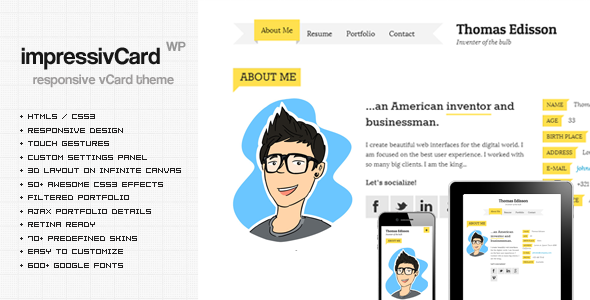
Stuck on your impressivCard WP WordPress theme? Let's fix it.
No endless back-and-forth. Just send us the details and we'll get it done.
No obligation · Replies within 1 hour · Quote within 1 day
Setup · Customization · Bug fixes · WooCommerce integration
About impressivCard WP WP Theme
ImpressivCard WP is a WordPress theme by Pixelwars built specifically for digital business cards and personal portfolio pages. It strips away everything unnecessary and focuses on one goal: presenting a person, freelancer, or brand in a clean, mobile-first single-page layout.
The theme suits consultants, designers, developers, and anyone who wants a fast-loading online presence without building a full website. It supports contact details, social links, skills, and a short bio section out of the box. Setup is quick, and the admin options are straightforward enough that most users can configure it without touching code. If you need something more tailored, the theme responds well to customization.
Get matched with a impressivCard WP developer in under one day
Tell us about your impressivCard WP project. Small fixes, impressivCard WP theme customization, or a full website build, whatever you need, we've got it covered.
We'll connect you to the right impressivCard WP developers, define the scope, and get everything 100% clear.
You'll get one estimate, hire your preferred developer, and start collaborating.
ImpressivCard WP is simple on the surface but has real limits if you push it beyond its default layout. A developer who knows the theme can add sections, modify the card structure, integrate third-party tools, and fix conflicts with plugins or hosting environments. Through Codeable, you get matched with vetted WordPress developers who have done this type of work before. No generalist guesswork, no wasted back-and-forth. Just focused help from someone who knows WordPress themes at a code level.
Pros
- Minimal setup time — most users have a working card page within an hour
- Mobile-first layout that looks clean on phones without any extra configuration
- Lightweight codebase with no unnecessary page templates or bloat
- Built-in social link and contact section removes the need for extra plugins
- Straightforward Customizer options that non-technical users can handle independently
Cons
- Single-page structure limits it to one layout format with no multi-page flexibility
- Limited built-in section types — adding a portfolio grid or testimonials requires custom work
- No page builder support out of the box, which restricts drag-and-drop editing
- Sparse documentation makes troubleshooting harder without developer experience
- Update frequency from Pixelwars has been inconsistent, which can raise compatibility concerns
Who is impressivCard WP for?
Freelance Designers
Freelance designers need a fast, visual first impression. ImpressivCard WP delivers a clean profile layout where a headshot, skills list, and portfolio link sit above the fold. It loads quickly, looks polished on mobile, and keeps the focus on the designer rather than the website itself.
Consultants and Coaches
Consultants and coaches benefit from a focused single-page presence that answers the key question fast: who are you and how do I contact you. ImpressivCard WP handles both without distracting navigation or extra pages. A short bio, a few credentials, and a contact form cover most of what a prospective client needs.
Developers and Tech Professionals
Developers and tech professionals often share a URL on GitHub profiles, LinkedIn bios, or email signatures. ImpressivCard WP gives that link something worth landing on. The theme is lightweight enough that a developer audience will notice the fast load time, and it can be customized further by anyone comfortable with code.
Speakers and Event Professionals
Speakers need a simple page that event organizers can find and share quickly. ImpressivCard WP suits this well. A headshot, speaking topics, and a booking contact are enough, and the single-page format keeps everything accessible without digging through menus or multiple pages.
Job Seekers and Recent Graduates
Recent graduates and job seekers benefit from having a clean personal URL to include on a CV or LinkedIn. ImpressivCard WP creates that presence without requiring design or development skills. It communicates professionalism without the overhead of building a full portfolio site from scratch.

Customizing impressivCard WP
Out of the box, ImpressivCard WP gives you color controls, font options, and section toggles through the WordPress Customizer. You can adjust the layout, swap profile images, edit bio text, and reorder sections without writing a single line of code.
Where it gets more involved is when clients want custom animations, unique card layouts, or additional sections not included in the default template. That is where an impressivCard WP expert earns their keep. A developer familiar with the theme can extend it cleanly using child themes, avoiding core file edits that break on updates. Custom CSS and PHP hooks inside a child theme keep changes intact and maintainable long term.
Recommended plugins for impressivCard WP
ImpressivCard WP works well with a handful of plugins that add practical value. Contact Form 7 or WPForms can replace the default contact link with an embedded form. Smush or ShortPixel handles image compression, which matters a lot for profile photos on a single-page layout.
For anyone treating their card page as a landing page, pairing it with proper SEO configuration through Yoast or Rank Math is worth doing. If site speed is a priority, a caching plugin and a CDN can sharpen load times significantly. See our WordPress performance service or WordPress SEO service for more detail.
Not sure which plugins to use? This WordPress plugins directory covers the most popular options with reviews and setup guides.
impressivCard WP common issues
ImpressivCard WP social icons not showing
Social icons failing to display usually comes down to one of two things: the icon font file is not loading, or a caching plugin is serving a stale version of the stylesheet. Start by clearing your cache and checking the browser console for 404 errors on font files. If the icon font is blocked, a CDN or security plugin may be the cause. Disabling them temporarily confirms whether that is the issue. If icons still do not appear, re-saving the social link fields in the Customizer sometimes triggers a refresh. If nothing works, a developer can trace the exact CSS conflict quickly.
ImpressivCard WP profile image not displaying correctly
Profile image display problems in ImpressivCard WP are usually caused by image dimension mismatches or a caching issue after swapping the photo. The theme expects a square crop, so uploading a non-square image can distort the layout. Use the WordPress image editor to crop before setting the profile image. If the old image keeps showing, flush your browser cache and any server-side cache. Persistent display bugs after a correct upload may point to a CSS conflict with another active plugin.
ImpressivCard WP contact section not working
If the contact section is not working, the most common cause is a conflict with a spam protection plugin blocking form submissions, or a server-side mail configuration issue. First, check if WordPress can send email at all using a plugin like WP Mail SMTP. Many hosts disable PHP mail by default. Switching to SMTP with a transactional email service fixes this reliably. If the contact section uses a mailto link rather than a form, browser security settings on mobile can sometimes interfere with that link opening.
ImpressivCard WP layout broken after WordPress update
A broken layout after a WordPress core update usually means a CSS or JavaScript conflict introduced by the update. Check the browser console for JS errors first. If the theme has not been updated recently, a function it relies on may have changed. Switching to a default theme temporarily confirms whether the issue is theme-specific. Restoring from a backup and testing the update in a staging environment is the safest path. Our WordPress bug fixing service can diagnose and resolve layout regressions quickly.
impressivCard WP FAQ
ImpressivCard WP is available on ThemeForest as a premium theme from Pixelwars. There is no free version. You purchase a license for a single site or an extended license for use on a client project. The purchase includes future updates and basic support through the Envato marketplace for a limited period after purchase.
The theme is designed as a single-page layout and does not include native multi-page templates. You can technically create additional WordPress pages, but the theme’s styling and structure are built around one page. Adding multiple pages without customization will produce inconsistent results. A developer can extend it to support additional pages cleanly using a child theme.
ImpressivCard WP does not have built-in Elementor compatibility and was not designed with page builder integration in mind. Elementor can technically be activated alongside it, but the single-page structure and custom Customizer settings may conflict with Elementor’s editing interface. Using the theme as intended through the Customizer is the more reliable approach.
Before updating, always back up your site including the database and theme files. Your Customizer settings are stored in the WordPress database, so they typically survive a theme update. However, if you have made direct edits to theme files, those will be overwritten. Using a child theme for all custom code is the only reliable way to protect changes across updates.
Yes, with the right license. A regular ThemeForest license covers one end product, meaning one website. If you are building a site for a client where they pay for the end product, you need an extended license or a separate regular license for that project. Check Envato’s licensing terms before delivering a client site to avoid compliance issues.
Hire an impressivCard WP Developer
Need help setting up, customizing, or fixing your ImpressivCard WP site? Whether it is a layout tweak, a broken feature, or a full custom build on top of the theme, a specialist can handle it faster and cleaner than trial and error. Get a free estimate and describe what you need. You will hear back within 24 hours with no obligation to proceed.
You'll need a free Codeable account so developers can ask questions and send their quotes.