Industrio WordPress Theme
by shtheme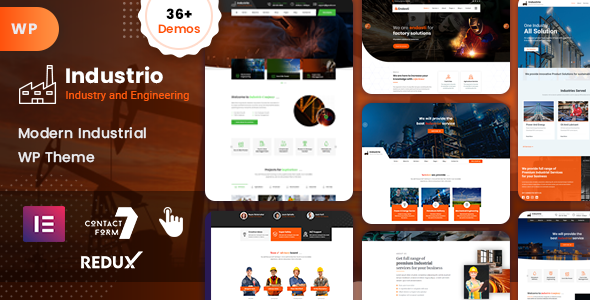
Stuck on your Industrio WordPress theme? Let's fix it.
No endless back-and-forth. Just send us the details and we'll get it done.
No obligation · Replies within 1 hour · Quote within 1 day
Setup · Customization · Bug fixes · WooCommerce integration
About Industrio WP Theme
Industrio is a WordPress theme built by ShTheme for industrial, manufacturing, and engineering businesses. It ships with a page builder-friendly layout, pre-built demo pages, and sections designed specifically for factories, construction firms, and heavy industry companies.
The theme includes WPBakery Page Builder, Revolution Slider, and a set of shortcodes that cover services, team members, project portfolios, and testimonials. It supports WooCommerce, which makes it useful for companies selling industrial parts or equipment online.
Industrio targets a specific niche and does it well. The default styling is dark, structured, and professional. Setup is faster than a generic multipurpose theme because the demo content is already built around industrial use cases rather than requiring heavy modification to fit the sector.
Get matched with a Industrio developer in under one day
Tell us about your Industrio project. Small fixes, Industrio theme customization, or a full website build, whatever you need, we've got it covered.
We'll connect you to the right Industrio developers, define the scope, and get everything 100% clear.
You'll get one estimate, hire your preferred developer, and start collaborating.
Industrio is niche-specific, which is a strength, but it also means generic WordPress advice does not always apply. ShTheme’s implementation of WPBakery and Redux has its own quirks, and customizing it without experience leads to conflicts during updates.
Through Codeable, you get matched with vetted WordPress developers who have worked with themes like Industrio before. No guesswork, no junior freelancers. Post your project, get an estimate within 24 hours, and only pay if you decide to move forward.
Pros
- Pre-built demo content designed specifically for industrial and manufacturing businesses
- WooCommerce-ready for selling industrial parts or equipment directly from the site
- Revolution Slider included, useful for showcasing heavy machinery or project highlights
- Dedicated sections for services, team, projects, and client logos out of the box
- One-click demo import speeds up initial setup significantly compared to blank themes
Cons
- Built around WPBakery, which locks page structure into shortcodes and complicates future migration
- Default page load speed is slow due to bundled scripts and Revolution Slider overhead
- Redux options panel is dense and can be confusing for non-technical site owners
- Design is dated compared to Elementor-based or block-based industrial themes released more recently
- Limited documentation makes troubleshooting specific layout or conflict issues harder without developer help
Who is Industrio for?
Manufacturing Companies
Industrio’s default demo closely matches what a manufacturing company needs. Services sections, project portfolios, and team pages are already structured for the sector. A manufacturer can import the demo and have a credible, professional site with relatively minor content swaps rather than rebuilding from scratch.
Construction and Contracting Firms
Construction firms need to show past projects clearly. Industrio’s portfolio post type handles this well, with grid and filterable layouts that work for showcasing completed builds. The dark, heavy styling fits construction aesthetics without additional design work to make the site feel appropriate for the industry.
Engineering Services
Engineering consultancies can use Industrio’s service pages and team sections to present specialisations and credentials. The theme supports detailed service descriptions with icons, images, and call-to-action buttons. It reads professionally for B2B audiences, which matters when the client base includes procurement managers and project leads.
Industrial Equipment Suppliers
With WooCommerce support built in, industrial equipment suppliers can list products, manage inventory, and accept orders directly. The theme handles product pages cleanly. Combining this with a proper performance setup ensures the shop loads fast enough to retain buyers who are comparing multiple suppliers.
Factory and Warehouse Operations
Factories and warehouse operations often need a simple but credible web presence to support B2B sales. Industrio covers the basics without overcomplicating things. A contact section, services overview, and company background can be live quickly using the existing demo structure with straightforward content replacement.

Customizing Industrio
Industrio gives you a Theme Options panel powered by Redux Framework, where you can control colors, fonts, header layout, footer structure, and sidebar positions. Most changes work without touching code, but the options panel can feel cluttered if you are not used to Redux-based themes.
WPBakery is the included builder, so custom layouts are drag-and-drop. That said, migrating away from WPBakery later requires effort, since shortcodes get embedded directly into content.
If you need custom post types, unique service page structures, or industry-specific functionality that goes beyond the demo, working with an Industrio expert saves time. A developer familiar with ShTheme’s architecture can extend the theme cleanly without overriding core files, keeping your site updatable and stable.
Recommended plugins for Industrio
Industrio works with the standard WordPress plugin ecosystem. For contact and lead capture, Contact Form 7 and WPForms both integrate without issues. WooCommerce support is built in, so adding a product catalog for parts or equipment is straightforward.
For better site speed, pairing Industrio with a caching plugin and optimizing the included Revolution Slider is important. The theme loads several scripts by default that can slow things down. See our WordPress performance service for help with that.
If search visibility matters, structured data and proper on-page optimization should be layered on top. Our WordPress SEO service covers that work specifically.
Not sure which plugins to use? This WordPress plugins directory covers the most popular options with reviews and setup guides.
Industrio common issues
Industrio theme slow loading speed
Industrio loads Revolution Slider scripts and WPBakery assets on every page by default, even pages that do not use either. The fix involves conditionally loading scripts only where needed, minifying CSS and JS, and setting up a caching layer. A CDN for images also helps significantly. See our WordPress performance service for a full audit and implementation.
Industrio WPBakery shortcodes showing on page
Raw WPBakery shortcodes appearing on the front end usually means the WPBakery plugin is deactivated or missing. Industrio bundles a version of WPBakery that may conflict with a separately installed copy. Check that only one version is active. If the theme was updated and the bundled plugin was overwritten, reinstalling the plugin through Appearance > Install Plugins typically resolves it.
Industrio Revolution Slider not working after update
Revolution Slider conflicts after a WordPress or theme update are common. The bundled version of RevSlider in Industrio may be behind the standalone plugin version. Go to the Revolution Slider dashboard and check for update notices. If slides are blank or throwing JavaScript errors, clearing the browser cache and any server-side cache resolves the issue in most cases. If not, a WordPress bug fix may be needed.
Industrio theme not importing demo content correctly
Demo import failures in Industrio are usually caused by server memory limits or request timeouts. Set max_execution_time to 300 and memory_limit to at least 256M in your PHP configuration. If the host does not allow that, importing demo XML manually through Tools > Import and then importing widget and theme settings separately usually works as a fallback.
Industrio FAQ
Industrio was built for older WordPress versions, and ShTheme’s update cadence has slowed. It generally functions on WordPress 6.x, but full site editing and block editor features are not supported. WPBakery handles layouts, so the classic editor is the intended workflow. Testing on a staging environment before updating WordPress is strongly recommended.
Industrio ships with WPBakery, not Elementor. You can install Elementor separately, but the two builders conflict when both are active on the same pages. Most developers recommend choosing one and sticking with it. Replacing WPBakery with Elementor in an existing Industrio site requires manually rebuilding page layouts.
Yes. Industrio includes basic WooCommerce styling for product pages, shop archives, cart, and checkout. It is not a dedicated WooCommerce theme, so the styling is functional rather than polished. For a product-heavy store, additional CSS or a WooCommerce plugin like CartFlows may be needed to improve the buying experience.
Always use a child theme for any custom CSS or template changes. Updates to the parent theme will overwrite files directly edited in the parent. If you have not been using a child theme, a developer can migrate your customizations into one before the next update. Check our WordPress maintenance service for ongoing update management.
Migrating away from Industrio is possible but requires work. WPBakery shortcodes embedded in page content will not render correctly in a new theme. Content needs to be rebuilt in the new theme’s builder or the block editor. The database, media, and settings migrate cleanly. See our WordPress migration service for help with the full process.
Hire an Industrio Developer
Whether you need help with the initial setup, custom layout work, plugin conflicts, or performance issues, a dedicated Industrio developer can get it done without breaking your site. Work is handled through Codeable, so you only deal with vetted professionals. Get a free estimate with no obligation. Describe your project and receive a clear quote within 24 hours.
You'll need a free Codeable account so developers can ask questions and send their quotes.