Industx WordPress Theme
by ThemeChampion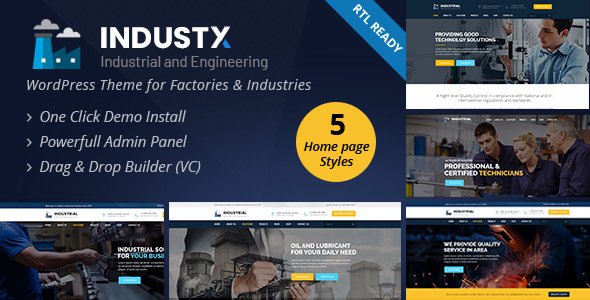
Stuck on your Industx WordPress theme? Let's fix it.
No endless back-and-forth. Just send us the details and we'll get it done.
No obligation · Replies within 1 hour · Quote within 1 day
Setup · Customization · Bug fixes · WooCommerce integration
About Industx WP Theme
Industx is a WordPress theme by ThemeChampion built for industrial, manufacturing, and construction businesses. It comes with a heavy-duty visual style, pre-built page layouts, and WooCommerce compatibility for companies that also sell products or parts online.
The theme ships with a drag-and-drop page builder, multiple header styles, and section-based layouts designed to present services, project portfolios, and team profiles clearly. It supports custom widgets, contact forms, and Google Maps integration out of the box.
ThemeChampion themes are coded to WordPress standards and include regular updates. Industx works well for businesses that need a professional-looking site without starting from scratch, though getting the most from it often takes someone who knows the theme inside out.
Get matched with a Industx developer in under one day
Tell us about your Industx project. Small fixes, Industx theme customization, or a full website build, whatever you need, we've got it covered.
We'll connect you to the right Industx developers, define the scope, and get everything 100% clear.
You'll get one estimate, hire your preferred developer, and start collaborating.
Getting Industx set up properly is faster and less frustrating when you work with someone who already knows the theme. Through Codeable, you get matched with a vetted WordPress developer who has hands-on experience with industrial themes like Industx. You describe the project, get a clear estimate within 24 hours, and decide whether to proceed. No commitment required. It’s a straightforward way to get quality work done without the guesswork of hiring blind.
Pros
- Pre-built layouts designed specifically for industrial and manufacturing businesses
- WooCommerce ready for product catalogues and online quote or order systems
- Multiple header styles and section options without needing additional plugins
- Regular updates and active support from ThemeChampion
- Compatible with popular page builders, making layout edits accessible
Cons
- Default demo content requires significant rework to avoid a generic look
- Some styling options are limited without adding custom CSS
- Page builder dependency can make the theme harder to migrate away from later
- Heavy use of background images and sections can slow load times without optimisation
- Documentation is functional but sparse on advanced customisation scenarios
Who is Industx for?
Manufacturing Companies
Industx suits manufacturers that need to present product lines, certifications, and factory capabilities clearly. The WooCommerce integration handles parts catalogues or trade ordering. An Industx developer can configure pricing tiers, enquiry forms, and product filtering to match how your sales process actually works.
Construction and Building Contractors
Construction companies need a site that shows off completed projects and builds trust fast. Industx’s portfolio layouts and services sections handle this well. A specialist can set up project galleries, service area pages, and lead capture forms that feed directly into your follow-up workflow.
Industrial Equipment Suppliers
Equipment suppliers often need detailed product pages with specs, downloads, and enquiry options alongside a strong services section. Industx supports this structure natively with WooCommerce. An Industx expert can fine-tune product templates and add custom fields for technical specifications.
Engineering Firms
Engineering firms need a site that communicates credibility quickly. Industx’s clean service layouts and team profile sections work well here. An Industx specialist can build out case study pages, configure contact routing for different service lines, and integrate document download areas for technical resources.
Logistics and Warehousing Businesses
Logistics businesses benefit from Industx’s strong service and coverage area layouts. The theme’s map integration and multi-column content blocks present operational details clearly. A developer can add custom quote request forms, connect the site to booking or dispatch tools, and optimise load times for mobile users on the go.

Customizing Industx
Industx gives you a solid starting point, but matching it exactly to your brand takes more than swapping colours in the Customizer. Font pairings, spacing, header layouts, and section order all need hands-on attention to look polished rather than templated.
An experienced Industx expert can rebuild demo content around your actual services, wire up contact forms to your CRM, and configure WooCommerce if you need a product catalogue or quote request system. Custom CSS work is often needed to override default styles cleanly without breaking updates.
If you have a specific layout in mind that the built-in options don’t quite reach, an Industx specialist can extend the theme properly, keeping your site maintainable and update-safe.
Recommended plugins for Industx
Industx pairs well with several plugins that add real functionality. WooCommerce turns it into a product or parts catalogue. WPML handles multilingual content for businesses operating across regions. Yoast or Rank Math slots in cleanly for on-page SEO work, and if you want a structured approach to visibility, a dedicated WordPress SEO service can handle that properly.
For sites with heavy image galleries or video backgrounds, caching and image optimisation plugins make a real difference. A full WordPress performance review is worth running before launch to make sure load times don’t cost you enquiries.
Not sure which plugins to use? This WordPress plugins directory covers the most popular options with reviews and setup guides.
Industx common issues
Industx theme header not displaying correctly after update
Header display issues after a ThemeChampion update are usually caused by a CSS conflict with a plugin or a child theme that wasn’t built to handle the new markup structure. Check your browser console for errors first. If you’re using a caching plugin, clear it completely before further investigation. If the issue persists, a WordPress bug fixing service can trace the conflict and apply a clean fix without breaking other parts of the site.
Industx page builder layout broken on mobile devices
Broken mobile layouts in Industx are often tied to custom column widths or fixed-pixel values set inside the page builder. Open the affected section in the builder, check for manually set widths, and switch them to percentage-based values or remove overrides entirely. If the problem appeared after a plugin update, there may be a conflict with the builder’s responsive controls. A WordPress bug fix can isolate and resolve this quickly.
WooCommerce product page styling not matching Industx theme
When WooCommerce product pages don’t inherit Industx styling, the cause is usually a missing or overridden WooCommerce template file. Industx may ship with custom WooCommerce templates that need updating after a WooCommerce version bump. Check if the theme has a woocommerce folder in its directory and compare file versions against the current WooCommerce templates. Updating those files or rebuilding them in a child theme resolves most styling gaps.
Industx theme slow loading speed and poor performance scores
Industx sites often score poorly on performance tests due to unoptimised images in section backgrounds, render-blocking scripts from the page builder, and unminified CSS loaded by the theme. Start by running a full audit in PageSpeed Insights and address the highest-impact items first. Image compression, lazy loading, and a caching layer typically bring the biggest gains. For a structured fix, a dedicated WordPress performance service covers all of this end to end.
Industx FAQ
Yes. Industx was designed with industrial and manufacturing businesses in mind. It includes service layouts, portfolio sections, team profiles, and WooCommerce support. The pre-built structure covers most of what a manufacturing site needs. Getting it to look polished and work exactly as required usually means working with an Industx specialist rather than relying solely on the demo layouts.
Industx is built to work with WPBakery page builder, which is common across ThemeChampion themes. It doesn’t natively include Elementor support, though some developers run both on the same install. Mixing builders creates technical debt and can cause conflicts. If you prefer Elementor, discuss that with your Industx developer before starting the build.
Industx demo content is typically imported through the theme’s built-in one-click demo importer, found under Appearance in the WordPress dashboard after the theme is activated. You’ll need the required plugins installed first, including the page builder and any widget plugins flagged during setup. If the importer fails, a manual XML import via Tools is the fallback option.
Technically yes, but most of the pre-built page layouts in Industx are built with shortcodes or blocks tied to WPBakery. Removing the builder means losing those layouts. You can build pages using the native WordPress block editor, but you’d be starting layouts from scratch. An Industx developer can advise on the cleanest approach based on your specific requirements.
Cost depends on scope. A straightforward Industx setup with demo content configured to your brand typically falls in the range of a few hundred dollars. Custom development, WooCommerce configuration, or integration work costs more. The clearest way to get an accurate number is to post your project through Codeable and receive a fixed estimate before committing to anything.
Hire an Industx Developer for Your Project
Whether you need a full Industx setup, a specific customisation, or an existing site fixed up, working with a specialist saves time and avoids the trial-and-error approach. Our developers know Industx and the ThemeChampion codebase well enough to work efficiently from day one.
Post your project and get a free estimate with no obligation to hire. You’ll have a developer matched to your needs within 24 hours.
You'll need a free Codeable account so developers can ask questions and send their quotes.