inForward WordPress Theme
by Monkeysan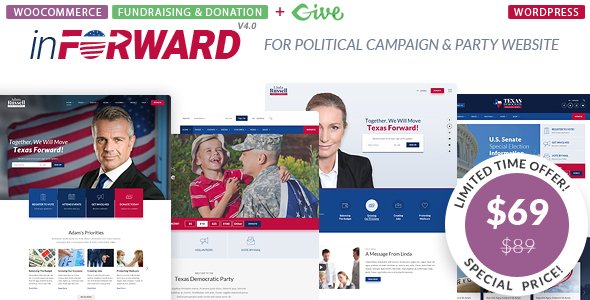
Stuck on your inForward WordPress theme? Let's fix it.
No endless back-and-forth. Just send us the details and we'll get it done.
No obligation · Replies within 1 hour · Quote within 1 day
Setup · Customization · Bug fixes · WooCommerce integration
About inForward WP Theme
inForward is a WordPress theme built by Monkeysan, designed for political campaigns, NGOs, nonprofits, and community organizations. It ships with purpose-built sections for candidate profiles, event listings, donation calls-to-action, and cause-driven storytelling.
The theme uses a visual page builder, giving site owners control over layout without writing code. It includes multiple homepage demos, pre-built inner page templates, and support for popular plugins like WooCommerce and Contact Form 7.
Out of the box, inForward covers most of what a campaign or advocacy site needs. Headers are sticky, layouts are mobile-responsive, and the color scheme system lets you match party or brand colors quickly. It is a solid starting point for any organization that needs a credible, action-oriented web presence without building from scratch.
Get matched with a inForward developer in under one day
Tell us about your inForward project. Small fixes, inForward theme customization, or a full website build, whatever you need, we've got it covered.
We'll connect you to the right inForward developers, define the scope, and get everything 100% clear.
You'll get one estimate, hire your preferred developer, and start collaborating.
inForward has specific quirks in how it handles builder layouts, meta options, and plugin compatibility. A developer who has not worked with it before will spend time just mapping the theme structure. Through Codeable, you get matched with vetted WordPress professionals who understand themes like inForward at a technical level. No junior freelancers, no guesswork. Just developers who can look at your site, identify what needs doing, and execute it correctly. That saves you time and avoids the cost of fixing mistakes later.
Pros
- Purpose-built for political campaigns and nonprofits with dedicated section templates
- Multiple polished homepage demo layouts importable with one click
- Sticky header, mobile-responsive grid, and donation CTA sections included out of the box
- Compatible with WooCommerce, Contact Form 7, and major page builders
- Color scheme and typography controls make brand matching quick through the Customizer
Cons
- Demo content import can be slow and occasionally fails on lower-tier hosting environments
- Builder shortcodes create lock-in, making it harder to switch themes later without losing layout
- Limited native event management — a separate plugin is needed for anything beyond basic listings
- Update frequency from Monkeysan has slowed, which can create compatibility gaps with newer WordPress versions
- Some inner page templates feel dated compared to current design standards and need visual updating
Who is inForward for?
Political Campaign Websites
inForward was built with candidates in mind. The candidate bio section, issue platform layout, and volunteer signup areas map directly to what a campaign site needs. Pair it with a CRM integration and an events plugin, and you have a functional campaign presence ready for launch well ahead of election season.
Nonprofit and Charity Organizations
Nonprofits benefit from inForward’s cause section, team profiles, and donation call-to-action blocks. The theme communicates mission and urgency without requiring a custom build from scratch. A developer can connect it to payment gateways or donation platforms like GiveWP to handle recurring giving properly.
Community Advocacy Groups
Local advocacy groups need a site that builds trust and drives action fast. inForward’s bold header layouts, petition-style CTAs, and event sections work well for grassroots organizations. Customizing the color scheme to match a group’s identity takes under an hour with the right developer on the project.
NGO and International Aid Organizations
International NGOs often need multilingual support and contact forms in multiple languages. inForward works with WPML and Polylang, making it a viable base for global organizations. A developer can also integrate translation workflows and region-specific content so the site serves multiple audiences from one installation.
Fundraising and Donation Campaigns
Fundraising campaigns need clear donation prompts, progress indicators, and a fast checkout flow. inForward’s donation section provides the visual framework. Connecting it to WooCommerce, Stripe, or a dedicated fundraising plugin like GiveWP turns that framework into a working payment system.

Customizing inForward
Getting inForward set up is straightforward, but tailoring it to a specific campaign or cause takes more work than the demo suggests. Fonts, colors, and section order are adjustable through the Customizer, but deeper layout changes often require CSS overrides or builder modifications.
Common customization requests include restructuring the donation section, adding multilingual support, integrating CRM tools, and building custom event or volunteer registration flows. These go beyond what the theme options panel handles natively.
Working with an inForward expert means those changes get done correctly the first time. Rather than patching together workarounds, a developer who knows the theme structure can extend it cleanly, so updates do not break your layout and the site stays maintainable long-term.
Recommended plugins for inForward
inForward pairs well with plugins that add functionality the theme does not cover natively. WooCommerce handles merchandise or donation products. The Events Calendar manages public appearances and volunteer meetups. WPML or Polylang adds multilingual support for campaigns reaching diverse communities.
For performance, image optimization and caching plugins make a measurable difference, especially on pages with heavy video or gallery sections. See our WordPress performance services for specifics. If your campaign relies on organic search, structured SEO work matters too. Our WordPress SEO service covers that ground.
Not sure which plugins to use? This WordPress plugins directory covers the most popular options with reviews and setup guides.
inForward common issues
inForward demo import not working
Demo import failures in inForward are usually caused by PHP memory limits, max execution time settings, or server timeouts on shared hosting. Increase memory_limit to at least 256MB and max_execution_time to 300 seconds in your php.ini or via wp-config.php. If the import still stalls, try importing XML content manually using the WordPress importer rather than the theme’s one-click tool. Our WordPress bug fixing service can resolve persistent import issues.
inForward page builder elements not displaying correctly
Builder elements not rendering correctly usually points to a plugin conflict or a missing script dependency. Start by deactivating all plugins except the theme’s required ones and check if the layout restores. Also clear any caching plugin before testing. If you are using a third-party page builder alongside inForward’s built-in shortcodes, conflicts between the two are common and need developer-level resolution to sort cleanly.
inForward theme not updating or update breaking layout
Before updating inForward, back up your site and test the update on a staging environment. Layout breaks after an update usually happen because customizations were made directly in theme files rather than a child theme. Going forward, keep all custom CSS and template overrides in a child theme. If an update has already broken your layout, a developer can audit the diff and restore the affected sections without losing your content.
inForward donation button not linking correctly
Broken donation button links in inForward are often a misconfigured URL in the theme options panel or a permalink flush issue. Go to Settings > Permalinks and save without changes to regenerate rewrite rules. If the button is built with a shortcode or builder block, check that the target page or product URL still exists and has not changed slug. For payment gateway issues, plugin-level debugging is needed. See our bug fixing service for help.
inForward FAQ
Yes. inForward was designed specifically for political campaigns and advocacy organizations. It includes candidate profile sections, issue platform layouts, event listings, volunteer signup areas, and donation CTAs. It covers the core needs of most campaign sites out of the box, though deeper features like CRM integration or online fundraising still need plugin work or custom development.
inForward uses its own shortcode-based layout system rather than native Gutenberg blocks. Elementor can be used alongside it, but mixing the two builders on the same pages often causes styling conflicts. Most developers working with inForward stick to the theme’s built-in builder for consistency. Full Gutenberg support is not a strong point of this theme at its current version.
The most reliable method is installing a dedicated donation plugin like GiveWP or connecting WooCommerce for payment processing. inForward has visual donation CTA sections, but it does not handle payment processing natively. Once your plugin is configured, you embed a shortcode or block into the theme’s donation section. A developer can wire this up cleanly and test the full checkout flow end to end.
Yes, inForward sites migrate cleanly when done correctly. The main risks are URL mismatches and serialized data in the database that stores old domain references. Use a migration plugin or service to handle search-and-replace on the database after the move. Our WordPress migration service covers inForward sites and ensures layouts and links stay intact after the transfer.
Monkeysan has released inForward updates, but the cadence has slowed compared to more actively maintained themes. It still works with current WordPress versions, but compatibility with the latest PHP versions and newer plugins should be tested before assuming full support. If you rely on the theme long-term, having a developer on hand for ongoing maintenance is a practical safeguard against future compatibility issues.
Hire an inForward WordPress Developer
Whether you need a full inForward build, specific customizations, or help fixing something that has broken, working with an experienced developer makes the difference. Our vetted WordPress developers on Codeable know the theme inside out and can scope your project accurately from day one.
Get a free estimate with no obligation. Describe your project and get matched with an inForward developer within 24 hours.
You'll need a free Codeable account so developers can ask questions and send their quotes.