Ink WordPress Theme
by Codestag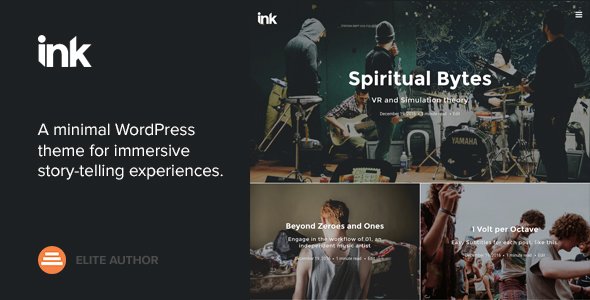
Stuck on your Ink WordPress theme? Let's fix it.
No endless back-and-forth. Just send us the details and we'll get it done.
No obligation · Replies within 1 hour · Quote within 1 day
Setup · Customization · Bug fixes · WooCommerce integration
About Ink WP Theme
Ink is a magazine and blog WordPress theme built by Codestag. It targets writers, journalists, and editorial teams who need a clean reading experience without sacrificing layout flexibility. The theme ships with multiple homepage layouts, a sticky header, and support for standard post formats including video, gallery, and audio.
Codestag built Ink with performance in mind. The codebase is lean, meaning pages load without the overhead common in multipurpose themes. The typography system gives editors control over font sizing and spacing directly from the customizer. Widget-heavy sidebars and footer areas make it easy to organize content without touching code. It works well with WooCommerce if you need a shop alongside your publication.
Get matched with a Ink developer in under one day
Tell us about your Ink project. Small fixes, Ink theme customization, or a full website build, whatever you need, we've got it covered.
We'll connect you to the right Ink developers, define the scope, and get everything 100% clear.
You'll get one estimate, hire your preferred developer, and start collaborating.
Ink is approachable out of the box, but editorial sites quickly outgrow default settings. Custom ad placements, paywall logic, newsletter integrations, and multi-author workflows all require real development work. Finding a reliable developer is the harder problem. Codeable connects you with vetted WordPress specialists who have proven track records. You post your project, get estimates within 24 hours, and only hire if the fit is right. No risk, no commitment upfront.
Pros
- Lightweight codebase loads faster than most multipurpose magazine themes
- Multiple homepage and archive layouts included without a page builder
- Strong typography controls in the customizer for editorial readability
- Clean support for standard WordPress post formats out of the box
- Active Codestag support with regular compatibility updates
Cons
- Fewer third-party tutorials compared to mainstream themes like Newspaper or Divi
- WooCommerce styling requires manual CSS adjustments for a polished shop look
- No built-in mega menu, requires a plugin or custom development
- Limited dark mode support without additional customization
- Advanced ad zone control requires code or a plugin since there is no built-in ad manager
Who is Ink for?
Independent News Blogs
Ink handles breaking news layouts well. The grid homepage, category-filtered widgets, and sticky header keep readers oriented across large archives. An Ink developer can extend this with custom breaking news tickers, category color coding, and author-specific landing pages that a solo journalist or small newsroom team can manage independently.
Personal Writing Portfolios
Writers building a byline presence need clean article pages that stay out of the way. Ink’s typography system and minimal sidebar options make long-form work readable. An Ink specialist can add a portfolio custom post type, press mentions section, or contact form that fits naturally into the existing design without making the site feel overbuilt.
Niche Magazine Sites
Niche publishers covering topics like food, travel, or tech need category pages that feel curated. Ink’s archive layout options give you a head start. An Ink expert can build custom category templates with featured image carousels, sponsor banners, and related post logic tied to tags rather than categories to improve internal linking across a deep content library.
Multi-Author Publications
Sites with multiple contributors need author archive pages, role-based editorial workflows, and structured byline display. Ink supports this at a basic level. An Ink developer can extend it with co-author support via plugin, custom author profile fields using ACF, and contributor dashboards that keep the editorial process organized without complicating the front-end layout.
Photography and Visual Journals
Photographers running a visual journal need gallery post formats that do not crop or compress images unpredictably. Ink’s gallery format support is solid. An Ink specialist can configure full-width image templates, lightbox integration, and EXIF data display. Pairing Ink with an optimized image delivery stack keeps the experience fast even with high-resolution files.

Customizing Ink
Ink customization goes well beyond swapping colors. The theme customizer exposes options for layout width, sidebar positioning, post meta display, and header styles. You can switch between grid-based and list-based archive layouts without a plugin.
If you need something more specific, an Ink expert can modify the template hierarchy, add custom post types, or build child theme overrides that survive updates. Custom advertising zones, author bio styling, and category-specific layouts are common requests. An Ink specialist can also integrate ACF field groups into article templates, giving editors structured content fields that editors can manage without developer help after handoff.
Recommended plugins for Ink
Ink pairs naturally with performance and SEO plugins, but those need correct configuration to avoid conflicts with the theme’s built-in scripts. A caching layer like WP Rocket works well once the theme’s inline styles are excluded from aggressive minification. For search visibility, pairing Ink with a proper WordPress SEO setup covering schema markup and open graph tags makes a real difference for editorial content. If the site grows, WordPress performance optimization covering image delivery and server-side caching keeps load times stable under traffic spikes.
Not sure which plugins to use? This WordPress plugins directory covers the most popular options with reviews and setup guides.
Ink common issues
Ink theme homepage layout not displaying correctly after update
Homepage layout issues after an update usually trace back to a widget area that lost its settings or a customizer option that reset. Check the customizer under Homepage Settings and confirm the front page is set to a static page or the correct template. Clear any caching plugin after the update. If the layout is still off, inspect the page template assigned to the homepage in the page editor and reassign if needed.
Ink WordPress theme sidebar not showing on single posts
If the sidebar disappears on single posts, check the page template for that post. Ink typically offers a sidebar toggle per post or uses a global setting in the customizer. Navigate to Appearance > Customize > Layout and confirm the default sidebar setting. Also check individual post settings in the post editor sidebar panel if the theme adds per-post options. Widget area content must also be populated or the sidebar collapses.
Ink theme featured image not showing on homepage grid
Missing featured images on the homepage grid usually mean the image was not set, or the image size registered by Ink was not generated for existing uploads. Set a featured image on the post, then use a plugin like Regenerate Thumbnails to rebuild the correct crop sizes Ink expects. If images are still missing, check the homepage template to confirm which image size it calls and verify that size exists in your media settings.
Ink theme mobile menu not working or not opening
A broken mobile menu is often caused by a JavaScript conflict with another plugin. Open the browser console and look for JS errors. Deactivate plugins one at a time to isolate the conflict. Also check if a caching plugin is serving a minified JS bundle that excludes the theme’s menu script. If the problem persists after isolation, a developer can requeue the menu script correctly. For persistent conflicts, WordPress bug fixing can resolve this efficiently.
Ink theme custom logo not saving in customizer
Logo not saving in the customizer is often a permissions issue or a browser cache problem. Try clearing your browser cache and attempting the save again in an incognito window. Check that the uploads folder is writable by the server. If the issue persists, deactivate security plugins temporarily to rule out file permission restrictions they may enforce. A site health check under Tools > Site Health will flag permission problems.
Ink theme conflict with Yoast SEO or RankMath breadcrumbs
Breadcrumb conflicts between Ink and SEO plugins happen when both output breadcrumb markup on the same template. Most SEO plugins allow you to disable their breadcrumbs independently. In Yoast, go to SEO > Search Appearance > Breadcrumbs and toggle the setting. In RankMath, check Modules > Breadcrumbs. If Ink has its own breadcrumb function, you may need to remove the theme’s hook or the plugin’s shortcode to avoid duplicates on category and single post pages.
Ink theme footer widgets not displaying in columns
Footer widgets collapsing into a single column usually means the footer widget area is not receiving enough widgets to trigger the multi-column layout, or the column count in the customizer is set to one. Check Appearance > Customize > Footer and set the column number. Then confirm you have active widgets in each footer widget area. If the layout is still wrong, a CSS conflict from another plugin may be overriding the theme’s footer grid styles.
Ink theme slow loading on shared hosting
Ink is a lighter theme, but shared hosting with slow PHP or no opcode caching amplifies any overhead. Start with server-side caching through a plugin like WP Super Cache or W3 Total Cache. Then optimize images with a compression plugin. Avoid loading unused plugins. If speed is still an issue after those steps, a full WordPress performance audit will identify the specific bottleneck whether it is database queries, unoptimized assets, or server configuration.
Ink theme WooCommerce shop page layout broken
WooCommerce on Ink often needs CSS fixes because the theme was not built with a shop in mind. Common issues include product images not fitting the grid, add-to-cart buttons misaligned, and checkout fields unstyled. Create a child theme and add WooCommerce-specific CSS there. Avoid editing parent theme files directly. If you need a fully styled shop that matches the Ink editorial design, a developer can build a proper child theme with dedicated WooCommerce templates.
Ink theme child theme not inheriting parent styles correctly
A child theme that does not inherit parent styles is usually missing the correct enqueue setup. The child theme’s functions.php must use wp_enqueue_style with a dependency on the parent stylesheet handle. Do not use @import in style.css for production. If you copied the parent’s functions.php directly into the child theme, that overrides rather than extends it. Only add functions to the child theme’s functions.php that you want to override or add, not the full parent file.
Ink FAQ
Ink is a premium WordPress theme sold through Codestag and ThemeForest. It is not available for free. A standard license covers one site and includes updates and support for a defined period. An extended license is required for client sites or projects where end users are charged.
Ink is built on the WordPress customizer and works with the block editor out of the box. It is not a Gutenberg-first theme, but standard blocks render correctly in the content area. Elementor can be used for landing pages, but Ink’s own layout system handles most editorial needs without a page builder. Mixing builders with magazine themes sometimes creates styling conflicts.
Create a folder in wp-content/themes named ink-child. Add a style.css file with the correct Template header pointing to the parent theme slug. Then add a functions.php that enqueues the parent stylesheet before the child stylesheet. Upload via FTP or the theme editor and activate the child theme from Appearance > Themes.
Yes, Ink suits news and editorial sites well. It supports multiple homepage layouts, category-based organization, post formats, and a clean reading experience. For larger news operations with breaking news tickers, custom taxonomy archives, or subscriber paywalls, you will need an Ink developer to extend the default feature set.
Ink has basic WooCommerce support, meaning it declares compatibility and the shop will function. However, the shop layout uses default WooCommerce templates without Ink-specific styling. Product pages, cart, and checkout all work but may look generic. A developer can build a styled child theme that integrates the shop visually with the magazine layout.
Ink exposes typography settings through the WordPress customizer under Appearance > Customize > Typography. You can change the body font, heading font, and sizes from there. If you need fonts outside the included options, a developer can enqueue a custom Google Font and override the CSS variables or font stack the theme uses in its stylesheet.
Codestag maintains Ink and releases updates for WordPress compatibility. Check the theme’s changelog on ThemeForest or the Codestag website for the latest tested WordPress version. Always test updates on a staging site before applying them to production, especially after major WordPress releases that affect the block editor or REST API.
Post your project on Codeable to get matched with a vetted Ink theme developer. You describe what you need, receive estimates from specialists within 24 hours, and hire only if you are satisfied with the scope. There is no obligation to hire after getting an estimate. It is the most reliable way to find someone who knows the theme.
Yes, Ink supports multiple authors through standard WordPress user roles. Author archive pages are included in the theme. For more advanced multi-author setups, such as co-authored posts, contributor dashboards, or custom author profile fields, a developer can extend Ink using plugins like Co-Authors Plus combined with ACF for structured author data.
Ink is designed around the WordPress customizer and native block editor. It does not require a page builder and is not optimized specifically for Divi, Elementor, or Beaver Builder. You can use Elementor for specific pages, but the theme’s magazine layouts and archive templates operate independently of any builder and do not need one to function correctly.
Hire an Ink WordPress Developer or Expert
Whether you need a small layout fix or a full editorial platform build on Ink, the right developer makes the difference between a site that works and one that actually performs. Our specialists have hands-on experience with Codestag themes and WordPress publishing setups. Get a Free Estimate and describe your project. You will receive a clear scope and price before any work begins.
You'll need a free Codeable account so developers can ask questions and send their quotes.