Integrio WordPress Theme
by WebGeniusLab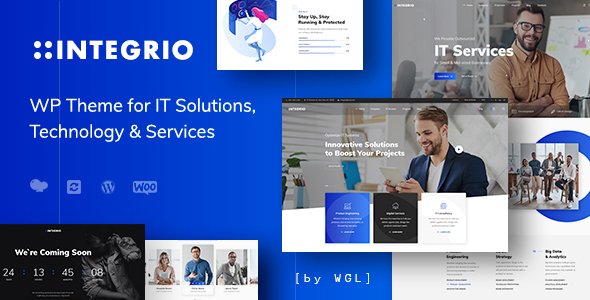
Stuck on your Integrio WordPress theme? Let's fix it.
No endless back-and-forth. Just send us the details and we'll get it done.
No obligation · Replies within 1 hour · Quote within 1 day
Setup · Customization · Bug fixes · WooCommerce integration
About Integrio WP Theme
Integrio is a multipurpose WordPress theme built by WebGeniusLab. It targets agencies, IT companies, and tech startups that need a professional site without starting from scratch. The theme ships with over 20 pre-built demos, a drag-and-drop page builder, and WooCommerce support out of the box.
Under the hood, Integrio uses Elementor as its primary builder, which keeps the workflow familiar for most developers. It includes a header and footer builder, custom post types for portfolio and services, and a dedicated theme options panel powered by Redux Framework.
Performance is reasonable for a feature-heavy theme, though it requires some configuration to get there. The codebase is clean by multipurpose standards, and WebGeniusLab maintains active updates and support through ThemeForest.
Get matched with a Integrio developer in under one day
Tell us about your Integrio project. Small fixes, Integrio theme customization, or a full website build, whatever you need, we've got it covered.
We'll connect you to the right Integrio developers, define the scope, and get everything 100% clear.
You'll get one estimate, hire your preferred developer, and start collaborating.
Integrio is capable, but it has enough moving parts that small configuration mistakes compound quickly. An experienced developer on Codeable can set it up correctly the first time, whether that means importing demos cleanly, customizing templates, or integrating third-party plugins without conflicts. Rather than spending hours in the options panel, you get a working site built to your spec. All developers on Codeable are vetted and rated, so you know the person handling your project has done this before.
Pros
- Ships with 20+ niche-specific demos covering agencies, IT, and startups
- Built on Elementor, so most WordPress developers can pick it up without a learning curve
- Includes a dedicated header and footer builder with mobile controls
- WooCommerce and WPML ready out of the box without additional setup plugins
- Active updates and support from WebGeniusLab through ThemeForest
Cons
- Page load times need manual optimization as the theme loads several scripts by default
- Heavy dependency on Elementor means switching page builders later is not straightforward
- Redux options panel has a steep learning curve for non-technical clients managing the site
- Demo import occasionally fails or imports incomplete content depending on server configuration
- Some design elements feel dated compared to more recently released multipurpose themes
Who is Integrio for?
IT & Software Companies
Integrio was designed with IT and software companies in mind. Its service and case study post types let you present technical offerings clearly. The demos include layouts for software teams, IT support firms, and technology consultancies with structured sections for features, process timelines, and team profiles.
Digital Agencies
Digital agencies get solid portfolio functionality, filterable by category. Combined with Elementor, you can build proposal-ready case study pages quickly. The header builder supports branded navigation, and the demos provide credible starting points rather than generic agency layouts you see on most multipurpose themes.
Startups
For early-stage startups needing a fast, professional presence, Integrio’s landing page demos cover product announcements, app showcases, and investor-facing pages. You can build something presentable without a large development budget, then scale the site as the product grows.
Freelance Developers & Designers
Freelancers can use Integrio to present work samples, list services, and capture leads through integrated contact forms. The theme handles portfolio filtering and single project pages without custom development. It is a practical choice for solo practitioners who want a polished site without managing a complex custom build.
SaaS & App Landing Pages
SaaS and app businesses can use Integrio’s feature grid layouts, pricing table sections, and testimonial blocks to build a focused landing page. The WooCommerce integration supports digital product sales and basic checkout flows. It works well for single-product sites that need speed and clarity over broad catalog functionality.

Customizing Integrio
Integrio gives you a lot of control through its Redux-based options panel. You can adjust typography, color schemes, header layouts, and sidebar positions without touching code. The built-in header builder handles sticky headers, transparent headers, and mobile menus independently.
For deeper work, an Integrio expert can modify child theme stylesheets, register custom Elementor widgets, or extend the portfolio and services post types with additional fields using ACF. The demo content is useful as a starting point, but most client projects require structural changes to templates and archive pages that go beyond what the panel offers.
If you need a custom layout that does not fit the included demos, working with an experienced Integrio developer will save you significant time over trial and error inside Elementor.
Recommended plugins for Integrio
Integrio works with the standard Elementor Pro widget library, which expands what you can build considerably. For contact forms, it supports Contact Form 7 and WPForms. WooCommerce integration is included for product pages and shop layouts.
WPML support makes it a practical choice for multilingual sites. For added speed, pairing it with a caching plugin and a CDN is recommended. You can also extend it with plugins for SEO and performance optimization to get the most out of the theme’s structure.
Not sure which plugins to use? This WordPress plugins directory covers the most popular options with reviews and setup guides.
Integrio common issues
Integrio demo import not working
Demo import failures in Integrio are usually caused by server memory limits or PHP timeout settings. Set memory_limit to at least 256MB and max_execution_time to 300 in your php.ini or wp-config.php. Also confirm all required plugins (Elementor, Revolution Slider, WPBakery if used) are installed and activated before importing. If the issue persists, manual import via XML and widget data files is more reliable. A developer can also handle this through WP-CLI to avoid browser timeout issues.
Integrio header not showing correctly on mobile
Integrio’s mobile header is controlled separately in the header builder under the responsive settings tab. If your mobile menu is broken or the header layout shifts, check that you have configured a mobile-specific header version rather than relying on the desktop header to scale down. Clear any caching plugins after making changes. If the issue involves a custom header template overriding theme defaults, a developer will need to inspect the template hierarchy and adjust the conditional loading logic.
Integrio Elementor widgets missing or not loading
Missing Integrio Elementor widgets usually mean the theme’s core plugin is deactivated or out of date. Go to Appearance > Install Plugins and make sure the Integrio Core plugin is active. If widgets still do not appear, deactivate other Elementor add-on plugins temporarily to check for conflicts. Regenerating the Elementor CSS cache from the Elementor settings panel also resolves display issues after plugin updates. For persistent problems, a bug fix is the fastest path to resolution.
Integrio theme slow loading speed
Integrio loads several scripts and stylesheets by default. Start by enabling asset combining and minification through a plugin like WP Rocket or LiteSpeed Cache. Disable Revolution Slider on pages where it is not used. Audit loaded scripts with Query Monitor and dequeue those not needed on specific pages. Also compress images during upload and serve them via a CDN. These steps alone can reduce load time noticeably. For a full audit and implementation, see the WordPress performance service.
Integrio FAQ
Integrio is a solid choice for IT companies, agencies, and startups. It has a good range of demos, active development from WebGeniusLab, and Elementor integration that keeps the build process straightforward. It is not the fastest out of the box, and it requires some configuration work to perform well. For the right use case, it delivers a professional result without heavy custom development.
Yes. Elementor is Integrio’s primary page builder. The theme includes custom Elementor widgets through its companion plugin, Integrio Core. These add theme-specific elements like service boxes, counters, and portfolio grids directly inside the Elementor editor. Elementor Pro is not required, but it extends what you can build with additional widget types and dynamic content features.
Purchase Integrio from ThemeForest and download the installable ZIP file. In WordPress, go to Appearance > Themes > Add New > Upload Theme, select the ZIP, and activate it. You will then be prompted to install required plugins including Integrio Core and Elementor. After activating those, import a demo from the theme panel under Integrio > Demo Import.
Integrio includes WooCommerce support with styled product pages, cart, and checkout templates. It is suited for small to medium stores, particularly digital products or services sold alongside a main business site. For large catalogs or advanced store features, you may need additional WooCommerce plugins. The theme does not include a dedicated shop demo, so some layout customization is usually needed.
Yes. Integrio is WPML compatible, which means you can create translated versions of pages, posts, and custom content types. String translations for theme text are also manageable through WPML. For full multilingual setup, including translated menus and Elementor templates, some configuration is required. If you are planning a multilingual build, a developer familiar with both Integrio and WPML will speed up the process considerably.
Hire an Integrio Expert Developer
Need help setting up, customizing, or fixing Integrio? FoxyConcept connects you with vetted Integrio developers through Codeable. Post your project, get matched within 24 hours, and receive a free estimate before any work begins. Whether you need a full site build, a custom template, or a specific fix, you only pay when you’re ready to proceed. Get a free estimate today and get it done right.
You'll need a free Codeable account so developers can ask questions and send their quotes.