Iteck WordPress Theme
by ThemesCamp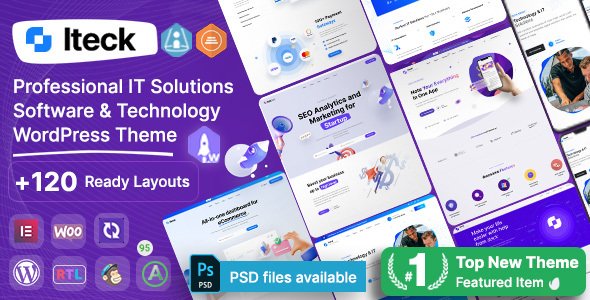
Stuck on your Iteck WordPress theme? Let's fix it.
No endless back-and-forth. Just send us the details and we'll get it done.
No obligation · Replies within 1 hour · Quote within 1 day
Setup · Customization · Bug fixes · WooCommerce integration
About Iteck WP Theme
Iteck is a WordPress theme built by ThemesCamp for IT companies, software agencies, and tech startups. It ships with a clean, corporate layout designed specifically for digital services businesses that need to communicate credibility fast.
The theme includes multiple homepage layouts, pre-built inner pages for services, pricing, and team sections, plus WPBakery Page Builder integration. It works with WooCommerce if you need a shop, and the header and footer options give you decent structural flexibility without touching code.
Iteck targets businesses that want a professional tech-sector look without building from scratch. It covers the basics well: readable typography, icon-heavy feature sections, and a visual style that fits IT consultancies, SaaS products, and managed service providers.
Get matched with a Iteck developer in under one day
Tell us about your Iteck project. Small fixes, Iteck theme customization, or a full website build, whatever you need, we've got it covered.
We'll connect you to the right Iteck developers, define the scope, and get everything 100% clear.
You'll get one estimate, hire your preferred developer, and start collaborating.
Iteck has enough moving parts that small mistakes cost time. WPBakery layouts break when updated incorrectly, and ThemesCamp themes have specific customization patterns that aren’t obvious if you haven’t worked with them before.
FoxyConcept connects you with vetted WordPress developers through Codeable. Every developer on the platform has passed a strict technical review. You get a free estimate before committing to anything, and work is matched to developers who actually know themes like Iteck, not a generalist who’ll figure it out as they go.
Pros
- Multiple pre-built homepage layouts cover common IT and SaaS site structures
- WPBakery Page Builder included, so non-developers can rearrange sections without code
- WooCommerce compatible for agencies that sell services or digital products directly
- Icon-focused design system works well for feature lists, service grids, and pricing tables
- Regular updates from ThemesCamp with active support via their ticketing system
Cons
- WPBakery Page Builder creates shortcode lock-in, making it hard to switch builders later
- Default page speed scores are average and require optimization work before going live
- Limited mega menu functionality compared to themes built on dedicated header builders
- Mobile menu behavior can be inconsistent across custom header layouts without additional CSS
- Documentation covers basic setup but lacks guidance for advanced customizations or child theme use
Who is Iteck for?
IT Consulting Firms
Iteck’s service-page templates and team sections are built for consulting businesses that need to present credentials clearly. The structured layout helps visitors understand service offerings quickly. A developer can extend these pages with case study post types, client logo sliders, and inquiry forms connected to a CRM without fighting the theme’s design patterns.
SaaS Product Landing Pages
The theme’s feature grid sections and pricing table blocks map well to SaaS marketing pages. You can build a focused single-product landing page using one of the homepage layouts. Pairing Iteck with a dedicated form plugin and analytics setup gives you a functional lead generation page without custom development from scratch.
Managed Service Providers
MSPs need to list services, communicate support tiers, and give potential clients a clear way to contact them. Iteck’s pricing tables and service sections cover this structure. Customization work typically focuses on adding ticketing system integrations, custom contact routing, and a knowledge base section that the theme doesn’t include by default.
Software Development Agencies
Agencies presenting portfolios, team credentials, and multi-service offerings fit Iteck’s layout structure well. The challenge is usually differentiating from the default look. A developer familiar with Iteck can restyle sections, add custom portfolio post types, and restructure the case study presentation to reflect the agency’s specific positioning and visual brand.
Tech Startups
Early-stage tech startups often need a credible web presence fast. Iteck’s pre-built layouts reduce setup time significantly. The main customization need at this stage is usually a focused homepage, a blog, and a clean contact flow. Those can be delivered quickly by an Iteck developer who doesn’t need to learn the theme structure from scratch.

Customizing Iteck
Iteck gives you a solid starting point, but most businesses need changes that go beyond swapping colors and uploading a logo. The theme relies on WPBakery Page Builder, which means layout edits involve shortcodes and a visual editor that can get complicated quickly, especially when modifying existing sections rather than building new ones.
Custom post types, advanced mega menus, plugin conflicts, or integrations with CRMs and booking tools usually need a developer. An Iteck expert who knows the theme’s structure can make those changes cleanly without breaking the existing layout or introducing technical debt.
Typography adjustments, custom header layouts, and unique service page structures are common requests. A developer familiar with ThemesCamp themes will know where Iteck stores its settings and how to override them properly using child themes rather than editing core files.
Recommended plugins for Iteck
Iteck works with the plugin ecosystem most WordPress sites rely on. Contact Form 7 and WPForms both integrate cleanly. WooCommerce support means you can add a services shop or product listings without a separate theme.
For performance, caching plugins like WP Rocket pair well with Iteck, though you may need a developer to handle script optimization and image delivery correctly. If you’re running SEO through Yoast or Rank Math, both work fine. Check our WordPress performance service or SEO optimization service if you need those areas handled properly alongside your Iteck build.
Not sure which plugins to use? This WordPress plugins directory covers the most popular options with reviews and setup guides.
Iteck common issues
Iteck theme WPBakery layout broken after update
WPBakery updates can conflict with ThemesCamp’s bundled version of the builder. If a layout breaks after an update, the first step is checking which version of WPBakery the theme was built against. Rolling back to the previous plugin version often restores the layout immediately. Long term, the fix is updating the theme and plugin together in a staging environment first. Our WordPress bug fixing service can diagnose and resolve this without data loss.
Iteck WordPress theme slow loading speed
Iteck loads several scripts and stylesheets by default, including WPBakery assets that run even on pages that don’t use the builder. A developer can audit the asset queue, disable unused scripts per page type, enable lazy loading for images, and configure a caching layer properly. These steps typically move Core Web Vitals scores from poor to acceptable. Hosting environment also plays a role, so that gets checked too.
Iteck header not displaying correctly on mobile
Iteck’s mobile menu behavior depends on the header layout selected. Some layouts use a custom mobile breakpoint that doesn’t match the theme’s responsive CSS exactly, causing overlap or hidden navigation items. The fix usually involves adjusting the mobile breakpoint in the theme options and adding targeted CSS for the affected header variant. Check that no custom header plugins are conflicting with ThemesCamp’s built-in mobile menu scripts first.
Iteck theme custom CSS not applying after changes
Custom CSS entered in the WordPress Customizer or Iteck’s theme options panel can fail to apply if a caching plugin is serving a stale stylesheet. Clear all cache layers first, including server-side cache if your host provides one. If the issue persists, confirm the CSS selector specificity is high enough to override Iteck’s default styles. Using a child theme for custom CSS is the correct long-term approach and avoids this problem entirely after theme updates.
Iteck FAQ
ThemesCamp has released updates to keep Iteck compatible with recent WordPress versions, including the block editor environment. That said, Iteck relies on WPBakery for layout editing, so the Gutenberg editor is largely bypassed. Test any major WordPress core update on a staging site first, especially if you have heavily customized WPBakery layouts. Check the ThemesCamp changelog before updating to confirm compatibility notes.
Iteck is built around WPBakery Page Builder, not Elementor. You can technically install Elementor alongside WPBakery, but running both builders on the same site creates conflicts and bloat. If you want to rebuild Iteck pages in Elementor, that’s a migration project rather than a simple switch. A developer can handle that transition cleanly if you want to move away from WPBakery.
Create a new folder in your wp-content/themes directory, name it something like iteck-child, and add a style.css file with a Template: iteck header line. Then add a functions.php file to enqueue the parent stylesheet. Activate the child theme from the WordPress admin. All custom CSS and PHP changes go in the child theme to survive future Iteck updates.
Yes, the layout works for any service-based business that suits a structured, professional look. Finance, consulting, education, and healthcare businesses have all used IT-style themes effectively. The main adjustment is replacing tech-specific copy and icons with your own content. A developer can restyle sections to shift the visual tone if the default look feels too tech-heavy for your audience.
ThemesCamp provides support through their item comment section on ThemeForest and a dedicated support ticket system for verified purchasers. Response times vary. For development help beyond basic theme questions, such as custom functionality, plugin conflicts, or layout work, a vetted Iteck developer through FoxyConcept will resolve issues faster and with more technical depth than theme support typically covers.
Hire an Iteck Developer
Whether you need a full Iteck setup, a custom layout, or specific functionality added to an existing site, we can match you with a developer who knows the theme. Work is handled through Codeable, so you get a vetted professional, a fixed estimate upfront, and no risk if the match isn’t right.
Get a free estimate and describe your project. You’ll hear back within 24 hours.
You'll need a free Codeable account so developers can ask questions and send their quotes.