Itfirm WordPress Theme
by Case-Themes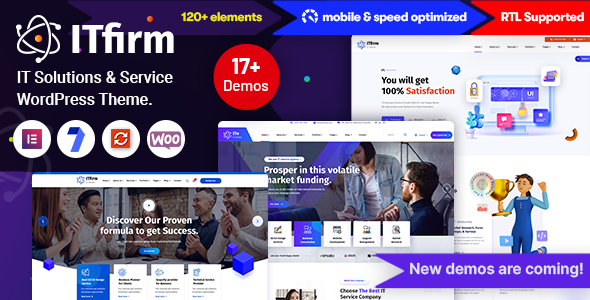
Stuck on your Itfirm WordPress theme? Let's fix it.
No endless back-and-forth. Just send us the details and we'll get it done.
No obligation · Replies within 1 hour · Quote within 1 day
Setup · Customization · Bug fixes · WooCommerce integration
About Itfirm WP Theme
Itfirm is a WordPress theme built by Case-Themes, designed specifically for IT companies, software agencies, and tech service providers. It ships with a clean, corporate layout and a set of pre-built demo pages that cover common IT business needs — services, team, pricing, portfolio, and contact.
The theme is built on a page builder-friendly structure, so non-developers can adjust layouts without touching code. It includes header and footer variations, custom widgets, and a shortcode library. Itfirm is compatible with WooCommerce, which makes it workable for companies selling digital products or software licenses alongside their services.
Out of the box, it loads reasonably fast and passes basic accessibility checks. It follows WordPress coding standards and supports the block editor, though the classic editor remains the more fluid experience for this theme’s layout system.
Get matched with a Itfirm developer in under one day
Tell us about your Itfirm project. Small fixes, Itfirm theme customization, or a full website build, whatever you need, we've got it covered.
We'll connect you to the right Itfirm developers, define the scope, and get everything 100% clear.
You'll get one estimate, hire your preferred developer, and start collaborating.
Itfirm is straightforward to set up, but getting it to do exactly what your business needs takes real WordPress experience. Developers on Codeable are vetted specifically for WordPress — no generalists, no guesswork. You post your project, get matched with a qualified developer, and receive a fixed estimate before any work begins. It is a direct path to getting Itfirm working the way you actually need it to.
Pros
- Pre-built demo for IT and software companies reduces initial setup time
- Includes multiple header layouts and sticky navigation options out of the box
- WooCommerce compatible for selling digital products or software subscriptions
- Shortcode library covers common IT content blocks like feature lists and pricing tables
- Supports WPML for multilingual IT company websites
Cons
- Classic editor experience is smoother than the block editor integration, which feels partially adapted
- Default demo content is generic and requires significant copy and image replacement to look professional
- Limited documentation for advanced customization scenarios like custom post types or API integrations
- Some built-in shortcodes produce dated-looking output without custom CSS adjustments
- Theme updates from Case-Themes have been infrequent, which may create compatibility concerns over time
Who is Itfirm for?
IT Consulting Firms
Itfirm suits consulting businesses that need a professional services page, a team section, and a clear contact path. The layout communicates credibility without needing heavy customization. A developer can add case study templates and a filterable expertise section to make the site more useful for converting prospects.
Software Development Agencies
Software agencies need a portfolio, a services breakdown, and a strong call to action. Itfirm covers the basic structure. With developer help, you can add custom project gallery post types, client logos sliders, and technology stack showcases that the default theme does not include out of the box.
Managed IT Service Providers
MSPs need service plan pages, a support request flow, and trust signals like certifications and client count. Itfirm provides the layout skeleton. A developer can connect ticketing tools, build out a service tier comparison table, and integrate a live chat widget matched to the theme design.
SaaS Product Companies
SaaS companies can use Itfirm as a marketing site with WooCommerce handling subscriptions or free trial signups. The pricing table shortcode gives you a starting point. A developer can refine the plan comparison layout, add toggle billing options, and connect payment gateways specific to your product.
Cybersecurity Businesses
Cybersecurity firms need to look authoritative and load fast. Itfirm’s corporate layout supports this. You can extend it with service-specific landing pages, a resource library for whitepapers, and lead capture forms integrated with a CRM. A developer handles the technical depth a security-focused company requires.

Customizing Itfirm
Itfirm gives you a solid starting point, but most IT companies need changes that go beyond the Theme Customizer. Adjusting the service section layout, adding custom post types for case studies, connecting a CRM, or building out a client portal all require proper development work.
An Itfirm expert can handle these tasks cleanly, without breaking the theme structure or leaving behind patched code. Common customization requests include custom pricing tables, dynamic team member filtering, contact form integrations with tools like HubSpot or Pipedrive, and performance tuning for pages with heavy content blocks.
If you need Itfirm extended to behave like a true business tool rather than just a marketing site, working with a developer who knows the theme saves time. You avoid trial-and-error with plugins that conflict, and you get output built to your exact requirements.
Recommended plugins for Itfirm
Itfirm pairs well with a range of plugins that extend its functionality. Contact Form 7 and WPForms handle lead capture. Elementor or WPBakery can replace the default builder if you want more layout control. For client-facing portals, WP Customer Area integrates cleanly.
If you need to grow beyond a brochure site, adding performance optimisation or a solid SEO setup makes a real difference. WooCommerce works with Itfirm for selling software or digital downloads. WPML handles multilingual setups for international IT firms.
Not sure which plugins to use? This WordPress plugins directory covers the most popular options with reviews and setup guides.
Itfirm common issues
Itfirm theme mobile menu not working
Mobile menu issues in Itfirm usually trace back to a JavaScript conflict with another plugin, or a theme script loading out of order. Check the browser console for JS errors first. If a plugin added recently broke it, deactivate plugins one at a time to isolate the cause. If the menu was working and stopped after a WordPress core update, the theme’s bundled jQuery handler may need updating. A developer can patch this cleanly without modifying core theme files directly.
Itfirm page builder layout broken after WordPress update
Layout breaks after WordPress updates often happen when a bundled page builder version inside Itfirm falls out of sync with the current WordPress environment. If you are using WPBakery or a similar tool packaged with the theme, it may need an independent update. Check whether the issue affects all pages or just specific templates. Restoring from a recent backup while a developer reviews compatibility is the safest path. Our bug fixing service can resolve this quickly.
Itfirm theme slow loading on homepage
Slow homepage performance in Itfirm typically comes from unoptimised images in the slider, multiple render-blocking scripts loaded by the theme, or too many active plugins adding overhead. Run a GTmetrix or PageSpeed test to see exactly what is blocking load. Compressing images, enabling caching, and deferring non-critical scripts usually produce quick gains. For more persistent issues, a proper performance audit identifies the deeper causes.
Itfirm contact form not sending emails
When contact forms stop sending in Itfirm, the problem is almost always server-level email delivery, not the form itself. WordPress’s default mail function relies on your host’s sendmail, which many hosts restrict. Install an SMTP plugin like WP Mail SMTP and connect it to a transactional email service. Also check your spam folder before assuming emails are lost. If the form plugin itself is misconfigured, reviewing its settings takes about ten minutes to diagnose.
Itfirm FAQ
Itfirm has basic block editor support, but the classic editor gives a more complete experience with the theme’s built-in shortcodes and layout tools. Most of the demo pages were built using classic editor workflows. If you want to work primarily with the block editor, expect to do some additional setup or rely on a developer to bridge the gap.
Yes, Itfirm works alongside Elementor. You can rebuild or extend pages using Elementor’s drag-and-drop interface while keeping the theme’s header, footer, and global styles. This is a common approach for users who want more layout flexibility than the default page builder provides. A developer can set this up without conflicts and preserve your existing content.
Itfirm includes a one-click demo import option accessible from the theme settings panel in your WordPress dashboard. You need to install the required plugins before importing. The process usually takes a few minutes. If the import stalls or produces errors, it is typically a PHP memory limit issue on your host. Increasing the limit to at least 256MB resolves most import failures.
Yes, Itfirm is WooCommerce compatible. You can use it to sell digital products, software licenses, or service packages. The default WooCommerce pages inherit the theme’s styling with minor visual adjustments needed. For a polished store experience, a developer may need to style the cart, checkout, and product pages to match your brand more precisely.
Case-Themes provides support through ThemeForest comments and a dedicated support system for verified buyers. Response times vary. For faster, more specific help, working with a WordPress developer who knows Itfirm is a practical alternative. You can also explore our maintenance plans for ongoing site support beyond what the theme author provides.
Hire an Itfirm WordPress Developer
Whether you need a full Itfirm setup, a specific feature added, or something fixed that has stopped working, a dedicated developer gets it done properly. All work is handled through Codeable, which means you get a vetted WordPress professional, a clear scope, and a fixed price before anything starts. Get a free estimate and describe what you need. No obligation to proceed.
You'll need a free Codeable account so developers can ask questions and send their quotes.