Jannah WordPress Theme
by TieLabs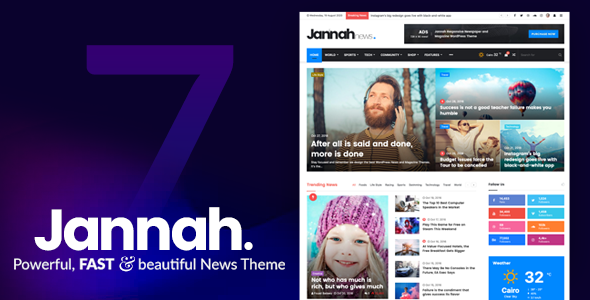
Stuck on your Jannah WordPress theme? Let's fix it.
No endless back-and-forth. Just send us the details and we'll get it done.
No obligation · Replies within 1 hour · Quote within 1 day
Setup · Customization · Bug fixes · WooCommerce integration
About Jannah WP Theme
Jannah is a news and magazine theme built by TieLabs. It’s one of the most feature-packed editorial themes on ThemeForest, consistently ranked among the top sellers in its category. The theme ships with a drag-and-drop page builder, multiple homepage layouts, an ad management system, AMP support, and a built-in review system.
Jannah targets publishers running high-traffic news sites, blogs, and online magazines. It handles large content volumes well and includes performance-conscious features like lazy loading and CSS/JS optimization out of the box. The options panel is deep, which means you can shape the look and functionality without touching code. That same depth, however, makes the learning curve steeper than simpler themes.
TieLabs maintains the theme actively, with regular updates covering compatibility with the latest WordPress and WooCommerce versions.
Get matched with a Jannah developer in under one day
Tell us about your Jannah project. Small fixes, Jannah theme customization, or a full website build, whatever you need, we've got it covered.
We'll connect you to the right Jannah developers, define the scope, and get everything 100% clear.
You'll get one estimate, hire your preferred developer, and start collaborating.
Jannah’s options panel is wide. Knowing which settings interact, which require a child theme to override safely, and how to extend the theme without breaking updates takes experience. A Jannah developer on Codeable has already solved the problems you’re about to hit, whether that’s a custom ad zone, a modified category template, or a WooCommerce layout that matches your editorial design. Projects are estimated for free with no obligation, and you’re matched with a vetted developer within 24 hours.
Pros
- One of the most complete built-in ad management systems of any WordPress theme
- AMP support ships natively, useful for news publishers targeting mobile search
- Multiple pre-built homepage and archive templates reduce design time significantly
- Built-in lazy loading, CSS/JS minification, and caching hooks for performance
- Active development from TieLabs with consistent updates and dedicated support forum
Cons
- Options panel depth creates a steep learning curve for non-technical site owners
- Default install is visually dense; requires deliberate customization to avoid a cluttered look
- Heavy JavaScript load on the frontend can hurt Core Web Vitals scores without optimization
- Some built-in features overlap with popular plugins, creating conflicts if both are active
- Child theme is essentially required for any template-level customization, which adds setup overhead
Who is Jannah for?
Online News Publication
Jannah is built for news. The breaking news ticker, category-based homepage widgets, and ad zone system map directly onto how news sites are structured. A Jannah developer can configure the category templates and ad placements to match your editorial workflow without requiring custom code on every page.
Niche Blog Network
Running several topic-specific blogs under one install is manageable with Jannah’s per-category template settings. Each section of the site can carry a different layout and color scheme. A Jannah specialist can set this up cleanly, especially if you need custom sidebars or featured post logic per category.
Tech or Product Review Site
Jannah includes a built-in review system with score boxes and criteria ratings, making it a natural fit for review-focused sites. The layout handles comparison tables and product summaries well. Pairing this with affiliate links and structured schema markup requires a Jannah expert familiar with the theme’s review module.
Sports or Entertainment Magazine
High-volume sports and entertainment sites benefit from Jannah’s infinite scroll, video embed handling, and social sharing tools. The visual layouts support large featured images and quick-scan post grids. A Jannah developer can configure the front page to prioritize live content sections like scores or trending posts.
Multi-author Editorial Platform
Jannah supports author profiles, contributor pages, and per-author post archives out of the box. For editorial teams with different roles and publishing workflows, a Jannah specialist can extend the author template, add custom fields, and integrate with editorial plugins without breaking the theme’s existing structure.

Customizing Jannah
Jannah ships with more configuration options than most editors will ever use. The theme panel covers typography, color schemes, header layouts, sidebar positions, post templates, ad placements, and social sharing styles. Most changes are made through the WordPress Customizer or the dedicated TieLabs options panel.
For deeper work, such as custom post templates, modified archive layouts, or third-party plugin integration, you’ll want a Jannah expert who knows where the theme stores its template files and how the options panel interacts with custom CSS. Child theme development is recommended before making structural edits to avoid losing changes on updates.
If you need a custom homepage grid, a branded color system, or a modified header that doesn’t match any of the built-in presets, working with a Jannah specialist saves significant time compared to trial and error through the options panel.
Recommended plugins for Jannah
Jannah integrates with WooCommerce for shop functionality, bbPress for community forums, and BuddyPress for social networking features. It also supports Elementor, though the native builder handles most layout needs without it.
For publishers focused on search visibility, pairing Jannah with a proper WordPress SEO setup makes a measurable difference, since the theme’s structured markup needs to be complemented by schema, sitemap, and metadata strategy. On the speed side, Jannah’s built-in lazy load and minification are a starting point, but a full WordPress performance audit is usually needed to hit Core Web Vitals targets on high-traffic news sites.
Not sure which plugins to use? This WordPress plugins directory covers the most popular options with reviews and setup guides.
Jannah common issues
Jannah theme slow loading on mobile
Jannah loads several scripts on every page by default, including sliders and social widgets that may not be needed globally. Start by disabling unused homepage blocks in the options panel and enabling the built-in CSS/JS minification. If scores are still poor, a full asset audit is the next step. Our WordPress bug fixing service can identify exactly which scripts are blocking render and remove or defer them without breaking functionality.
Jannah breaking news ticker not working
The breaking news ticker pulls from a specific category set in the Jannah options panel under the Breaking News section. If the ticker is invisible, check that the category is assigned, that posts in that category are recent, and that the ticker isn’t disabled per-page via the post meta options. If the ticker element is present in the DOM but hidden, a CSS conflict from a plugin or custom styles is likely the cause.
Jannah theme not compatible with Elementor
Jannah has its own built-in page builder. Running Elementor alongside it can cause layout conflicts, particularly in the header and footer areas where both tools try to register template hooks. The safest approach is to limit Elementor to specific pages using its site settings and avoid using both builders on the same template. A Jannah developer can configure which builder controls which sections.
Jannah ads not showing in sidebar
Jannah’s ad zones are tied to specific widget areas and shortcodes. If an ad isn’t appearing in the sidebar, first confirm the correct widget area is active for that page type under Appearance > Widgets. Ad blockers in your own browser will also suppress the preview. If the zone is configured correctly but still blank, check for a JavaScript error in the browser console that may be interrupting the ad rendering script.
Jannah theme update broke my homepage layout
Homepage layout changes after an update usually mean a Jannah option was reset or a template file was modified directly rather than through a child theme. Compare your current homepage settings against your pre-update screenshots. If you modified template files without a child theme, those changes are gone. A WordPress bug fixing specialist can help restore the layout and move your customizations into a child theme to prevent this from happening again.
Jannah related posts not displaying correctly
Jannah’s related posts feature can be configured by category, tag, or custom field. If related posts aren’t showing, check the Related Posts settings in the Jannah panel and confirm the posts being viewed share tags or categories with other published posts. If the section renders empty on all posts, a caching plugin may be serving a stale version of the template before related post data is available.
Jannah social share buttons missing
Social share buttons in Jannah are controlled through the theme options panel under Social Sharing. If they’re missing, confirm they’re enabled globally and not disabled via per-post meta settings. Some caching plugins strip inline scripts that handle share counts. If the buttons appeared before a plugin update, deactivate recently updated plugins one at a time to isolate the conflict. Our WordPress bug fixing service handles plugin conflict diagnosis efficiently.
Jannah WooCommerce layout broken
Jannah includes WooCommerce compatibility styles, but they don’t always cover custom WooCommerce templates introduced in newer plugin versions. If the shop page or single product layout looks broken, check whether the issue appeared after a WooCommerce update. Overriding the relevant WooCommerce template files inside a child theme with updated markup usually resolves the issue without waiting for a Jannah update.
Jannah custom CSS not applying after update
If you added custom CSS through the WordPress Customizer’s Additional CSS field, it should survive theme updates. If you added it directly to the theme’s style.css or a custom CSS file inside the theme folder, updates will overwrite it. Move all custom CSS to a child theme or to the Customizer. For complex style overrides, a child theme stylesheet with proper specificity is more reliable than the Customizer field.
Jannah AMP pages showing errors in Google Search Console
AMP errors in Search Console on Jannah sites usually relate to missing structured data, invalid HTML in post content, or ads that don’t comply with AMP specifications. Start by running individual AMP URLs through Google’s Rich Results Test. Common fixes include removing non-AMP-compatible shortcodes from post content and adjusting the ad unit configuration in Jannah’s AMP settings to use AMP-compatible ad tags.
Jannah FAQ
Jannah outputs clean semantic HTML and includes schema markup for articles and reviews. It’s a reasonable starting point for SEO. That said, theme structure alone doesn’t determine rankings. You’ll still need a dedicated SEO plugin, proper metadata configuration, and a solid internal linking strategy. The theme doesn’t replace that work, it just doesn’t get in the way of it.
Yes. Jannah supports the Gutenberg block editor for post and page content. Some of its own layout features, like homepage widgets and post templates, still use its native builder rather than Gutenberg. Most publishers use Gutenberg for article content and the Jannah panel for site-wide layout configuration. Both can coexist without conflict.
Create a folder in wp-content/themes with a name like jannah-child. Inside it, create a style.css with the standard child theme header referencing Jannah as the parent template. Then add a functions.php that enqueues the parent and child stylesheets. Any template files you copy into the child theme folder will override the parent versions without being touched by updates.
Jannah includes WooCommerce compatibility and shop layout styles. It works for stores that are secondary to editorial content, such as a magazine selling branded merchandise. For a dedicated ecommerce site where the shop is the primary purpose, a theme built specifically for WooCommerce would give you more control over product layouts and checkout flows.
Jannah is sold under a Regular License on ThemeForest, which covers a single end product. If you’re building sites for multiple clients or running several separate publications, you need a separate license for each. An Extended License applies if end users are charged to access the site. Review TieLabs’ licensing terms on the ThemeForest product page for your specific situation.
Yes, Jannah includes full RTL support. Layouts, typography, and navigation mirror correctly for right-to-left languages like Arabic, Hebrew, and Persian. You activate RTL by setting your WordPress site language to an RTL language under Settings > General. No additional plugin is needed for basic RTL functionality within Jannah.
Start with Jannah’s built-in minification and lazy loading settings in the options panel. Beyond that, use a caching plugin, optimize your images before uploading, and consider a CDN for static assets. For a measurable improvement on Core Web Vitals, a proper performance audit is usually needed to identify the specific scripts and render-blocking resources affecting your scores.
TieLabs updates Jannah regularly. The theme has been on the market for years and maintains compatibility with current WordPress and WooCommerce releases. Update frequency has historically been several times per year. You can check the changelog on the ThemeForest product page to see the cadence and what recent updates addressed before purchasing.
Migrating an existing site to Jannah means exporting your content and reimporting it, then rebuilding your homepage layout and configuring the theme options to match your design goals. Post content transfers cleanly, but layout, widgets, and custom templates need to be rebuilt in Jannah’s system. A WordPress migration specialist can handle this without losing content or SEO history.
Codeable is the most reliable option. It’s a vetted network of WordPress developers, and you can post your Jannah project and receive a scoped estimate within 24 hours at no cost. All developers on the platform have been reviewed for code quality and client communication. You choose who to hire after reviewing the estimate, with no obligation to proceed.
Hire a Jannah Expert Developer
Whether you need a full Jannah setup, a custom template, or targeted fixes to your existing site, a specialist can scope it quickly and deliver without guesswork. All work is done through Codeable, where developers are vetted and estimates are free. Get a Free Estimate and describe your project. No commitment required.
You'll need a free Codeable account so developers can ask questions and send their quotes.