Jobseek WordPress Theme
by Coffeecream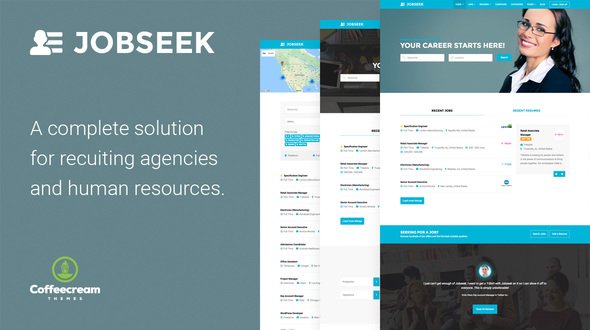
Stuck on your Jobseek WordPress theme? Let's fix it.
No endless back-and-forth. Just send us the details and we'll get it done.
No obligation · Replies within 1 hour · Quote within 1 day
Setup · Customization · Bug fixes · WooCommerce integration
About Jobseek WP Theme
Jobseek is a WordPress job board theme built by Coffeecream. It is designed to help you launch a fully functional job listing site without heavy plugin stacks or complex configuration. The theme pairs cleanly with WP Job Manager, giving you a solid foundation for job postings, applications, and employer profiles.
The design is clean and candidate-focused, with a layout that puts job search front and center. Filtering by category, location, and job type works out of the box. Jobseek suits freelance marketplaces, niche industry boards, and regional employment directories alike.
It is built on a lightweight base with responsive layouts across mobile and desktop. If you want a job board that looks professional from day one without months of custom work, Jobseek gives you a credible starting point. That said, most real-world job boards need at least some developer input to get things right.
Get matched with a Jobseek developer in under one day
Tell us about your Jobseek project. Small fixes, Jobseek theme customization, or a full website build, whatever you need, we've got it covered.
We'll connect you to the right Jobseek developers, define the scope, and get everything 100% clear.
You'll get one estimate, hire your preferred developer, and start collaborating.
Job board sites are more technically demanding than a standard WordPress build. Jobseek gives you a good shell, but payment workflows, application logic, employer permissions, and search performance all need proper implementation.
The developers available through Codeable have been individually vetted and have real experience with themes like Jobseek. You are not posting to a race-to-the-bottom marketplace. You get a qualified developer who has done this before and can scope the work accurately from the start.
Pros
- Clean, candidate-focused design with job search prominent on the homepage
- Built specifically for WP Job Manager, so core features work without heavy configuration
- Responsive layout handles mobile job searches well out of the box
- Lightweight base theme keeps initial page load times reasonable
- Customizer options cover branding basics without requiring a child theme for simple changes
Cons
- Deep customization of application flows requires developer work, not just Customizer settings
- WP Job Manager paid add-ons stack up in cost quickly for full-featured job boards
- Limited built-in options for employer branding or custom company profile pages
- Structured data for job postings is not fully automated and needs manual attention for SEO
- Coffeecream support response times can be slow for complex issues outside basic theme questions
Who is Jobseek for?
General Job Board
Jobseek works well as a broad employment board covering multiple sectors. The category and job type filtering lets candidates narrow searches quickly. With WP Job Manager handling the backend logic, you can have employers post and manage their own listings without admin involvement on every submission.
Niche Industry Employment Site
Niche boards for industries like healthcare, tech, or construction benefit from Jobseek’s clean structure. You can restrict categories, set custom job types, and build an audience that trusts the board because it stays focused. A developer can add industry-specific fields to listing forms without significant rework of the theme itself.
Freelance Marketplace
With the right WP Job Manager add-ons, Jobseek can be adapted for freelance project listings rather than traditional job postings. Project duration, budget fields, and remote work flags can all be added. Candidate profiles through Resume Manager give freelancers a place to showcase their work alongside applications.
Regional Jobs Directory
Location-based job boards are a strong use case for Jobseek. The theme supports location filtering natively, and with good SEO work on location plus keyword combinations, a regional board can rank well in local search. This works particularly well in markets underserved by national job sites.
Employer Recruitment Portal
Companies running internal or semi-public recruitment portals can use Jobseek to manage listings and applications in one place. Employer accounts through WP Job Manager let hiring managers post and track jobs themselves. Application management and notification emails keep the process organized without a dedicated HR platform.

Customizing Jobseek
Out of the box, Jobseek covers the basics: colors, fonts, header layout, and homepage sections are all adjustable through the WordPress Customizer. You can set up job categories, tweak listing card styles, and configure your search filters without touching code.
But most site owners hit a wall quickly. Custom application workflows, employer dashboards, resume upload logic, and payment integration for job posting fees all require hands-on work. A Jobseek expert can extend the theme properly without hacking core files or breaking updates.
If you need WP Job Manager add-ons wired in correctly, custom email notifications, or a front-end submission form that actually matches your brand, that is work best handled by someone who knows the theme inside out. Generic WordPress developers often underestimate job board complexity.
Recommended plugins for Jobseek
Jobseek is built around WP Job Manager, so extensions from that ecosystem slot in naturally. Resume Manager adds candidate profiles. WC Paid Listings connects job posting fees to WooCommerce. Applications and Bookmarks extend the candidate experience significantly.
For traffic-heavy job boards, pairing Jobseek with proper caching and a CDN matters. A slow job board loses candidates fast. See our WordPress performance service for help there.
If your board needs to rank for location or industry keywords, structured data and on-page SEO for job listings needs specific attention. Our WordPress SEO service covers that ground.
Not sure which plugins to use? This WordPress plugins directory covers the most popular options with reviews and setup guides.
Jobseek common issues
Jobseek theme job listings not displaying correctly
Listing display issues in Jobseek are usually caused by a conflict between the theme’s templates and a plugin or page builder overriding the layout. First, check if the issue appears with all plugins disabled. If listings show correctly, reactivate plugins one by one to find the conflict. Template override errors in a child theme are another common cause. A developer can audit the template hierarchy quickly. See our WordPress bug fixing service if you need hands-on help.
WP Job Manager not working with Jobseek after update
WP Job Manager updates occasionally introduce template changes that break theme compatibility. Jobseek templates in your installation may be outdated versions no longer matching the plugin’s current output. Go to WP Job Manager settings and check for a template update notice. If templates need refreshing in a child theme, do not just copy old versions over. A developer should review the diff and merge changes properly to avoid data loss or layout breakage.
Jobseek apply button not working
A broken apply button in Jobseek usually points to one of three things: a JavaScript conflict blocking the modal from opening, a missing WP Job Manager Applications add-on, or an incorrect permalink setting. Start by checking the browser console for JS errors. Then confirm that your permalink structure is set to Post Name in WordPress settings and that you have saved it after any recent changes. If the modal still fails, a developer can trace the conflict efficiently.
Jobseek search filter showing no results
Empty search results in Jobseek are often a permalink or rewrite rule problem. Go to Settings, Permalinks, and hit Save without changing anything. This flushes rewrite rules. If that does not fix it, check whether the jobs page has the correct page template assigned. The WP Job Manager shortcode must appear on the page Jobseek is pointing to for archive and search queries to work correctly. Database query caching can also cause stale empty results.
Jobseek FAQ
Yes. Jobseek is built specifically for WP Job Manager. The theme’s templates, archive pages, and search functionality are all designed around how WP Job Manager structures job data. Using the theme without this plugin will leave most of the job board functionality non-functional. Keep both the theme and plugin updated together to avoid template compatibility issues.
Technically you can install Jobseek without WP Job Manager, but you will have a standard WordPress site with a job-board-styled homepage and no actual listing functionality. The search, category filters, job cards, and application forms all depend on WP Job Manager being active. There is no practical reason to run Jobseek without it.
Jobseek does not include paid listing functionality on its own. You need the WP Job Manager WC Paid Listings add-on plus WooCommerce to charge employers for posting jobs. Once those are installed and configured, Jobseek integrates with the checkout process. Setting up pricing packages and payment flows correctly typically requires a developer to configure properly.
Resume functionality in Jobseek comes from the Resume Manager add-on for WP Job Manager. Install and activate that plugin, then configure which user roles can submit resumes. Jobseek includes basic template support for resume listings. If you want the resume section to match your site’s design closely or add custom fields to candidate profiles, a developer will need to handle that work.
Coffeecream continues to release updates for Jobseek, but the pace is not rapid. The theme receives compatibility updates when WP Job Manager makes significant changes. Before purchasing or building on Jobseek, check the ThemeForest changelog to confirm the last update date and whether it is current with recent WordPress and WP Job Manager versions.
Hire a Jobseek Developer
Whether you need a Jobseek site built from scratch, a broken feature fixed, or custom functionality added on top of WP Job Manager, we can match you with the right developer fast. Post your project and get a free estimate within 24 hours through Codeable. No obligation to hire, no upfront cost.
Get your free estimate now and describe what you need. A vetted Jobseek developer will review it and come back with a clear scope and price.
You'll need a free Codeable account so developers can ask questions and send their quotes.