Jobster WordPress Theme
by pixel_prime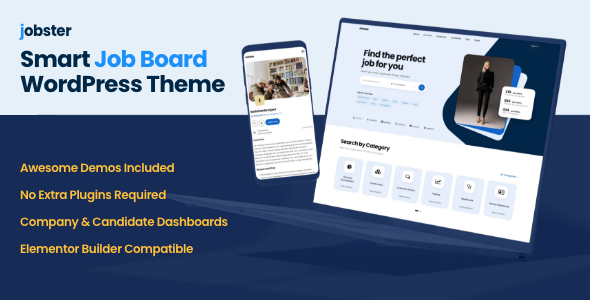
Stuck on your Jobster WordPress theme? Let's fix it.
No endless back-and-forth. Just send us the details and we'll get it done.
No obligation · Replies within 1 hour · Quote within 1 day
Setup · Customization · Bug fixes · WooCommerce integration
About Jobster WP Theme
Jobster is a WordPress job board theme built by pixel_prime and sold on ThemeForest. It targets recruitment agencies, freelance platforms, and niche job boards that need a clean, functional hiring portal without building from scratch.
The theme ships with WP Job Manager integration, a polished front-end job submission form, candidate profiles, and employer dashboards. It supports paid listings via add-ons, resume management, and category-based job browsing. The design is clean and modern, built with Elementor compatibility in mind.
Setup is relatively straightforward for developers. For non-technical users, getting the demo content imported and the listings configured correctly takes some work. Jobster is a solid foundation, but most serious job boards will need customization beyond the defaults to match their exact workflow and brand.
Get matched with a Jobster developer in under one day
Tell us about your Jobster project. Small fixes, Jobster theme customization, or a full website build, whatever you need, we've got it covered.
We'll connect you to the right Jobster developers, define the scope, and get everything 100% clear.
You'll get one estimate, hire your preferred developer, and start collaborating.
Jobster can be installed in an afternoon, but building a job board that actually works for your users takes real development work. Matching candidates to employers, managing listing expiry, handling payments, and keeping everything fast under load are not problems the theme solves on its own.
Developers on Codeable have built job boards with Jobster for recruitment agencies, staffing firms, and niche hiring platforms. They know the common sticking points and how to get past them. You get a scoped estimate before any work starts, with no obligation to proceed.
Pros
- Deep integration with WP Job Manager gives access to a wide add-on ecosystem
- Front-end job submission and employer dashboard work well without custom coding
- Clean, minimal design that works for most professional job board use cases
- Elementor compatibility makes layout changes accessible without touching code
- WooCommerce support for paid listing packages is built into the architecture
Cons
- Demo import can be unreliable and often requires manual cleanup to match the preview
- WP Job Manager add-ons are sold separately and costs add up quickly for full feature sets
- Template overrides require careful version management to avoid breaking on theme updates
- Search and filtering options are basic without additional plugins or custom development
- Limited documentation for advanced customization beyond the standard setup
Who is Jobster for?
Recruitment Agencies
Recruitment agencies can use Jobster to host job listings on behalf of multiple employer clients. The employer dashboard lets clients post and manage their own listings. With some customization, you can add client tiers, restrict posting limits per account, and build a pipeline management view that fits how your agency actually operates.
Freelance Marketplaces
Freelance platforms need both a job side and a talent side. Jobster handles employer and candidate profiles natively through WP Job Manager. Adding skills-based filtering, portfolio fields, and a project-based listing format takes custom work, but the foundation is there. Payment escrow and messaging require additional plugins or custom development.
Niche Industry Job Boards
A job board focused on a specific industry, like healthcare, legal, or tech, benefits from Jobster’s category and tag system. Custom job types and filtered search make it easy for candidates to find relevant roles. Niche boards often need custom application forms per job type, which requires template-level modifications to the WP Job Manager output.
University Career Portals
Universities can use Jobster to connect students with internship and graduate opportunities. Employer accounts can be restricted to verified companies. Student candidate profiles can include graduation year, course of study, and CV uploads. The front-end application process is clean enough for non-technical users on both sides of the listing.
Remote Work Platforms
Remote work platforms need location fields that are optional or region-based rather than city-specific. Jobster’s default location handling assumes physical locations, so some field customization is needed. Adding remote-specific filters, time zone fields, and contract type tags makes the board more useful for distributed hiring workflows.

Customizing Jobster
Out of the box, Jobster gives you a working job board structure. But most clients need more than that. Common customization requests include custom application workflows, employer verification steps, location-based filtering, integration with external HR tools, and membership-based listing tiers.
Styling changes through the Customizer or Elementor cover surface-level adjustments. Deeper work, like modifying how job types are stored, adding custom fields to candidate profiles, or building a front-end recruiter dashboard, requires PHP and template-level changes.
A Jobster expert who knows the WP Job Manager ecosystem can do this quickly and cleanly. They know which filters to hook into, which templates are safe to override, and how to avoid conflicts with plugin updates. If you need something specific built, that kind of targeted knowledge saves a lot of time.
Recommended plugins for Jobster
Jobster works with the WP Job Manager add-on library, which covers paid listings, applications, bookmarks, alerts, and resume management. WooCommerce handles payment processing for premium listing packages.
If you need better search visibility for your job listings, structured data and proper indexing matter. A WordPress SEO service can handle that. For high-traffic job boards where page load affects user drop-off, WordPress performance optimization is worth investing in early. Add-on conflicts and caching misconfigurations are common issues on listing-heavy sites.
Not sure which plugins to use? This WordPress plugins directory covers the most popular options with reviews and setup guides.
Jobster common issues
Jobster theme job listings not showing on front end
This is usually a permalink issue. Go to Settings > Permalinks and click Save without changing anything. This flushes rewrite rules that WP Job Manager relies on. If listings still don’t appear, check that the Job Listings page is correctly assigned under WP Job Manager > Pages. Also confirm the shortcode [jobs] is present on that page and the page is published.
Jobster WP Job Manager application form not working
A broken application form is most often caused by a plugin conflict or a missing WP Job Manager Applications add-on. Check your browser console for JavaScript errors first. Deactivate non-essential plugins one at a time to isolate the conflict. If you’re using a caching plugin, clear the cache and test again. Confirm the application form is enabled under WP Job Manager > Settings > Job Applications. If the issue persists, a bug fixing service can diagnose it quickly.
Jobster theme demo import not working correctly
Jobster’s demo import requires the correct XML file and all required plugins active before importing. Missing plugins cause widgets, page builders, and layout sections to import broken. Install all required plugins first, then re-run the import. If images are missing, re-run the import with the media import option checked. Some Elementor templates may need refreshing manually after import to pull in the correct widget data.
Jobster employer dashboard showing blank page
A blank employer dashboard is almost always a permissions or page assignment issue. Check that the Employer Dashboard page is correctly assigned in WP Job Manager > Pages. Confirm the user role has the correct capabilities, as some security plugins strip custom role permissions on install. If you recently updated WP Job Manager, check the changelog for any capability changes. Also test with the default WordPress theme active to rule out a Jobster template conflict.
Jobster FAQ
pixel_prime updates Jobster periodically, but there can be a lag between major WordPress releases and theme compatibility updates. Always check the ThemeForest changelog before updating WordPress on a live job board. Testing on a staging site first is the safest approach. If you are running an older version of Jobster, check for conflicts with current WP Job Manager versions as well, since both need to stay in sync.
Jobster includes Elementor support for page layout and styling. The main job listing templates are controlled by WP Job Manager PHP templates, not Elementor widgets, so you cannot edit job card layouts visually in Elementor without additional custom work. For general pages like the homepage, about page, and pricing pages, Elementor works as expected within the Jobster design framework.
No. WP Job Manager is a core dependency for Jobster. The theme’s listing pages, application forms, employer dashboards, and candidate profiles all rely on WP Job Manager hooks, shortcodes, and data structures. Removing it breaks the theme’s primary functionality. If you need a job board without WP Job Manager, Jobster is not the right theme for that setup.
Paid listings require the WP Job Manager Paid Listings add-on combined with WooCommerce. You create listing packages as WooCommerce products, then assign them in the Paid Listings settings. Employers purchase a package before submitting a job. The setup takes some configuration work to get pricing, expiry rules, and package limits correct. A developer can get this working reliably in a few hours.
Yes, Jobster migrates cleanly as long as you move the full database and update the site URL correctly. Job listings are stored as a custom post type in WordPress, so they move with a standard database export. After migration, flush permalinks and confirm WP Job Manager page assignments are still correct. For a smooth move, a WordPress migration service handles the technical steps without data loss.
Hire a Jobster Developer
Need a Jobster developer to build out your job board, fix a broken feature, or add custom functionality? Post your project and get matched with a vetted WordPress developer within 24 hours. Get a free estimate with no obligation to hire. Whether you need a full build, a specific integration, or a single bug fixed, you only pay if you decide to move forward.
You'll need a free Codeable account so developers can ask questions and send their quotes.