Juris WordPress Theme
by GT3themes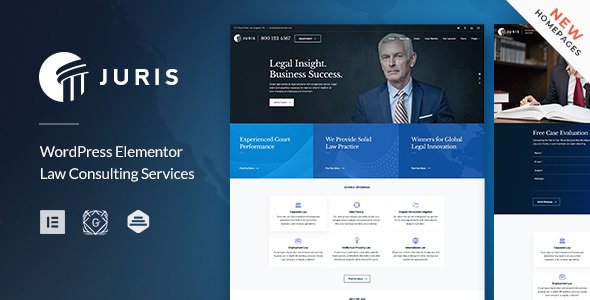
Stuck on your Juris WordPress theme? Let's fix it.
No endless back-and-forth. Just send us the details and we'll get it done.
No obligation · Replies within 1 hour · Quote within 1 day
Setup · Customization · Bug fixes · WooCommerce integration
About Juris WP Theme
Juris is a WordPress theme built by GT3themes, designed specifically for law firms, attorneys, and legal service providers. It ships with a clean, professional layout that communicates trust and authority without heavy customization work upfront.
The theme includes multiple homepage demos, a practice areas section, attorney profile pages, a case results layout, and a testimonials module. It works with Elementor, so you can edit pages visually without touching code.
GT3themes has built Juris with WooCommerce compatibility, contact form integration, and a mobile-first approach. Performance is solid out of the box, and the codebase follows standard WordPress conventions, which makes it predictable to work with when you need custom development or third-party plugin integration.
Get matched with a Juris developer in under one day
Tell us about your Juris project. Small fixes, Juris theme customization, or a full website build, whatever you need, we've got it covered.
We'll connect you to the right Juris developers, define the scope, and get everything 100% clear.
You'll get one estimate, hire your preferred developer, and start collaborating.
Juris looks polished in the demo, but most law firms run into gaps when they try to configure it for real client work. A developer who has worked with the theme before will move faster and avoid the common mistakes.
Through Codeable, you get matched with vetted WordPress professionals who know themes like Juris inside out. No agencies, no juniors, no guessing. Post your project, get an estimate within 24 hours, and only hire if you’re happy with what you see. It’s a straightforward way to get qualified help fast.
Pros
- Built specifically for legal and law firm use cases, not a generic multipurpose theme
- Elementor-compatible so page editing is visual and accessible without code
- Includes attorney profile layouts, practice area pages, and case result sections out of the box
- Multiple demo imports available, reducing initial setup time significantly
- Clean, professional design that communicates credibility without heavy styling work
Cons
- Demo import can be slow or incomplete depending on server environment
- Some Elementor widgets rely on GT3themes' plugin, creating a dependency you can't easily swap out
- Documentation is limited for advanced customization beyond the included demos
- Limited built-in multilingual support without a third-party plugin
- Custom post types for attorneys and practice areas can conflict with other CPT plugins if not configured carefully
Who is Juris for?
Solo Attorneys and Small Law Firms
Juris works well for solo practitioners who need a professional online presence without a large budget. The theme’s attorney profile layout and contact form setup give a small firm everything it needs to convert visitors into consultations. A developer can have a working site live in a few days.
Multi-Practice Law Firms
For firms covering multiple areas of law, Juris handles practice area pages cleanly. You can build out individual sections for each specialisation, link attorneys to their relevant areas, and keep the navigation structured. A Juris developer can extend this with filtered search if the firm has a large team.
Legal Consultancy and Advisory Services
Legal consultancies often need a site that emphasises thought leadership as much as services. Juris supports blog layouts and content-heavy pages well. Adding a resource library, downloadable guides, or a newsletter signup on top of the base theme is straightforward with the right developer.
Immigration and Visa Law Practices
Immigration law sites often need multilingual support and detailed service breakdowns by visa type. Juris can be configured with WPML to serve clients in multiple languages. The practice area structure maps naturally to visa categories, making it a practical fit for this niche.
Personal Injury and Family Law Firms
Personal injury and family law firms rely on trust signals: testimonials, case results, and clear calls to action. Juris includes layouts for all three. A developer can wire up a lead capture form directly to a CRM so enquiries from the site feed straight into the firm’s intake process.

Customizing Juris
Juris gives you a good starting point, but most law firms need adjustments that go beyond the Elementor builder. That includes custom intake forms, booking systems, conditional content by practice area, or a client portal integration.
A Juris expert can set up the theme to match your firm’s exact structure, whether you handle one area of law or twenty. That means configuring attorney profile custom post types, setting up practice area taxonomies, and wiring in a CRM or case management tool if needed.
Typography, colour schemes, and header layouts in Juris are all adjustable, but getting consistency across mobile and desktop often takes more than drag-and-drop. A developer who knows the theme well can handle that without breaking the demo content you started with.
Recommended plugins for Juris
Juris pairs well with several plugins that extend its core functionality. WPML or Polylang work for multilingual law firm sites. WooCommerce can handle document sales or consultation payments. Gravity Forms or WPForms handle client intake. For lead tracking, MonsterInsights connects cleanly.
If site speed matters, and it should for any firm running Google Ads, combining Juris with a proper caching and optimisation setup makes a measurable difference. See our WordPress performance service for details. For firms that want organic search visibility, pairing Juris with solid on-page work through our WordPress SEO service is a natural next step.
Not sure which plugins to use? This WordPress plugins directory covers the most popular options with reviews and setup guides.
Juris common issues
Juris theme Elementor widgets not loading after update
This usually happens when the GT3 Page Builder plugin is out of sync with the theme version after an update. Go to Plugins > Installed Plugins, deactivate and reactivate the GT3 plugin, then clear your Elementor cache under Elementor > Tools > Regenerate CSS. If widgets still don’t load, check whether Elementor itself needs an update. If the problem persists, a WordPress bug fix is the fastest route to a clean resolution.
Juris attorney profile page showing blank or broken layout
A blank attorney profile page is usually a permalink issue or a missing template file. Go to Settings > Permalinks and click Save without changing anything to flush rewrite rules. If the layout is broken rather than blank, check whether the GT3 Core plugin is active, as the attorney post type depends on it. Conflicts with caching plugins can also strip styles on custom post type pages.
Juris theme demo import failing or missing content
Demo import failures in Juris are often caused by PHP memory limits or upload size restrictions on the hosting server. Increase memory_limit to at least 256MB in wp-config.php and raise max_execution_time to 300 seconds. Importing on a staging environment first reduces risk. If the import partially completes and leaves orphaned content, a developer can clean up the database and reimport cleanly.
Juris contact form not sending emails
Email delivery failures from Juris contact forms are almost always a server mail configuration issue, not a theme problem. Install an SMTP plugin like WP Mail SMTP and connect it to a transactional email service such as Mailgun, SendGrid, or Postmark. Test with the plugin’s built-in send test. If you’re using a form plugin like Gravity Forms or WPForms, check that the notification email address is correct and not landing in spam. Our WordPress maintenance service covers ongoing email deliverability monitoring.
Juris FAQ
Yes, Juris is built to work with Elementor. Most of the demo layouts are Elementor-based. Some design elements also rely on the GT3 Page Builder plugin, which installs alongside the theme. For best results, keep both Elementor and the GT3 plugin updated together, as version mismatches are the most common source of display issues.
Technically yes, but the design language is clearly built for legal services. The layouts, typography, and section structures all lean toward professional services. You could adapt it for accounting, finance, or consulting, but you’d be working against the default styling more than with it. A general-purpose theme would likely need less rework for an unrelated niche.
Juris is WooCommerce compatible. You can add a shop for document templates, legal guides, or paid consultations. The default WooCommerce styling will need some CSS adjustment to match the Juris design, but the integration works without conflicts. A developer can align the shop pages with the rest of the site in a few hours.
Migrating to Juris involves moving your content, rebuilding your page layouts in Elementor, and configuring the attorney and practice area post types to match your existing structure. It’s not a one-click process. Our WordPress migration service covers the full transfer including content, SEO settings, and redirects so nothing is lost in the move.
GT3themes does release updates for Juris, though the update frequency is moderate compared to larger theme developers. Major WordPress version releases are generally followed by compatibility updates. It’s worth keeping automatic updates off and testing updates on a staging site first, as Elementor-dependent themes can behave unexpectedly after updates without testing.
Hire a Juris WordPress Developer
Whether you need a full Juris setup from scratch, a fix for something that broke, or custom features added on top of the theme, we can connect you with a developer who knows exactly what they’re doing. Work is handled through Codeable, so every developer is pre-vetted and reviewed by real clients.
Get a free estimate with no obligation. You’ll hear back within 24 hours with a clear scope and price. No commitment until you’re ready to go ahead.
You'll need a free Codeable account so developers can ask questions and send their quotes.