Kaleido WordPress Theme
by imaginem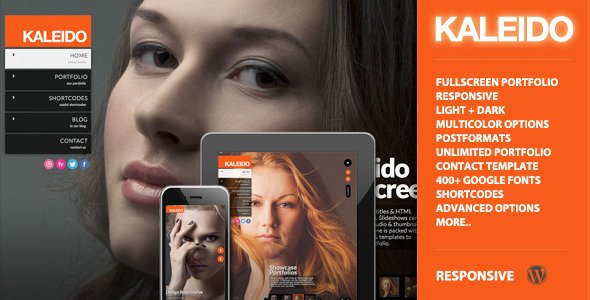
Stuck on your Kaleido WordPress theme? Let's fix it.
No endless back-and-forth. Just send us the details and we'll get it done.
No obligation · Replies within 1 hour · Quote within 1 day
Setup · Customization · Bug fixes · WooCommerce integration
About Kaleido WP Theme
Kaleido is a multipurpose WordPress theme built by Imaginem, the studio behind popular themes like Blocks and Mosaic. It is designed around a grid-based layout system that suits image-heavy websites, particularly photography portfolios, creative agencies, and visual storytelling projects.
The theme ships with a drag-and-drop page builder, multiple portfolio grid styles, and full-width imagery options. It supports WooCommerce for shops and includes a customizable header and footer builder. Kaleido’s architecture is built for visual impact without requiring heavy customization out of the box. It is a solid choice for anyone who wants a polished, gallery-driven site with minimal setup time, while still offering enough depth for developers to extend and customize further.
Get matched with a Kaleido developer in under one day
Tell us about your Kaleido project. Small fixes, Kaleido theme customization, or a full website build, whatever you need, we've got it covered.
We'll connect you to the right Kaleido developers, define the scope, and get everything 100% clear.
You'll get one estimate, hire your preferred developer, and start collaborating.
Kaleido looks straightforward until you need it to do something specific. Custom grid layouts, filtered portfolio pages, WooCommerce tweaks, or plugin conflicts can stall a project fast. FoxyConcept connects you with vetted Kaleido developers through Codeable, the professional WordPress developer network. Every developer is screened, and you get a free estimate before committing to anything. No hourly guessing. No hiring risk. Just a developer who knows the theme and can get the work done.
Pros
- Grid layout system is well-suited for photographers and visual creatives without needing custom development
- Imaginem updates the theme regularly, maintaining compatibility with current WordPress and WooCommerce versions
- Multiple portfolio layout styles are included out of the box, including masonry, fixed grid, and fullscreen options
- Header and footer builder gives layout control without requiring a page builder plugin
- WooCommerce integration is native and styled to match the theme's visual language without extra CSS work
Cons
- The built-in page builder is less flexible than Elementor or Gutenberg for standard content pages
- Documentation is sparse in places, making it harder to troubleshoot without developer knowledge
- Heavy use of large images can hurt page speed scores without careful optimization
- Portfolio filtering and custom taxonomies require PHP knowledge to extend beyond the default setup
- Limited third-party tutorial resources compared to mainstream themes like Divi or Avada
Who is Kaleido for?
Photography Portfolio
Kaleido’s fullscreen grid and masonry layouts make it a natural fit for photographers. You can organize work by category, display galleries without plugins, and control hover effects per portfolio item. A developer can set up filterable portfolios and custom taxonomy archives that match your exact shooting categories.
Creative Agency Website
Agencies need a site that shows work cleanly and converts visitors. Kaleido handles case study-style portfolios well. With custom header layouts, animated transitions, and WooCommerce for selling services or downloads, it covers most agency requirements. A Kaleido developer can wire up lead capture forms and CRM integrations without touching the visual structure.
Visual Art and Design Studio
Design studios and artists benefit from Kaleido’s emphasis on image presentation. The theme supports high-resolution imagery natively, and its grid system handles mixed media well. A developer can build out project detail pages with custom fields, linking client, medium, and year data to archive filters.
WooCommerce Print or Art Shop
Kaleido’s WooCommerce integration allows photographers and artists to sell prints, digital downloads, or merchandise directly. Product pages can be styled to match the portfolio aesthetic. A developer can set up variable products, custom checkout flows, and Stripe or PayPal integration with minimal visual disruption to the site.
Wedding and Event Photography
Wedding photographers need galleries that load fast and look sharp on mobile. Kaleido handles both. With password-protected portfolio pages, client proofing integrations, and inquiry forms, it works as a full business site. A developer can add booking plugins and automate client communication without third-party site builders.

Customizing Kaleido
Kaleido gives you a reasonable level of control through the WordPress Customizer, but deeper customization requires working with its grid settings, custom CSS, and the theme’s own layout controls. Getting the homepage, portfolio archives, and inner page templates to behave exactly as needed often takes more than just toggling options.
A Kaleido expert can handle things like custom portfolio filtering logic, pixel-accurate grid spacing, WooCommerce styling that matches your brand, and integrating third-party plugins without breaking the visual layout. Whether you need a single tweak or a full build-out, working with someone who knows Kaleido’s structure saves significant time and avoids the common pitfalls that come with modifying theme templates directly.
Recommended plugins for Kaleido
Kaleido integrates well with several key plugins. WooCommerce adds a fully functional shop layer. Elementor can be used on standard pages, though Kaleido’s own builder handles portfolio and archive layouts better natively. WPML support makes it viable for multilingual sites.
For performance tuning, image optimization and caching configuration are important given the theme’s visual weight. Visit our WordPress performance service for help there. For organic visibility, metadata structure and schema improvements matter for portfolio and product pages. Our WordPress SEO service covers both technical and on-page needs specific to visual-heavy themes like Kaleido.
Not sure which plugins to use? This WordPress plugins directory covers the most popular options with reviews and setup guides.
Kaleido common issues
Kaleido portfolio grid not displaying correctly after update
Grid display issues after a theme update are usually caused by a conflict between the updated template files and cached page data. Start by clearing your caching plugin and testing with default WordPress settings. If the grid still breaks, compare your active child theme templates against the updated parent theme files. A template override from an older version is often the culprit. Our WordPress bug fixing service can identify and resolve template conflicts quickly.
Kaleido theme slow to load on mobile
Kaleido’s visual weight means large unoptimized images are the most common cause of slow mobile load times. Check that images are served in WebP format and sized appropriately for mobile breakpoints. Lazy loading should be enabled, and a caching plugin like WP Rocket or LiteSpeed Cache should be configured. Avoid loading unused scripts from deactivated plugins. Our WordPress performance service handles full audits for image-heavy themes.
Kaleido custom CSS not applying to portfolio pages
Kaleido’s portfolio pages use custom post type templates that may not inherit styles from the standard page stylesheet. Custom CSS added through the Customizer applies to standard pages but can miss portfolio archives and single portfolio templates. Add your CSS directly to a child theme’s style.css using the correct template-specific selectors. If you are unsure which selectors to target, a Kaleido developer can inspect the rendered templates and apply the styles in the right place.
Kaleido WooCommerce product page layout broken
WooCommerce product page layout issues in Kaleido usually stem from a plugin update that changed template hooks or a missing child theme override. Check whether the issue appeared after a WooCommerce update. Kaleido’s WooCommerce templates may need refreshing to match the latest WooCommerce version. Go to WooCommerce > Status > Tools > Update WooCommerce database and check for outdated templates. For persistent issues, our bug fixing service can patch the conflict without breaking the rest of the site.
Kaleido FAQ
Yes. Kaleido is built specifically with visual creatives in mind. It includes multiple grid and masonry portfolio layouts, fullscreen image display options, and per-item hover effects. Photographers can organize work by category or project without extra plugins. The WooCommerce integration also makes selling prints straightforward.
Elementor can be used on standard pages within Kaleido, but the theme’s portfolio and archive templates use its own built-in layout system. Mixing Elementor and Kaleido’s native builders on the same pages can cause conflicts. For most users, it is cleaner to use Kaleido’s native tools for portfolio content and Elementor only for static pages if needed.
Yes. Kaleido includes native WooCommerce support with styled product and cart pages that match the theme’s visual design. It works for selling prints, digital downloads, and physical products. More complex store setups, like variable pricing or subscription products, may need a developer to configure and style correctly.
Create a child theme folder in wp-content/themes/ with a style.css file that declares the parent theme as Kaleido using the Template: header field, then add a functions.php that enqueues the parent stylesheet. Activate the child theme from the WordPress dashboard. Any template or CSS changes should be made inside the child theme to survive future updates.
Imaginem continues to release updates for Kaleido, maintaining compatibility with current WordPress and WooCommerce versions. You can check the changelog on ThemeForest or via the theme’s update notifications in your WordPress dashboard. Staying on a supported version is important for security and plugin compatibility.
Hire a Kaleido WordPress Developer
Need a Kaleido developer for a custom build, a layout fix, or an ongoing project? FoxyConcept works through Codeable, which means every developer you reach has been vetted for WordPress expertise. You describe what you need, get a free estimate, and only move forward if it makes sense. There is no obligation and no upfront payment. Get your free estimate here and have a Kaleido developer matched to your project within 24 hours.
You'll need a free Codeable account so developers can ask questions and send their quotes.