Kamperen WordPress Theme
by Edge-Themes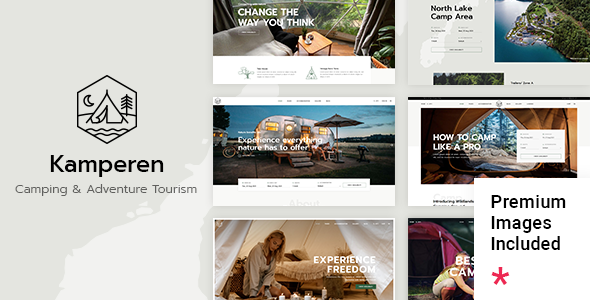
Stuck on your Kamperen WordPress theme? Let's fix it.
No endless back-and-forth. Just send us the details and we'll get it done.
No obligation · Replies within 1 hour · Quote within 1 day
Setup · Customization · Bug fixes · WooCommerce integration
About Kamperen WP Theme
Kamperen is a WordPress theme built by Edge-Themes, designed specifically for outdoor, camping, and adventure travel businesses. It ships with a collection of pre-built demo pages that cover gear shops, campsite directories, and travel blogs. The layouts are built on Edge-Themes’ proprietary page builder, giving you drag-and-drop control without needing a third-party plugin.
The theme supports WooCommerce out of the box, making it a practical choice for selling camping gear or booking outdoor experiences. Typography and color options are controlled through a dedicated theme panel, so visual changes don’t require code edits. Header styles, footer layouts, and blog templates come in multiple variations, giving site owners flexibility without starting from scratch. It targets a niche audience well, with outdoor-focused iconography, warm earthy defaults, and section layouts suited to adventure-brand storytelling.
Get matched with a Kamperen developer in under one day
Tell us about your Kamperen project. Small fixes, Kamperen theme customization, or a full website build, whatever you need, we've got it covered.
We'll connect you to the right Kamperen developers, define the scope, and get everything 100% clear.
You'll get one estimate, hire your preferred developer, and start collaborating.
Edge-Themes builds feature-heavy themes, and Kamperen is no exception. The options panel is extensive, the demo content has many moving parts, and WooCommerce integration adds another layer of complexity. Getting it to match a specific brand vision takes more than tweaking sliders.
Working through Codeable, you get matched with vetted WordPress developers who know theme customization at this level. Post your project, get a free estimate, and only move forward if the scope and price work for you. No commitment required.
Pros
- Built specifically for outdoor and camping niches with matching layouts and iconography
- WooCommerce integration is included and pre-styled for gear or experience sales
- Multiple header and footer variations without needing additional plugins
- Comes with Slider Revolution bundled, saving on a separate license
- Deep theme options panel gives granular control over typography, spacing, and color
Cons
- Uses Edge-Themes' proprietary builder, not Elementor or Gutenberg, limiting plugin compatibility
- Demo import can be unreliable and may require manual cleanup after setup
- Page load times can be heavy out of the box due to bundled scripts and assets
- Theme updates occasionally break customizations made directly in child theme CSS
- Support from Edge-Themes is forum-based and response times can be slow
Who is Kamperen for?
Camping Gear Online Store
Kamperen’s WooCommerce-ready layouts make it a practical starting point for a camping gear shop. Product grids, category pages, and cart styling all come pre-designed with an outdoor aesthetic. You’ll likely need a developer to refine filters, adjust product page layouts, and configure payment and shipping correctly for your specific store setup.
Campsite or Glamping Booking Website
For campsite or glamping businesses, Kamperen provides the visual foundation and pairs well with booking plugins like WooCommerce Bookings or Amelia. The theme’s grid and card layouts work for listing pitches, pods, or cabins. Custom availability calendars and booking flows will need developer work to integrate cleanly with the theme’s existing templates.
Outdoor Adventure Travel Blog
The blog layouts in Kamperen suit adventure travel writing well. Multiple post format options, full-width featured images, and category filtering work without heavy customization. For writers who also sell gear or courses, combining the blog with WooCommerce on the same install is straightforward and one of the stronger use cases for this theme.
Hiking and Trail Guide Directory
Trail guide and directory sites need structured listings and location-based filtering. Kamperen’s base layouts can handle this visually, but you’ll need a custom post type setup and a directory or map plugin to make it functional. A developer familiar with the theme can build this without disrupting the existing design patterns.
Outdoor Equipment Rental Service
Equipment rental businesses benefit from Kamperen’s product-focused layouts and WooCommerce compatibility. Rental-specific plugins like WooCommerce Rentals can be integrated, but they need custom template work to match the theme’s styling. This is a solid use case for the theme, though it almost always requires developer involvement to work correctly.

Customizing Kamperen
Kamperen’s customization lives inside Edge-Themes’ own options panel rather than the native WordPress Customizer. This means you get a deep set of controls, but the learning curve is steeper than more widely-used themes. Typography, spacing, header behavior, and color schemes all have dedicated settings, and most changes preview without touching code.
For anything beyond the standard options, you’ll want a Kamperen expert. Custom post types, modified WooCommerce templates, integration with booking plugins, or layout changes that the panel doesn’t cover all require direct PHP and CSS work. Edge-Themes’ shortcode system also has quirks that take time to learn. A developer familiar with the Kamperen theme structure can get those customizations done accurately and without breaking existing page layouts.
Recommended plugins for Kamperen
Kamperen pairs naturally with WooCommerce for gear sales, and Edge-Themes includes several bundled plugins including Slider Revolution and contact form support. You can extend it further with booking plugins like WooCommerce Bookings or Amelia for campsite reservations.
For speed, the theme’s bundled scripts can add weight, so pairing Kamperen with a solid caching and optimization setup matters. Check our WordPress performance service for that. If you’re building an adventure travel site that needs to rank for location-based searches, structured content and technical SEO work is worth investing in early. Our WordPress SEO service covers that ground.
Not sure which plugins to use? This WordPress plugins directory covers the most popular options with reviews and setup guides.
Kamperen common issues
Kamperen demo import not working or incomplete
Demo imports in Edge-Themes products fail for a few common reasons: server memory limits too low, PHP execution timeout set too short, or required plugins not activated before importing. Set memory_limit to at least 256MB and max_execution_time to 300 in your PHP configuration. Make sure Slider Revolution, WPBakery, and any other required plugins are active first. If the import still fails partially, importing XML content and theme options separately is more reliable than the one-click method. Our bug fixing service can handle this if it keeps failing.
Kamperen WooCommerce pages not styled correctly
Kamperen ships with WooCommerce template files that can fall out of sync after a WooCommerce update. Check WooCommerce > Status > System Status for any outdated template warnings. The fix usually involves updating the theme’s WooCommerce templates to match the current WooCommerce version, which requires editing template files in the child theme. Avoid editing parent theme files directly. If you’re not comfortable with PHP template files, a developer can resolve this without affecting your other customizations. See our WordPress bug fixing service.
Kamperen slider not showing on homepage after update
After a Kamperen or Slider Revolution update, the homepage slider sometimes disappears because the shortcode reference breaks or the slider alias changes. Open Slider Revolution in the dashboard, confirm the slider alias matches exactly what’s entered in the theme’s homepage settings or the page builder element. Also check that Slider Revolution is activated and licensed if the bundled version requires it. Clearing any caching plugins after making changes is essential before testing. If the issue is a conflict with another plugin, disabling plugins one at a time will identify the cause.
Kamperen theme options not saving changes
When Kamperen’s theme options panel won’t save, the most common cause is a PHP or MySQL error during the save request, or a security plugin blocking the admin AJAX call. Open your browser’s developer tools, go to the Network tab, and watch the request when you hit save. A 403 or 500 error points to a security plugin or server rule. Temporarily disable security plugins to test. Also check that your user role has full admin permissions and that no caching plugin is serving a stale version of the options page after saving.
Kamperen FAQ
Kamperen is built around Edge-Themes’ own page builder, not Elementor. You can technically install Elementor alongside it, but conflicts with the theme’s shortcodes and styles are likely. Most Kamperen users stick with the bundled builder to avoid layout issues. If you want to switch the page builder on an existing Kamperen site, a developer should handle the migration to avoid content loss.
Edge-Themes maintains Kamperen with periodic updates, and the theme generally keeps pace with major WordPress releases. That said, updates sometimes lag by a few weeks after a major WordPress release. Always test updates on a staging site before pushing to production. If you’re running an older version of Kamperen, check compatibility before updating WordPress core.
Yes, WooCommerce support is a core feature of Kamperen. The theme includes pre-styled shop, product, and cart pages designed to match the outdoor theme aesthetic. For more advanced store setups, including custom product types, rentals, or bookings, you’ll need additional plugins and likely some developer work to integrate them cleanly with the theme templates.
After activating Kamperen, navigate to Edge-Themes’ import panel inside the dashboard. Install and activate all required plugins first, then run the one-click demo import. If it fails, try importing the XML content file and theme options file separately. Server memory and timeout limits are the most common causes of failed imports. Check with your host if issues persist.
Moving an existing site to the Kamperen theme means rebuilding your content inside Edge-Themes’ page builder, since your current layouts won’t transfer automatically. Content like posts and pages migrates fine, but visual layouts need to be rebuilt. For a full site migration, a developer can handle the rebuild while keeping your existing content and SEO structure intact.
Hire a Kamperen WordPress Developer
Whether you need a full Kamperen setup from a blank install, modifications to an existing site, or help fixing something that broke during an update, a specialist will get it done without guesswork. All work is delivered through Codeable’s vetted developer network, so quality is consistent and communication is clear.
Get a free estimate with no obligation to hire. Describe your project, get matched within 24 hours, and decide from there.
You'll need a free Codeable account so developers can ask questions and send their quotes.