Kappe WordPress Theme
by PremiumLayers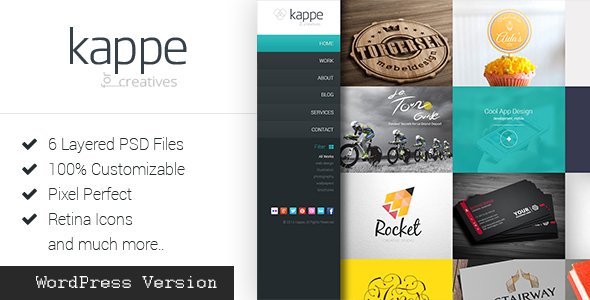
Stuck on your Kappe WordPress theme? Let's fix it.
No endless back-and-forth. Just send us the details and we'll get it done.
No obligation · Replies within 1 hour · Quote within 1 day
Setup · Customization · Bug fixes · WooCommerce integration
About Kappe WP Theme
Kappe is a WordPress theme by PremiumLayers built for creative agencies, portfolios, and studios. It ships with a clean grid layout, smooth transitions, and a strong focus on visual presentation. The theme is built on Elementor, which means most layout changes happen in a drag-and-drop editor without touching code.
Out of the box, Kappe includes multiple homepage demos, portfolio templates, and a blog layout. Typography is minimal and well-spaced, giving content room to breathe. It supports WooCommerce, so adding a shop to a portfolio or agency site is straightforward.
PremiumLayers keeps the codebase lean. Page load times are reasonable for a visual theme, and the demo content imports cleanly in most environments. It suits freelancers and small studios who want a polished result without spending weeks on setup.
Get matched with a Kappe developer in under one day
Tell us about your Kappe project. Small fixes, Kappe theme customization, or a full website build, whatever you need, we've got it covered.
We'll connect you to the right Kappe developers, define the scope, and get everything 100% clear.
You'll get one estimate, hire your preferred developer, and start collaborating.
Kappe looks straightforward until you need something specific. Custom layouts, plugin conflicts, slow load times on image-heavy pages, or a portfolio filter that does not behave as expected all take real debugging time.
FoxyConcept works with vetted Kappe developers through Codeable, the specialist WordPress developer network. Every developer is screened before taking projects. You post your project, get a clear estimate, and only pay if you decide to move forward. No risk, no obligation.
Pros
- Built on Elementor, so layout edits are visual and fast for non-developers
- Multiple pre-built demo templates import cleanly with one click
- WooCommerce compatible out of the box, useful for studios selling products or services
- Minimal, well-structured code keeps baseline performance respectable
- Strong portfolio presentation with grid and masonry layout options
Cons
- Heavily dependent on Elementor, which adds plugin lock-in and page builder overhead
- Limited layout flexibility without Elementor Pro for advanced widgets
- Demo content can be time-consuming to replace when building a fully custom site
- Documentation from PremiumLayers is sparse compared to larger theme shops
- Some built-in animations can cause issues on slower mobile connections if not disabled
Who is Kappe for?
Creative Agency
Kappe suits agencies that need a sharp homepage, a filterable case study portfolio, and a simple contact flow. The grid layouts let you showcase client work cleanly. A developer can extend it with custom project post types and team member profiles to cover a full agency site without starting from scratch.
Freelance Photographer
Photographers get a lot from Kappe’s full-width image support and masonry grid options. Gallery pages load smoothly and the minimal design keeps attention on the images. A developer can add client gallery password protection or lightbox customization to make the experience more professional.
Graphic Design Studio
Design studios need a portfolio that reflects their own work. Kappe’s clean typography and whitespace work well here. You can organize projects by category, add process breakdowns inside each project page, and link to live work. Custom filtering and hover effects are common additions for this use case.
Architecture Firm
Architecture firms need large images, project categorization by type or location, and a professional contact page. Kappe handles this well structurally. A developer can build out a custom project archive with filter options for residential, commercial, and renovation work alongside an integrated inquiry form.
Digital Product Shop
With WooCommerce support built in, Kappe works for studios selling digital products like presets, templates, or fonts alongside their portfolio. The shop pages match the overall visual style. A developer can configure product delivery, licensing terms, and checkout flow to match what you are selling.

Customizing Kappe
Kappe customization starts in the Elementor page builder, where you can rearrange sections, swap images, and adjust spacing visually. The WordPress Customizer handles site-wide settings like fonts, colors, header layout, and footer structure.
Beyond the defaults, a Kappe expert can build custom portfolio filter systems, animate section transitions, add AJAX-powered project loaders, or wire up a contact form to a CRM. If you need something the theme does not offer natively, such as a client portal, a custom post type for case studies, or a multi-language setup, that requires PHP and CSS work outside Elementor.
Custom child themes protect your changes from update overwrites. A Kappe developer can set that up alongside any bespoke functionality so your site stays maintainable long-term.
Recommended plugins for Kappe
Kappe works with most major WordPress plugins without conflict. Common additions include WooCommerce for product listings, WPForms or Gravity Forms for lead capture, and WPML or Polylang for multilingual support.
For performance, pairing Kappe with a caching plugin and image optimization tool makes a noticeable difference, especially on portfolio pages with large images. See our WordPress performance service for details.
If organic traffic matters to your business, structured data, meta tags, and site architecture improvements go beyond what Kappe handles alone. Our WordPress SEO service covers that ground properly.
Not sure which plugins to use? This WordPress plugins directory covers the most popular options with reviews and setup guides.
Kappe common issues
Kappe theme portfolio filter not working
Portfolio filter issues in Kappe are usually caused by a JavaScript conflict with another plugin or a missing Isotope library dependency. Start by deactivating plugins one at a time to isolate the conflict. If the filter worked before a plugin update, that is the likely cause. Clearing your cache after each change is important. If the issue persists, a developer can inspect the console errors and patch the conflict directly. See our WordPress bug fixing service for help.
Kappe theme slow loading on mobile
Kappe pages with large portfolio images can load slowly on mobile due to unoptimized images and Elementor’s default asset loading. Start by running images through a compression tool and enabling lazy loading. Disabling unused Elementor widgets reduces the CSS and JS footprint. A caching plugin with mobile-specific rules also helps. For persistent performance problems, a developer can audit the full asset stack and implement server-level improvements. Check our WordPress performance service.
Kappe Elementor layout broken after update
Broken layouts after an Elementor or Kappe update are common when there are version mismatches between the theme, Elementor, and Elementor Pro. Roll back the update using a backup first, then check the PremiumLayers changelog for compatibility notes. If no backup exists, a developer can rebuild broken sections using the existing structure as a reference. Always test updates on a staging environment before applying them to a live site.
Kappe theme header not displaying correctly
Header display problems in Kappe are often caused by a custom CSS conflict, a caching issue, or a header setting overridden at the page level in Elementor. Check the Customizer header settings first, then look at any page-specific template settings in Elementor. Clear all caches including server-side cache if your host provides one. If the header disappears after a plugin install, deactivate that plugin and test. A developer can trace the source quickly if the cause is not obvious.
Kappe FAQ
Yes, Kappe is well-suited for portfolio sites. It includes grid and masonry layouts, project filtering, and full-width image support. The minimal design puts focus on the work rather than the interface. It works best for creatives, agencies, and studios where visual presentation is the priority. If you need advanced filtering or custom project post types, a developer can extend it beyond the defaults.
Kappe works with Elementor Free for basic editing, but some template features and advanced widgets used in the demo content require Elementor Pro. If your site build relies closely on the demo layouts, Pro is worth having. For simpler builds where you replace demo content with your own, the free version of Elementor covers most needs alongside the Kappe theme settings.
Most of Kappe’s layout and design work happens inside Elementor and the WordPress Customizer, both of which are visual tools that do not require coding. Importing a demo and replacing content is manageable without technical skills. More specific changes like custom post types, conditional logic, or performance tuning will need a developer. The threshold depends on how far your requirements go beyond the theme defaults.
Yes, Kappe is WooCommerce compatible. The shop and product pages follow the theme’s visual style without major clashes. You can sell physical products, digital downloads, or services alongside a portfolio. For more advanced shop needs like custom checkout flows or product filtering, a developer can extend the WooCommerce setup to match your requirements.
Migrating an existing site to Kappe means rebuilding your pages inside Elementor using the new theme’s templates as a starting point. Content like posts and images can transfer using WordPress export tools, but layout reconstruction is manual work. If your current site has custom functionality, that needs to be reconfigured in the new environment. Our WordPress migration service covers this process properly.
Hire a Kappe Developer
Need a Kappe developer who knows the theme inside out? FoxyConcept connects you with vetted WordPress specialists through Codeable. Whether you need a full site build, a custom portfolio feature, or a fix for something broken, you get a free estimate before committing to anything.
Get your free estimate and have a developer matched to your project within 24 hours.
You'll need a free Codeable account so developers can ask questions and send their quotes.