Kerge WordPress Theme
by LMPixels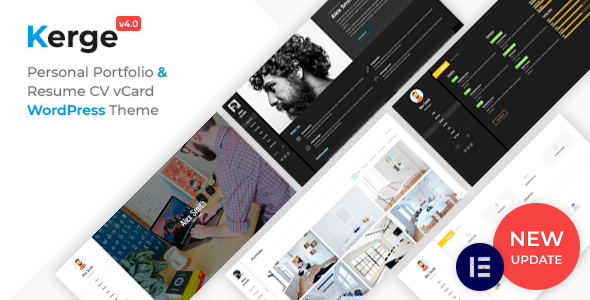
Stuck on your Kerge WordPress theme? Let's fix it.
No endless back-and-forth. Just send us the details and we'll get it done.
No obligation · Replies within 1 hour · Quote within 1 day
Setup · Customization · Bug fixes · WooCommerce integration
About Kerge WP Theme
Kerge is a lightweight WordPress theme by LMPixels, built for speed and simplicity. It targets creative portfolios, agencies, and freelancers who want a clean presentation without loading a page builder or a stack of scripts that slow things down.
The theme ships with a minimal footprint, multiple demo layouts, and tight integration with the Elementor page builder. Typography is handled through Google Fonts, and the layout system gives you enough flexibility to build distinct pages without writing custom CSS from scratch.
LMPixels has a track record of well-coded themes with decent documentation, and Kerge fits that pattern. It installs cleanly, demo content imports without major issues, and the default styles look professional out of the box. If you need a fast-loading creative theme without bloat, Kerge is a practical choice.
Get matched with a Kerge developer in under one day
Tell us about your Kerge project. Small fixes, Kerge theme customization, or a full website build, whatever you need, we've got it covered.
We'll connect you to the right Kerge developers, define the scope, and get everything 100% clear.
You'll get one estimate, hire your preferred developer, and start collaborating.
Most Kerge issues come down to customizations that go just far enough outside the defaults to need a developer. Elementor template conflicts, header builder quirks, custom post type display problems, and WooCommerce styling gaps are all solvable but require someone who knows the theme internals.
Codeable connects you with vetted WordPress developers who have hands-on experience with LMPixels themes. You post a project, get matched with a qualified Kerge developer within 24 hours, and receive a free estimate before committing to anything. No generalist freelancers, no bidding wars.
Pros
- Lightweight codebase with minimal frontend scripts, resulting in fast page loads out of the box
- Clean Elementor integration that works without major conflicts or layout breakage
- Multiple portfolio and agency demo layouts that import reliably
- Well-structured child theme support, making customizations update-safe
- LMPixels provides consistent theme updates and maintains compatibility with current WordPress versions
Cons
- Limited built-in header layout options compared to themes with a dedicated header builder
- WooCommerce styling requires manual CSS adjustments to match the default Kerge design
- Documentation covers basics but lacks detail on advanced customization scenarios
- No built-in mega menu support without a third-party plugin
- Demo content import can occasionally fail on servers with low PHP memory limits
Who is Kerge for?
Creative Portfolio
Kerge’s portfolio grid and minimal layout make it a natural fit for showcasing creative work. Designers, illustrators, and art directors get a clean canvas that keeps the focus on the work itself. A Kerge developer can extend the portfolio post type with custom fields for project details, client credits, and case study content.
Freelance Designer or Photographer
Freelancers who want a professional presence without a heavy theme benefit from Kerge’s fast load times and clean typography. A Kerge specialist can set up contact forms, booking integrations, and a blog section that matches the overall design without requiring constant maintenance.
Digital Agency
Agencies using Kerge typically need custom service page templates, team sections, and lead generation forms. The theme handles these use cases well when extended properly. A Kerge expert can build reusable Elementor templates that keep the site consistent as the agency adds new service pages.
SaaS or App Landing Page
Kerge’s single-page layout options work well for app and SaaS landing pages. Feature sections, pricing tables, and call-to-action blocks can be built cleanly in Elementor. A Kerge developer can integrate payment links, trial sign-up forms, and analytics tracking without disrupting the theme structure.
Small Business Services Site
Local service businesses like consultants, clinics, or law firms benefit from Kerge’s professional look and straightforward navigation. A Kerge specialist can configure the theme for local SEO, add a Google Maps section, set up a service menu, and ensure the contact page is properly structured for lead capture.

Customizing Kerge
Kerge customization runs through the WordPress Customizer and Elementor. You can control header layouts, typography, color schemes, section padding, and button styles without touching code. Most visual changes are handled visually, which keeps the workflow fast for straightforward projects.
For more specific changes, like adjusting the portfolio grid, adding custom post type templates, or altering the navigation behavior on mobile, you will likely need a Kerge expert to step in. A developer familiar with LMPixels themes knows where the theme hooks are, how the child theme structure should be set up, and how to extend Kerge without creating update conflicts.
Custom header layouts, WooCommerce integration adjustments, and unique landing page structures are the most common requests a Kerge specialist handles. Getting these right the first time saves significant rework later.
Recommended plugins for Kerge
Kerge pairs well with a focused set of plugins. Elementor Pro extends the native builder with forms, dynamic content, and theme builder templates. WooCommerce adds a shop layer if the project needs one. WPML or Polylang handle multilingual setups.
For performance, pairing Kerge with a caching plugin and optimizing Google Fonts loading makes a measurable difference. See the WordPress performance service for a full breakdown of what to tune.
On the SEO side, Rank Math or Yoast integrate cleanly. Schema markup, meta control, and sitemap generation all work without conflicts. If you want a structured SEO setup built on top of Kerge, the WordPress SEO optimisation service covers that end to end.
Not sure which plugins to use? This WordPress plugins directory covers the most popular options with reviews and setup guides.
Kerge common issues
Kerge demo content not importing correctly
Demo import failures in Kerge usually come down to PHP memory limits or execution timeouts on the server. Set memory_limit to at least 256MB and max_execution_time to 300 in your php.ini or wp-config.php. Also confirm that the required plugins, particularly Elementor, are installed before importing. If the process stalls repeatedly, import XML content manually through the WordPress importer and configure widgets separately.
Kerge header overlapping page content on scroll
A sticky header overlapping content in Kerge is typically caused by a missing top padding on the page wrapper or an incorrect header height value in the Customizer. Go to Appearance > Customize > Header and check the sticky header offset setting. If the theme does not expose this value, add a CSS rule targeting the page content wrapper with padding-top equal to the measured header height. A fixed pixel value is more reliable than a percentage here.
Kerge portfolio grid not displaying in correct columns
Portfolio column layout issues in Kerge are often caused by a column setting that does not match the screen breakpoint or a conflict with an Elementor section wrapper. Check the portfolio shortcode or widget settings for a columns parameter. Also verify that no custom CSS is overriding the grid width. If the layout breaks only on tablet, the issue is usually in the Elementor responsive column settings, not the theme itself. Adjust those per breakpoint in the Elementor panel.
Kerge mobile menu not opening or closing
If the Kerge mobile menu toggle does nothing when tapped, the likely cause is a JavaScript conflict with another plugin. Open the browser console and look for JS errors on page load. Deactivate plugins one at a time to isolate the conflict, starting with caching and optimization plugins. Also check that jQuery is loading correctly and not being deferred in a way that delays menu script initialization. If the problem persists, the WordPress bug fixing service can diagnose and resolve the conflict.
Kerge Elementor sections showing wrong fonts after update
Font changes after an Elementor or Kerge update usually mean that a Global Font setting was reset or that the theme’s font enqueue logic changed. Go to Elementor > Site Settings > Typography and confirm your font assignments are still in place. If custom fonts were set through Elementor Kit styles, republish the kit. Kerge’s Customizer font settings and Elementor Global Fonts can conflict, so pick one system and remove overrides from the other to prevent this recurring.
Kerge footer widgets not appearing on all pages
Footer widgets disappearing on specific pages in Kerge is usually a page template issue. Some Kerge templates, such as full-width or landing page layouts, suppress the footer widget area by design. Check the page template setting under Page Attributes in the WordPress editor. If you need footer widgets on a full-width template, you will need to modify the template file in a child theme to re-include the widget area. Avoid editing the parent theme directly.
Kerge WooCommerce product page layout broken
WooCommerce product page layout breaking in Kerge is a common issue because WooCommerce ships with its own template files that do not always align with the theme’s CSS. The fastest fix is to copy WooCommerce template files into a /woocommerce/ folder in your child theme and adjust the HTML structure there. For styling, add targeted CSS scoped to .woocommerce classes. If the layout is significantly broken after a WooCommerce update, check the WordPress bug fixing service for a faster resolution path.
Kerge custom CSS not applying after theme update
Custom CSS disappearing after a Kerge update is almost always caused by edits made directly to the parent theme’s style.css file. Theme updates overwrite these files. Always use a child theme for custom CSS, or add styles through Appearance > Customize > Additional CSS, which stores values in the database and survives updates. If you were using a plugin like Simple Custom CSS, confirm it is still active and the CSS was not accidentally deleted during the update process.
Kerge page builder content not showing on front end
When Elementor content shows in the editor but not on the front end, the most common cause is that the page is still in draft status or the Elementor data was not saved correctly. Click Update in the Elementor editor, then view the page. If the issue persists, go to Elementor > Tools > Regenerate CSS and refresh. Also check for caching plugins serving a stale version of the page. Clear all cache layers, including any server-side cache, after making changes. If nothing resolves it, check the WordPress bug fixing service.
Kerge site slow to load despite minimal content
Kerge is a lightweight theme, so slow load times usually point to unoptimized images, render-blocking scripts, or Google Fonts loading synchronously. Start by running the site through PageSpeed Insights to identify the specific bottlenecks. Install a caching plugin, enable lazy loading for images, and consider hosting Google Fonts locally to avoid the DNS lookup overhead. Also audit the installed plugins, as a single poorly coded plugin can undo Kerge’s native speed advantages. Check the WordPress performance service for a full optimization checklist.
Kerge FAQ
Yes. Kerge is built with Elementor as the primary page builder. The demo layouts are Elementor templates, and the theme is designed to work alongside Elementor’s styling system. The free version of Elementor is sufficient for most setups, though Elementor Pro adds form widgets, dynamic content, and a theme builder that expands what you can build within Kerge.
Kerge supports WooCommerce, but the out-of-the-box styling for shop and product pages is basic. You will likely need some custom CSS or a Kerge developer to align the WooCommerce templates with the rest of the site’s design. Core functionality, including cart, checkout, and product archives, works without conflicts on a standard install.
After activating Kerge, navigate to Appearance > Import Demo Content or use the theme’s built-in onboarding wizard if available. Install all required plugins when prompted, then select a demo and import. Ensure your server’s PHP memory limit is at least 256MB before starting. If the importer times out, try importing on a local environment first or contact your host to increase resource limits temporarily.
Kerge can be used with the block editor, but the demo layouts and design system are built around Elementor. Using it without a page builder means building pages entirely in Gutenberg, which requires more manual work to match the visual style of the demos. For a straightforward blog or text-heavy site, Gutenberg is fine. For anything layout-heavy, Elementor is the better path with this theme.
Kerge works well for portfolio websites. The theme includes portfolio post types, filterable grid layouts, and clean single project templates. It loads fast, which matters for image-heavy portfolios. A Kerge specialist can extend the portfolio with custom taxonomies, lightbox galleries, and case study page formats if the default setup does not cover your specific needs.
Create a folder in /wp-content/themes/ named kerge-child. Inside it, add a style.css file with a header that includes Template: kerge and a functions.php file that enqueues the parent theme’s stylesheet using wp_enqueue_scripts. Activate the child theme from Appearance > Themes. All custom CSS and template overrides go in the child theme to survive Kerge updates.
Yes. Kerge supports Google Fonts through the Customizer, and Elementor adds its own font management layer on top. You can also load custom fonts manually by enqueuing them in your child theme’s functions.php and referencing them in your CSS. If you need a premium or self-hosted font, a Kerge developer can integrate it cleanly without performance issues.
LMPixels has a reasonable update history. Kerge receives updates for WordPress and WooCommerce compatibility, bug fixes, and occasional feature additions. Before updating, always back up your site and check the changelog for any breaking changes, particularly around Elementor compatibility. Using a child theme ensures your customizations are not affected by parent theme updates.
Yes. You can post a project on Codeable and get matched with a vetted Kerge developer within 24 hours. You receive a free estimate before committing to anything. Whether you need a small fix, a full custom build, or ongoing development support, a qualified Kerge specialist can handle it through a structured, risk-free process.
Kerge is available as a premium theme on ThemeForest, so there is no split free and pro version in the traditional sense. Some LMPixels themes have free lite versions on WordPress.org, but Kerge’s full feature set, including demo content, portfolio templates, and advanced Customizer options, comes with the purchased theme. Check the ThemeForest listing for the current feature list and pricing.
Hire a Kerge Expert Developer
If your Kerge site needs custom development, bug fixes, or a full build from scratch, working with a specialist is the fastest path to a clean result. Our developers know LMPixels themes, understand how Kerge’s structure works, and can handle everything from minor tweaks to complex integrations.
Get a Free Estimate and describe what you need. No obligation, no upfront payment, matched with a qualified Kerge developer within 24 hours.
You'll need a free Codeable account so developers can ask questions and send their quotes.