Keystroke WordPress Theme
by Axilthemes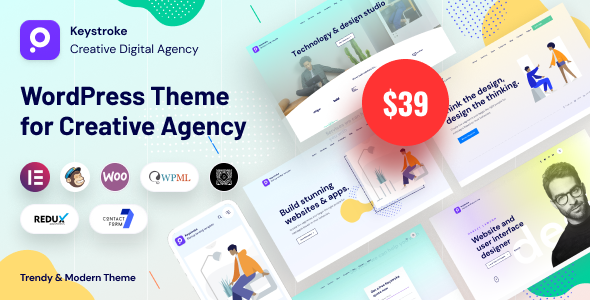
Stuck on your Keystroke WordPress theme? Let's fix it.
No endless back-and-forth. Just send us the details and we'll get it done.
No obligation · Replies within 1 hour · Quote within 1 day
Setup · Customization · Bug fixes · WooCommerce integration
About Keystroke WP Theme
Keystroke is a multipurpose WordPress theme built by Axilthemes, designed primarily for digital agencies, SaaS products, and IT service companies. It ships with a large library of pre-built demo sites, all importable in one click, and relies on Elementor as its page builder.
The theme follows a modern, professional aesthetic with clean typography and structured layouts that suit B2B audiences. It includes built-in header and footer builders, mega menu support, and WooCommerce compatibility out of the box.
Keystroke is actively maintained by Axilthemes, who also develop the popular ElementsKit and ShopEngine plugins. That background shows in how well the theme integrates with Elementor’s ecosystem. Performance is reasonable for a feature-heavy theme, though some configuration is needed to get there. It suits teams who want a polished starting point without building everything from scratch.
Get matched with a Keystroke developer in under one day
Tell us about your Keystroke project. Small fixes, Keystroke theme customization, or a full website build, whatever you need, we've got it covered.
We'll connect you to the right Keystroke developers, define the scope, and get everything 100% clear.
You'll get one estimate, hire your preferred developer, and start collaborating.
Axilthemes builds solid themes, but documentation only goes so far. When you need a layout that does not exist in the demos, a custom integration, or you have inherited a Keystroke site that needs fixing, you need a developer who has worked inside the theme before.
Through Codeable, you get matched with vetted WordPress developers who know Keystroke and the Elementor ecosystem it runs on. No generalist freelancers, no guesswork. Post your project and get a clear estimate within 24 hours.
Pros
- Large library of niche-specific demo sites importable in one click
- Built-in header and footer builder with solid layout options
- Tight integration with ElementsKit and ShopEngine from the same developer
- WooCommerce ready with dedicated shop page templates
- Actively maintained with regular updates from Axilthemes
Cons
- Heavily dependent on Elementor, making it hard to switch page builders later
- Demo import pulls in a lot of plugin dependencies you may not need
- Out-of-the-box performance scores are average without additional optimization
- Advanced customization requires ElementsKit Pro, adding to overall cost
- Support quality is inconsistent on complex or non-standard issues
Who is Keystroke for?
Digital Agency Website
Keystroke includes several agency-focused demos with portfolio sections, service pages, and team layouts ready to go. The mega menu and flexible header builder handle complex navigation that agencies typically need. A developer can wire up custom project post types and filter functionality to match your workflow without starting from scratch.
SaaS Product Landing Page
SaaS demos in Keystroke focus on feature highlights, pricing tables, and conversion-oriented layouts. The Elementor-based structure makes it straightforward to A/B test sections or swap out blocks. Integration with tools like Stripe payment links or CRM embeds is doable with some developer input to keep things clean.
IT Services Company
IT and managed service companies are Axilthemes’ core audience for Keystroke. Demos include service listing pages, case study layouts, and contact forms structured for B2B lead generation. The theme handles technical service content well, with structured sections for certifications, process timelines, and client logos.
WooCommerce Store
Keystroke is WooCommerce compatible and pairs with ShopEngine for deeper template control. You can customize product pages, cart, and checkout without custom code if you use ShopEngine alongside it. For stores needing subscription products, custom attributes, or wholesale pricing, developer involvement gets you there faster.
Startup or Tech Business Site
Startups get clean, modern layouts and a fast path from blank site to something presentable. Keystroke demos for tech businesses include hero sections built for clarity, pricing blocks, and FAQ layouts. It works well as a foundation when your brand is still developing and you need flexibility to iterate quickly.

Customizing Keystroke
Keystroke gives you a lot of control through the WordPress Customizer and Elementor. You can adjust global colors, typography, header layouts, and sidebar configurations without touching code. The built-in header builder covers most common navigation patterns including sticky headers, transparent headers, and split layouts.
For deeper work, a Keystroke expert can go further. Custom post type templates, conditional header logic, WooCommerce cart modifications, and performance optimizations all require hands-on development. Axilthemes provides documentation, but it stops well short of advanced use cases.
If you need custom Elementor widgets, third-party plugin integration, or a layout that departs significantly from the included demos, working with a Keystroke expert saves real time and avoids the trial-and-error that comes with modifying a complex theme.
Recommended plugins for Keystroke
Keystroke works well with ElementsKit, Axilthemes’ own Elementor addon, which adds widgets for mega menus, tabs, sliders, and more. Pair it with ShopEngine if you are running a WooCommerce store and need full control over shop templates.
For site speed, proper caching setup and image optimization matter more than the theme itself. See our WordPress performance service for specifics. If you are planning SEO work on top of your Keystroke site, our WordPress SEO service covers technical and on-page optimization alongside your existing setup.
Not sure which plugins to use? This WordPress plugins directory covers the most popular options with reviews and setup guides.
Keystroke common issues
Keystroke theme demo import not working
Failed demo imports in Keystroke are usually caused by missing required plugins, a low PHP memory limit, or a server timeout during import. First, install and activate all required plugins listed on the demo import screen. Then increase PHP memory to at least 256MB in your wp-config.php. If the import still times out, try importing the XML content manually through Tools > Import rather than the one-click option. If issues persist, our bug fixing service can resolve it quickly.
Keystroke header not showing correctly on mobile
Mobile header issues in Keystroke typically come from conflicting CSS between the theme’s header builder and Elementor sections, or from custom CSS that was not written with breakpoints in mind. Open the Header Builder in Keystroke settings and check that the mobile header is set to an active layout. If you have added custom styles, check they are scoped correctly using browser dev tools to identify which rule is overriding the mobile display.
Keystroke theme slow loading after Elementor update
Keystroke’s performance can drop after Elementor updates because the theme relies on Elementor heavily, and updates sometimes re-enable scripts and styles on pages that do not need them. Check Elementor’s Experiments settings and disable legacy features you do not use. Clear all caches, including server-side cache, after updates. If scores dropped significantly, a performance audit will identify exactly what changed and what to fix.
Keystroke WooCommerce shop page layout broken
A broken WooCommerce shop layout in Keystroke usually means a plugin conflict or a missing ShopEngine template. Go to ShopEngine > Templates and check that your shop, archive, and product templates are active and assigned correctly. If you are not using ShopEngine, Keystroke falls back to WooCommerce defaults, which may not match the demo. Deactivating plugins one by one helps isolate conflicts. Our WordPress bug fixing service handles this type of issue directly.
Keystroke FAQ
Keystroke generates clean HTML and is compatible with major SEO plugins like Yoast and Rank Math. That said, SEO performance depends heavily on how the site is built, not just the theme. Page speed, heading structure, and schema markup all need attention separately. A default Keystroke install with a full demo imported will need optimization work before it performs well in search.
No, not in any practical sense. Keystroke is built around Elementor. The demos, header builder, and most template layouts depend on Elementor being active. You can use it with the block editor for simple pages, but you lose most of what the theme offers. If you want to avoid Elementor dependency, a different theme is a better starting point.
Keystroke has a free version available on the WordPress theme directory with limited demos and features. The Pro version unlocks the full demo library, advanced header options, and deeper customization. Most serious builds need Pro, which is sold as an annual license through Axilthemes. Check their site for current pricing as it changes periodically.
Yes, you can migrate your content to Keystroke, but it involves more than a theme switch. Existing page builder content will not transfer cleanly if you are moving from a different builder. Your content, images, and settings need to be rebuilt or remapped in Elementor. Our WordPress migration service handles this and ensures nothing is lost in the process.
Keystroke requires Elementor (free) to function properly. Most demos also pull in ElementsKit for additional widgets and Axilthemes’ own plugin for theme functionality. WooCommerce demos add ShopEngine to the list. You can run the theme without the addon plugins, but the demo layouts will not match what you see in previews. Stick to plugins you actually use to keep the install clean.
Hire a Keystroke Developer
Whether you need a full site built on Keystroke, a specific feature added, or an existing site cleaned up, we can match you with a developer who knows the theme. Work is scoped and priced before anything starts. Get a free estimate with no obligation to hire. You will hear back within 24 hours.
You'll need a free Codeable account so developers can ask questions and send their quotes.